 Module · LNK Numbering and References
LNK Numbering and References: your invoice, credit slip and delivery slip numbers, and the customer's purchase order number
Your business customer has a purchase order number, and their accounts department will not pay an invoice that does not show it. Today they write it in a message and you copy it by hand. LNK Numbering and References gives them a field at the Payment step, and the number follows the order all the way to the invoice. The module also numbers your documents in your format: F2026-00042 for an invoice, AV2026-00007 for a credit slip.
- Version 1.1.1 · PrestaShop 1.7.6 to 8.x
- Version 1.9.1 · PrestaShop 9
- PrestaShop 1.7.6 to 9.x
- PHP 7.1 to 8.4
- Contains a core override
Screenshots
Key points
- Numbering series per shop: order, invoice, credit slip, delivery slip.
- Pattern with tags ({YYYY}, {YY}, {MM}, {SHOP}, {NNNNN}), yearly or monthly reset.
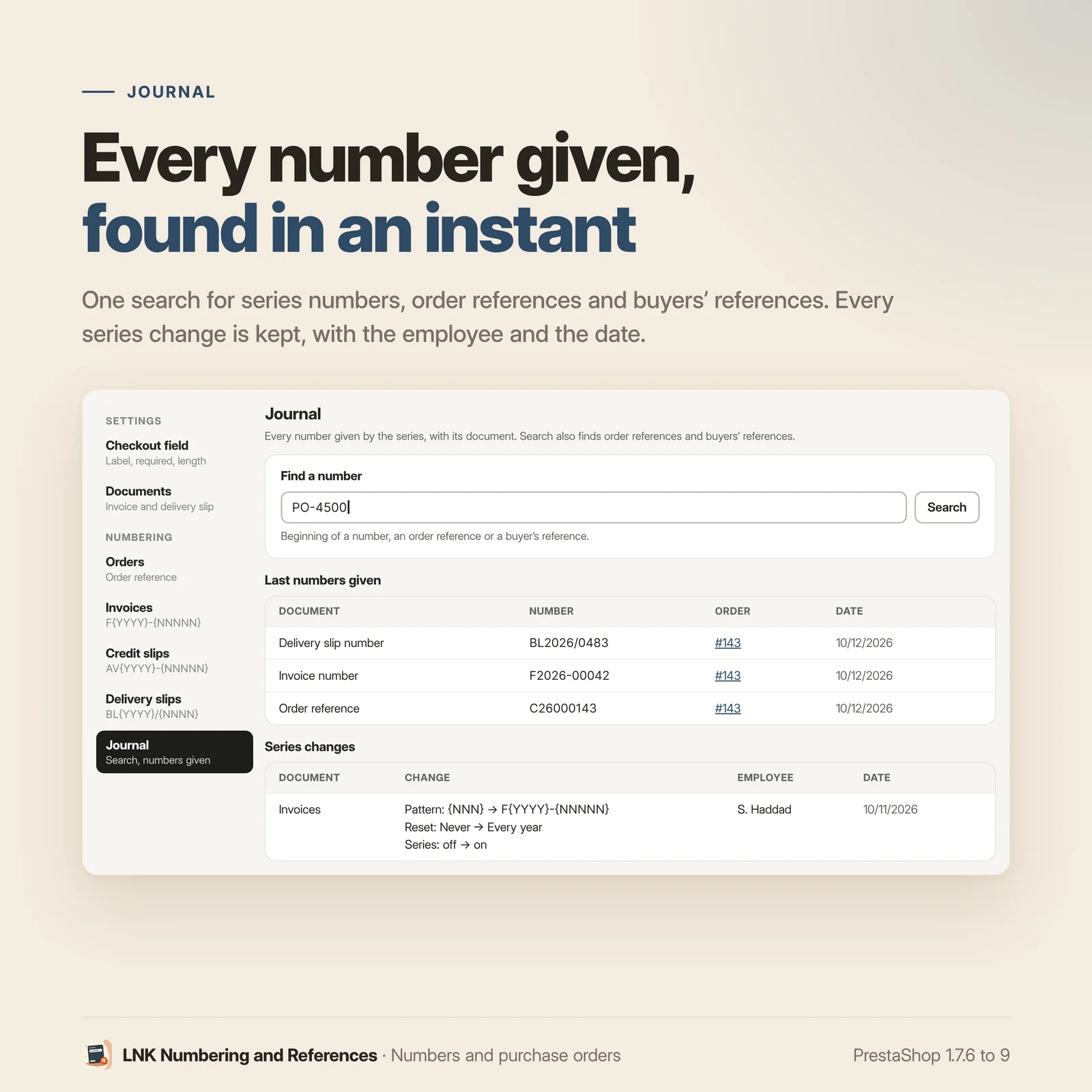
- Preview of the next number, journal and search of the numbers given.
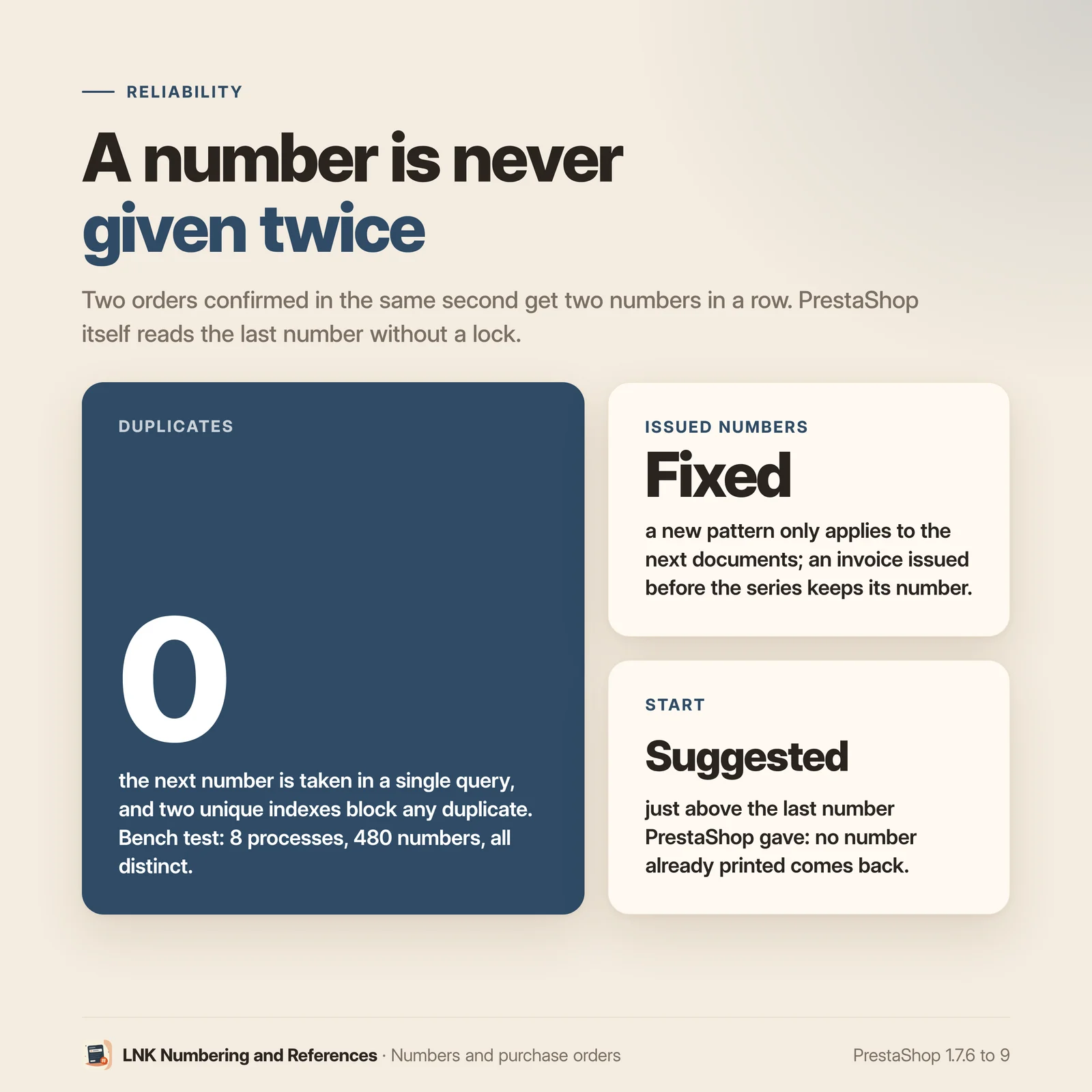
- A number given never changes; counter without duplicates, even in the same second.
- Credit slip that quotes the original invoice.
- "Your order reference" field at the top of the Payment step.
- Entry saved as it is typed, copied to the order.
- Required for the chosen customer groups, checked by the server.
- On the PDF invoice and delivery slip.
- Column and filter in the order list.
- Editable from the order page.
{lnk_poref}variable for order e-mails.- 0.5 KB of CSS and 1.3 KB of JavaScript, on the checkout page only.
- Multistore: settings per shop.
- French, English and Arabic (right to left).
- PrestaShop 1.7.6 to 9, two declared overrides (credit slip and delivery slip PDF numbers).
Your invoice, credit slip and delivery slip numbers
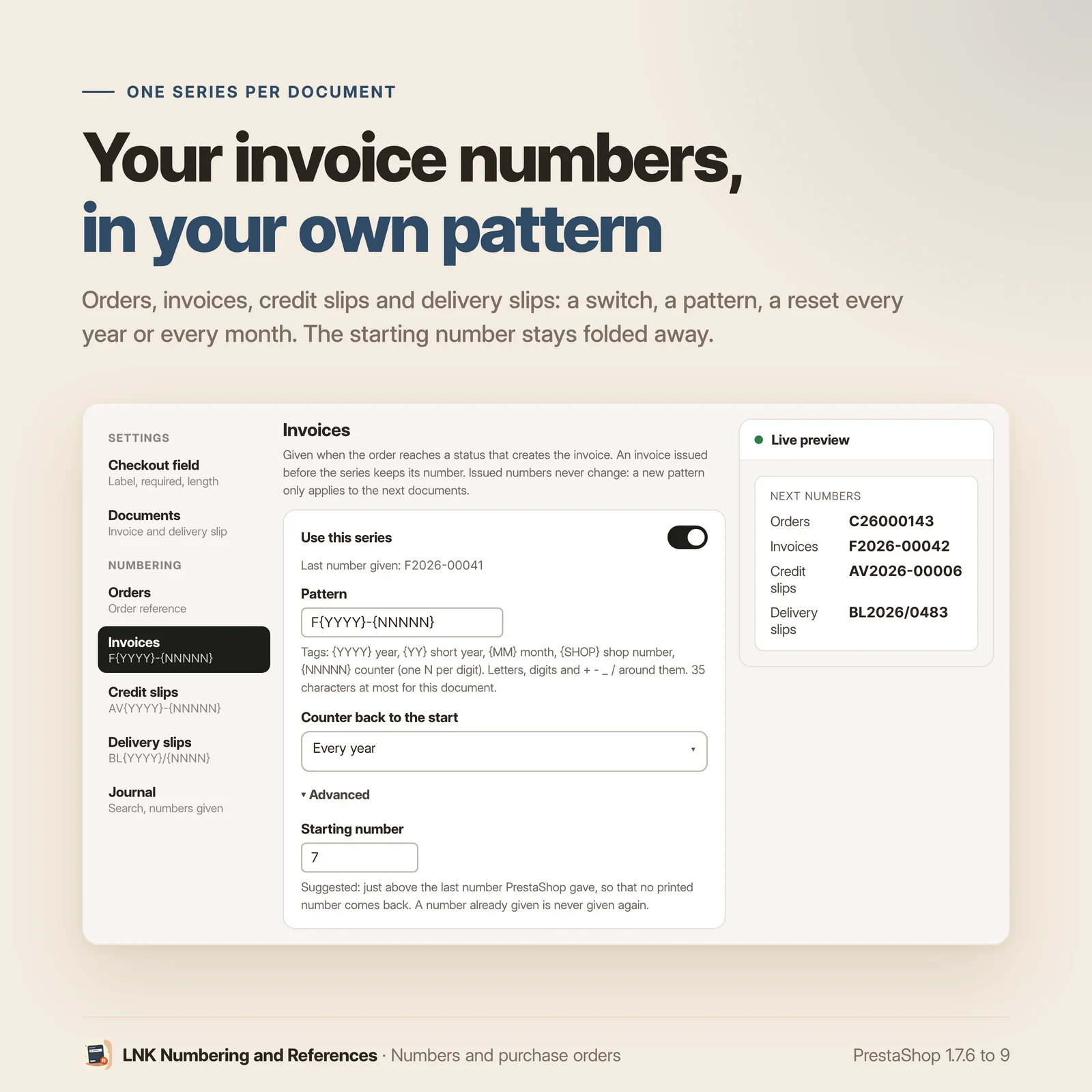
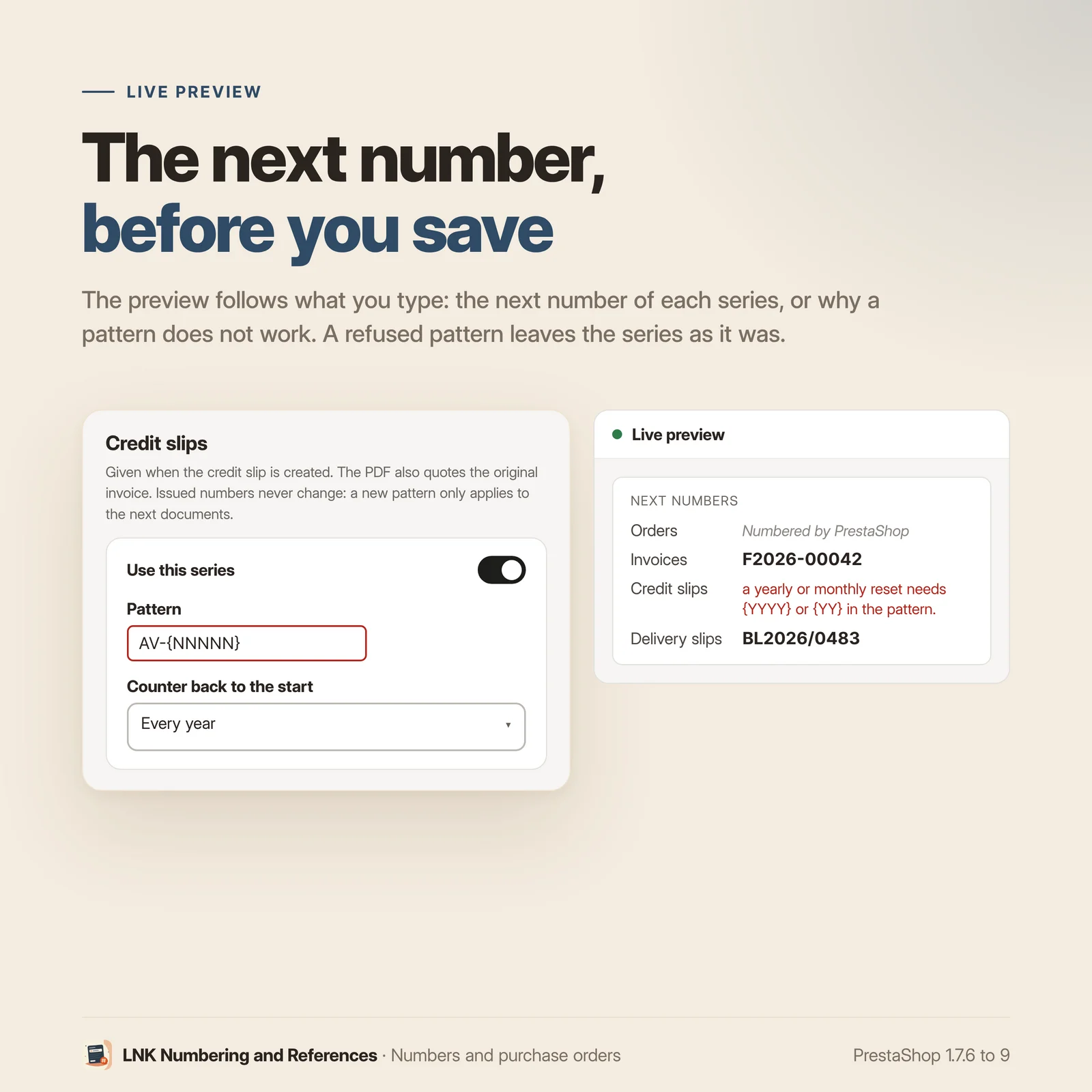
One series per document and per shop: order reference, invoice, credit slip, delivery slip. You write the pattern with tags: {YYYY} for the year, {MM} for the month, {SHOP} for the shop, {NNNNN} for the counter. The counter starts again every year, every month or never, and the preview shows the next number as you type. It starts just above PrestaShop's last number, so that no printed number comes back.
A number given never changes and is never given again. Two invoices issued in the same second get two numbers that follow each other: the counter is taken in a single locked query. An invoice issued before the series keeps its number. The credit slip quotes the original invoice, number and date. The journal finds any number and its order, and keeps every series change with the employee who made it.
A field at the Payment step
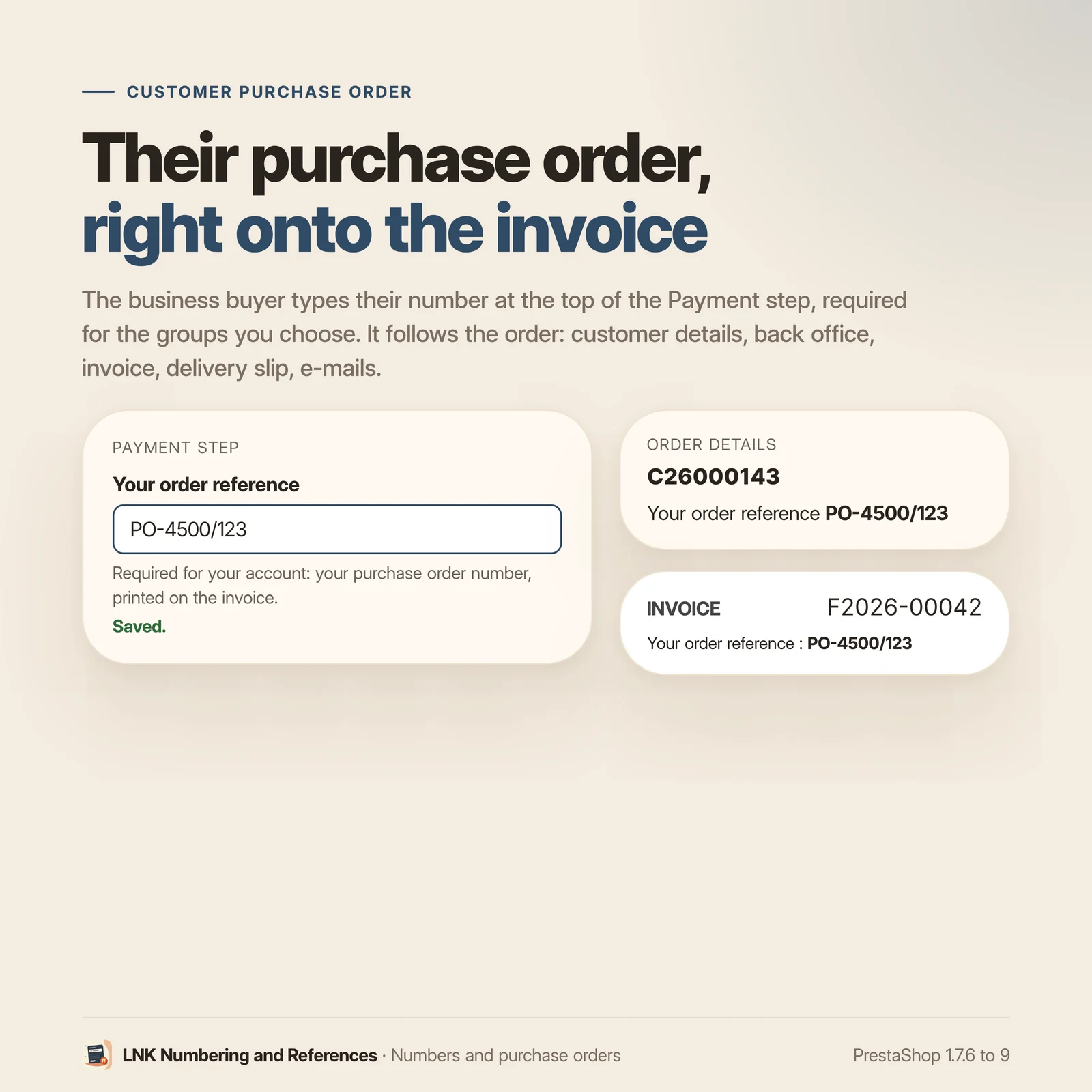
"Your order reference" shows at the top of the Payment step. What the customer types is saved as they go, and copied to the order when it is placed. Letters and digits of every script, and the usual signs of a number (. , _ / # : + -), within the length you choose.
Required for your business customers
Tick the groups for whom the reference is required: these customers cannot pay without it. The payment button waits for the entry, and the server sends a payment started without a reference back to the Payment step. Other customers only see an optional field.
On the invoice, the delivery slip and in the order list
The reference is printed on the PDF invoice and delivery slip. It has its own column in the back
office order list, with a filter: type the number the customer gives you on the phone, and the order
comes up. It shows in the customer's order details, and you correct it from the order page. Order
e-mails can show it with the {lnk_poref} variable.
Light and fast
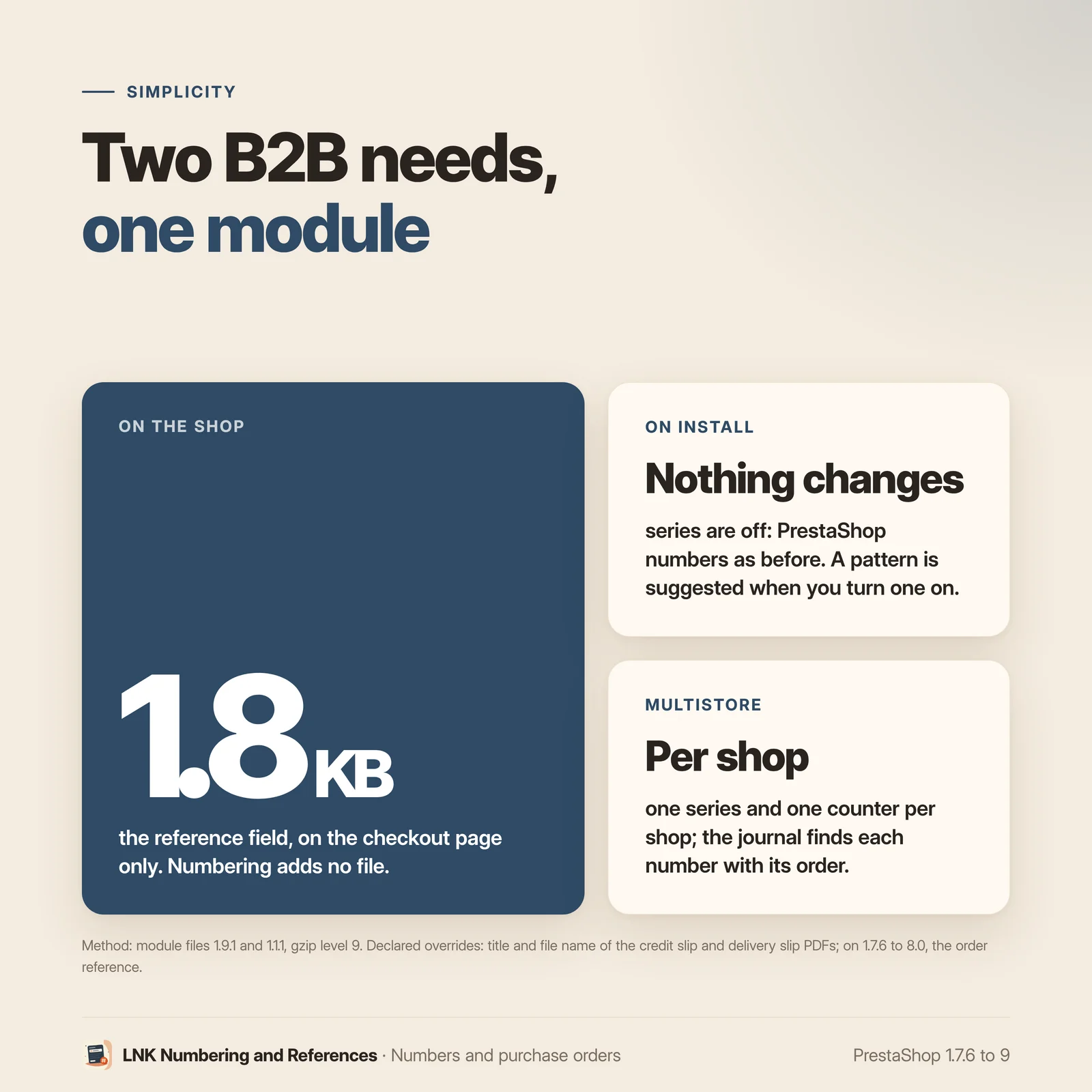
Figures measured on the shipped module, compressed (zlib, level 9): 0.5 KB of CSS and 1.3 KB of JavaScript, loaded on the checkout page only. No other page of the shop loads anything.
Compatible with PrestaShop 1.7.6, 8 and 9
Two versions of the module, one per generation: 1.1 for PrestaShop 1.7.6 to 8.x, 1.9 for PrestaShop 9, with a native settings page in each back office, under Orders. Checked on the bench on 1.7.6, 8.1, 9.0 and 9.2 with the Classic theme. Two declared overrides (the credit slip and delivery slip PDF numbers), no e-mail template changed, no external call.
Frequently asked questions
Where does the customer type their reference?
At the top of the Payment step of the checkout, before choosing the payment method. What they type is saved as they go; the customer sees "Saved." under the field.
Can the reference be required for business customers only?
Yes. Tick the customer groups concerned in the settings. These customers cannot pay without a reference; the others see an optional field. The group that counts is the customer's default group.
Can a customer get around a required reference?
Not through the checkout. The payment button waits for the reference, and if a payment is started without it, the server sends the customer back to the Payment step with a message, before the order is created. One limit only: a payment confirmed outside the checkout, by a server-to-server call from a payment provider (without the visitor's cart), is not checked. The order is then created without a reference, and you can add it from the order page.
Does the reference appear on the invoice?
Yes, on the PDF invoice and delivery slip, under the order details, with the field label in the language of the order. A switch in the settings removes it from both documents.
How do I find an order from the customer's number?
In the back office order list, the "Customer ref." column has its filter: type all or part of the number. The search covers every order, not only the page displayed.
Can a reference be corrected after the order?
Yes, from the order page in the back office, by an employee allowed to edit orders. An empty field removes the reference.
Can the reference appear in e-mails?
Yes. The order e-mails (confirmation, status changes) receive the {lnk_poref} variable. The
module changes no e-mail template: add the variable wherever you want in your templates. It is
empty when the order has no reference.
Which characters are accepted?
Letters and digits of every script, spaces and . , _ / # : + -, with a letter or a digit first. The maximum length is a setting, 40 characters by default and 64 at most. A refused entry shows a message under the field.
Can the field label be changed?
Yes, in each language: "Purchase order number" or "PO number", for example. Left empty, the field keeps "Your order reference", translated. The same label is used in the order details and on the documents.
Does it slow the shop down?
No. The module loads 0.5 KB of CSS and 1.3 KB of JavaScript, compressed, on the checkout page only. The other pages load nothing.
Does it work with my theme and my checkout?
With PrestaShop's native checkout, without any setting (checked with Classic on 1.7.6, 8.1 and
9.2). A custom theme or checkout places the displayLnkPorefField hook; the server guard applies
either way.
Is it multistore compatible?
Yes. Settings are made per shop, per shop group or for all shops. Each reference is tied to the shop of its order. Numbering series are set shop by shop, each with its own counter.
How do I number my invoices in my own format?
In the settings, Numbering section, open Invoices. Write the pattern, for example F{YYYY}-{NNNNN}, choose when the counter starts again (never, every year, every month), then switch the series on. The preview shows the next number as you type. Orders, credit slips and delivery slips each have their own series, on the same model.
What happens to invoices already issued?
They keep their number: the module never renumbers an issued document. The series only applies to the next documents, and its suggested start is just above PrestaShop's last number, so that no printed number comes back.
Can two invoices issued in the same second get the same number?
No. The counter is taken in a single query that locks its row, and a unique index refuses any duplicate. Two documents issued together get two numbers that follow each other.
Does the credit slip quote the original invoice?
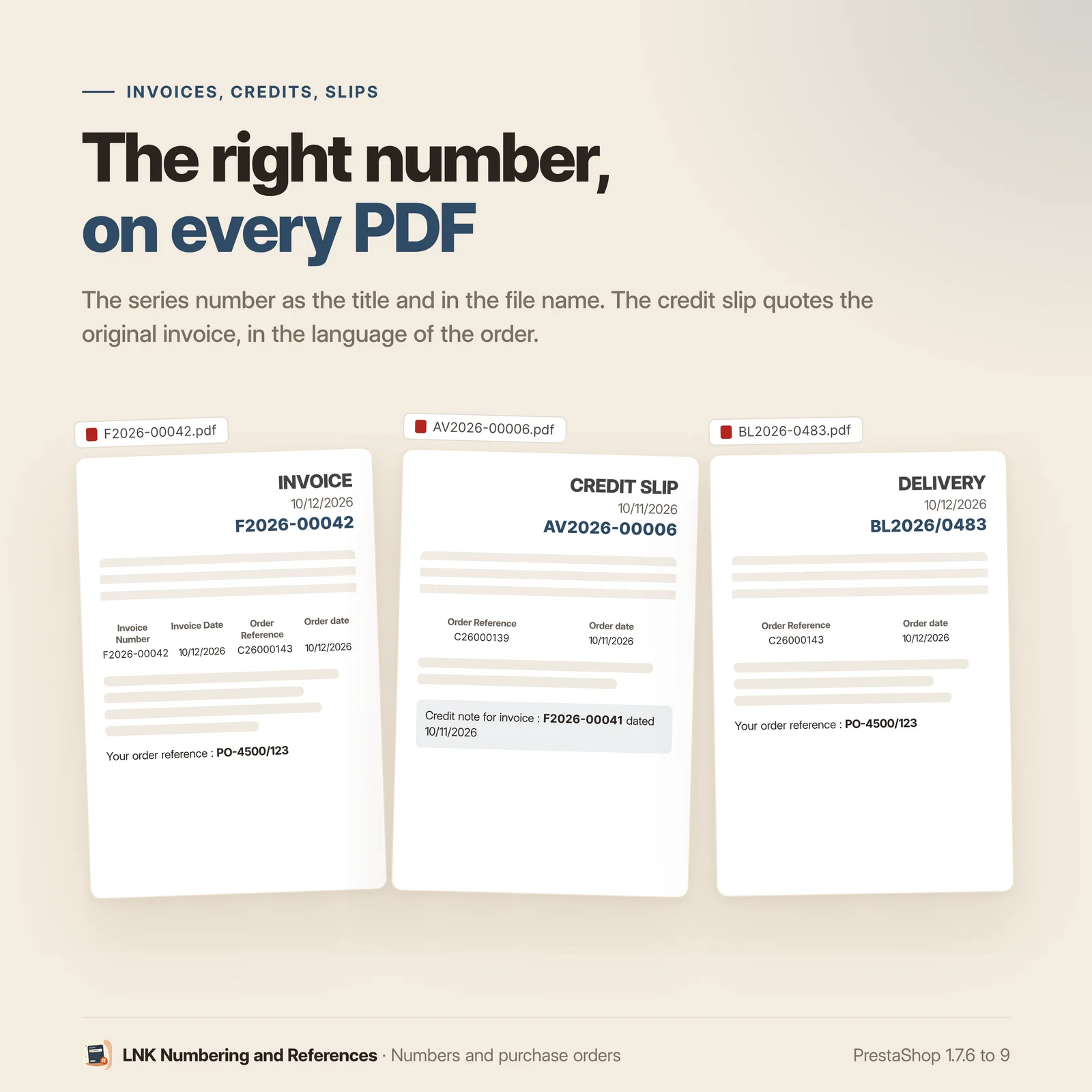
Yes. The PDF credit slip carries its series number as title and file name, and a line quotes the original invoice with its number and date, in the language of the order.
Can I change the pattern during the year?
Yes. The numbers already given stay as they are, and the new pattern applies to the next documents. A number already given is never given again. The journal keeps every change, with the employee and the date.
Does the module change PrestaShop files?
It uses the core hooks wherever they exist. For the title and file name of the PDF credit slip and delivery slip, the core offers none that works: the module installs two declared overrides, and a third one for the order reference on 1.7.6 to 8.0. PrestaShop installs and removes them with the module. No e-mail template is changed.
Release history
-
Version 1.9.1 PrestaShop 9
New
- The module becomes "LNK Numbering and References": on top of the buyer's reference, it numbers the shop's documents.
- Numbering series per shop, for the order reference, the invoice number, the credit slip number and the delivery slip number: {YYYY}, {YY}, {MM}, {SHOP} tags and {N…} counter, reset never, every year or every month, starting number.
- Atomic counter: two documents issued in the same second get two different numbers, one after the other. A number is never given twice, and an issued document keeps its number.
- Invoice: the series number is assigned when the order reaches the "invoice" status, and shown on the PDF, in the back office and to LNK E-invoicing. An invoice issued before the series keeps its number.
- Credit slip: the series number is assigned when the credit slip is created. The PDF carries it as title and file name, and quotes the original invoice (number and date).
- Delivery slip: the series number is assigned on the status change that creates the slip. The PDF carries it as title and file name. A slip issued before the series keeps its number.
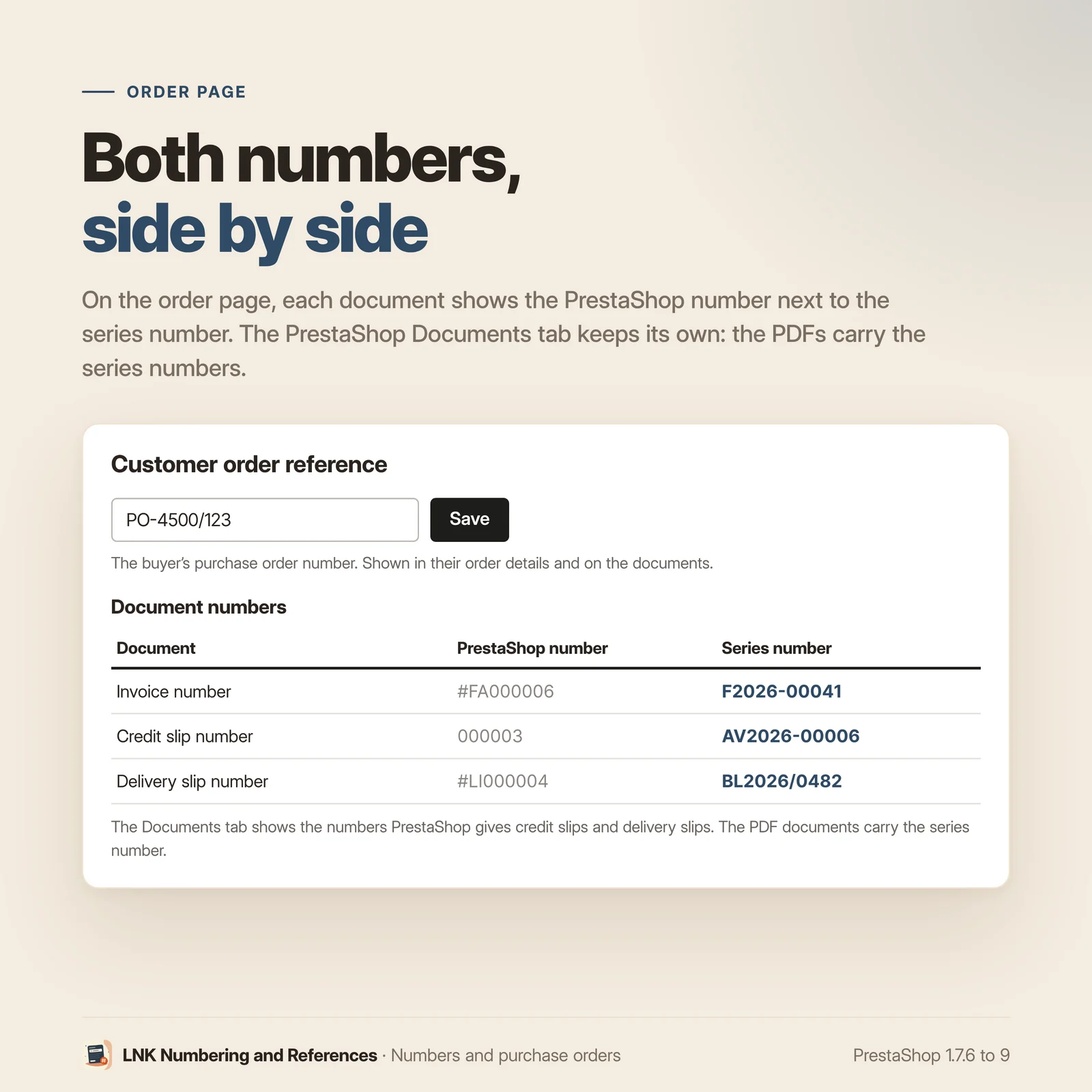
- Back office: one section per document (pattern, reset, starting number folded under "Advanced"), live preview of the next numbers, and a journal: search for a number, an order reference or a buyer's reference, last numbers given and series changes. On an order page, the series numbers next to PrestaShop's.
- lnk.poref.reference/1 contract: the buyer's reference for LNK E-invoicing.
-
Version 1.9.0 PrestaShop 9
New
- "Your order reference" field at the top of the Payment step: the buyer's purchase order number, saved on the cart as it is typed, then copied to the order.
- Reference required for the chosen customer groups: the payment button waits for the reference, and the server sends a payment started without it back to the Payment step.
- The reference in the customer's order details, on the back office order page (editable), in a filterable column of the order list, on the PDF invoice and delivery slip, and in the {lnk_poref} variable of the order e-mails.
- Theme contract lnk.poref/1: displayLnkPorefField and displayLnkPoref hooks, lnk:poref:saved event, --lnk-poref-* CSS variables.
- Settings page on the common skin of LNK modules, under Orders, with a preview of the field, the order details and the invoice.
- Multistore: settings per shop, per group or shared; references tied to the shop of their order.
- French, English and Arabic (right to left).
-
Version 1.1.1 PrestaShop 1.7.6 to 8.x
New
- The module becomes "LNK Numbering and References": on top of the buyer's reference, it numbers the shop's documents.
- Numbering series per shop, for the order reference, the invoice number, the credit slip number and the delivery slip number: {YYYY}, {YY}, {MM}, {SHOP} tags and {N…} counter, reset never, every year or every month, starting number.
- Atomic counter: two documents issued in the same second get two different numbers, one after the other. A number is never given twice, and an issued document keeps its number.
- Invoice: the series number is assigned when the order reaches the "invoice" status, and shown on the PDF, in the back office and to LNK E-invoicing. An invoice issued before the series keeps its number.
- Credit slip: the series number is assigned when the credit slip is created. The PDF carries it as title and file name, and quotes the original invoice (number and date).
- Delivery slip: the series number is assigned on the status change that creates the slip. The PDF carries it as title and file name. A slip issued before the series keeps its number.
- Back office: one section per document (pattern, reset, starting number folded under "Advanced"), live preview of the next numbers, and a journal: search for a number, an order reference or a buyer's reference, last numbers given and series changes. On an order page, the series numbers next to PrestaShop's.
- lnk.poref.reference/1 contract: the buyer's reference for LNK E-invoicing.
Show the previous version
-
Version 1.1.0 PrestaShop 1.7.6 to 8.x
New
- "Your order reference" field at the top of the Payment step: the buyer's purchase order number, saved on the cart as it is typed, then copied to the order.
- Reference required for the chosen customer groups: the payment button waits for the reference, and the server sends a payment started without it back to the Payment step.
- The reference in the customer's order details, on the back office order page (editable), in a filterable column of the order list, on the PDF invoice and delivery slip, and in the {lnk_poref} variable of the order e-mails.
- Theme contract lnk.poref/1: displayLnkPorefField and displayLnkPoref hooks, lnk:poref:saved event, --lnk-poref-* CSS variables.
- Settings page on the common skin of LNK modules, under Orders, with a preview of the field, the order details and the invoice.
- Multistore: settings per shop, per group or shared; references tied to the shop of their order.
- French, English and Arabic (right to left).