LNK Spam Guard: no more fake customer accounts or contact form spam
LNK Spam Guard stops the bots that fill your contact form with links, create fake customer accounts and sign fake addresses up to your newsletter. It works from installation, with no captcha for your customers to solve and without Google, and lets you add Google reCAPTCHA v2 or v3, or Cloudflare Turnstile, if you want to. A module dedicated to PrestaShop 9, multistore, in French, English and Arabic.
- Version 1.1.5 · PrestaShop 1.7.6 to 8.x
- Version 1.9.7 · PrestaShop 9
- PrestaShop 1.7.6 to 9.x
- PHP 7.1 to 8.4
- No override
Screenshots
Key points
- Protects the contact form, account creation, newsletter, login and forgotten password
- As options: account creation during checkout (PrestaShop checkout and One Page Checkout) and the "Notify me" out-of-stock alert
- Active from installation, with no key, no captcha to solve and no Google
- Google reCAPTCHA v2 or v3, or Cloudflare Turnstile without Google, as an option
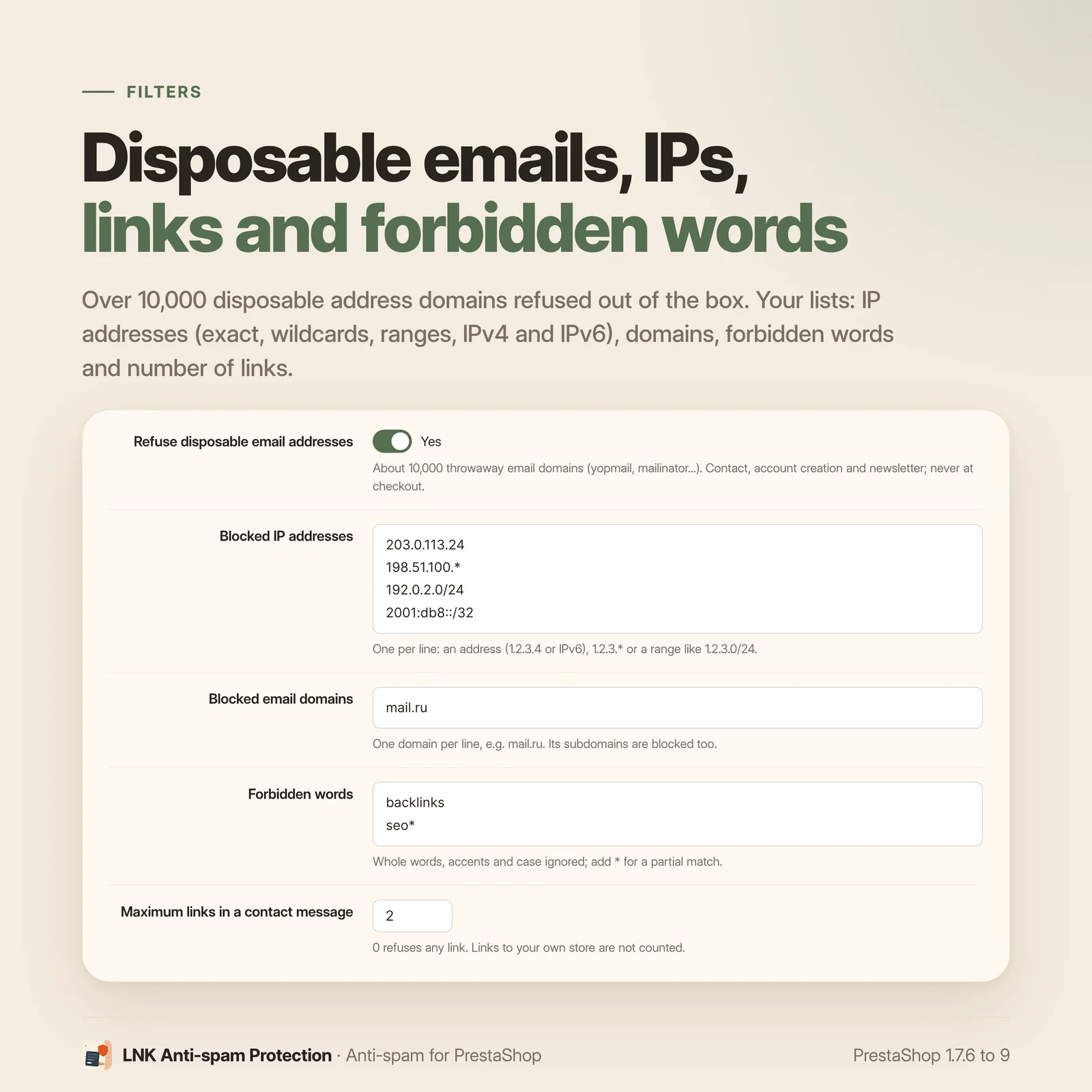
- Blocked IP addresses: addresses, wildcards and ranges, IPv4 and IPv6
- More than 10,000 disposable email domains refused
- Blacklist of addresses, domains and patterns, and always accepted domains
- Maximum number of links and forbidden words in messages and names
- Never blocks a real buyer during checkout
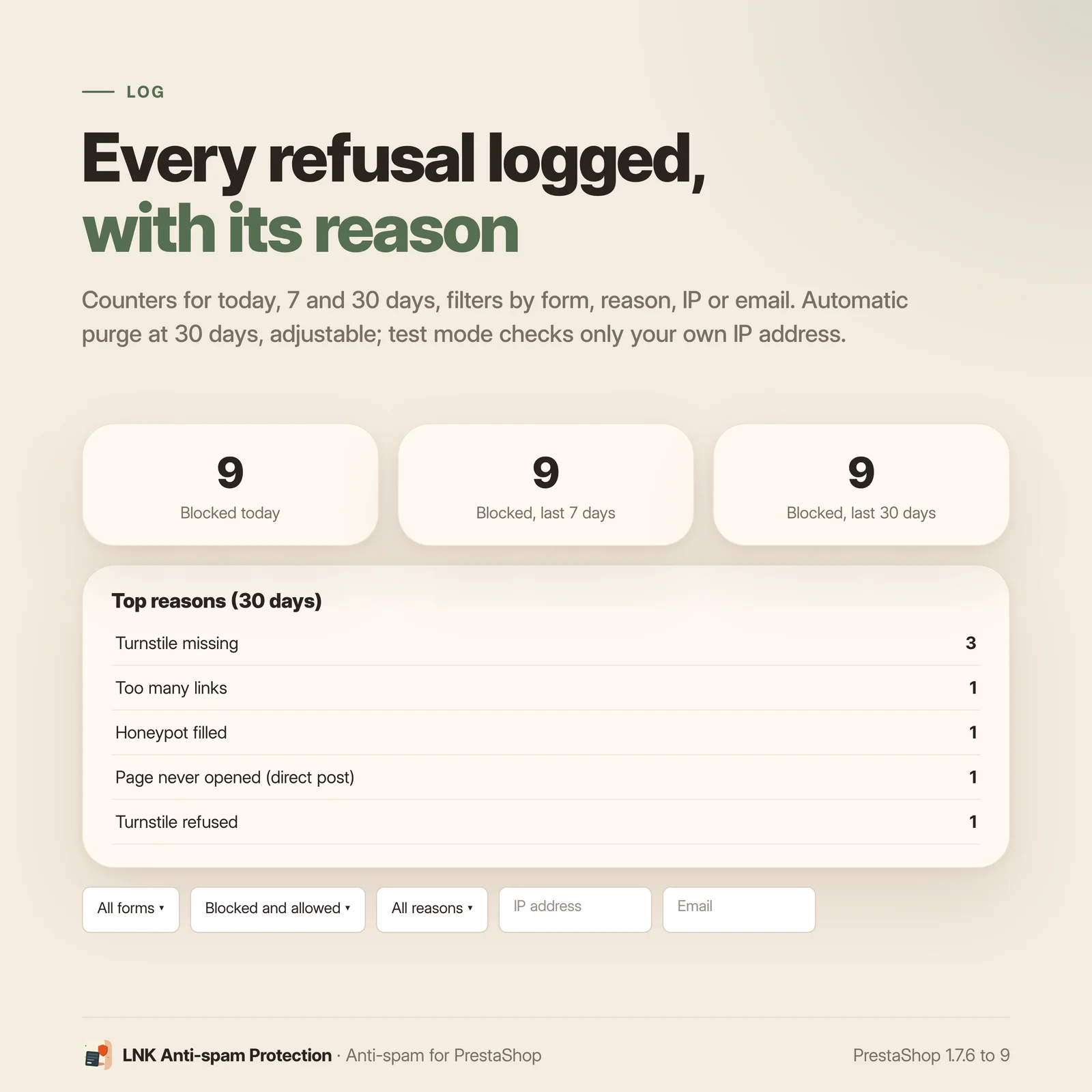
- Refusal log with counters, filters and automatic purge
- Test mode restricted to your IP addresses
- Multistore: settings, filters and log specific to each shop
- Interface and visitor messages in French, English and Arabic
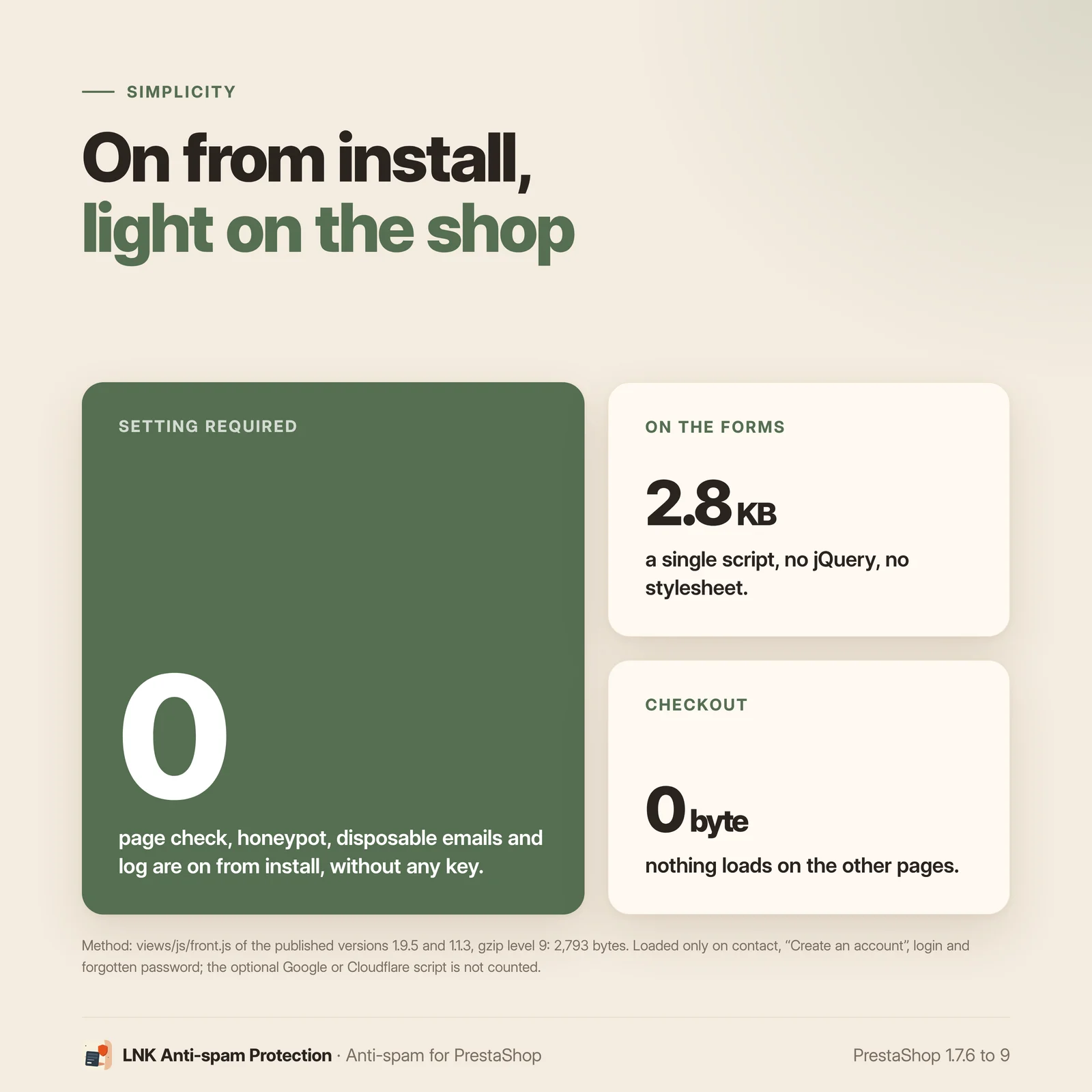
- 2.8 KB of JavaScript, no stylesheet, no jQuery, nothing on other pages
- No override, PrestaShop 9.0 to 9.x, PHP 8.1 to 8.4
Why your shop receives spam and fake accounts
The forms of a PrestaShop shop are public: contact form, "Create an account" page, newsletter sign-up, "Notify me" alert on the product page. Bots submit them in bulk, without ever opening the page, to drop links, test addresses or fill your customer list.
The result is familiar: an inbox full of messages packed with links, a customer list polluted with fake accounts, a newsletter list swollen with addresses that will never open an email and harm the reputation of your mailings.
The protected forms
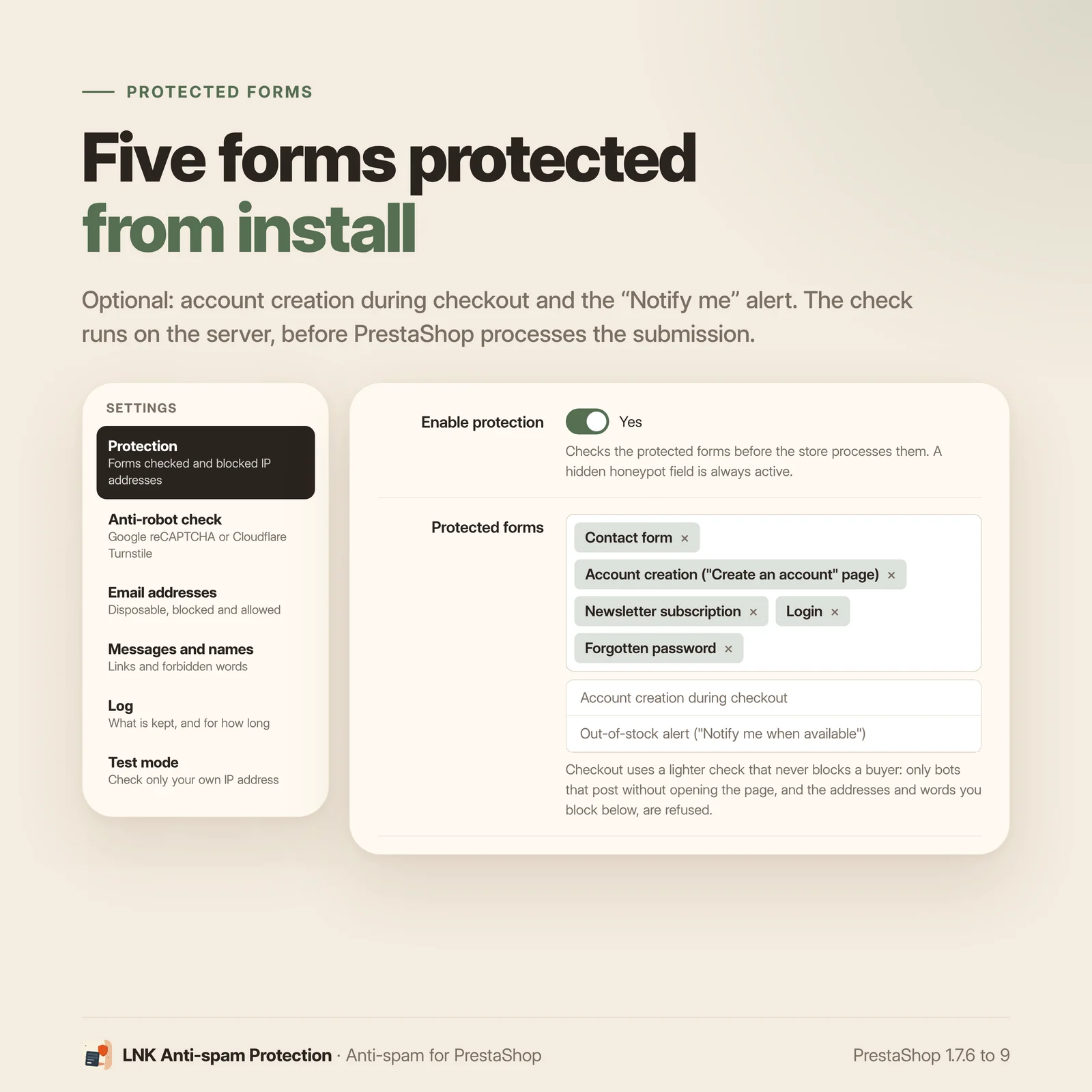
Tick the forms to protect in the back office. These five are protected from installation:
- the contact form;
- the "Create an account" page;
- the newsletter sign-up (PrestaShop module
ps_emailsubscription, form and AJAX submission); - the login, including from the "Sign in" tab of the checkout;
- the forgotten password.
As options, unticked by default:
- account creation during checkout, for the PrestaShop checkout and the PrestaShop One Page Checkout module;
- the out-of-stock alert ("Notify me when available", PrestaShop module
ps_emailalerts, AJAX submission from the product page): page stamp, blocked IP addresses and email filters. A refusal shows in the module's own error message, on Classic as on Hummingbird.
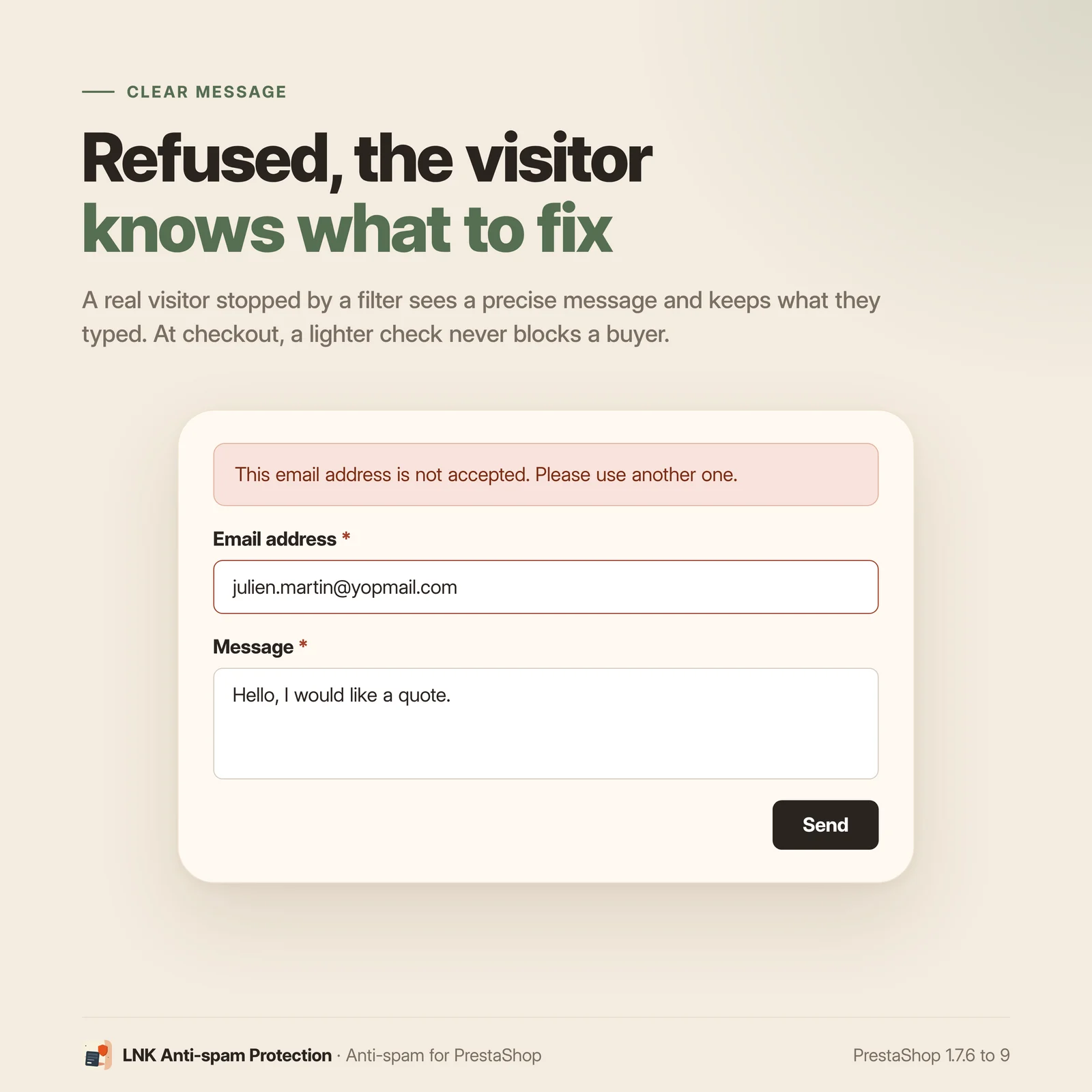
The check runs on the server, before PrestaShop processes the submission. A refused submission creates nothing: no message, no customer, no subscriber, no alert. The visitor keeps what they typed and sees a clear message.
Anti-spam with or without captcha: honeypot, reCAPTCHA or Cloudflare Turnstile
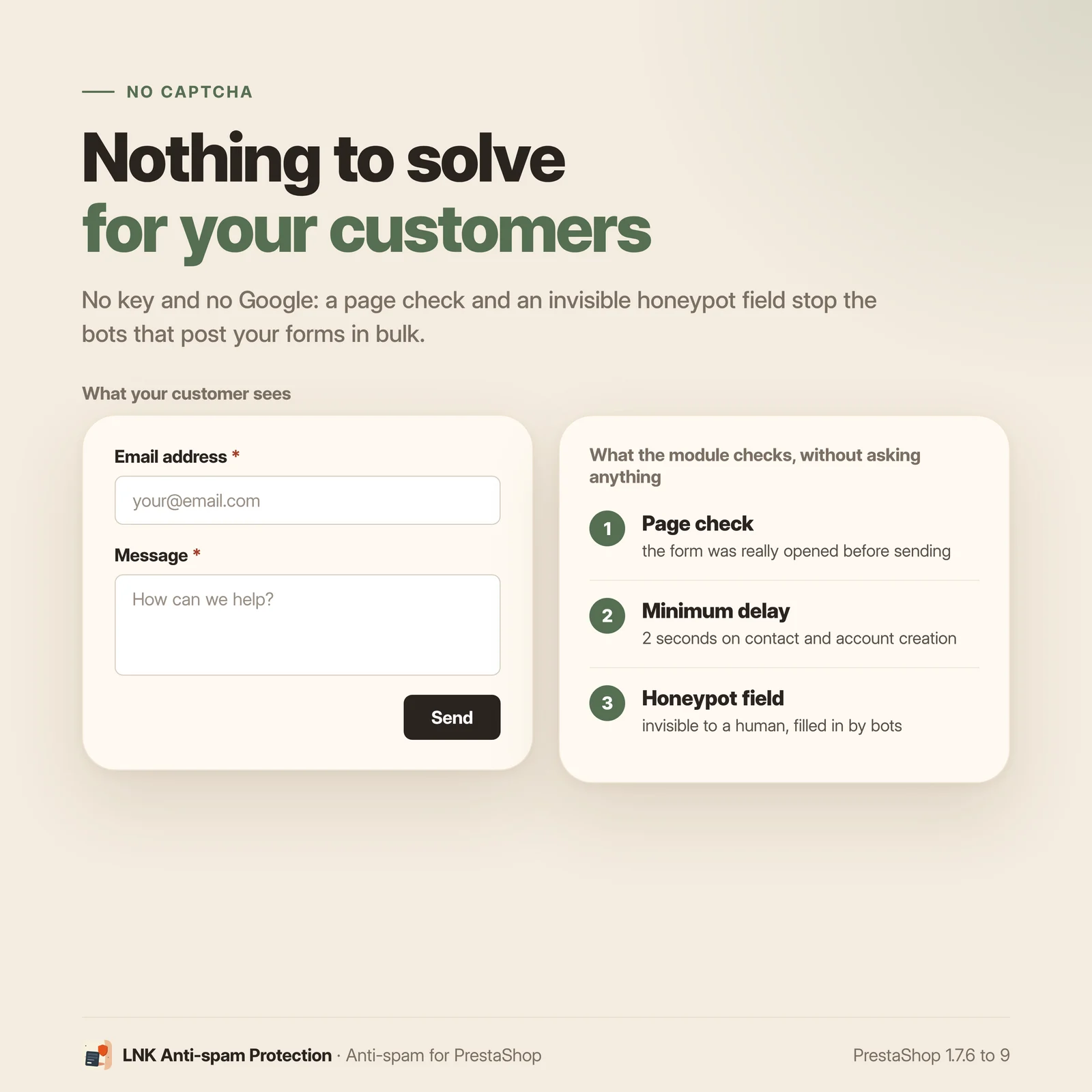
Two protections work without a key and without asking the visitor anything:
- a page stamp: the time the form was displayed is kept in the PrestaShop cookie. A bot that submits the form without having opened the page is refused. On the contact form and account creation, a submission less than 2 seconds after display is refused too;
- a honeypot field, invisible to a human, which bots fill in.
With the filters described below, these protections are enough for a shop that wants no Google service at all.
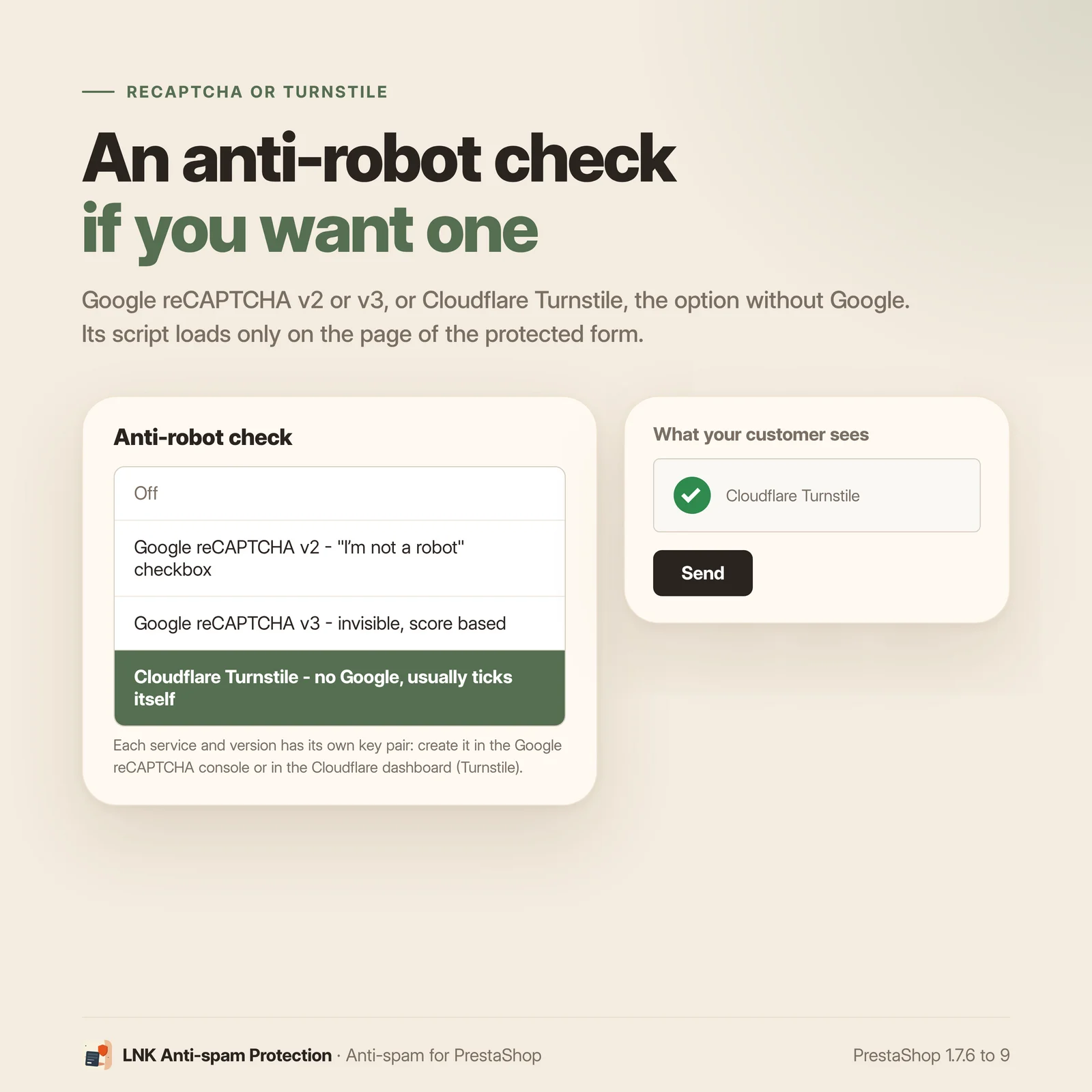
To go further on the contact form and account creation, turn on an anti-robot check, as you choose:
- Google reCAPTCHA v2 (the "I'm not a robot" box);
- Google reCAPTCHA v3 (invisible, with an adjustable minimum score);
- Cloudflare Turnstile, the option without Google: shown like the v2 box, above the send button, it usually ticks itself.
Each service has its own key pair, and its script only loads on the page of the protected form. On the login and forgotten password, the check is a separate option, off by default. The newsletter, present on every page, and the out-of-stock alert never use it. The answer is checked on the server; if Google or Cloudflare does not answer, the submission is refused: a bot does not get through during an outage.
IP address, email address and message filters
The module also refuses submissions based on their origin and content:
- blocked IP addresses: one per line, exact address (IPv4 or IPv6), wildcard (
1.2.3.*) or range (1.2.3.0/24,2001:db8::/32). Checked first, on every protected form, checkout and out-of-stock alert included. A badly written line is refused at save; - disposable email addresses: more than 10,000 temporary address domains (public
disposable-email-domainslist, CC0, shipped with the module) on the contact form, account creation, newsletter and out-of-stock alert; - your blacklist: addresses, domains (subdomains included) and patterns (
*@*.ru); - always accepted domains, to correct a false positive;
- maximum number of links in a contact message (2 by default); links to your own shop do not count;
- forbidden words in the contact message and in the first and last name of a new account, as whole words, ignoring accents and case.
A real visitor refused by a filter sees a precise message ("This email address is not accepted") and can correct what they typed. A logged-in customer's own account email is never refused on the out-of-stock alert. A blocked IP address also refuses the real customers who share that connection: copy the IP from the log, and block a range with care.
Refusal log and test mode
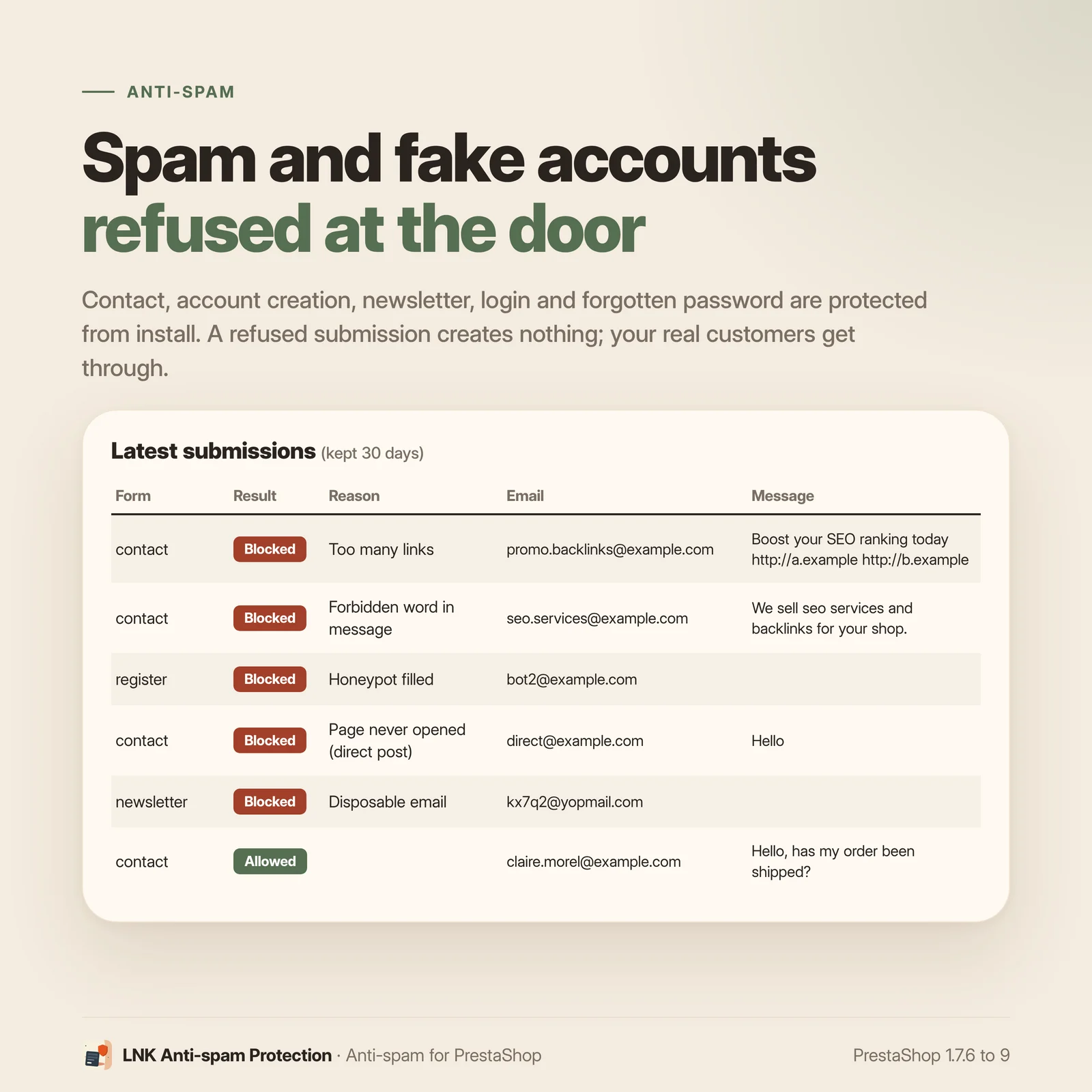
Each refusal is written to a log in the back office: form, reason, email address, IP, browser, message excerpt, and the service's answer when an anti-robot check is on (reCAPTCHA v3 score included). A refusal by IP address records the matching entry of the list. Counters (today, 7 days, 30 days) show what the module stops. Accepted submissions can be logged too, as an option. The log purges itself after 30 days (adjustable from 1 to 365); no password is ever written to it.
Test mode limits the checks to your IP addresses: you try the settings on the live shop without bothering your customers. The settings page shows the IP that PrestaShop sees.
Never blocking a buyer during checkout
Protection of account creation during checkout follows a strict rule: never block a real buyer. It only refuses two bot signals: missing page stamp and filled honeypot field. No Google or Cloudflare, no minimum delay (the browser's autofill can be instant), no disposable address list: only your own lists (blocked IP addresses and emails) apply. The module adds no script to the checkout pages.
Light and fast
Figures measured on 1.9.6 before publication, compressed with zlib at level 9; they will be
taken from verification.json at publication. The module's only front-office script,
views/js/front.js, weighs 2.8 KB (2,806 bytes). The module loads no stylesheet in the
front office and does not use jQuery.
This script only loads on pages that carry a protected form: contact, "Create an account", login and forgotten password. All other pages, checkout included, load nothing: 0 bytes. For the newsletter, the honeypot field is written into the HTML by the server, with no script; the out-of-stock alert is checked on the server, with nothing loaded on the product page. Google's or Cloudflare's script only loads if you turn reCAPTCHA or Turnstile on, and only on those same pages; it is not counted here. The disposable domain list stays on the server and is never sent to the browser.
What the module does not do
To buy with full knowledge:
- it does not limit the number of submissions per visitor: against a massive attack, a firewall or Cloudflare are still needed;
- a bot driving a real browser passes the page stamp; reCAPTCHA or Turnstile remain the tools against it on the contact form and account creation;
- the out-of-stock alert has no captcha and no honeypot field: the
ps_emailalertstemplate has no hook for that field. It relies on the page stamp, blocked IP addresses and email filters; - blocking an IP address refuses everyone who uses it, real customers included;
- form pages (and any page carrying the newsletter) must not be served by a full-page cache;
- login from the checkout has no anti-robot check, and One Page Checkout's own login and account creation pages are not covered by the "Login" option;
- any other captcha module must be disabled, otherwise two modules check the same forms.
PrestaShop 9 compatibility
| PrestaShop | 9.0 to 9.x |
| PHP | 8.1 to 8.4 |
| Verified themes | Classic and Hummingbird (PrestaShop 9.2.0); 1.9.3 new features verified on Hummingbird |
| Anti-robot check | Google reCAPTCHA v2 or v3, or Cloudflare Turnstile, as an option |
| Checkouts | PrestaShop checkout; PrestaShop One Page Checkout (verified on Hummingbird) |
| Override | None |
| Back office | Settings page and log in native PrestaShop 9 Symfony |
| Interface languages | French, English, Arabic |
| Multistore | Settings, filters, log and retention per shop (verified on PrestaShop 9.1.5, two shops) |
Verified on PrestaShop 9.2.0 with the Classic and Hummingbird themes, by a fresh install on PrestaShop 9.0.3, and in multistore on PrestaShop 9.1.5. Details in COMPATIBILITY.md.
Frequently asked questions
How do I stop contact form spam and fake customer accounts on PrestaShop?
Install LNK Spam Guard: the contact form, the "Create an account" page, the newsletter subscription, login and forgotten password are protected from installation, with no setting. A bot that submits the form without opening the page, too fast, or by filling the invisible field is refused, and nothing is created. You can then add an anti-robot check (Google reCAPTCHA or Cloudflare Turnstile), a list of blocked IP addresses and email address and word filters.
Is the module compatible with my PrestaShop version?
Yes, if it is PrestaShop 9.0 to 9.x, with PHP 8.1 to 8.4. It was verified on PrestaShop 9.2.0 with the Classic and Hummingbird themes, and installed fresh on PrestaShop 9.0.3. PrestaShop 1.7.6 to 8.x is covered by a separate version of the module.
Does the module contain a core override?
No. No override. The module makes no change to the PrestaShop core: it only uses standard hooks. It therefore conflicts with no other module this way, and a PrestaShop update leaves no orphan file.
Do I need a Google reCAPTCHA account?
No. The page stamp, the honeypot field and the filters work without a key, without Google and without asking the visitor anything. The anti-robot check (Google reCAPTCHA v2 or v3, or Cloudflare Turnstile) is an option, off at installation, for the contact form and account creation, and separately for the login and forgotten password. Beware: a wrong secret key blocks the forms where that check is on, never the checkout.
Can the module block a real customer during checkout?
No, that is the design rule of the checkout. Protection of account creation during checkout is an option, unticked by default; when on, it only refuses bot signals (missing page stamp, filled invisible field) and what you block yourself (IP addresses, email addresses and words from your lists), with no Google, no minimum delay and no disposable address list. The module adds no script to the checkout pages.
Does this module slow down my shop?
No. Its only script weighs 2.8 KB compressed, it loads no stylesheet and does not use jQuery. This script only loads on the contact, account creation, login and forgotten password pages; all other pages load nothing. Google's or Cloudflare's script is only added if you turn reCAPTCHA or Turnstile on.
Do I need to change my theme?
No, not with a theme that follows PrestaShop (Classic, Hummingbird and their derivatives): the module uses the standard hooks of the forms. If your theme's contact form does not call the consent hook, the invisible field is added by JavaScript. For a custom theme, we place the hook for you free of charge.
Is it compatible with a cache module, another captcha or One Page Checkout?
With PrestaShop One Page Checkout, yes: that module's account and guest creation is protected by the checkout option. Another captcha module must be disabled, otherwise two modules check the same forms. Form pages, and any page carrying the newsletter sign-up, must not be served by a full-page cache: real visitors would be refused.
Does the module work with multistore and multiple languages?
Yes. Settings are made shop by shop (or for all shops at once), and filtering, the log and its retention belong to each shop. This was verified on PrestaShop 9.1.5 in multistore with two shops. Messages shown to visitors and the module's interface are translated into French, English and Arabic.
What data does the module record, and is it GDPR compliant?
For each refusal, the log keeps the form, the reason, the email address, the IP address, the browser and an excerpt of the contact message (255 characters at most), never a password. These rows are deleted after 30 days by default (adjustable from 1 to 365). If you turn reCAPTCHA or Turnstile on, Google's or Cloudflare's script loads without waiting for cookie consent: the compliance of that choice remains your responsibility.
Does the module stop every bot?
No, and no module can promise that. It stops bots that submit forms without a browser and those that fill the invisible field; against bots driving a real browser, reCAPTCHA or Turnstile remain the tools, on the contact form and account creation. A bot that always comes back from the same address can be blocked by the IP address list. It does not limit the number of submissions: against a massive attack, a firewall or Cloudflare are still needed.
What happens when I uninstall the module?
The forms go back to PrestaShop's own behaviour. Uninstalling deletes the module's settings, its back-office page and the log table, which only contains spam attempts. No core or theme file needs restoring.
Turnstile or reCAPTCHA: which one should I choose?
Both protect the same forms: contact form and account creation, plus login and forgotten password if you tick them. Cloudflare Turnstile works without Google: it shows as a box above the send button and usually ticks itself. Google reCAPTCHA v2 shows the "I'm not a robot" box; v3 is invisible and refuses below a minimum score you set. Only one service is active at a time, with its own key pair, created in the Google reCAPTCHA console or in the Cloudflare dashboard. The answer is checked on the server; if the service does not answer, the submission is refused. Neither applies to the newsletter, the checkout or the out-of-stock alert.
How do I block an IP address?
In the Protection section of the settings, "Blocked IP addresses" field: one entry per line,
either an exact address (IPv4 or IPv6), an IPv4 wildcard such as 1.2.3.*, or a range such as
1.2.3.0/24 or 2001:db8::/32. A badly written line is refused at save, with a message. A bot's
address can be copied from the refusal log. It is then refused first on every protected form,
checkout and out-of-stock alert included, and the log records "Blocked IP address" with the
matching entry. Beware: real customers who share that connection are refused too; block a range
with care. In multistore, the list is set shop by shop like the other settings.
Is the "Notify me" form protected?
Yes, as an option, unticked by default: tick "Out-of-stock alert" in the protected forms. It is
the "Notify me when available" form of the PrestaShop module ps_emailalerts, on the product
page. The module checks that the product page was opened in the browser, then applies the
blocked IP addresses and the email filters (disposable addresses, your blocked addresses,
domains and patterns, always accepted domains). A logged-in customer's own account email is
never refused by these filters. There is no captcha, no minimum delay and no honeypot field: the
ps_emailalerts template has no hook for that field. A refused submission shows the module's
own error message, on Classic as on Hummingbird, and no alert is saved.
Release history
-
Version 1.9.7 PrestaShop 9
Changes
- Log: the list is PrestaShop's native grid, like Orders or Customers. Every kept entry can be browsed, page by page (10, 20, 50 or more per page), not only the latest 200. Sorting by date, form, result, reason, email or IP address. Filters under each heading: period (from… to…), form, result, reason, and "contains" search in the detail, email, message, IP address and browser; "Reset" button. The chosen filters are kept for each employee.
- Browser column summarised ("Chrome · Windows", "Headless Chrome · Linux" for a windowless browser driven by a bot), full text on hover; message cut at 60 characters, full text on hover.
- Counters, retention and the "Empty the log" button unchanged; in multistore, the grid shows only the shops of the context, as before.
Fixes
- FAQ (fr, en, ar): question 1 lists every form protected from installation (contact, account creation, newsletter, login, forgotten password); question 5 says that, during checkout, your own lists (IP addresses, email addresses, words) also apply, as the settings help says. Question 6 gives the current weight of the script, 2.8 KB compressed.
-
Version 1.9.6 PrestaShop 9
Fixes
- Arabic (right-to-left) pages: the invisible trap field was pushed 10,000 px off screen. In Arabic, the page grew just as wide, with a horizontal scroll bar, and a screenshot of the page came out blank. The field is now clipped in place: still invisible to visitors, still filled in by bots, and the page keeps the screen width whatever the writing direction.
-
Security
- Cloudflare Turnstile: a token longer than 2,048 characters (Cloudflare's limit) is refused without calling Cloudflare.
Changes
- Clearer settings: in the "Anti-robot check" section, only the keys of the chosen service are shown; the v3 minimum score and the check on login and forgotten password move under "Advanced options", folded. Same for blocked patterns and always-allowed domains in the email addresses section. At most 12 visible settings per section. Saved values do not change: the chosen service, keys (Turnstile included) and each shop's settings are kept.
- Log: a Cloudflare Turnstile refusal is recorded as "Turnstile missing" or "Turnstile refused", no longer under the reason shared with reCAPTCHA. Lines already written keep their label.
Show the 11 previous versions
-
Security
- Blocked IP addresses: the list is compared with every address of the request (connection address, visitor address passed on by Cloudflare, each
X-Forwarded-Forentry), not only the one PrestaShop keeps. Behind a proxy, a bot can no longer get past the list by making up anX-Forwarded-Forheader. - Cloudflare Turnstile: a token is accepted only if its action is the form being sent; a token obtained on another page, or with no action, is refused.
- Huge contact message (over about 1 MB with an unclosed link): the regular-expression engine gave up and the message went through as if it had no link; it is now refused. Same rule for forbidden words.
Fixes
- Links to the shop served on a port (
shop.example:8080) no longer count as foreign links. - Turnstile: a widget error no longer leaves an exception in the browser console.
- An IPv4 address seen in IPv6 form (
::ffff:1.2.3.4) is matched by an IPv4 entry of the list. - Multistore: a shop that keeps its own anti-robot check while its keys, inherited from "All shops", were cleared there no longer refuses every form; the check is turned off for that shop (honeypot, page check and filters stay active).
- "Create an account" page: the Turnstile check shows in the same place as the reCAPTCHA v2 box, above the button.
- Blocked IP addresses: the list is compared with every address of the request (connection address, visitor address passed on by Cloudflare, each
-
Version 1.9.3 PrestaShop 9
New
- Cloudflare Turnstile, a fourth choice for the anti-robot check next to "Off", Google reCAPTCHA v2 and v3, with its own key pair (site key and secret key). Shown like the v2 box, above the send button, it usually ticks itself. Same forms as reCAPTCHA: contact form and account creation, login and forgotten password if their option is on; never the newsletter, the checkout or the stock alert. Cloudflare's script only loads on the page of the protected form. Server-side check with Cloudflare; the widget's action must match the form.
- Blocked IP addresses (Protection section): one per line, exact IPv4 or IPv6 address, IPv4 wildcard (
1.2.3.*) or CIDR range (1.2.3.0/24,2001:db8::/32). An invalid line is refused at save, with a message. Checked first, on every protected form, checkout and stock alert included; the log records "Blocked IP address" and the matching entry. Real customers sharing that connection are refused too: copy the IP from the log. - Out-of-stock alert (
ps_emailalertsmodule, "Notify me when available" on the product page, AJAX submission), a new protected form, unticked by default: page stamp (product page opened in this browser session), blocked IP addresses and email filters (disposable addresses, blocked addresses, domains and patterns, always accepted domains). No captcha, no minimum delay, no honeypot: theps_emailalertstemplate has no hook for that field. A logged-in customer's own account email is never refused by the email filters. A refusal showsps_emailalerts' own error message, through its own script (Classic and Hummingbird), and saves no alert.
Changes
- The "Google reCAPTCHA" settings section becomes "Anti-robot check"; its two options become "Check on login" and "Check on forgotten password" and apply to whichever service is chosen.
- Multistore: the "this shop only" checkbox now unlocks its field (fix), and its margin in the card is corrected. Verified on PrestaShop 9.1.5 with two shops: settings, filtering, log and retention specific to each shop.
Upgrade notes
- Updating from 1.9.x adds the new settings empty (Turnstile keys, blocked IP addresses). The chosen anti-robot check and the protected forms stay as they were; the stock alert stays unticked. No new hook.
- Then clear PrestaShop's CCC and Smarty caches: the module's script and templates change.
-
Security
- An account creation submitted to the checkout with an empty cart now follows the rules of the "Create an account" page; until now it was only subject to the checkout rules, or to none when the option was unticked.
New
- Newsletter sign-up protected (
ps_emailsubscriptionmodule, form and AJAX submission): page stamp and honeypot field written by the server, never reCAPTCHA. A refused submission subscribes nobody. - Login and forgotten password protected: page stamp and honeypot field, reCAPTCHA as an option for each (off by default). No minimum delay on login, for password managers. A login submitted from the "Sign in" tab of the checkout is checked too, without reCAPTCHA.
- Email address filters on the contact form, account creation and newsletter: more than 10,000 disposable address domains (CC0
disposable-email-domainslist), addresses, domains and patterns blocked by the merchant, always accepted domains. During checkout, only the merchant's lists apply. - Message filters on the contact form: maximum number of links (links to the shop do not count) and forbidden words, as whole words, ignoring accents and case. Forbidden words also apply to the first and last name on the "Create an account" page.
- Back-office log of refusals, with counters (today, 7 days, 30 days), filters and purge; as an option, accepted submissions too. Adjustable retention (30 days by default), purge specific to each shop. The log keeps Google's answer (v3 score, action, domain, error codes) and never a password.
- Test mode: checks only apply to the listed IP addresses; the settings page shows the IP seen by PrestaShop.
- Module interface and visitor messages in Arabic.
Upgrade notes
- The update creates the log table and ticks the newsletter, login and forgotten password forms, for every shop and shop group that has its own settings. The forbidden word list stays empty: each merchant chooses their own.
- Disable any other captcha module, and check that no full-page cache serves the pages carrying the newsletter form.
-
Version 1.9.1 PrestaShop 9
New
- Page stamp: the time the form was displayed is kept in the visitor's PrestaShop cookie. A submission without an opened page is refused; on the contact form and account creation, a submission less than 2 seconds after display too.
- Account creation during checkout, as an option unticked by default: PrestaShop checkout and PrestaShop One Page Checkout, including guest creation as soon as the email is typed. Only a missing page stamp and a filled honeypot field refuse; neither Google nor a minimum delay during checkout.
Changes
- The contact form's honeypot field is written by the server (
displayGDPRConsenthook); it is only added by JavaScript if the theme does not call that hook.
Upgrade notes
- The update registers two hooks (
displayGDPRConsent,actionSubmitAccountBefore) and clears PrestaShop's caches; the protected forms stay the ones that were ticked.
-
Version 1.9.0 PrestaShop 9
First version. Branch 9: PrestaShop 9.0 to 9.x only.
New
- Invisible honeypot field on the contact form and the "Create an account" page.
- Google reCAPTCHA of your choice: v2 ("I'm not a robot" box), v3 (invisible, adjustable minimum score) or off, with one key pair per version. Server-side check; if Google does not answer, the submission is refused.
- Refusal without redirection: the page is displayed again with a message, and what the visitor typed is kept.
- Settings page in the PrestaShop 9 Symfony back office, settings per shop.
-
Version 1.1.5 PrestaShop 1.7.6 to 8.x
Changes
- Settings: sections and labels aligned with the PrestaShop 9 version: "Protection", "Email addresses", "Messages and names", and their descriptions.
- Back-office skin: a label button (file upload) has its text centred, and drop-down lists take the width of their column instead of 200 px (shared lnk-admin library).
Fixes
- FAQ (fr, en, ar): question 1 lists every form protected from installation; question 5 says that, during checkout, your own lists (IP addresses, email addresses, words) also apply.
-
Version 1.1.4 PrestaShop 1.7.6 to 8.x
Fixes
- Arabic (right-to-left) pages: the invisible trap field was pushed 10,000 px off screen. In Arabic, the page grew just as wide, with a horizontal scroll bar, and a screenshot of the page came out blank. The field is now clipped in place: still invisible to visitors, still filled in by bots, and the page keeps the screen width whatever the writing direction.
-
Security
- Cloudflare Turnstile: a token longer than 2,048 characters (Cloudflare's limit) is refused without calling Cloudflare.
Changes
- Clearer settings: in the "Anti-robot check" section, only the keys of the chosen service are shown; the v3 minimum score and the check on login and forgotten password move under "Advanced options", folded. Same for blocked patterns and always-allowed domains in the email addresses section. At most 12 visible settings per section. Saved values do not change: the chosen service, keys (Turnstile included) and each shop's settings are kept.
- Log: a Cloudflare Turnstile refusal is recorded as "Turnstile missing" or "Turnstile refused", no longer under the reason shared with reCAPTCHA. Lines already written keep their label.
Fixes
- Google or Cloudflare script loaded from controllers/script/CaptchaScript.php, still only on the page of the protected form (factory rule for third-party scripts).
-
Same fixes as 1.9.4 (PrestaShop 9 branch).
Security
- Blocked IP addresses: the list is compared with every address of the request (connection address, visitor address passed on by Cloudflare, each
X-Forwarded-Forentry), not only the one PrestaShop keeps. Behind a proxy, a bot can no longer get past the list by making up anX-Forwarded-Forheader. - Cloudflare Turnstile: a token is accepted only if its action is the form being sent; a token obtained on another page, or with no action, is refused.
Fixes
- An IPv4 address seen in IPv6 form (
::ffff:1.2.3.4) is matched by an IPv4 entry of the list. - "Create an account" page: the Turnstile check shows in the same place as the reCAPTCHA v2 box, above the button.
- Multistore: a shop whose chosen anti-robot check lacks one of its two keys (a value specific to the shop, keys cleared in another context) no longer refuses all its protected forms; the check is turned off there.
Upgrade notes
- Nothing to migrate; clear PrestaShop's CCC and Smarty caches afterwards.
- Blocked IP addresses: the list is compared with every address of the request (connection address, visitor address passed on by Cloudflare, each
-
Version 1.1.1 PrestaShop 1.7.6 to 8.x
Same features as 1.9.3 (PrestaShop 9 branch).
New
- Cloudflare Turnstile, a fourth choice for the anti-robot check next to "Off", Google reCAPTCHA v2 and v3, with its own key pair (site key and secret key). Shown like the v2 box, above the send button, it usually ticks itself. Same forms as reCAPTCHA: contact form and account creation, login and forgotten password if their option is on; never the newsletter, the checkout or the stock alert. Cloudflare's script only loads on the page of the protected form. Server-side check with Cloudflare; the widget's action must match the form.
- Blocked IP addresses (General section): one per line, exact IPv4 or IPv6 address, IPv4 wildcard (
1.2.3.*) or CIDR range (1.2.3.0/24,2001:db8::/32). An invalid line is refused at save, with a message. Checked first, on every protected form, checkout and stock alert included; the log records "Blocked IP address" and the matching entry. Real customers sharing that connection are refused too: copy the IP from the log. - Out-of-stock alert (
ps_emailalertsmodule, "Notify me when available" on the product page, AJAX submission), a new protected form, unticked by default: page stamp (product page opened in this browser session), blocked IP addresses and email filters (disposable addresses, blocked addresses, domains and patterns, always accepted domains). No captcha, no minimum delay, no honeypot: theps_emailalertstemplate has no hook for that field. A logged-in customer's own account email is never refused by the email filters. A refusal showsps_emailalerts' own error message, through its own script, and saves no alert. Meant for theps_emailalertsversions of PrestaShop 1.7.7 to 8.x: the current version (3.0.0) requires PrestaShop 1.7.7 or later; on 1.7.6 an olderps_emailalertsis needed, and that case has not been verified. - Multistore: the settings page now works like PrestaShop's own settings pages. In a shop or group context, each setting has a checkbox in front of its label: ticked, the value is specific to that shop or group; unticked, the field is disabled and the value of all shops (or of the group) applies, and saving removes the shop's own value. In the "All shops" context, the page says you are editing all shops and that a shop or group with its own value keeps it. The log stays specific to each shop.
Changes
- The "Google reCAPTCHA" settings section becomes "Anti-robot check"; its two options become "Check on login" and "Check on forgotten password" and apply to whichever service is chosen.
Upgrade notes
- Updating from 1.1.0 adds the new settings empty (Turnstile keys, blocked IP addresses). The chosen anti-robot check and the protected forms stay as they were; the stock alert stays unticked. No new hook.
- Then clear PrestaShop's CCC and Smarty caches: the module's script and templates change.
-
Version 1.1.0 PrestaShop 1.7.6 to 8.x
First release of the
prestashop/legacybranch: PrestaShop 1.7.6 to 8.x, PHP 7.1 to 8.1. Same protections as 1.9.2 (PrestaShop 9 branch).New
- Page stamp: the time the form was displayed is kept in the visitor's PrestaShop cookie. A submission without the page having been opened is refused; on the contact form and account creation, so is a submission less than 2 seconds after display.
- Invisible honeypot field, written by the server in the contact form, the "Create an account" page and each newsletter block; added by JavaScript on login, forgotten password, and on the contact form of a theme that does not call
displayGDPRConsent. - Google reCAPTCHA of your choice: v2 ("I'm not a robot" checkbox), v3 (invisible, adjustable minimum score) or off, with one key pair per version. Checked on the server; if Google does not answer, the submission is refused.
- Newsletter sign-up protected (
ps_emailsubscriptionmodule 2.6 and later, form and AJAX submission): page stamp and honeypot field, never reCAPTCHA. A refused submission subscribes nobody. - Login and forgotten password protected: page stamp and honeypot field, reCAPTCHA as an option for each (off by default). No minimum delay on login, for password managers. A login submitted from the "Sign in" tab of the checkout is checked too, without reCAPTCHA.
- Account creation during checkout, an option unticked by default (PrestaShop checkout): only a missing page stamp, a filled honeypot field and the merchant's lists refuse; neither Google nor a minimum delay during checkout. An account creation submitted to the checkout with an empty cart follows the rules of the "Create an account" page.
- Email address filters on the contact form, account creation and newsletter: more than 10,000 disposable address domains (CC0
disposable-email-domainslist), addresses, domains and patterns blocked by the merchant, always accepted domains. During checkout, only the merchant's lists apply. - Message filters on the contact form: maximum number of links (links to the shop do not count) and forbidden words, as whole words, ignoring accents and case. Forbidden words also apply to the first and last name on the "Create an account" page.
- Back-office log of refusals (PrestaShop's native list), with counters (today, 7 days, 30 days), filters, sorting and purge; as an option, accepted submissions too. Adjustable retention (30 days by default), purge specific to each shop. The log keeps Google's answer (v3 score, action, domain, error codes) and never a password.
- Test mode: checks only apply to the listed IP addresses; the settings page shows the IP seen by PrestaShop.
- Refusal without redirection: the page is displayed again with a message, and the visitor's input is kept (except during checkout, where PrestaShop shows the form empty again).
- Native PrestaShop settings page (six sections), settings per shop. Interface and visitor messages in French, English and Arabic.
Upgrade notes
- First release of this branch: installation only. Disable any other captcha module, and make sure no full-page cache serves the pages that carry a protected form or the newsletter form.