 Module · LNK Advanced Search
LNK Advanced Search, the PrestaShop search that finds what your customers mean
A customer types “hummingbrid”, “jumper” instead of “sweater”, or waits two seconds for the search bar to answer: they leave empty-handed. LNK Advanced Search suggests products from the second letter, corrects typos, applies your synonyms and offers an advanced search that reads like a sentence. It replaces the PrestaShop search bar and keeps your results page.
- Version 1.1.10 · PrestaShop 1.7.6 to 8.x
- Version 1.9.11 · PrestaShop 9
- PrestaShop 1.7.6 to 9.x
- PHP 7.1 to 8.5
- No override
Screenshots
Key points
- Suggestions from the second letter: products, categories, brands, searches.
- Typos corrected, without random results.
- Multiple rules: unlimited synonyms, redirections and pinned products, per language.
- Multistore: rules and log belong to each shop.
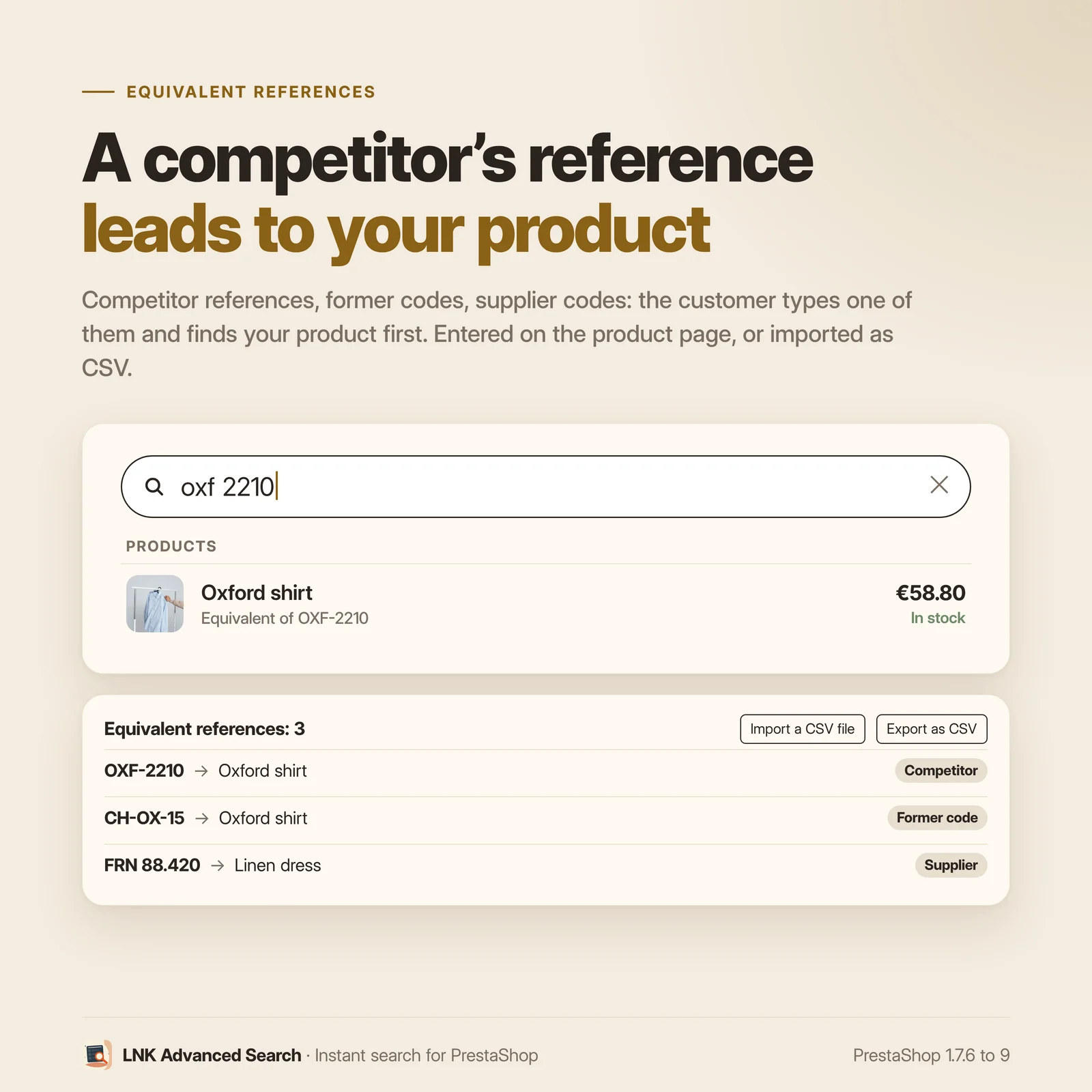
- Equivalent references: competitor references, former codes and supplier codes lead to the right product, with the mention "Equivalent of …"; entered on the product page or imported from CSV.
- Search by dimension: "tube 20 mm", "cable 2.5 mm²", "M8", "1/2"" find the right products (20 mm = 2 cm = Ø20, 1/2" = 15x21 = DN15), read in the name, features and combinations, with nothing to set.
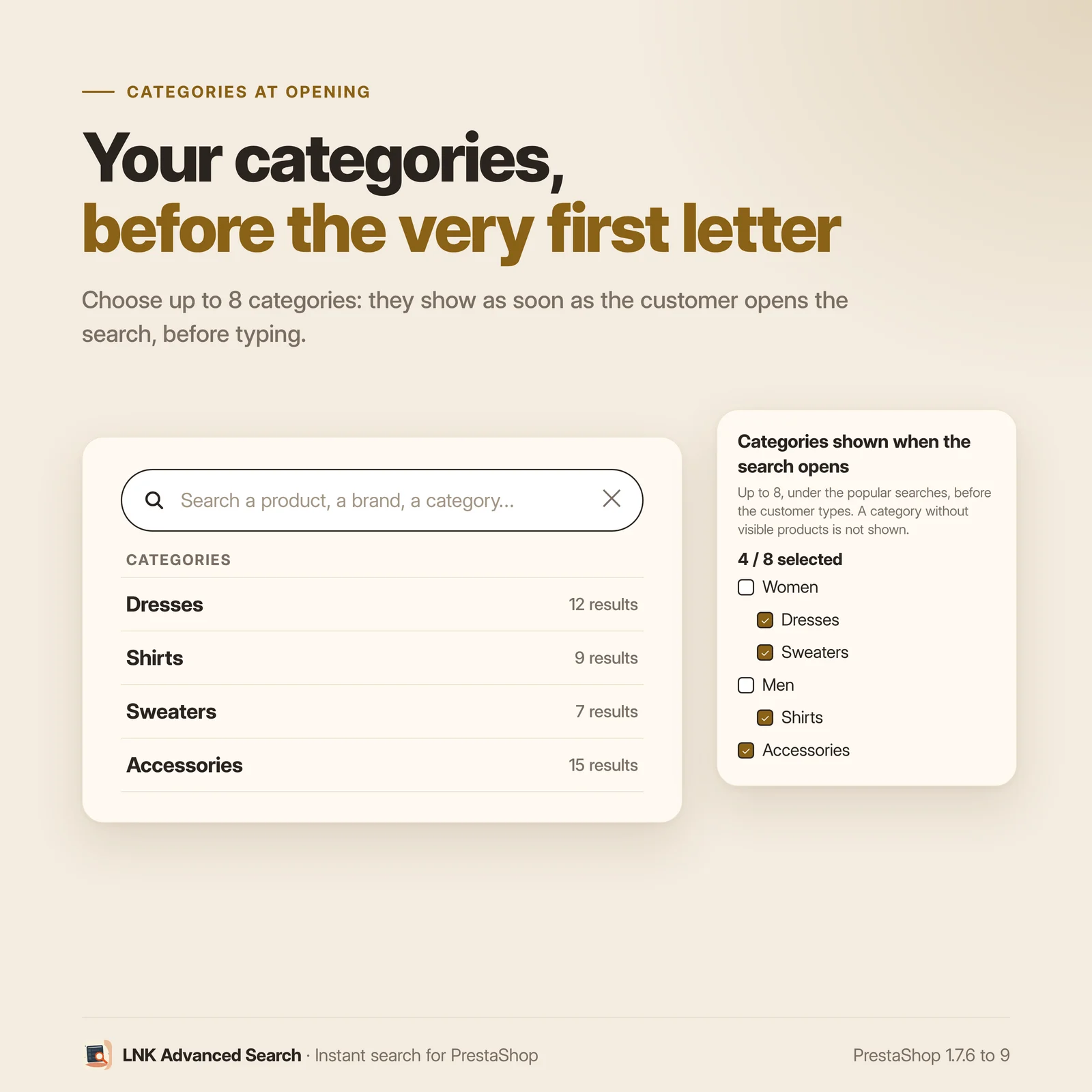
- As soon as the search opens, before any typing: your main categories (or up to 8 chosen ones) and your featured products, taken from your shop, nothing to enter.
- Arabic supported down to the correction, synonyms and redirections.
- Table of searches without results, and suggestions on the page of a search that finds nothing.
- Advanced search written as a sentence, with the real number of products.
- Same results page, same products as the suggestions.
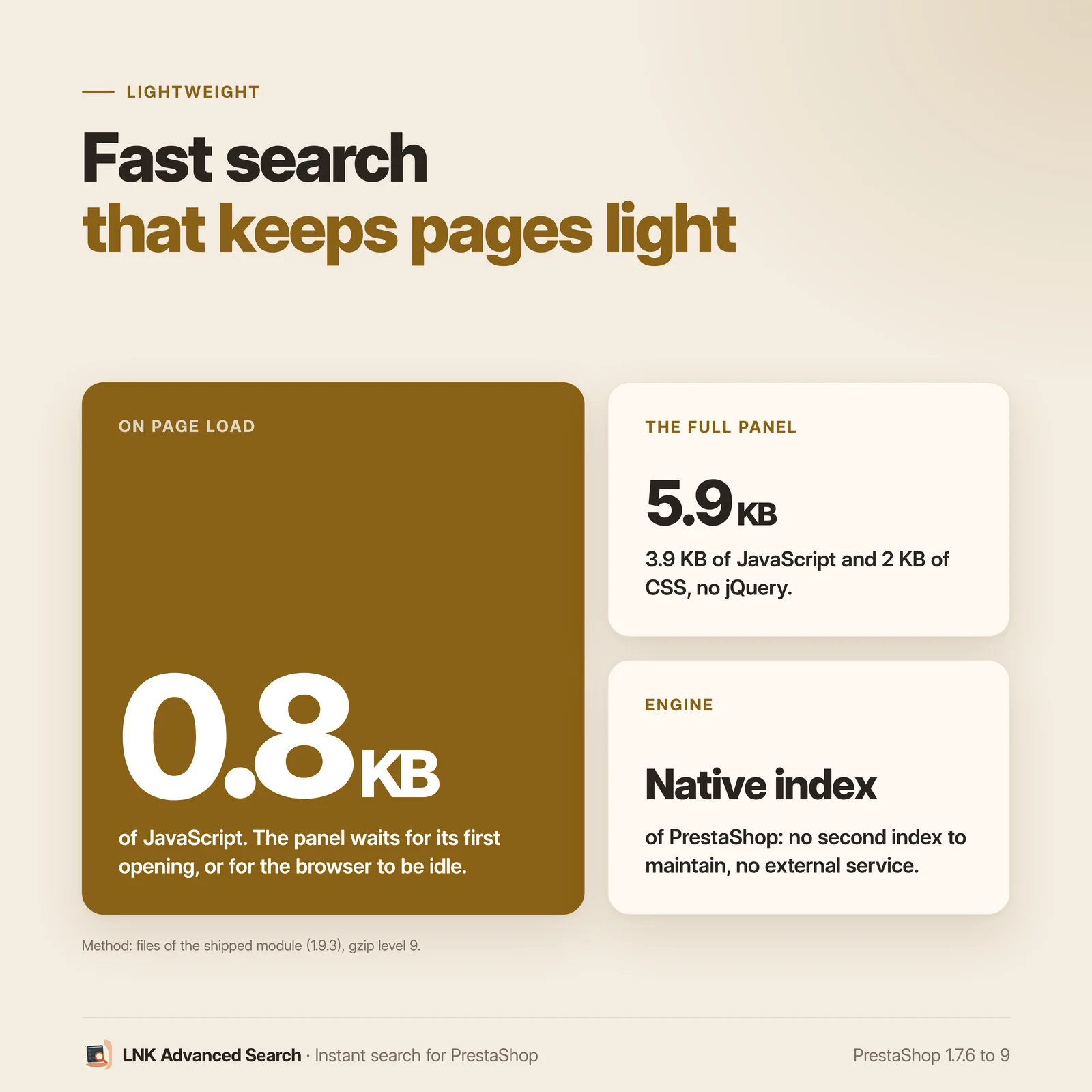
- 0.8 KB of JavaScript on load, panel loaded on opening.
- Native PrestaShop search index, no external service.
- Keyboard and screen readers supported, / key to open the search.
- Settings page with a preview of the real panel, in every language.
- PrestaShop 1.7.6 to 9, six languages, no override.
Instant suggestions
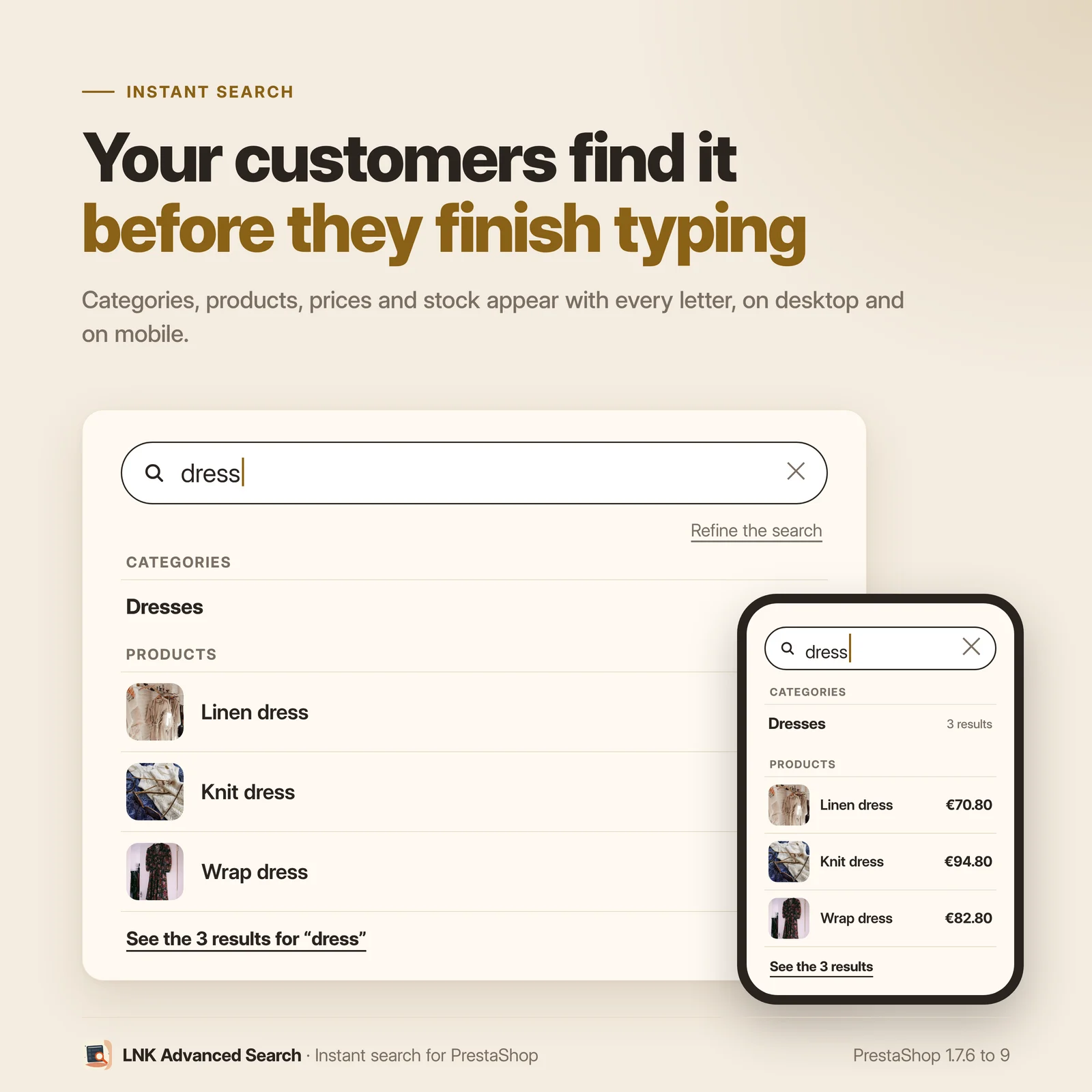
A panel slides down from the top of the page. With each keystroke, it suggests products with their thumbnail, price and stock, the matching categories and brands, and the frequent searches of your shop. Each block can be turned on and set in the back office. The keyboard is enough: arrows to browse, Enter to open, Escape to close.
Typos corrected
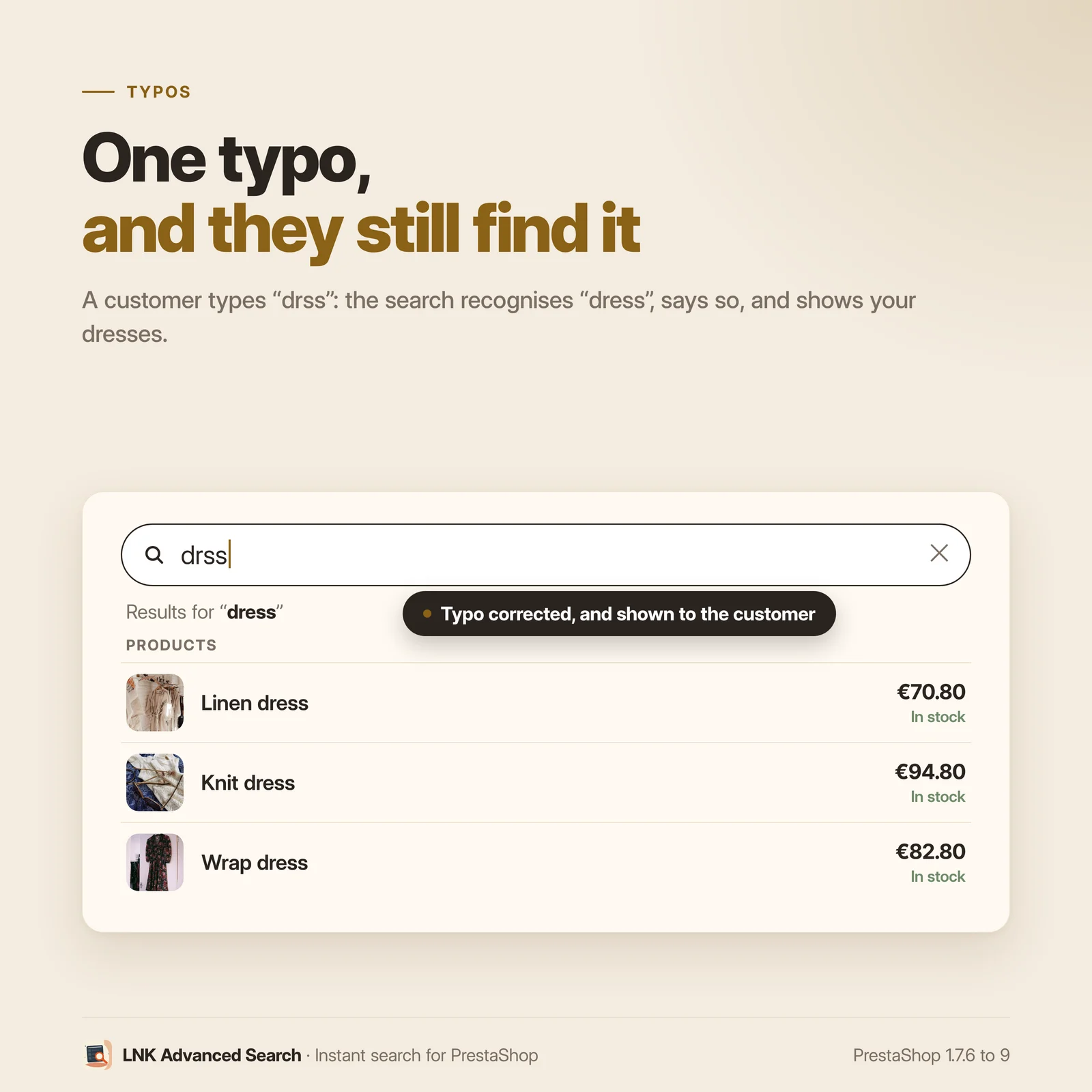
When a word does not exist in your catalog, LNK Advanced Search looks for the closest word and says so: “Results for “hummingbird””. An unrelated word brings nothing back, instead of random products.
In Arabic too: the correction is shown in the script of your catalog (“قميص”), and a typo on a single letter counts as one. Your redirections, pinned products and frequent searches keep the word as it was typed, script and accents included.
Your synonyms, your redirections, your products first
Sweater, pullover and jumper: one synonym group, and the three words find the same products. A search can also lead straight to a page (“delivery” to your delivery page) or show chosen products first. The table of searches without results shows what your customers look for without finding it, so you can create the synonym in one click.
An advanced search in one sentence
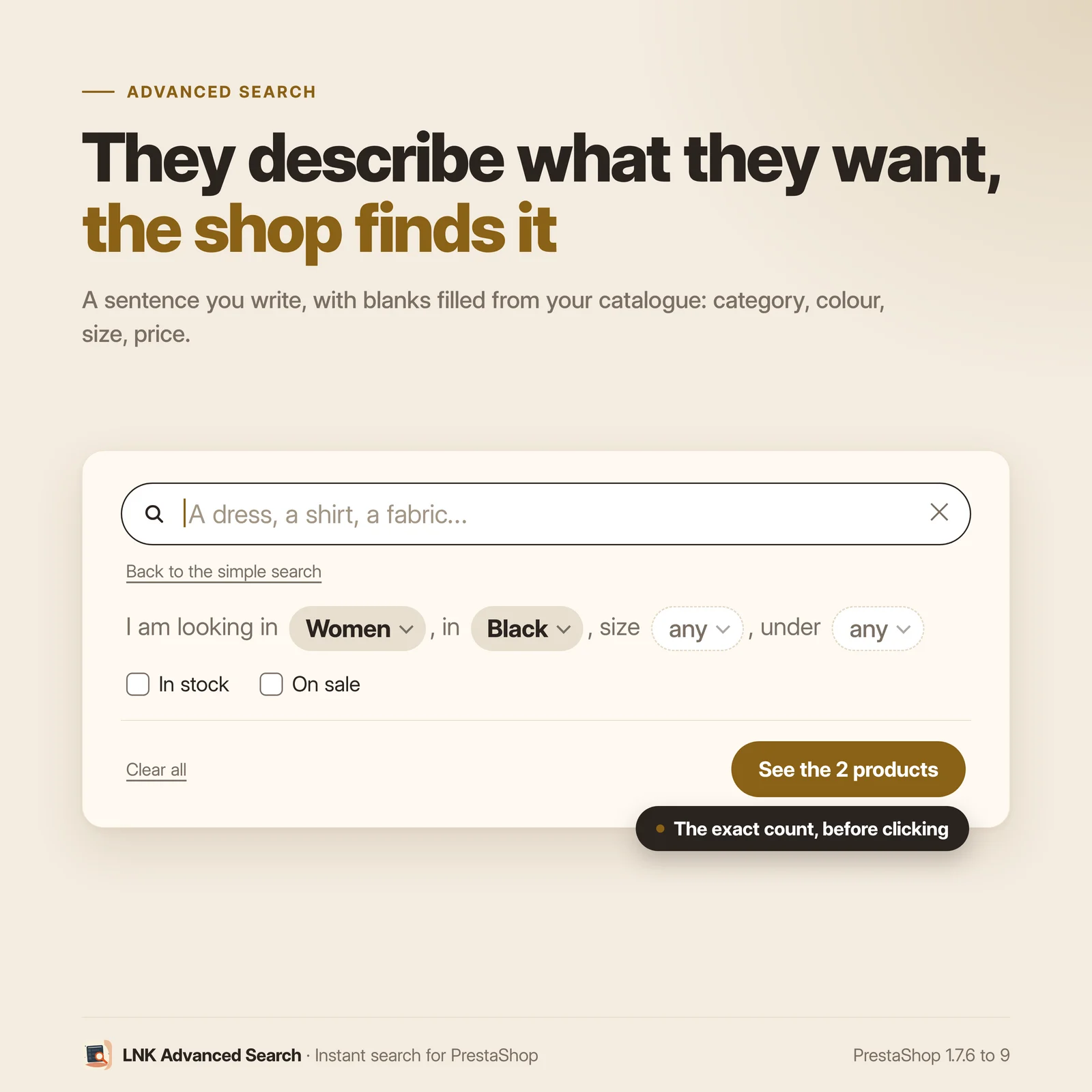
A discreet link, “Refine the search”, unfolds a sentence you write: “I am looking in [category], from the brand [brand], under [price].” Each gap offers the values present in your catalog: categories, brands, features, combinations, prices. In stock or On sale checkboxes complete it. The button shows the real number of products before the click.
Light and fast
Weights measured on the delivered module, compressed with gzip (level 9). When the page loads: the button (0.8 KB of CSS) and a 0.8 KB script. The panel, 4.6 KB of JavaScript and 2 KB of CSS, is prefetched while the browser is idle, without being applied, and only set up on first opening: the page is never recalculated for it. No jQuery dependency.
LNK Advanced Search ranks the products on the native search index before filtering them, and caches the searches already made: a repeated search does not compute again.
The same results page, the same products
The results page stays the one of your theme, with its thumbnails and sort orders. LNK Advanced Search provides its products with the same rules as the suggestions: the number shown in the panel is the one of the page. Disabled products, products hidden from search or reserved to a customer group: the PrestaShop rules are respected, and a test bench checks it for every version. A search that finds nothing suggests the popular searches and your categories, instead of an empty page.
Compatible with PrestaShop 1.7.6, 8 and 9
Two versions of the module, one per generation: 1.1 for PrestaShop 1.7.6 to 8.x, 1.9 for PrestaShop 9. The Classic and Hummingbird themes and the LNKBOOT themes are supported. In French, English, Arabic, Spanish, Italian and Polish. No override.
| Feature | |
|---|---|
| Multiple rules | Unlimited synonym groups (2 to 10 terms each), unlimited redirections (one per search), unlimited pinned products per search; all per language and per shop |
| Multistore | Yes: synonyms, redirections, pins and log belong to each shop; in the "All shops" context, the lists gather every shop and an addition goes to each one; a new shop gets the rules of the shop it copies |
Frequently asked questions
How can I improve the search of my PrestaShop shop?
Install LNK Advanced Search: it replaces the PrestaShop search bar with a panel of instant suggestions, corrects typos and applies your synonyms. Then disable the Search bar module (ps_searchbar): the settings page points it out and disables it in one click.
Do I need an external search engine?
No. LNK Advanced Search uses the PrestaShop search index, the one your shop already keeps up to date. No external service, no subscription, no data sent elsewhere.
My customers make typos: what happens?
When a word does not exist in your catalog, the module looks for the closest word and tells the customer: “Results for “hummingbird””. A word unrelated to the catalog brings nothing back, instead of random products. In Arabic, the correction is shown in the script of the catalog, and a typo on a single letter counts as one.
How do I add synonyms?
In the LNK Advanced Search page, Synonyms section: type the words separated by commas, for example “sweater, pullover, jumper”; in Arabic, the Arabic comma “،” works too. Each one then finds the products of the others. Synonyms are set for each language of the shop.
What do my customers look for without finding it?
The table of searches without results lists the searches that found nothing, the most frequent first (50 at most). From each row, you create a synonym or a redirection. The log keeps no personal data. It deletes its rows older than 90 days, about once every 200 searches: on a quiet shop, slightly older rows can therefore stay listed.
How does the advanced search work?
A “Refine the search” link unfolds a sentence you write, with lists in place of some words: category, brand, feature, combination, price. Each list offers the values present in your catalog, and the button shows the real number of products.
The sentence and the help text of the search field are delivered written in each language of the shop. A language added after the installation also gets them in its own language, or in English if the module is not translated into that language; a text you changed is kept. If you empty one of these fields, the shop shows nothing in its place. The preview of the settings page then shows the default text.
Does the search slow down my pages?
No. When the page loads, only the button (0.8 KB of CSS) and a 0.8 KB script are added. The panel loads on first opening. Products are ranked on the native search index, and a search already made is served from the cache.
Does my results page change?
It stays the one of your theme, with its thumbnails and sort orders. LNK Advanced Search provides its products, with the same rules as the suggestions: the number shown in the panel is the one of the page. If the Faceted search module has filters set for the search page, it keeps simple searches, and the back office explains the choice: your synonyms, pinned products, corrections and redirections then work in the panel only. Same thing if you turn off "Provide the results of the search page". In the panel, the Enter key always follows the redirection of a search, unless the customer chose a suggestion with the arrows.
Is the module compatible with PrestaShop 9?
Yes. Version 1.9 is made for PrestaShop 9, with a native settings page. Version 1.1 covers PrestaShop 1.7.6 to 8.x.
What happens if I uninstall the module?
Its 7 tables (synonyms, redirections, pinned products, search log, equivalent references, dimension index, equivalent notations), its settings and its cache are deleted. Your catalog and the PrestaShop search index are not changed. It installs no override.
How many synonyms, redirections and pins can I create?
As many as you want: the module sets no limit. A synonym group has 2 to 10 terms, 64 characters at most each; if it gets more, the settings page tells you which ones were not kept. Each search can have its redirection and as many pinned products as you want, in each language. A redirection leads to an https:// or http:// address, or to a page of the shop (path starting with /).
Does it work in multistore?
Yes. Synonyms, redirections, pins and the search log belong to each shop, like the settings. In the "All shops" or group context, the lists gather the shops of the context, with their names, and an addition goes to each one; a product is only pinned in the shops that sell it. A new shop gets the rules of the shop it copies.
My customers search with a competitor's reference or a former code: how can I help them?
With equivalent references. On the product page (Modules tab, LNK Advanced Search) or on the module page (Equivalent references section), you link as many references as you want to a product, or to one of its combinations: competitor, former code, supplier. A customer who types one of them finds this product first, in the suggestions and on the results page, with the mention "Equivalent of …". Spaces, dashes and dots do not count: "AB-12.5", "ab 125" and "AB125" give the same product. The match is exact, on the whole reference. For many references, import a CSV file (product ; equivalent reference ; type ; combination reference), and export it in the same format to edit it. The PrestaShop search index is not modified, and the references are shared by all shops, like the reference of a product. The section of the module page shows the 100 most recent references: its search field finds the others, and the export contains them all.
Can I suggest categories as soon as the search opens?
Yes. In Search field, tick up to 8 categories in the tree of your shop. They appear when the customer opens the search, under the popular searches, with their number of products. A category that is inactive, has no visible product or is reserved to other customer groups is not shown. With no category ticked, your main categories appear. Below them, your featured products: your best sellers, otherwise your latest products, only those the search would show to the customer. Everything comes from your shop, nothing to enter; the "Suggest before typing" switch turns them off. In multistore, each shop has its own list. Above them, the popular searches: the ones you write, 8 at most, otherwise the 6 most frequent searches of the last 30 days that find products.
My customers search by dimension ("tube 20 mm", "1/2""): does the module understand them?
Yes. The module reads the dimensions in the search and looks for them in the name, the features and the combinations of your products: length and section converted (20 mm = 2 cm = Ø20, 2.5 mm² = 2.5 mm2), thread (M8, M8x1.25), nominal diameter (DN15), inch (1/2", 1/2 inch) and product of dimensions (15x21) compared as they are. A feature value without unit takes the one written in the name of the feature ("Diameter (mm)"). The description is not read ("delivered with 2 M6 screws" would mislead the search); the reference is searched as before. A dimension that no product carries is ignored, and a line says so ("No product in 2.5 mm²: results for "tube""). The equivalent notations (1/2" = 15x21 = DN15, M8 = M8x1.25) are delivered filled, editable in the Dimensions section, with a CSV import that refuses an invalid line with its reason. Nothing to set: the dimension index builds itself, and "Test a search" shows what the module reads.
Release history
-
Version 1.9.11 PrestaShop 9
New
- Before any typing, when the search opens: your main categories when none is chosen, and your featured products (your best sellers, otherwise your latest products). Everything is taken from the shop from the installation, nothing to enter, and only products the search would show to the customer are suggested. No popular search is made up: until the shop has some, this block stays hidden. "Suggest before typing" setting, on by default and on update.
Fixes
- A language added after the installation received the search field text and the advanced search sentence in the default language of the shop. It now receives them in its own language, unless you had changed these texts: yours are kept.
- Documentation aligned with the module: button weight (0.8 KB of CSS); emptied help text and sentence (nothing on the shop, default text in the preview only) and added language; redirection also to an http:// address; with Faceted search filters for the search page or without "Provide the results of the search page", redirections limited to the panel; 7 tables deleted on uninstall; log of searches without results purged at 90 days about once every 200 searches; popular searches limited to 8 (6 for the automatic fallback) and 100 equivalent references shown on the module page; markup of the suggestions before typing in the theme contract.
- Back-office help texts: a redirection address may start with https://, http:// or /; searches without results are listed from the most frequent, with no 90-day limit.
-
Version 1.9.10 PrestaShop 9
Fixes
- In a header whose row is a flex row (Hummingbird and themes built on Bootstrap 5), the search button took a whole line: the logo, the menu and the search showed on three lines. The button now keeps its natural width, on every theme, without changing the theme. With LNK Mega Menu, in a header where the menu and the search share the same block (Classic), the search went below the menu: it now sits at the end of the menu line.
-
Version 1.9.9 PrestaShop 9
New
- Search by dimension: a customer who types "tube 20 mm", "cable 2.5 mm²", "screw M8 x 40" or "fitting 1/2"" finds the products that carry this dimension in their name, features or combinations. Lengths and sections are converted (20 mm = 2 cm = Ø20, 2.5 mm² = 2.5 mm2); threads, DN, inches and products of dimensions are compared as they are; comma or dot, "×" or "x" and spaces do not matter. A feature value without unit takes the one written in the name of the feature ("Diameter (mm)"). The PrestaShop search index is not modified.
- A dimension that no product carries is ignored, and a line says so in the suggestions and on the results page ("No product in 2.5 mm²: results for "tube""): never an empty page when the rest of the search finds products.
- Equivalent notations: a dimension of a group also finds the others. Delivered filled with plumbing (1/2" = 15x21 = DN15, from 1/8" to 2") and metric threads M3 to M24 at their standard pitch (M8 = M8x1.25); editable, resettable, CSV import and export (an invalid line is refused with its reason).
- "Dimensions" section: number of dimensions read, "Test a search" (what the module reads and how many products are found), reading of all the products again with the progress. Nothing to set: the dimension index builds itself and stays up to date.
Show the 20 previous versions
-
Version 1.9.8 PrestaShop 9
New
- Search without results: under the “no product” message of your theme, customers see the popular searches and the categories shown by the empty search field, otherwise your main categories. A category reserved to other customer groups or without visible products is not shown. Setting “Suggestions on a search without results”, on by default. Native displayNotFound hook, no JavaScript, template the theme can override (empty.tpl).
Changes
- Panel loading: while the browser is idle after the page loads, the panel stylesheet and script are only prefetched (rel=prefetch), not applied. They are inserted on first opening only, and the panel opens once both are loaded. The whole page is no longer recalculated during that idle time (237 ms long task measured on a theme). Data saver mode is still respected.
-
Version 1.9.7 PrestaShop 9
New
- Sharp thumbnails in the search: each product also gets the home and medium formats of your theme (image_srcset, width and height), and the browser picks the one matching the displayed size. A thumbnail enlarged by the theme is no longer blurry. The image key does not change.
- Option for platforms that wrap the response (Shopify section): envelope “script” reads the JSON from a script tag of the received page. Without the option, nothing changes on PrestaShop.
Fixes
- Numbers without agreement mistakes, in every language: “Results: 5”, “See the products (5)”, “See all the results for “dress” (5)”. No more “1 results”. The line of a suggested category shows the number alone.
- Equivalent references: a message for each action (“Reference added.”, “Reference deleted.”, “References imported: 12. Already present: 3. Refused: 0.”) instead of “Settings saved.”.
-
Version 1.9.6 PrestaShop 9
New
- Categories shown when the search opens: you choose up to 8 categories in the tree of your shop (Search field). They appear when the customer opens the search, under the popular searches, before typing. None chosen: nothing changes. A category that is inactive, has no visible product or is reserved to other customer groups is not shown.
- Equivalent references: you link competitor references, former codes or supplier codes to a product or a combination. A customer who types one of them finds the product first, in the suggestions and on the results page, with the mention “Equivalent of …”. Spaces, dashes and dots do not count (“AB-12.5” = “ab 125”). The PrestaShop search index is not modified.
- Entered in the Modules tab of the product page, or on the module page (Equivalent references section): add, search, delete, import of a CSV file and export in the same format.
Changes
- The front files pick their right-to-left variant (_rtl.css) from the language shown, through the updated common library of the LNK modules.
-
Version 1.9.5 PrestaShop 9
Changes
- Theme styling: a theme replaces the front files (button, panel, loader) by placing its own in themes/<theme>/modules/lnk_search/views/css/ or views/js/, under the same name. PrestaShop serves them instead of the module's, with the parent theme as a fallback, and a new address whenever the content changes. Before, these theme files were ignored.
- Theme contract: the {widget name='lnk_search'} widget placed in a template is always wrapped in {if Module::isEnabled('lnk_search')}, so an uninstalled module does not stop the page.
-
Version 1.9.4 PrestaShop 9
New
- Multistore: in the "All shops" or group context, synonyms, redirections, pinned products and searches without results gather every shop of the context, with their names. An addition goes to each of these shops, a deletion only affects them. Before, everything silently went to the default shop.
- A new shop created by copying another one gets its synonyms, redirections and pinned products; a deleted shop takes its own with it.
- The settings show which shops they apply to.
- A synonym group of more than 10 terms, or with a term longer than 64 characters, is reported: the extra terms were not kept, without any warning.
Fixes
- A product is only pinned in the shops that sell it; the other shops are reported.
- Multistore, on the front office: suggestions and the advanced search no longer offer a category, a brand, a feature or a combination missing from the shop.
- Shop installed in a subfolder: a redirection to a page of the site ("/delivery") keeps the subfolder.
-
Version 1.9.3 PrestaShop 9
Changes
- Back office: the settings page now uses the layout shared by all LNK modules (header, sections, cards, fields, preview). Same settings, same data, same preview of the panel; the full width preview reopens as you left it.
Fixes
- Right after an update, the suggestions could still serve, for up to 15 minutes, an answer computed by the previous version (for example a transliterated Arabic correction, "qmys" instead of "قميص"): the update now clears the module's answer cache.
-
Version 1.9.2 PrestaShop 9
New
- Banner when the Search bar module (ps_searchbar) is still enabled, with a button to disable it.
- Hint of the / key on the search button, on desktop, when the shortcut is enabled.
Changes
- Settings page redone: navigation by panels (Suggestions, Search field, Sentence search, Search page; No results, Synonyms, Redirections, Pinned products), language chosen in the header, preview of the real panel on the right (empty field or while typing, full width).
- Suggestion blocks set with counters; features under the product name chosen in their display order.
- Focus of the search field: no more black outline; the line under the field thickens in the theme's focus color.
- Addresses of the module's CSS and JS files versioned by the fingerprint of their content: after an update, neither a CDN nor the browser serves the old version.
Fixes
- Search in Arabic: the correction of a typo is shown in the script of the catalogue ("قميص") instead of the transliterated form PrestaShop keeps in its index ("qmys"); in French, with its accents. A typo on one Arabic letter counts as one, including the letters PrestaShop writes with two characters (ث, خ, ذ, ش, غ).
- Redirections, pinned products and frequent searches: the original entry is saved and displayed ("التوصيل", "Délai de livraison"); matching still uses the normalised form. Rules already saved keep working.
- Synonyms and suggested searches: the Arabic comma and semicolon ("،" and "؛") separate the terms, like the comma.
-
Version 1.9.1 PrestaShop 9
Changes
- Licence updated; module styles made generic, styling left to the theme.
-
Version 1.9.0 PrestaShop 9
First version for PrestaShop 9. PrestaShop 1.7.6 to 8.x has its own version, 1.1.0.
New
- A server-rendered search button and a panel of instant suggestions: products (thumbnail, price, stock, chosen features), categories, brands, frequent searches, optional CMS pages.
- Typo correction on the shop index, capped at 30 ms, without random results.
- Synonyms, redirections and pinned products, per language, and a table of searches without results over 90 days.
- Advanced search in a sentence written by the merchant, with the values present in the catalog and the real number of products.
- Products of the native search page provided with the same rules as the suggestions, sorting and pagination done in the database.
- Server cache per shop, language, customer group, currency and tax display, cleared on every catalog change.
- 0.8 KB of JavaScript when the page loads; 3.9 KB panel loaded on opening.
- Keyboard and screen readers supported (combobox pattern); French, English, Arabic, Spanish, Italian and Polish.
-
Version 1.1.10 PrestaShop 1.7.6 to 8.x
New
- Before any typing, when the search opens: your main categories when none is chosen, and your featured products (your best sellers, otherwise your latest products). Everything is taken from the shop from the installation, nothing to enter, and only products the search would show to the customer are suggested. No popular search is made up: until the shop has some, this block stays hidden. "Suggest before typing" setting, on by default and on update.
Fixes
- A language added after the installation received the search field text and the advanced search sentence in the default language of the shop. It now receives them in its own language, unless you had changed these texts: yours are kept.
- Documentation aligned with the module: button weight (0.8 KB of CSS); emptied help text and sentence (nothing on the shop, default text in the preview only) and added language; redirection also to an http:// address; with Faceted search filters for the search page or without "Provide the results of the search page", redirections limited to the panel; 7 tables deleted on uninstall; log of searches without results purged at 90 days about once every 200 searches; popular searches limited to 8 (6 for the automatic fallback) and 100 equivalent references shown on the module page; markup of the suggestions before typing in the theme contract.
- Back-office help texts: a redirection address may start with https://, http:// or /; searches without results are listed from the most frequent, with no 90-day limit.
-
Version 1.1.9 PrestaShop 1.7.6 to 8.x
Fixes
- In a header whose row is a flex row (Hummingbird and themes built on Bootstrap 5), the search button took a whole line: the logo, the menu and the search showed on three lines. The button now keeps its natural width, on every theme, without changing the theme. With LNK Mega Menu, in a header where the menu and the search share the same block (Classic), the search went below the menu: it now sits at the end of the menu line.
-
Version 1.1.8 PrestaShop 1.7.6 to 8.x
New
- Search by dimension: a customer who types "tube 20 mm", "cable 2.5 mm²", "screw M8 x 40" or "fitting 1/2"" finds the products that carry this dimension in their name, features or combinations. Lengths and sections are converted (20 mm = 2 cm = Ø20, 2.5 mm² = 2.5 mm2); threads, DN, inches and products of dimensions are compared as they are; comma or dot, "×" or "x" and spaces do not matter. A feature value without unit takes the one written in the name of the feature ("Diameter (mm)"). The PrestaShop search index is not modified.
- A dimension that no product carries is ignored, and a line says so in the suggestions and on the results page ("No product in 2.5 mm²: results for "tube""): never an empty page when the rest of the search finds products.
- Equivalent notations: a dimension of a group also finds the others. Delivered filled with plumbing (1/2" = 15x21 = DN15, from 1/8" to 2") and metric threads M3 to M24 at their standard pitch (M8 = M8x1.25); editable, resettable, CSV import and export (an invalid line is refused with its reason).
- "Dimensions" section: number of dimensions read, "Test a search" (what the module reads and how many products are found), reading of all the products again with the progress. Nothing to set: the dimension index builds itself and stays up to date.
-
Version 1.1.7 PrestaShop 1.7.6 to 8.x
New
- Search without results: under the “no product” message of your theme, customers see the popular searches and the categories shown by the empty search field, otherwise your main categories. A category reserved to other customer groups or without visible products is not shown. Setting “Suggestions on a search without results”, on by default. Native displayNotFound hook, no JavaScript, template the theme can override (empty.tpl).
Changes
- Panel loading: while the browser is idle after the page loads, the panel stylesheet and script are only prefetched (rel=prefetch), not applied. They are inserted on first opening only, and the panel opens once both are loaded. The whole page is no longer recalculated during that idle time (237 ms long task measured on a theme). Data saver mode is still respected.
-
Version 1.1.6 PrestaShop 1.7.6 to 8.x
New
- Sharp thumbnails in the search: each product also gets the home and medium formats of your theme (image_srcset, width and height), and the browser picks the one matching the displayed size. A thumbnail enlarged by the theme is no longer blurry. The image key does not change.
- Option for platforms that wrap the response (Shopify section): envelope “script” reads the JSON from a script tag of the received page. Without the option, nothing changes on PrestaShop.
Fixes
- Numbers without agreement mistakes, in every language: “Results: 5”, “See the products (5)”, “See all the results for “dress” (5)”. No more “1 results”. The line of a suggested category shows the number alone.
- Equivalent references: a message for each action (“Reference added.”, “Reference deleted.”, “References imported: 12. Already present: 3. Refused: 0.”) instead of “Settings saved.”.
-
Version 1.1.5 PrestaShop 1.7.6 to 8.x
New
- Categories shown when the search opens: you choose up to 8 categories in the tree of your shop (Search field). They appear when the customer opens the search, under the popular searches, before typing. None chosen: nothing changes. A category that is inactive, has no visible product or is reserved to other customer groups is not shown.
- Equivalent references: you link competitor references, former codes or supplier codes to a product or a combination. A customer who types one of them finds the product first, in the suggestions and on the results page, with the mention “Equivalent of …”. Spaces, dashes and dots do not count (“AB-12.5” = “ab 125”). The PrestaShop search index is not modified.
- Entered in the Modules tab of the product page, or on the module page (Equivalent references section): add, search, delete, import of a CSV file and export in the same format.
Changes
- The front files pick their right-to-left variant (_rtl.css) from the language shown, through the updated common library of the LNK modules.
-
Version 1.1.4 PrestaShop 1.7.6 to 8.x
Changes
- Theme styling: a theme replaces the front files (button, panel, loader) by placing its own in themes/<theme>/modules/lnk_search/views/css/ or views/js/, under the same name. PrestaShop serves them instead of the module's, with the parent theme as a fallback, and a new address whenever the content changes. Before, these theme files were ignored.
- Theme contract: the {widget name='lnk_search'} widget placed in a template is always wrapped in {if Module::isEnabled('lnk_search')}, so an uninstalled module does not stop the page.
-
Version 1.1.3 PrestaShop 1.7.6 to 8.x
New
- Multistore: in the "All shops" or group context, synonyms, redirections, pinned products and searches without results gather every shop of the context, with their names. An addition goes to each of these shops, a deletion only affects them. Before, everything silently went to the default shop.
- A new shop created by copying another one gets its synonyms, redirections and pinned products; a deleted shop takes its own with it.
- The settings show which shops they apply to.
- A synonym group of more than 10 terms, or with a term longer than 64 characters, is reported: the extra terms were not kept, without any warning.
Fixes
- A product is only pinned in the shops that sell it; the other shops are reported.
- Multistore, on the front office: suggestions and the advanced search no longer offer a category, a brand, a feature or a combination missing from the shop.
- Shop installed in a subfolder: a redirection to a page of the site ("/delivery") keeps the subfolder.
-
Version 1.1.2 PrestaShop 1.7.6 to 8.x
Changes
- Back office: the settings page now uses the layout shared by all LNK modules (header, sections, cards, fields, preview). Same settings, same data, same preview of the panel; the full width preview reopens as you left it.
Fixes
- Right after an update, the suggestions could still serve, for up to 15 minutes, an answer computed by the previous version (for example a transliterated Arabic correction, "qmys" instead of "قميص"): the update now clears the module's answer cache.
-
Version 1.1.1 PrestaShop 1.7.6 to 8.x
New
- Banner when the Search bar module (ps_searchbar) is still enabled, with a button to disable it.
- Hint of the / key on the search button, on desktop, when the shortcut is enabled.
Changes
- Settings page redone: navigation by panels (Suggestions, Search field, Sentence search, Search page; No results, Synonyms, Redirections, Pinned products), language chosen in the header, preview of the real panel on the right (empty field or while typing, full width).
- Suggestion blocks set with counters; features under the product name chosen in their display order.
- Focus of the search field: no more black outline; the line under the field thickens in the theme's focus color.
- Addresses of the module's CSS and JS files versioned by the fingerprint of their content: after an update, neither a CDN nor the browser serves the old version.
Fixes
- Search in Arabic: the correction of a typo is shown in the script of the catalogue ("قميص") instead of the transliterated form PrestaShop keeps in its index ("qmys"); in French, with its accents. A typo on one Arabic letter counts as one, including the letters PrestaShop writes with two characters (ث, خ, ذ, ش, غ).
- Redirections, pinned products and frequent searches: the original entry is saved and displayed ("التوصيل", "Délai de livraison"); matching still uses the normalised form. Rules already saved keep working.
- Synonyms and suggested searches: the Arabic comma and semicolon ("،" and "؛") separate the terms, like the comma.
- PrestaShop 1.7.6: the results page stayed with the core (the search type is not set there), with no redirection, pinned product or synonym; the module now handles it, as from 1.7.7 on. In 1.7.6, PrestaShop keeps Arabic as is in its index: the correction counts letters, not bytes.
-
Version 1.1.0 PrestaShop 1.7.6 to 8.x
First version for PrestaShop 1.7.6 to 8.x. PrestaShop 9 has its own version, 1.9.0.
New
- A server-rendered search button and a panel of instant suggestions: products (thumbnail, price, stock, chosen features), categories, brands, frequent searches, optional CMS pages.
- Typo correction on the shop index, capped at 30 ms, without random results.
- Synonyms, redirections and pinned products, per language, and a table of searches without results over 90 days.
- Advanced search in a sentence written by the merchant, with the values present in the catalog and the real number of products.
- Products of the native search page provided with the same rules as the suggestions, sorting and pagination done in the database.
- Server cache per shop, language, customer group, currency and tax display, cleared on every catalog change.
- 0.8 KB of JavaScript when the page loads; 3.9 KB panel loaded on opening.
- Keyboard and screen readers supported (combobox pattern); French, English, Arabic, Spanish, Italian and Polish.