 Module · LNK Announcement Bar
An announcement bar at the top of your PrestaShop shop
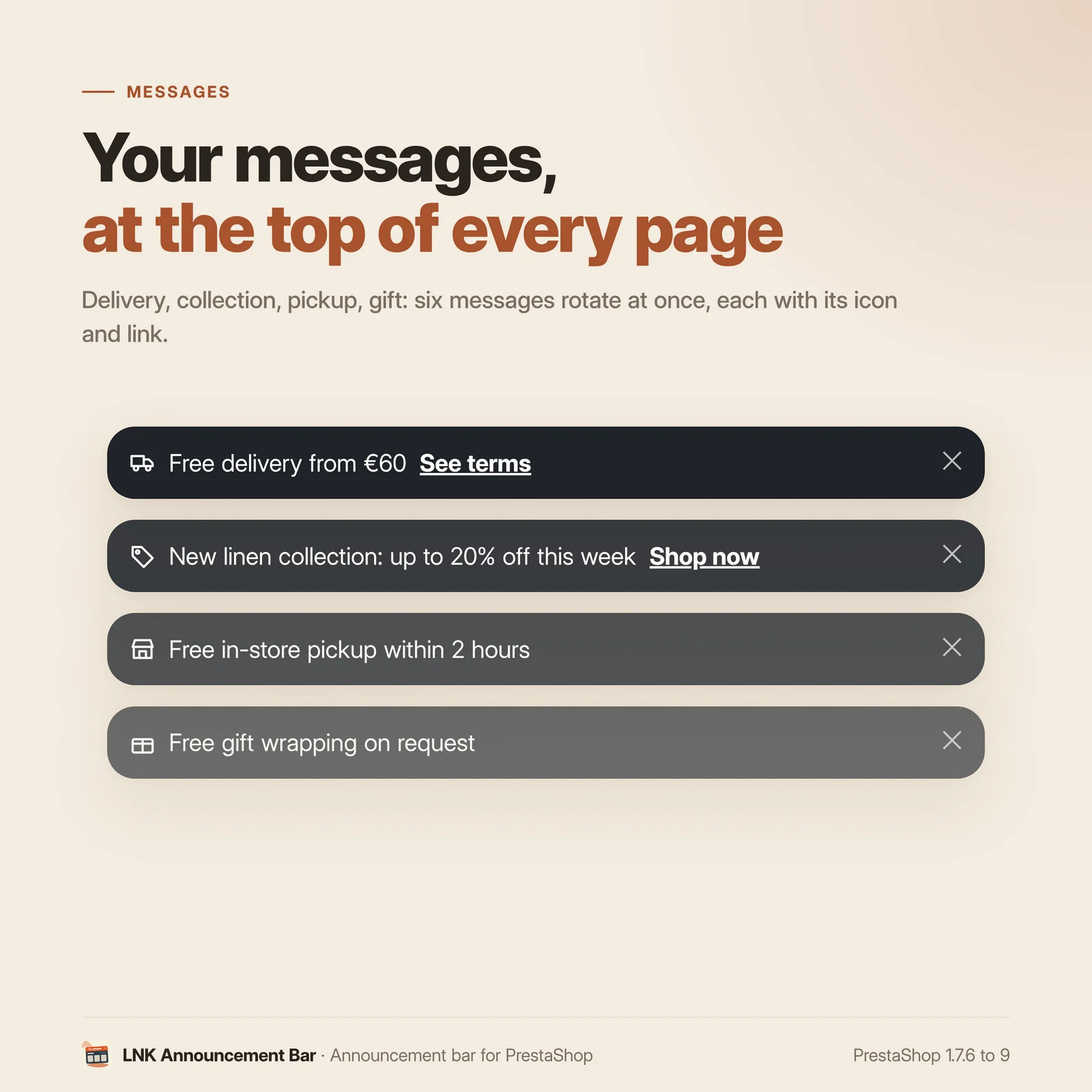
LNK Announcement Bar puts a bar at the top of your shop that rotates a few short messages: free shipping, sales, click and collect. Each message has its dates, its link and its targeting by customer group, device and page. The bar has its height from the first paint: the page never jumps.
- Version 1.1.3 · PrestaShop 1.7.6 to 8.x
- Version 1.9.3 · PrestaShop 9
- PrestaShop 1.7.6 to 9.x
- PHP 7.1 to 8.4
- No override
Screenshots
Key points
- Short rotating messages, six at a time at most
- Display dates to the minute
- Targeting by customer group, device and page
- No page jump, from the first paint
- Rotation in CSS, without JavaScript, pause on hover
- Closing remembered only with consent
- Seven styles, or your theme's colour, always readable
- Above the header or sticky at the top of the screen
- Text and link in every language, Arabic right to left
- Live preview on desktop and mobile, enlarged in one click
- Promo code linked to a cart rule: details, code copied, gone when the cart rule ends
- PrestaShop 1.7.6 to 9.x, PHP 7.1 to 8.4, no override
- Unlimited messages, up to six rotating at once
An announcement banner, without makeshift solutions
PrestaShop ships no announcement bar. Merchants make do with a text block or an image in the header, with no dates, no rotation and no targeting: the sale message stays online after the sale, and the same text shows to consumers and to businesses.
Dated and targeted messages
You write as many messages as you want; six rotate at a time at most. For each one:
- the text and the link in every language of the shop, with an icon of your choice;
- the dates, if needed: a sale message appears and disappears by itself, to the minute;
- the customer groups of your shop (visitors, customers, a business group…), or all;
- the devices: desktop, mobile, or both;
- the pages: home, categories, products, cart, other pages.
Two arrows sort the messages, in the order of the rotation. A live preview shows the bar on desktop and on mobile while you type, and expands to full width in one click.
A promo code in plain sight
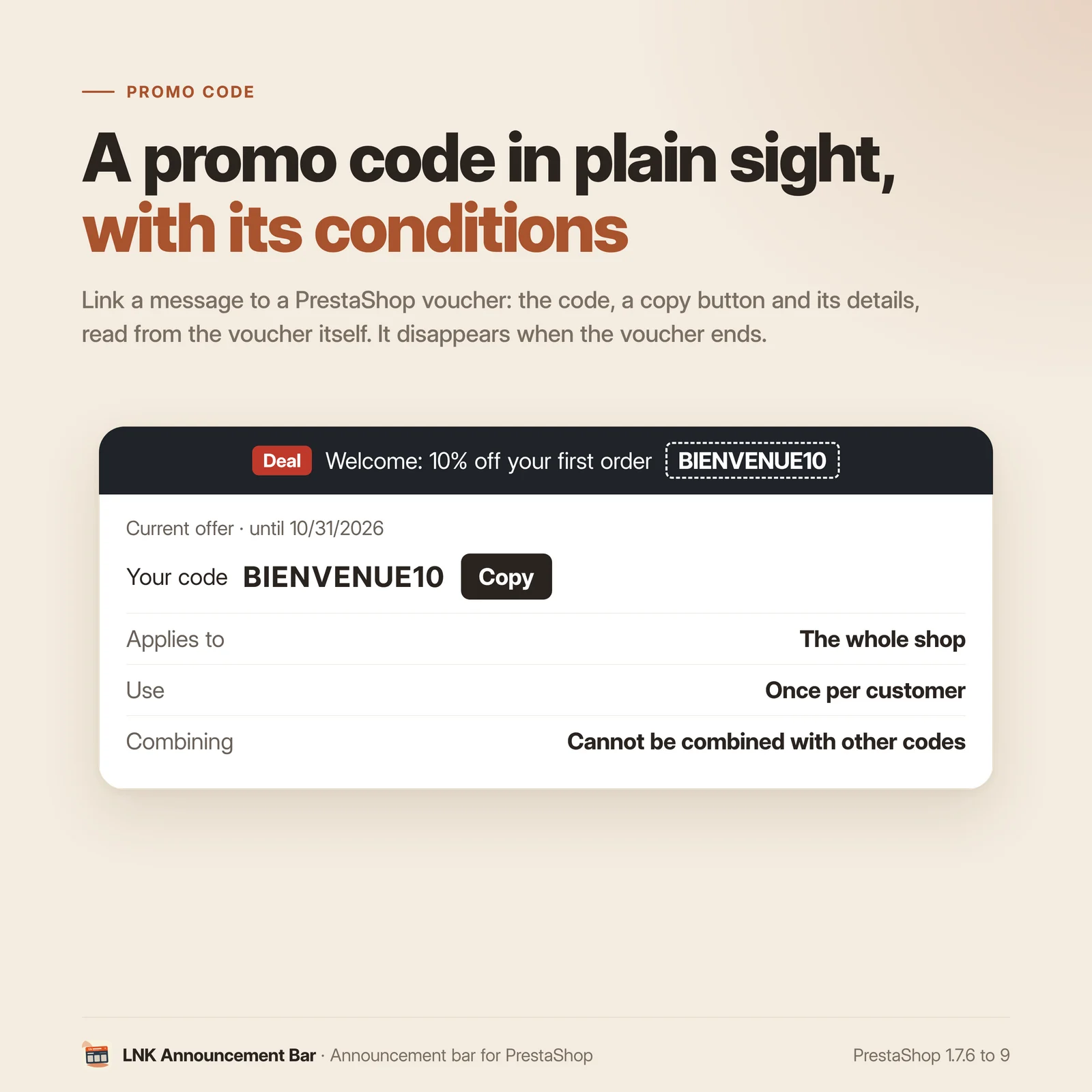
Link a message to a PrestaShop cart rule: the bar shows a “Deal” badge, your text and the code. A click opens the details right below, over the page without moving it: discount, end date, products, combining, use per customer, minimum purchase and exclusions, read from the cart rule itself. A button copies the code, a link leads to the collection.
Nothing is typed twice, and the message disappears by itself when the cart rule ends, is turned off, used up, or reserved to a customer or a group: a personal cart rule is never shown to everyone. The title, the explanation and the exclusions can be replaced in each language. On mobile, the text scrolls slowly and stops when touched. The stylesheet and the small script of the details load only on pages that show such a message.
No page jump
A bar added in JavaScript appears after the page and pushes it down: that is the layout shift Google measures (CLS). Here, the bar and all its messages are rendered by the server, in the same cell: it has the height of the longest message from the first paint, and the rotation never changes it. A bar closed by the visitor is hidden before the first paint of the next pages, with no jump either.
Rotation without JavaScript
Fade or vertical slide, 3 to 10 seconds per message, pause on hover and when a link has the focus: the rotation is written in CSS. For a visitor who asks for less motion, nothing moves; the messages scroll with a swipe.
The messages of each device are chosen by the stylesheet, without reading the visitor's browser: the page is the same for everyone, compatible with a full page cache.
Closing and consent
The visitor can close the bar if you allow it. It stays closed until a new message, 30 days at most, only if they accepted the "preferences" cookies of your cookie banner. Without consent, nothing is written: the bar comes back on the next page.
Léger et rapide
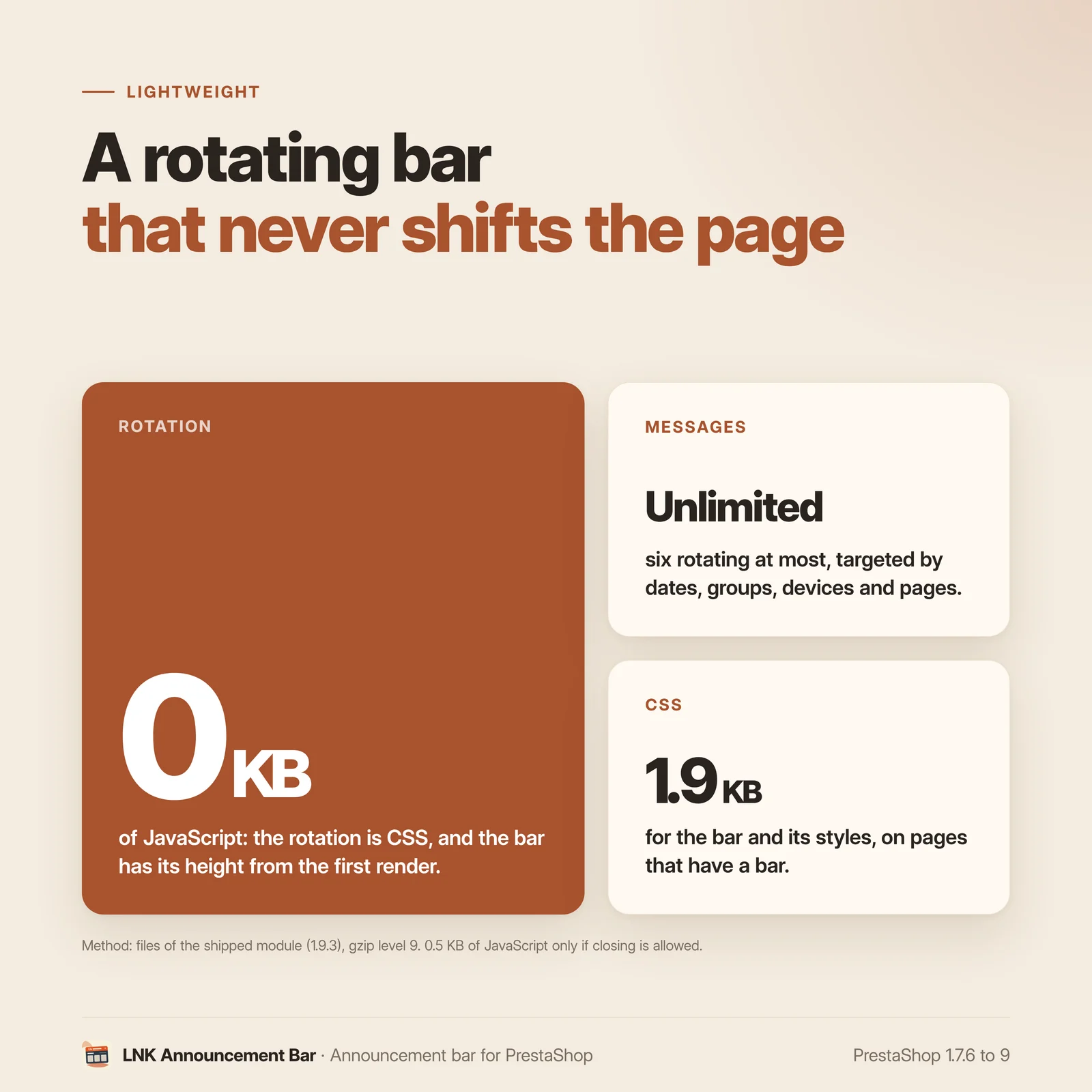
Figures measured on the shipped module, compressed with gzip (level 9). One stylesheet of 1.9 KB for the bar, its rotation and its seven styles, loaded only on the pages that have a bar. No JavaScript for the rotation; a script of 0.46 KB, loaded only if the visitor can close the bar. No added font: the bar uses your theme's. No external resource.
Seven styles, or your theme's
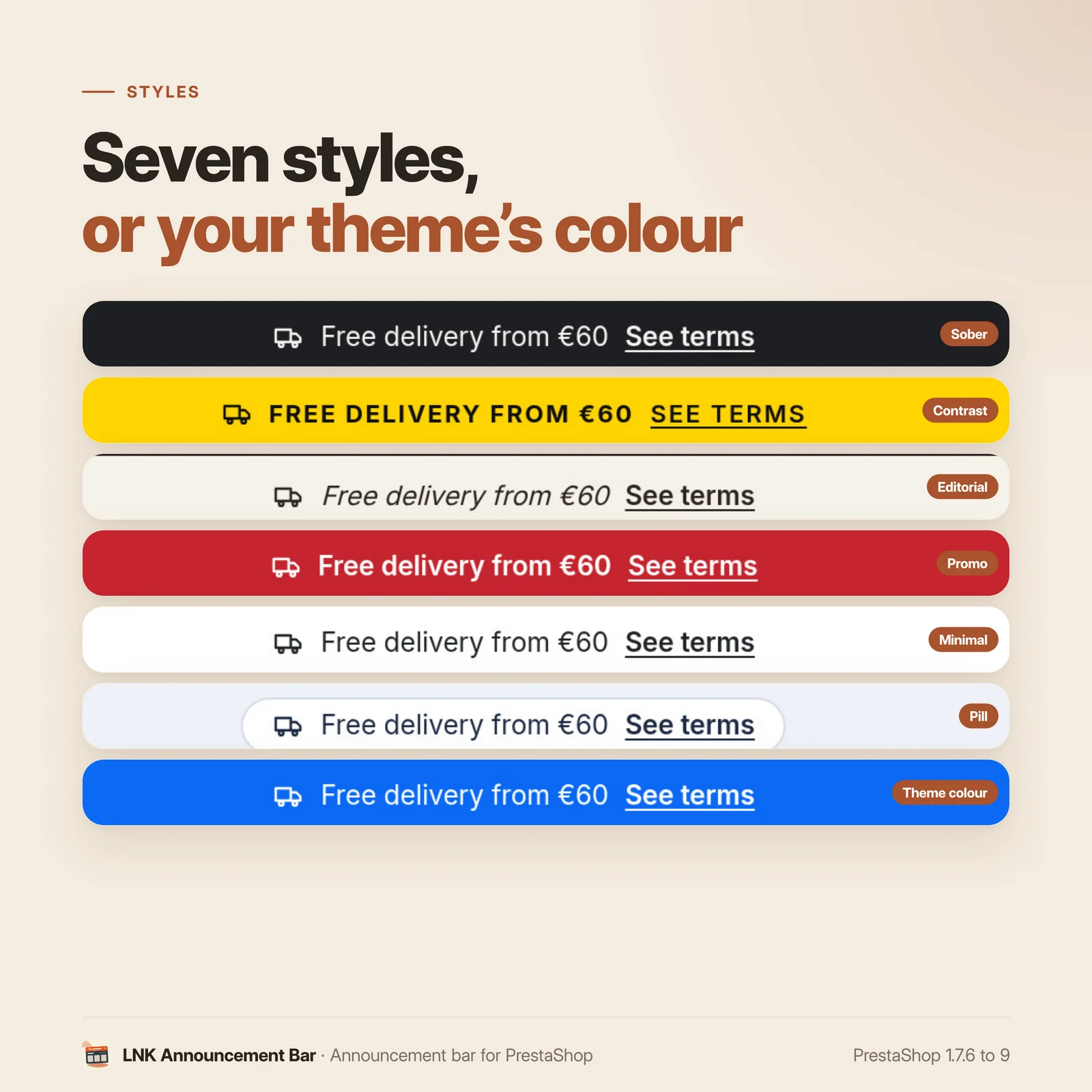
Sober, Contrast, Editorial, Promo, Minimal, Pill, or "From the theme": your theme's colour, with a black or white text chosen to stay readable (a contrast of at least 4.5:1). The bar sits above the header, or stays at the top of the screen while scrolling.
For themes and integrators
Neutral markup (.lnkab, BEM), documented CSS variables (--lnk-announcementbar-bg,
--lnk-announcementbar-text, --lnk-announcementbar-size…), template overridable in the theme.
The text follows the writing direction: in Arabic, the bar reads right to left with no setting.
Compatible with PrestaShop 1.7, 8 and 9
| PrestaShop | 1.7.6 → 9.x |
| PHP | 7.1 → 8.4 |
| Delivery | Two archives: 1.9.N for PrestaShop 9, 1.1.N for 1.7.6 to 8.x |
| Back office | Native Symfony on PrestaShop 9, classic admin controller below |
| Contains an override | No |
| Multistore | Yes: each message chooses its shops, with its own order and activation in each; bar settings per shop |
| Several messages | Yes: unlimited number of messages, up to six rotating at once in a single bar |
| External resources | None |
Each version is checked by a real installation: PrestaShop 1.7.8 and 8.1 for the 1.1.N archive, PrestaShop 9.0 for the 1.9.N archive. The tests cover installation, display, the back office and uninstallation.
Frequently asked questions
How do I add a banner at the top of my PrestaShop shop?
In Design > LNK Announcement Bar, write your message (for example "Free shipping from €60"), add a link if needed, then save. The bar appears above the header of your shop, in the chosen style, as soon as you save.
Can I show several messages one after the other?
Yes. Six messages rotate at a time at most, with a fade or a vertical slide, 3 to 10 seconds each. The rotation pauses when the visitor hovers over the bar. Two arrows set the order of the messages.
Does the bar make the page jump when it loads?
No. The bar and all its messages are rendered by the server, in the same cell: it has the height of its longest message from the first paint, and the rotation never changes it. A bar closed by the visitor is hidden before the first paint of the next pages.
Can I schedule a message for the sales?
Yes. Each message has optional start and end dates: it appears and disappears by itself, to the minute. The list of messages shows which ones are shown, scheduled or ended.
Can I show a message to business customers only, or only on mobile?
Yes. Each message is targeted by customer group (those of your shop), by device (desktop, mobile) and by page (home, categories, products, cart, other pages). A message for business customers only shows to the logged-in customers of that group.
Does the module slow down my shop?
No. The rotation is written in CSS, without JavaScript; the stylesheet weighs 1.9 KB compressed and loads only on the pages that have a bar. Only the closing uses a script of 0.46 KB, loaded only if you allow the visitor to close the bar.
Does the module set cookies?
Only when a visitor closes the bar, and only if they accepted the "preferences" cookies: a cookie remembers the closing until a new message, 30 days at most. Without that consent, nothing is written. If your cookie banner does not answer the module, a checkbox lets you state that it already handles this consent.
Do I need to change my theme?
No. The bar sits above the header, or stays at the top of the screen, through the hooks present in the Classic and Hummingbird themes. It uses your theme's font, and the "From the theme" style uses its colour.
Is the module compatible with PrestaShop 9?
Yes. The module comes in two archives: 1.9.N for PrestaShop 9, with a native Symfony back office, and 1.1.N for PrestaShop 1.7.6 to 8.x. The features are the same.
Does it work with several languages and in multistore?
In several languages, yes: the text, the text of the link and its address are entered in each language of the shop, and the bar follows the writing direction: in Arabic, it reads right to left. In multistore, yes: each message chooses its shops (“Shops” boxes in the editor), with its own place in the rotation and its own activation in each shop. A shop created by copying another takes over its messages. The bar settings (placement, rotation, style) are set per shop, per group or for all shops, and the page tells which shops they concern. A bar closed by a visitor stays open in your other shops.
Can I announce a promo code with its details?
Yes. Link the message to a PrestaShop cart rule: the bar shows the code, and a click opens the details over the page (discount, end date, products, combining, use, exclusions), read from the cart rule. The visitor copies the code with a button. The message disappears by itself when the cart rule ends, is turned off or used up; a cart rule reserved to a customer or a group is never shown to everyone.
How do I go back if the module does not suit me?
Uninstall it: your messages and settings are deleted, and the bar disappears from the shop. The module contains no override and does not change your theme.
How many messages can I create?
As many as you like. The bar rotates six at most at once, in the order of the list: those whose dates, customer group, device and page match the visitor. The others wait for their turn, for example for a sales period, with nothing to delete.
Release history
-
Version 1.9.3 PrestaShop 9
New
- Multistore: each message chooses its shops (“Shops” boxes in the editor), with its own place in the rotation and its own activation in each shop. A shop created by copying another takes over its messages; a deleted shop takes its rows with it. In “All shops”, the list shows the messages of each shop with their shops; the order is changed shop by shop. The bar settings apply to the shop, the group or all shops, as shown on the page.
Fixes
- Arabic, Persian, Urdu: the letters of the “Contrast” style, of the badge and of the detail eyebrow are no longer spaced out (they came apart).
- Sorting, turning on or off a message in one shop also changed the other shops.
- Deleting a shared message in one shop deleted it everywhere: it is now only removed from the current shops.
- The messages and settings of a theme are imported into the theme's shop, no longer into the shop of the context.
- A bar closed in one shop stayed closed in the other shops at the same address.
-
Version 1.9.2 PrestaShop 9
New
- Message linked to a cart rule: the bar shows a badge (“Deal”, editable per message), the text and the code; a click opens the details below the bar, over the page without moving it (discount, end date, products, combining, use, minimum, exclusions), read from the cart rule. Cart rules with or without a code. Title, explanation and exclusions can be replaced in French, English and Arabic. Copy button, close button, Escape key; without a script, the details open and the code can be selected. On mobile, the text scrolls slowly and stops when touched. Stylesheet and script loaded only when such a message is shown.
- The message disappears by itself when its cart rule ends, is turned off, used up, or reserved to a customer or a group; a closed bar comes back when the cart rule changes.
-
Version 1.9.1 PrestaShop 9
New
- Messages from other modules (
actionLnkAnnouncementBarMessageshook): LNK Free Cart Shipping adds the fixed text of its rule, without an amount ("Free shipping from €60"), after your messages. Plain text and checked link; the bar stays the same for everyone, compatible with page caching.
Changes
- Back office on the common look of the LNK modules: list of the messages in the order of the rotation (drag and drop, switch, edit and delete on each row), then the editor of a message with sections on the left (text and link, icon, targeting, publication), fields in the middle and live preview on the right; the bar (position, rotation, style, shared by all the messages) has its own page, with its preview. Same settings, same messages and same rendering in the shop.
- Messages from other modules (
Show the 5 previous versions
-
Version 1.9.0 PrestaShop 9
First version. Branch 9: PrestaShop 9.0 to 9.x only. PrestaShop 1.7.6 to 8.x use the
prestashop/legacybranch (1.1.0).New
- Announcement bar at the top of the shop: short rotating messages, six at most, each with its text, its link and the text of the link in every language, its icon and optional display dates.
- Targeting of each message by customer group, device (desktop, mobile) and page (home, categories, products, cart, other pages), without browser detection: works with a full page cache.
- No layout shift: the bar is rendered by the server, with the height of the longest message from the first paint. Rotation in CSS (fade or vertical slide), pause on hover and focus; reduced motion respected.
- Closing by the visitor, remembered until a new message (30 days at most) only with the "preferences" consent; a closed bar is hidden before the first paint.
- Position above the header or sticky at the top of the screen; seven styles in a single file (Sober by default; "From the theme" picks a black or white text, never below a 4.5:1 contrast), font of the theme.
- Back office: messages in the order of the rotation, editing, settings of the bar, live preview on desktop and mobile, full width on demand.
-
Version 1.1.3 PrestaShop 1.7.6 to 8.x
New
- Multistore: each message chooses its shops (“Shops” boxes in the editor), with its own place in the rotation and its own activation in each shop. A shop created by copying another takes over its messages; a deleted shop takes its rows with it. In “All shops”, the list shows the messages of each shop with their shops; the order is changed shop by shop. The bar settings apply to the shop, the group or all shops, as shown on the page.
Fixes
- Arabic, Persian, Urdu: the letters of the “Contrast” style, of the badge and of the detail eyebrow are no longer spaced out (they came apart).
- Sorting, turning on or off a message in one shop also changed the other shops.
- Deleting a shared message in one shop deleted it everywhere: it is now only removed from the current shops.
- The messages and settings of a theme are imported into the theme's shop, no longer into the shop of the context.
- A bar closed in one shop stayed closed in the other shops at the same address.
-
Version 1.1.2 PrestaShop 1.7.6 to 8.x
New
- Message linked to a cart rule: the bar shows a badge (“Deal”, editable per message), the text and the code; a click opens the details below the bar, over the page without moving it (discount, end date, products, combining, use, minimum, exclusions), read from the cart rule. Cart rules with or without a code. Title, explanation and exclusions can be replaced in French, English and Arabic. Copy button, close button, Escape key; without a script, the details open and the code can be selected. On mobile, the text scrolls slowly and stops when touched. Stylesheet and script loaded only when such a message is shown.
- The message disappears by itself when its cart rule ends, is turned off, used up, or reserved to a customer or a group; a closed bar comes back when the cart rule changes.
-
Version 1.1.1 PrestaShop 1.7.6 to 8.x
New
- Messages from other modules (
actionLnkAnnouncementBarMessageshook): LNK Free Cart Shipping adds the fixed text of its rule, without an amount ("Free shipping from €60"), after your messages. Plain text and checked link; the bar stays the same for everyone, compatible with page caching.
Changes
- Back office on the common look of the LNK modules: list of the messages in the order of the rotation (drag and drop, switch, edit and delete on each row), then the editor of a message with sections on the left (text and link, icon, targeting, publication), fields in the middle and live preview on the right; the bar (position, rotation, style, shared by all the messages) has its own page, with its preview. Same settings, same messages and same rendering in the shop.
Fixes
- The “Import the messages of the theme” button of the back office works again.
- Messages from other modules (
-
Version 1.1.0 PrestaShop 1.7.6 to 8.x
First version. Branch 1: PrestaShop 1.7.6 to 8.x. PrestaShop 9 uses the
mainbranch (1.9.0).New
- Announcement bar at the top of the shop: short rotating messages, six at most, each with its text, its link and the text of the link in every language, its icon and optional display dates.
- Targeting of each message by customer group, device (desktop, mobile) and page (home, categories, products, cart, other pages), without browser detection: works with a full page cache.
- No layout shift: the bar is rendered by the server, with the height of the longest message from the first paint. Rotation in CSS (fade or vertical slide), pause on hover and focus; reduced motion respected.
- Closing by the visitor, remembered until a new message (30 days at most) only with the "preferences" consent; a closed bar is hidden before the first paint.
- Position above the header or sticky at the top of the screen; seven styles in a single file (Sober by default; "From the theme" picks a black or white text, never below a 4.5:1 contrast), font of the theme.
- Back office (classic admin controller): messages in the order of the rotation, editing, settings of the bar, live preview on desktop and mobile, full width on demand.