 Module · LNK Theme Preview
Preview and test a PrestaShop theme before activating it
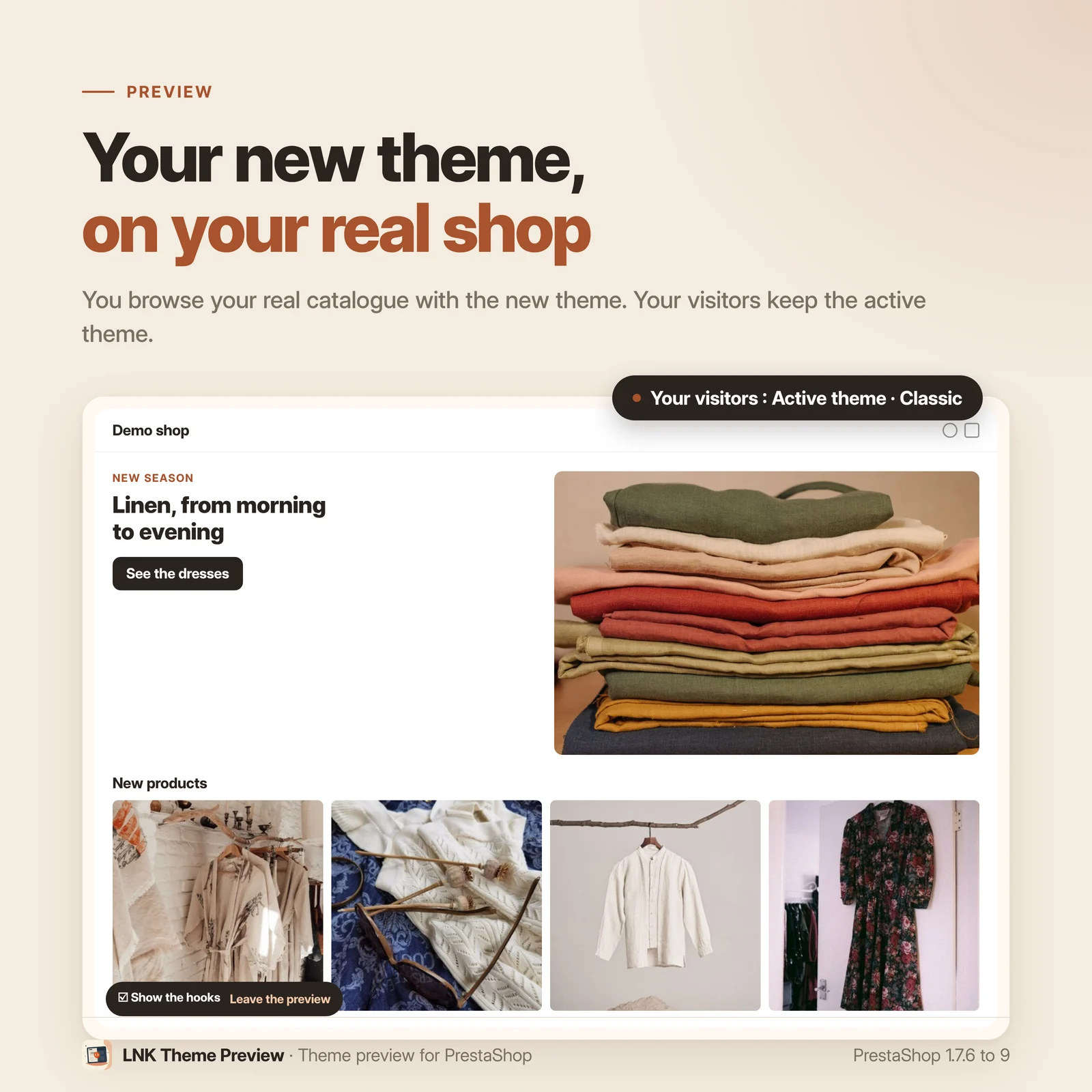
LNK Theme Preview displays your PrestaShop shop under a theme that is not active yet, behind a private link. You browse your real products, prices and cart before activating the theme. Meanwhile, your visitors keep seeing the current site.
- Version 1.1.6 · PrestaShop 1.7.6 to 8.x
- Version 1.9.6 · PrestaShop 9
- PrestaShop 1.7.6 to 9.x
- PHP 7.1 to 8.4
- Contains a core override
Screenshots
Key points
- Preview of a non-active theme on your real shop
- Theme in preparation invisible to your visitors
- Access through a signed link, specific to your installation
- Layout of modules per hook, seen in preview then published into the theme.yml
- theme.yml backed up before each publication, untouched hooks stay intact
- No more staging site to set up and maintain
- Module idle for visitors without a preview link
- Contains a core override (see the dedicated section)
- Free compatibility check before purchase
- All your installed themes, no limit, each with its own preview link and draft
- PrestaShop 1.7.6 to 9.x, PHP 7.1 to 8.4
- No external resource, no third-party cookie
Changing a PrestaShop theme and staging
To see a new theme in real conditions, merchants and agencies have two options today, each with its drawbacks.
The first is to set up a copy of the site, with installation, database copy, synchronization and maintenance. The copy's data drifts further from the real shop every day. A theme that looks fine on the copy can reveal problems on switchover day, on products it had never displayed.
The second is to activate the theme in production to see the result. Visitors then watch the work in progress, and sales suffer.
Previewing a theme on your real shop
You click “Preview” on the theme card: the private preview turns on and a magic link opens your shop with the theme being prepared. The module applies its templates, stylesheets and scripts, including the theme's own module template overrides.
You check the important pages on your real catalog, for example a product page with fifteen combinations, a category with three hundred references or the checkout.
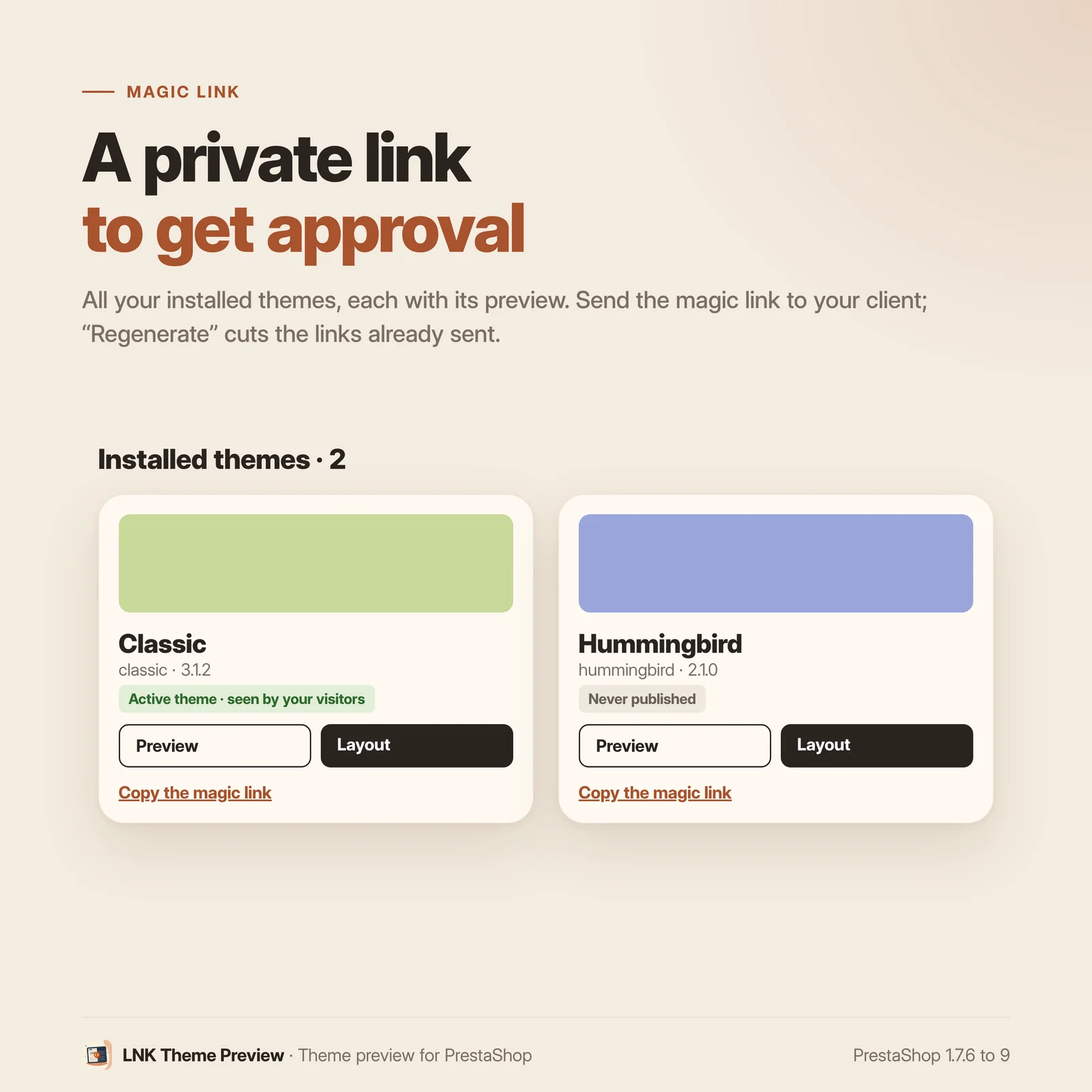
Meanwhile, visitors see the normal site. The preview requires a magic link, signed and specific to your installation. Without this link, access stays closed. You can send it to a customer for approval; “Regenerate” cuts the access of every link already sent.
Theme module layout, published into the theme.yml
Every PrestaShop theme decides, in its theme.yml file, which modules show on which hooks and which ones are disabled. That file is written by hand, and one mistake unhooks modules from their other positions when the theme is enabled.
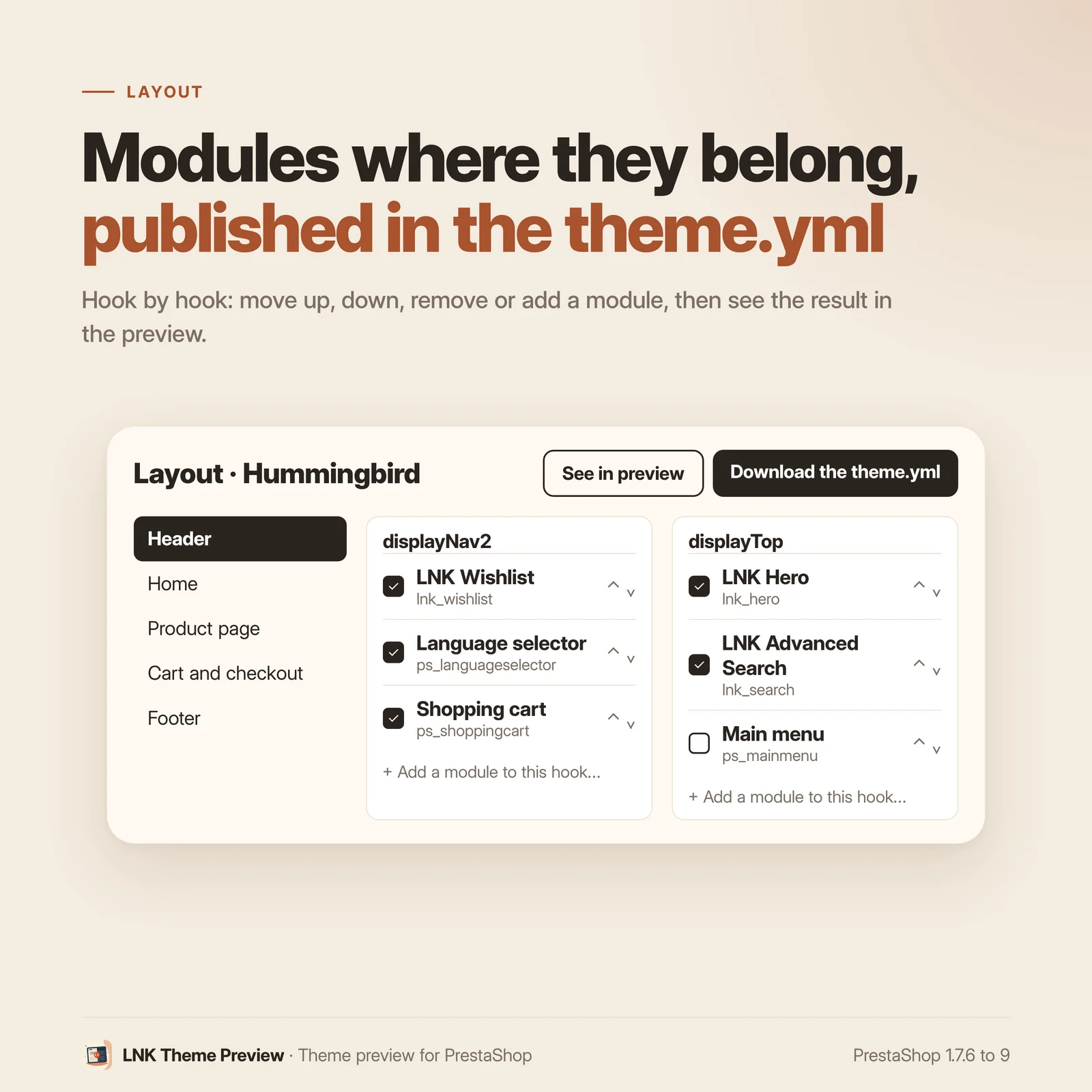
The module's Layout screen groups the hooks by page zone (header, home page, product page, cart and checkout…) and shows, for each one, its modules in order. You move them up or down, remove them, add one (only among those able to display there), and disable a module for this theme. Save the current configuration shows it right away in the private preview.
When the layout suits you, Save in the theme.yml writes it into the theme's file. The previous file is backed up first, outside the theme folder. The module lists only the hooks that change and those it must protect: when the theme is enabled, the other hooks stay intact, back office included. We checked it on PrestaShop 9.2 and 8.1 benches by comparing the whole hook table before and after enabling the theme.
A module that stays idle outside the preview
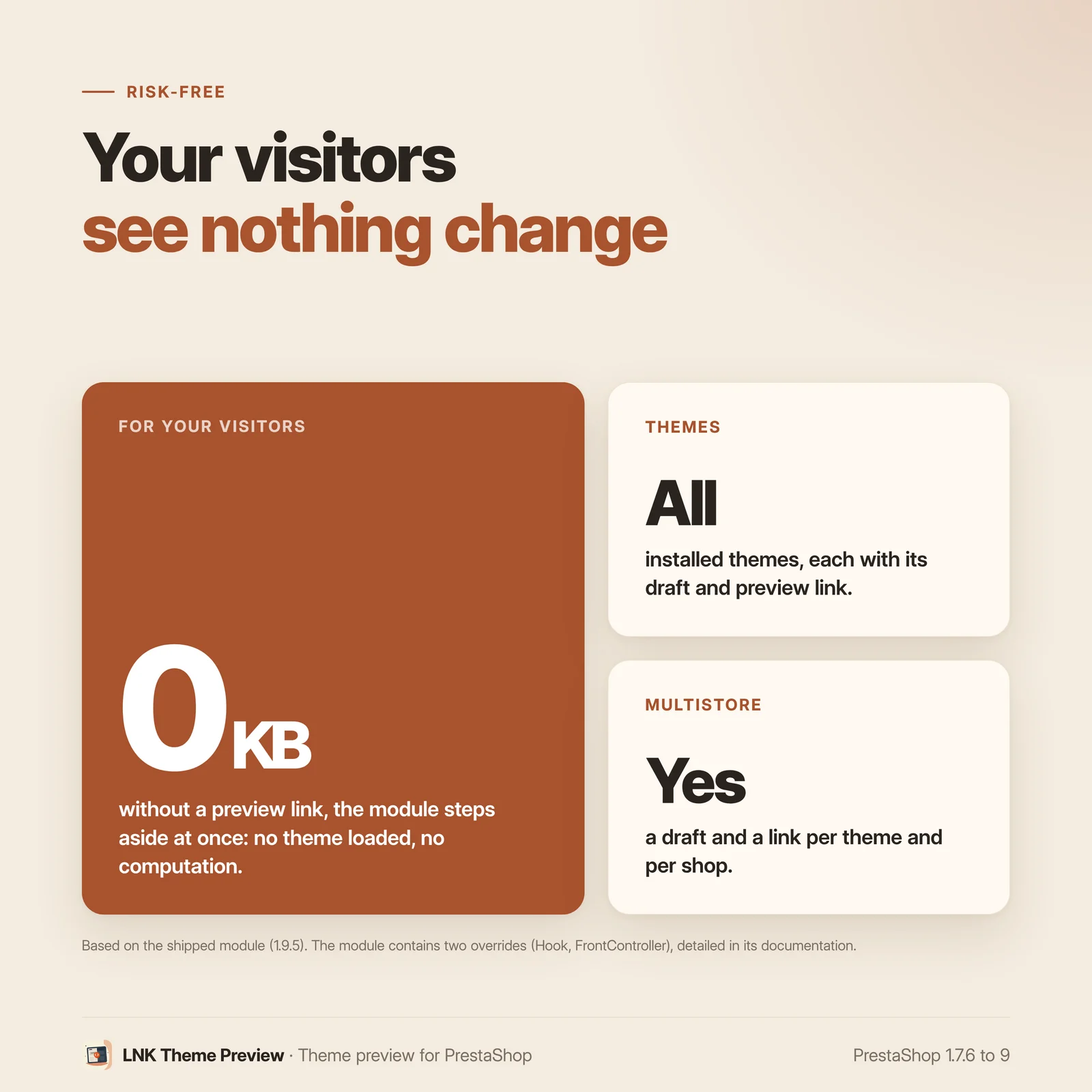
As long as no preview has been opened, the first instruction executed hands control back. After that, a visitor without a preview link leaves at once with the active theme: the module loads no theme and performs no computation.
During a preview, the whole path is protected. If anything goes wrong, the normal display takes over again. Your shop never depends on this module to work.
Léger et rapide
Figures measured on the shipped module, gzip-compressed (level 9). On the shop: no JavaScript and no stylesheet, for your visitors as during the preview, where only the previewed theme's files are served. In the back office, on the module's screens only: 1.8 KB of JavaScript written without any library and 0.6 KB of layout CSS, colours and components staying those of PrestaShop.
PrestaShop core override (FrontController and Hook)
We state it before purchase, as PrestaShop Addons now does on its product pages.
This module contains overrides (override) of two core classes, FrontController and
Hook. Files installed in your shop's override/ folder:
| File | Overridden methods | Role during a preview |
|---|---|---|
override/classes/controller/FrontController.php |
__construct |
switches the theme, its templates, its stylesheets and its scripts to the previewed theme |
override/classes/Hook.php |
exec, getHookModuleExecList |
applies the previewed theme's module layout (hooked modules and their order) and supplies images in the formats the shop has not generated yet |
Outside a preview, for your visitors as in the back office, PrestaShop works exactly as it does without the module.
An override is the only possible way to provide this feature. The active theme and the
stylesheet and script managers are set in the FrontController constructor, before the
first hook runs. No PrestaShop hook runs early enough. This constraint very likely explains
why there is no equivalent. We have not found any module offering this feature on the
PrestaShop market.
In practice:
- if another module already overrides one of these three methods, PrestaShop refuses the
installation with a clear message, without leaving your shop in an intermediate state.
A module overriding other methods of
FrontControllerorHookcoexists: PrestaShop merges both overrides into the same file; - the override must be revalidated for each major PrestaShop version. We have done so for 1.7, 8 and 9, and this follow-up is part of our work;
- uninstalling removes the override files, leaving nothing behind.
Free compatibility check before purchase. Send us the list of your shop's modules, or
simply the contents of your override/ folder. We tell you within 24 hours whether the module
is compatible, with no commitment.
Time saved for agencies and integrators
The module saves you from setting up, synchronizing, hosting, securing and then deleting a staging site. The theme is developed and validated on the client's installation. The client has no extra access to open and works with a single site.
The client approves on their site, with their products, which cuts down the back and forth.
Compatible with PrestaShop 1.7, 8 and 9
| PrestaShop | 1.7.6 → 9.x |
| PHP | 7.1 → 8.4 |
| Delivery | Two archives: 1.9.N for PrestaShop 9, 1.1.N for 1.7.6 to 8.x |
| Back office | Native Symfony on PrestaShop 9, classic admin controller below |
| Contains an override | Yes (FrontController, Hook) |
| Multistore | Yes: draft, published layout, preview and links of each shop; the theme.yml stays common to the theme |
| Themes handled | All installed themes, no limit: one preview link and one layout draft per theme and per shop |
| External resources | None |
Every version is checked by a real installation: PrestaShop 1.7.8 and 8.1 for the 1.1.N archive, PrestaShop 9.0 for the 1.9.N archive. The tests cover installation, display, back office and uninstallation.
Frequently asked questions
Can my visitors stumble upon the theme in preparation?
No. Entering preview requires a link containing a token signed with a secret specific to your installation. Without this link, a visitor sees the active theme, even if they guess the address, share a cache or arrive from a search engine.
Does this module contain a core override?
Yes, two. The module overrides the FrontController (override/classes/controller/FrontController.php) and Hook
(override/classes/Hook.php) classes, and we say so right on the product page. An override is the only possible way. _PS_THEME_DIR_ is a
constant defined before any module code runs, and the asset managers are instantiated in
the FrontController constructor. By the time the first hook runs, the theme and the assets
are already set.
This constraint explains why there is no theme preview module on the market. Hooks alone cannot deliver this feature cleanly.
Is an override risky?
The real risk is a conflict with another module overriding the same methods:
FrontController::__construct, Hook::exec or Hook::getHookModuleExecList. A module
overriding other methods of these classes coexists, PrestaShop merges both overrides. PrestaShop then
cleanly refuses the installation, without leaving the shop in an intermediate state. Our
free check before purchase removes that doubt in a few minutes. Just send us the list of
your modules.
What happens if I disable the module?
No visible effect. The override exits from its very first instruction. Uninstalling removes the override files and the core returns to its original state.
Does this module slow down my shop?
Outside preview, it performs one configuration read per page and, once the preview is armed, reads the preview cookie. It adds no extra query, no network call and no client-side asset.
Is it compatible with my PrestaShop version?
Yes, from PrestaShop 1.7.6 to PrestaShop 9, with a single license and two archives: 1.9.N for PrestaShop 9, whose screens are native Symfony controllers, and 1.1.N for 1.7.6 to 8.x. Before each release, every version is actually installed and then uninstalled in our integration matrix.
Can I preview a child theme?
Yes, including the templates inherited from the parent theme.
Does it replace a staging site?
For theme work, yes. You see the new theme on your real products, prices and catalog. A PrestaShop version upgrade or a database migration is a different matter and requires a real staging site.
I am not a developer, is it for me?
Yes. The module lets you look at the theme before switching, without taking the shop offline. It requires no code at all.
How does it behave in multistore?
Each shop has its own draft, published layout, preview and magic links: a link of one shop never opens another, and “Regenerate” cuts the links of the chosen shop. You set one shop at a time (the back office asks for it in “All shops”). The theme.yml stays common to the theme: publishing from one shop updates it for every shop using that theme, keeping the settings of each one (page layouts).
What is left if I uninstall the module?
The override files are removed, the settings and saved configurations deleted. The theme.yml files you
published stay, with their backups in var/lnk_themepreview/: they belong to your themes. If another module had overridden the
same classes, PrestaShop would have refused the installation from the start. So there is no
shared override to untangle.
Does the module set cookies?
The preview token is kept in the PrestaShop session of the person using it, meaning you or your integrator. No cookie is set for your visitors, and your consent banner stays unchanged.
Can publishing into the theme.yml unhook my other modules?
No. When a theme is enabled, PrestaShop removes a module cited in the theme.yml from every hook where it is not cited, and enables every cited module. The module therefore writes only the hooks that change and those carrying a module it cites, as they are, and never cites a module that is inactive or disabled for the theme. The previous theme.yml is backed up before each publication. One exception: if you remove a module from a hook and display it nowhere else, the inactive or disabled modules of that hook are unhooked from it.
Why do the images not show in the preview of another theme?
Each theme declares its image formats in its theme.yml, and PrestaShop only creates them when the theme is enabled. Hummingbird, for example, asks for formats Classic does not have. The theme card and the preview bar count these missing formats. “Prepare the images” creates them, and only them, then generates their thumbnails in batches with a progress bar; you can stop and resume it. A format that already exists is never changed, even when the theme gives it other dimensions. Until the preparation, the preview shows the closest existing size instead of an empty image (depending on the PrestaShop version, see docs/COMPATIBILITY.md). When the theme is enabled, PrestaShop replaces the list of formats with the one of the theme.
How many themes can I prepare at the same time?
As many as you have installed: each theme has its card in the module, its preview link and its layout draft, specific to each shop. A theme keeps one draft and one published version per shop. “Regenerate” cuts all the preview links of the shop at once.
Release history
-
Version 1.9.6 PrestaShop 9
Changes
- Product page, FAQ and README: both override files are named, with their methods and their role. The conflict risk is stated method by method: only a module already overriding
FrontController::__construct,Hook::execorHook::getHookModuleExecListprevents the installation. - Product page cover image.
Fixes
- Multistore: enabling the module on one more shop (or on all of them) failed when it was already enabled elsewhere, as PrestaShop took the module's own overrides for a conflict; on 1.7 and 8 the overrides were even removed. Disabling it on a single shop also removed the overrides for the other shops, where the preview stopped working. The update puts the overrides back where they were missing.
- Product page, FAQ and README: both override files are named, with their methods and their role. The conflict risk is stated method by method: only a module already overriding
-
Version 1.9.5 PrestaShop 9
New
- Multistore: each shop has its own draft, published layout, private preview and magic link secret. A link of one shop never opens the preview of another, and “Regenerate” cuts the links of the chosen shop.
- A new shop takes over the drafts and published versions of the copied shop, with its own secret; a deleted shop takes its own away.
Changes
- In “All shops” or a group, the page asks to choose a shop: no more silent writing into the default shop.
- Update without loss: the former common draft and published version are copied into each active shop. Magic links already sent must be sent again (they now carry the shop).
-
Version 1.9.4 PrestaShop 9
Fixes
- Publishing a layout: the settings of each shop (config/themes/<theme>/shop<N>.json, including page layouts) were deleted for every shop using the theme. They are now kept, and only the module placement is applied to them.
- Product page and FAQ: multistore is no longer announced as complete. Single shop: yes; full multistore being validated for the next version.
Show the 11 previous versions
-
Version 1.9.3 PrestaShop 9
Changes
- Back office in the shared LNK module skin (decision of 06/10/2026: one back office for all our modules): header with breadcrumb and title, Themes and Help tabs as buttons, installed themes as a list (theme sketch, Copy the magic link, Preview, Layout), magic link in the right column. Layout page as an editing screen: page zones as vertical sections with their hook count, one zone at a time (address #lnkh-s-<zone>), hooks as cards, move up and down as icon buttons, modules to disable on the right. Help: table of contents as sections, boxes as cards.
- Shared factory library embedded as is (views/css/lib/lnk-admin.css, views/js/lib/lnk-admin.js); the module stylesheet redefines no skin rule.
- Same settings, same saving, same theme.yml, same storefront rendering; update without loss (hooks and tab kept).
-
Version 1.9.2 PrestaShop 9
Pages redesigned after Fouad's mockup.
New
- Help tab: the path in four steps, who sees what, the magic link, the two saves, the disabled modules and frequently asked questions, with a side table of contents.
- Preview on a theme card: opens the shop under this theme through its magic link; “See in preview” from the layout does the same. “Regenerate” and “Leave the preview on this browser” at the bottom of the Themes tab.
- Hook names in the preview: every display hook rendered is surrounded by two HTML comments, and a separate layer draws its outline and name over the page, without moving a single pixel (checked on the home page, a category and a product page). Floating “Show the hooks” checkbox. An empty hook is not marked: themes test its output before showing its container. Never for a visitor: outside the preview, the page does not change by a single byte.
- Regenerate the magic links: the links already sent no longer work, including in the browsers that already came in (the preview cookie holds the token, checked again at each request). “Copy the magic link” on each theme.
- Layout page by page zone (header, home page, categories, side columns, product page, cart and checkout, customer account, contact, footer, PDF documents, technical), with a filter, counters and the modules to disable with a search.
- Fixed save bar: state of the changes, “Saved on … · not published” or “Published on …”, “Save the current configuration”, “Save in the theme.yml”, “Cancel the changes”.
- Theme images in the preview: the card of a theme and the preview bar count the image formats the theme declares and the shop does not have yet. “Prepare the images” creates these formats, and only them, then generates their thumbnails in batches, with a progress bar, and can be resumed; an existing format is never changed. Meanwhile, the preview shows the closest existing size instead of an empty image. The button of the bar only shows in the browser that opened the preview from the back office.
Changes
- The hooks of the back office, of the dashboard and of the administration forms are never offered in the layout. On the bench, after enabling a published theme, they stay identical in the hook table.
- A single page, shared by both branches of the module.
- The “Private preview” card and its switch are gone: the first “Preview” on a theme arms the private preview, “Leave the preview on this browser” leaves it.
- Addresses of admin.css and admin.js versioned by the fingerprint of their content: a cache or a CDN never serves an old file under the same address.
- Display name, menu tab and page title: “LNK Theme Preview” (“LNK” + translated name), also renamed on update. The screen of a theme keeps its title “Layout · <theme>”.
- Code reviewed by the factory checks, with no visible change: PHPDoc on every public method, static analysis clean at level 5 (image format cropping mode detected from the core field, ImageManager::resize called according to the PrestaShop version).
-
Version 1.9.0 PrestaShop 9
Branch 9: PrestaShop 9.0 to 9.x only. PrestaShop 1.7.6 to 8.x move to the
prestashop/legacybranch (1.1.0).New
- Layout screen (Design → Theme layout), in the Symfony back office: for each display hook, its modules in order; move up, move down, remove, add a module able to display on the hook, add a hook, disable a module for the theme.
- Draft saved per theme, applied by the preview; gap with the published version shown hook by hook.
- Publication into the theme.yml:
global_settings.hooks.modules_to_hookandglobal_settings.modules.to_disable, dated backup of the previous file invar/lnk_themepreview/<theme>/, theme JSON cache purged. - theme.yml download with the draft applied, for a theme generator.
- Exact export: only the hooks that change, and those carrying a cited module, are listed; no inactive or disabled module is cited (PrestaShop would enable every cited module).
tests/test-layout.phpreplays the core algorithm on 3,000 random cases. - XLF translations in French, English and Arabic (
Modules.Lnkthemepreview.Admin). - Upgrade from 1.0: saved hook maps become drafts.
Changes
- Theme grid and Layout screen as a native Symfony controller and Twig, with the back office components; no module configuration page anymore.
config/routes.ymlandconfig/services.ymlshipped in place.
Removed
- The legacy admin controller and the Smarty templates, now on the
prestashop/legacybranch.
-
Version 1.1.6 PrestaShop 1.7.6 to 8.x
Changes
- Product page, FAQ and README: both override files are named, with their methods and their role. The conflict risk is stated method by method: only a module already overriding
FrontController::__construct,Hook::execorHook::getHookModuleExecListprevents the installation. - Product page cover image.
Fixes
- Multistore: enabling the module on one more shop (or on all of them) failed when it was already enabled elsewhere, as PrestaShop took the module's own overrides for a conflict; on 1.7 and 8 the overrides were even removed. Disabling it on a single shop also removed the overrides for the other shops, where the preview stopped working. The update puts the overrides back where they were missing.
- Product page, FAQ and README: both override files are named, with their methods and their role. The conflict risk is stated method by method: only a module already overriding
-
Version 1.1.5 PrestaShop 1.7.6 to 8.x
New
- Multistore: each shop has its own draft, published layout, private preview and magic link secret. A link of one shop never opens the preview of another, and “Regenerate” cuts the links of the chosen shop.
- A new shop takes over the drafts and published versions of the copied shop, with its own secret; a deleted shop takes its own away.
Changes
- In “All shops” or a group, the page asks to choose a shop: no more silent writing into the default shop.
- Update without loss: the former common draft and published version are copied into each active shop. Magic links already sent must be sent again (they now carry the shop).
-
Version 1.1.4 PrestaShop 1.7.6 to 8.x
Fixes
- Publishing a layout: the settings of each shop (config/themes/<theme>/shop<N>.json, including page layouts) were deleted for every shop using the theme. They are now kept, and only the module placement is applied to them.
- Product page and FAQ: multistore is no longer announced as complete. Single shop: yes; full multistore being validated for the next version.
-
Version 1.1.3 PrestaShop 1.7.6 to 8.x
Changes
- Back office in the shared LNK module skin (decision of 06/10/2026: one back office for all our modules): header with breadcrumb and title, Themes and Help tabs as buttons, installed themes as a list (theme sketch, Copy the magic link, Preview, Layout), magic link in the right column. Layout page as an editing screen: page zones as vertical sections with their hook count, one zone at a time (address #lnkh-s-<zone>), hooks as cards, move up and down as icon buttons, modules to disable on the right. Help: table of contents as sections, boxes as cards.
- Shared factory library embedded as is (views/css/lib/lnk-admin.css, views/js/lib/lnk-admin.js); the module stylesheet redefines no skin rule. Card titles handled by the shared skin on 1.7 and 8 (no module-specific reset any more).
- Same settings, same saving, same theme.yml, same storefront rendering; update without loss (hooks and tab kept).
-
Version 1.1.2 PrestaShop 1.7.6 to 8.x
Pages redesigned after Fouad's mockup.
New
- Help tab: the path in four steps, who sees what, the magic link, the two saves, the disabled modules and frequently asked questions, with a side table of contents.
- Preview on a theme card: opens the shop under this theme through its magic link; “See in preview” from the layout does the same. “Regenerate” and “Leave the preview on this browser” at the bottom of the Themes tab.
- Hook names in the preview: every display hook rendered is surrounded by two HTML comments, and a separate layer draws its outline and name over the page, without moving a single pixel (checked on the home page, a category and a product page). Floating “Show the hooks” checkbox. An empty hook is not marked: themes test its output before showing its container. Never for a visitor: outside the preview, the page does not change by a single byte.
- Regenerate the magic links: the links already sent no longer work, including in the browsers that already came in (the preview cookie holds the token, checked again at each request). “Copy the magic link” on each theme.
- Layout page by page zone (header, home page, categories, side columns, product page, cart and checkout, customer account, contact, footer, PDF documents, technical), with a filter, counters and the modules to disable with a search.
- Fixed save bar: state of the changes, “Saved on … · not published” or “Published on …”, “Save the current configuration”, “Save in the theme.yml”, “Cancel the changes”.
- Theme images in the preview: the card of a theme and the preview bar count the image formats the theme declares and the shop does not have yet. “Prepare the images” creates these formats, and only them, then generates their thumbnails in batches, with a progress bar, and can be resumed; an existing format is never changed. Meanwhile, the preview shows the closest existing size instead of an empty image. The button of the bar only shows in the browser that opened the preview from the back office.
Changes
- The hooks of the back office, of the dashboard and of the administration forms are never offered in the layout. On the bench, after enabling a published theme, they stay identical in the hook table.
- A single page, shared by both branches of the module.
- The “Private preview” card and its switch are gone: the first “Preview” on a theme arms the private preview, “Leave the preview on this browser” leaves it.
- Addresses of admin.css and admin.js versioned by the fingerprint of their content: a cache or a CDN never serves an old file under the same address.
- Display name, menu tab and page title: “LNK Theme Preview” (“LNK” + translated name), also renamed on update. The screen of a theme keeps its title “Layout · <theme>”.
- Code reviewed by the factory checks, with no visible change: PHPDoc on every public method, static analysis clean at level 5 (image format cropping mode detected from the core field, ImageManager::resize called according to the PrestaShop version).
-
Version 1.1.1 PrestaShop 1.7.6 to 8.x
Fixes
- Back office in English on PrestaShop 1.7.6 to 1.7.7: these versions do not load the XLF translations of modules. This branch moves to the native translation system of modules (
translations/fr.php,translations/ar.php), loaded from 1.7.6 to 8.x. - The hooks of the back office dashboard (displayDashboardTop…) are no longer offered in the Layout screen.
- Back office in English on PrestaShop 1.7.6 to 1.7.7: these versions do not load the XLF translations of modules. This branch moves to the native translation system of modules (
-
Version 1.1.0 PrestaShop 1.7.6 to 8.x
Branch 1: PrestaShop 1.7.6 to 8.x. PrestaShop 9 moves to the
mainbranch (1.9.0).New
- Layout screen (Design → Theme layout): for each display hook, its modules in order; move up, move down, remove, add a module able to display on the hook, add a hook, disable a module for the theme.
- Draft saved per theme, applied by the preview; gap with the published version shown hook by hook.
- Publication into the theme.yml:
global_settings.hooks.modules_to_hookandglobal_settings.modules.to_disable, dated backup of the previous file invar/lnk_themepreview/<theme>/, theme JSON cache purged. - theme.yml download with the draft applied, for a theme generator.
- Exact export: only the hooks that change, and those carrying a cited module, are listed; no inactive or disabled module is cited (PrestaShop would enable every cited module).
tests/test-layout.phpreplays the core algorithm on 3,000 random cases. - XLF translations in French, English and Arabic (
Modules.Lnkthemepreview.Admin). - Upgrade from 1.0: saved hook maps become drafts.
Changes
- Theme grid and Layout screen as an admin controller (
ModuleAdminController) and Smarty templates, with the back office components; no module configuration page anymore. - Minimum compatibility raised to PrestaShop 1.7.6, the first version where a module uses the back office translation system.
Removed
- The Symfony back office,
src/,config/*.ymlandvendor/, now on the PrestaShop 9 branch.
-
First distributable version. The original version was developed for a single shop and declared for PrestaShop 9 only.
Security
index.phpguards in every folder.- The theme name is sanitized before building a path to
theme.yml: directory traversal and the null byte are neutralized (covered by the tests).
New
- Compatibility PrestaShop 1.7.0 → 9.x. Checked in the sources of 1.7.8, 8.1 and 9.0:
stylesheetManager,javascriptManagerandcccReducerareprotectedproperties instantiated inFrontController::__constructwith the same arguments, andSmartyResourceModule,SmartyResourceParent,ThemeRepositoryandHook::getHookModuleExecListare identical. The override is therefore portable as is. - Symfony back office on PrestaShop 9:
PrestaShopAdminController,#[AdminSecurity], Twig template, tab pointing to the route throughTab::$route_name. PS 1.7 and 8 keep theHelperFormeditor. composer.json+ versioned PSR-4 autoloader: PrestaShop 9 includesmodules/<module>/vendor/autoload.phpthroughContainerBuilder.classes/LnkThemePreviewCompat.php: everything that depends on the version is isolated there.docs/OVERRIDES.md: what the module overrides, why no hook can do it, and what it means for the buyer.- Unit tests for the HMAC token and for theme name sanitization (15 assertions).
Fixes
- The
objecttype as parameter and return type in the override requires PHP 7.2+, while PrestaShop 1.7.8 runs from PHP 7.1. The module did not start. PreviewSessionused constructor promotion withreadonly, which is PHP 8.1+, so it was unusable on 1.7 and 8.- Hand-written
<style>and<script>in the back office: moved toviews/css/admin.cssandviews/js/admin.js, loaded throughaddCSS/addJS. ps_versions_compliancygoes from9.0.0to1.7.0.0.