 Module · LNK Pro Accounts
Open your PrestaShop shop to professionals
LNK Pro Accounts separates the registration of individuals from that of professionals on your PrestaShop shop. The professional gives their company name, SIRET and intra-community VAT number; the module checks them, puts the customer in the right customer group according to their tax zone and, if you wish, waits for your approval before opening the account. Your prices can also stay reserved for pro accounts.
- Version 2.1.1 · PrestaShop 1.7.6 to 8.x
- Version 2.9.1 · PrestaShop 9
- PrestaShop 1.7.7 to 9.x
- PHP 7.1 to 8.4
- No override
Screenshots
Key points
- Separate individual and professional registration, forms built field by field
- SIRET checked (INSEE Sirene API, with your key)
- VAT number checked while typing and verified by VIES
- Automatic customer group by tax zone, pro groups created on request
- Manual approval of pro accounts, with an email to the customer
- Email reminders for missing SIRET and VAT numbers
- Reserved catalogue: prices hidden from visitors, catalogue closed as an option
- reCAPTCHA or Cloudflare Turnstile anti-bot, if enabled
- Attachments outside the module folder, data kept on uninstall
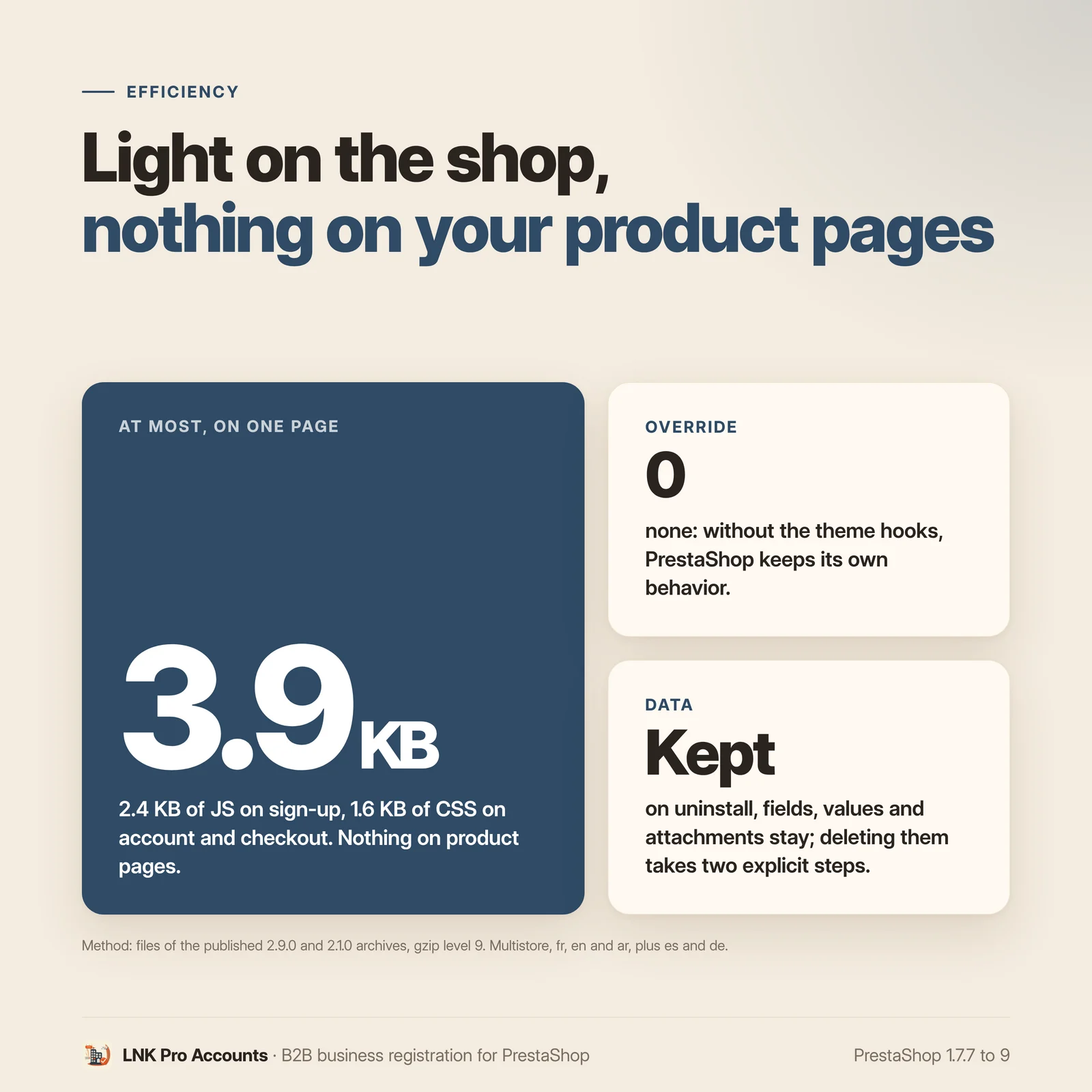
- 3.9 KB compressed at most, on the two registration pages; 1.6 KB on login, account and checkout; nothing elsewhere
- French, English, Arabic from right to left, plus Spanish and German
- PrestaShop 1.7.7 to 9.x, PHP 7.1 to 8.4, no override, multistore
Two registrations, two forms
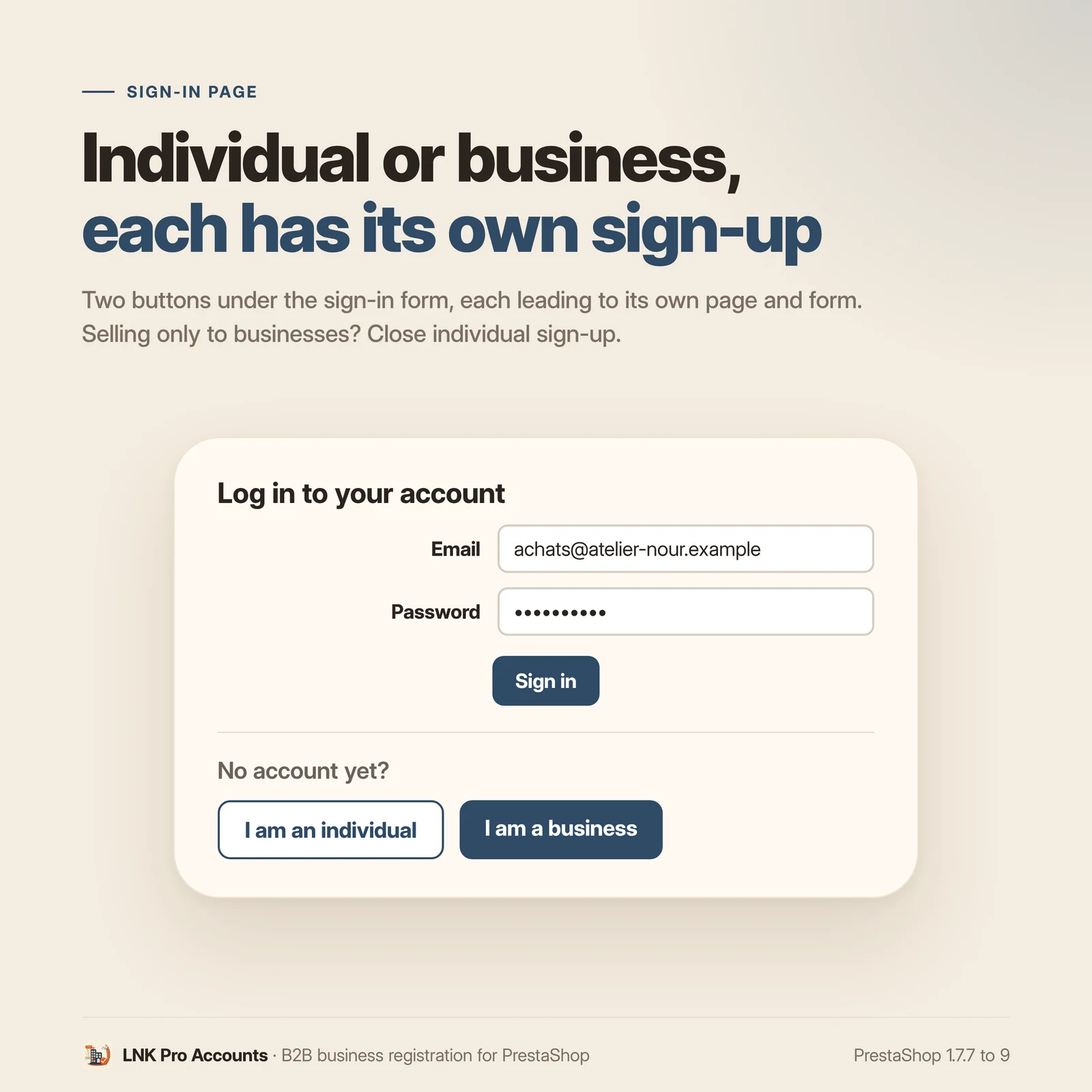
The visitor chooses their path: “I am an individual” or “I am a business”, two buttons added
under the login form, each one leading to its own page (/compte-particulier and /compte-professionnel).
You can close registration for individuals, show a CMS presentation page before the pro
registration and have professionals accept their own terms of sale.
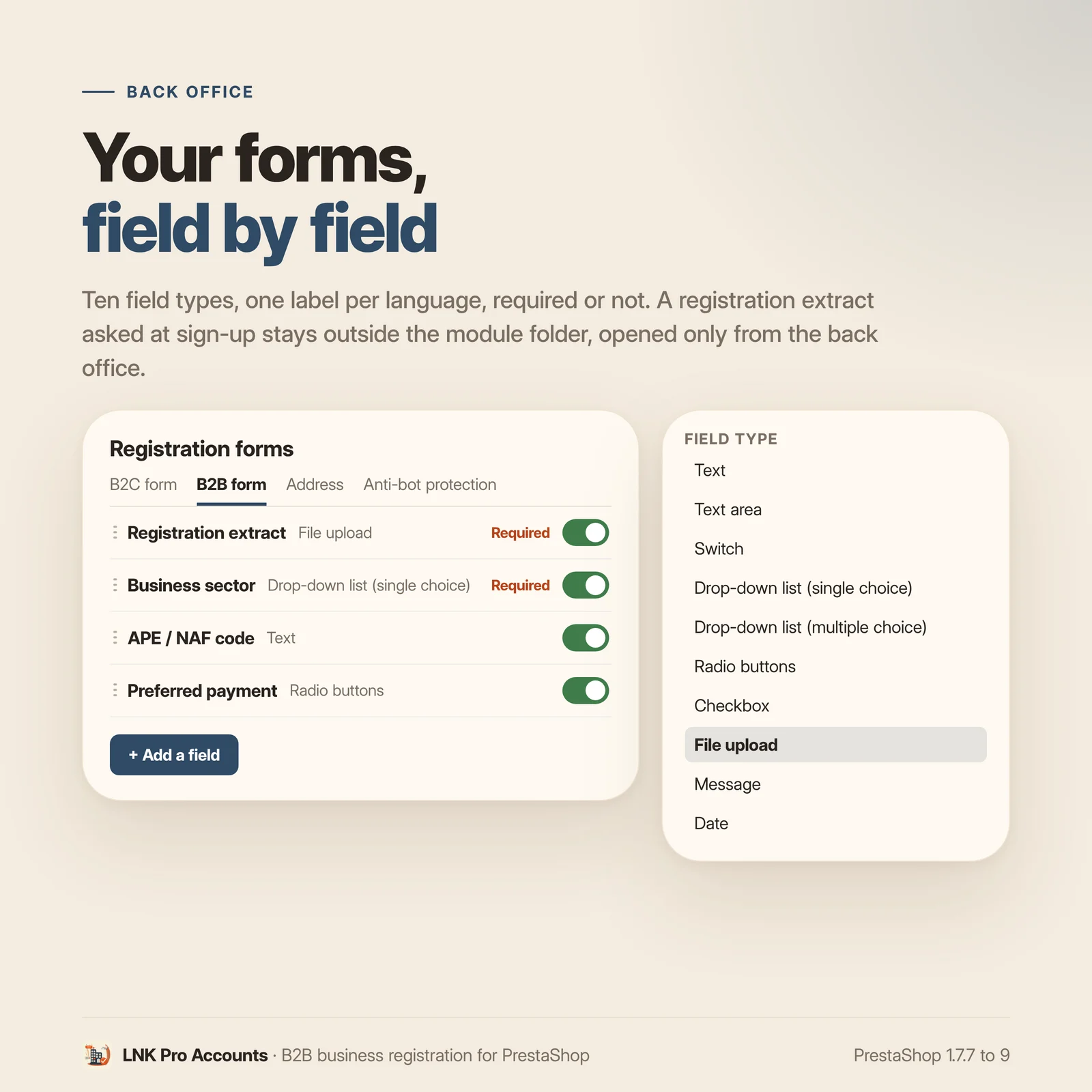
Each form is built field by field: text, text area, switch, single or multiple choice list, radio buttons, checkboxes, file upload (a certificate of incorporation, for example), information message and date. Each field has its label in each language and can be required. The first address can be asked for at registration.
SIRET and VAT number checked
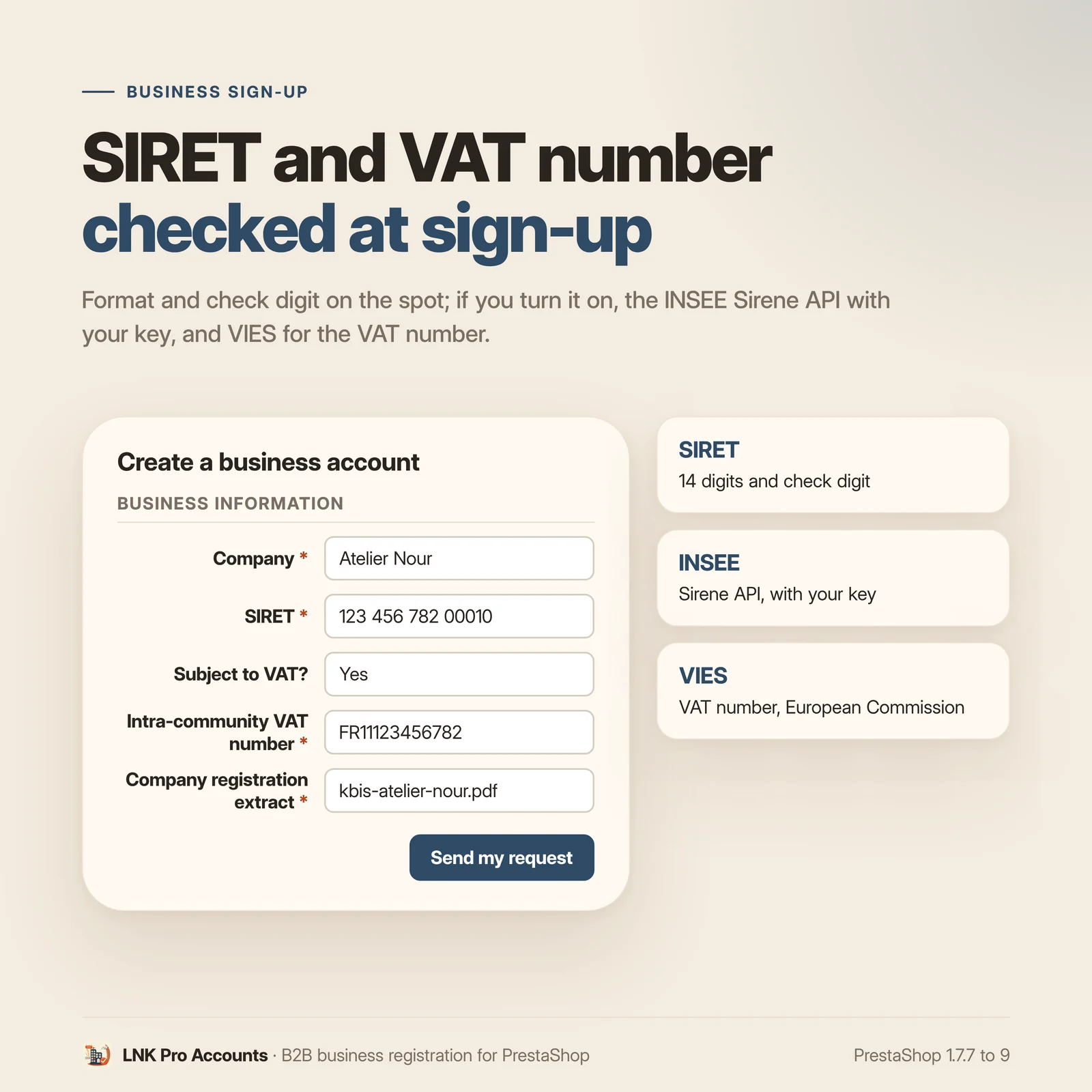
- SIRET: 14 digits and check key verified locally, then, if you turn it on, existence of the establishment checked with the INSEE Sirene API, with your own access key.
- Intra-community VAT number: format checked while typing according to the country, then, if you turn it on, verified with VIES, the European Commission service.
- A “Subject to VAT?” question can come before the field.
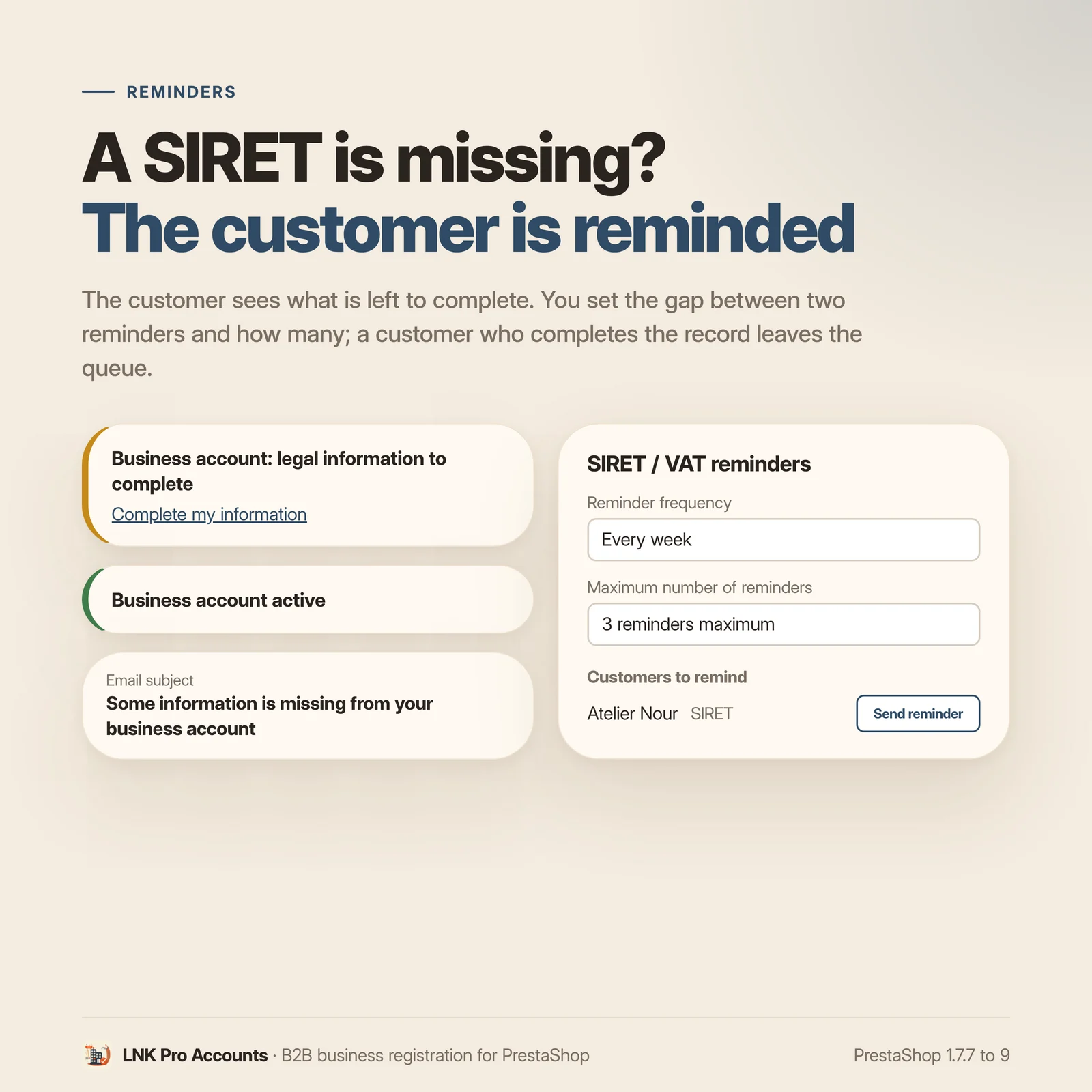
Each field can be shown or not, and can be required. A pro customer whose SIRET or VAT number is missing can be reminded by email: you set the gap between two reminders and their maximum number, then have the tokenised address shown in the back office called once a day (cron task at your host or native scheduled tasks module). A customer who completes their details leaves the queue.
The right customer group for the tax zone
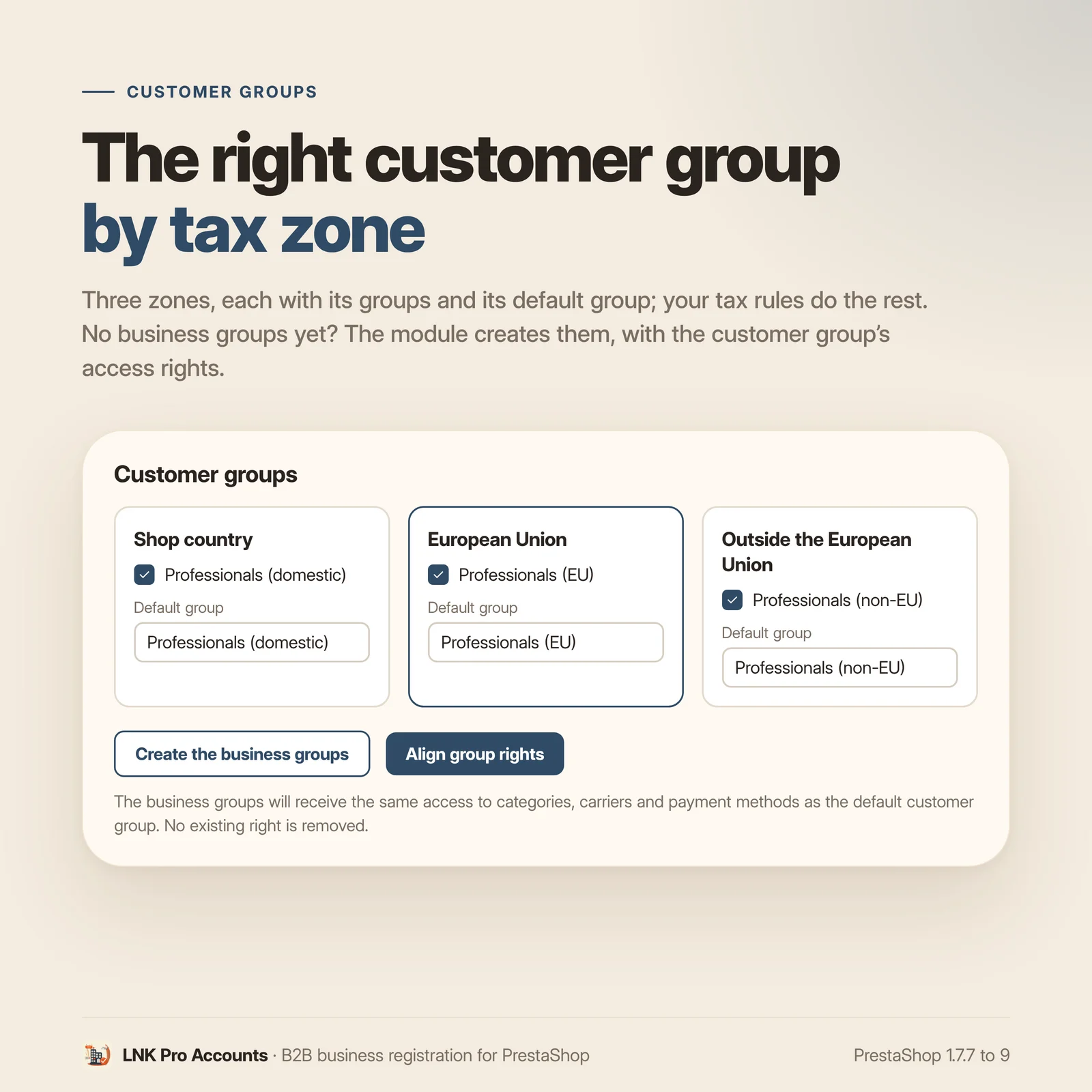
Three zones, each set separately: your shop's country, the European Union, the rest of the world. For each one, you choose the pro customer's groups and default group; your shop's tax rules then apply the right regime. The module sets no rate.
Your shop has no pro groups yet? The module creates the three groups on request, and aligns their access rights (categories, carriers, payment and other modules) with those of the default customer group, without ever removing a right. Without this alignment, a customer placed in a new PrestaShop group finds an empty catalogue.
Your company accounts created before the module can be brought in in one click: they receive the groups of their zone on top of those they already have. A customer without an address, so without a known country, is never moved.
Manual approval of pro accounts
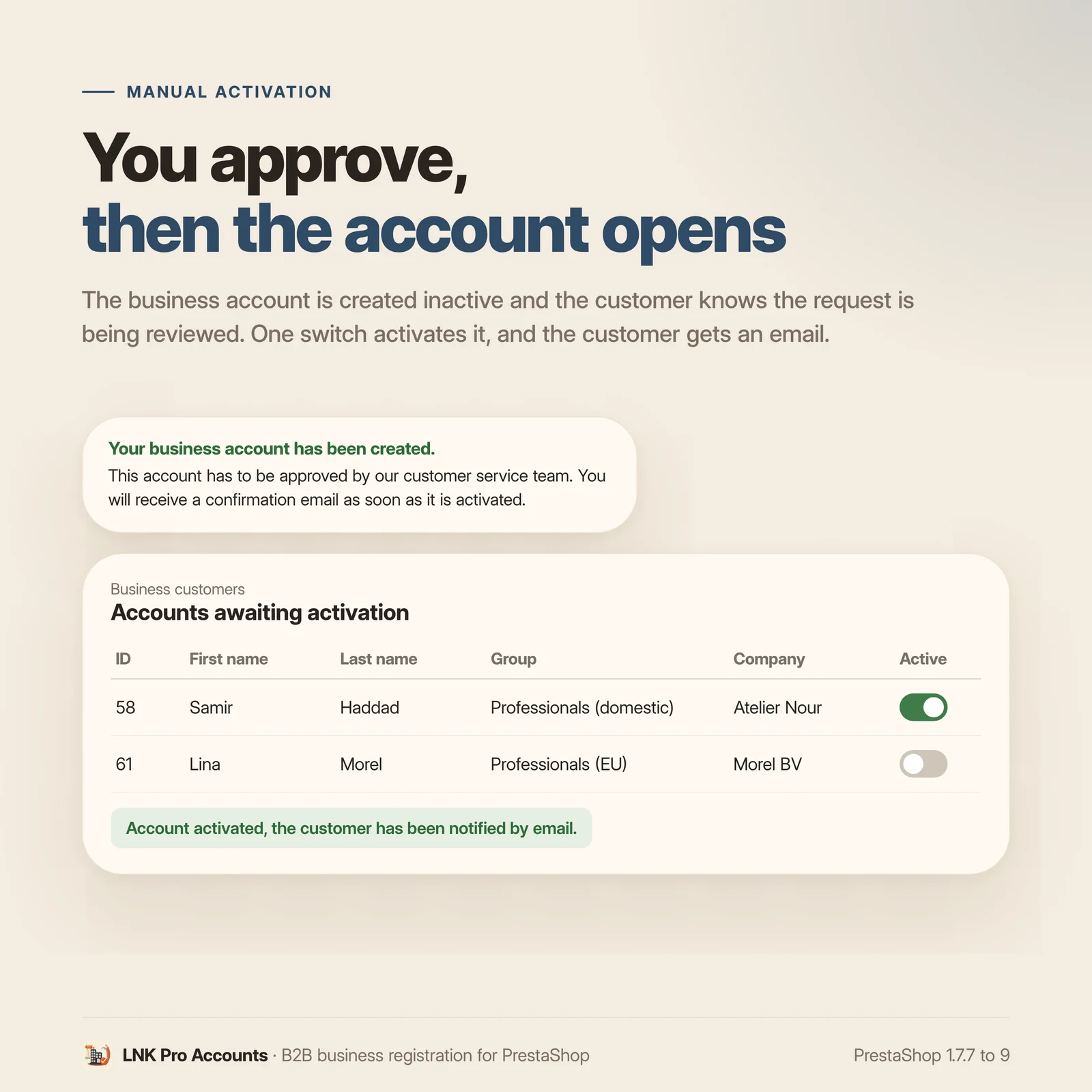
Turn on manual approval: a pro account is created inactive, the customer is told that their request is being reviewed, and you find the pending accounts in the back office. One click activates the account and the customer receives an email. You also choose the emails sent to the customer and to the merchant (account creation and update) and the employees notified.
Catalog reserved for businesses
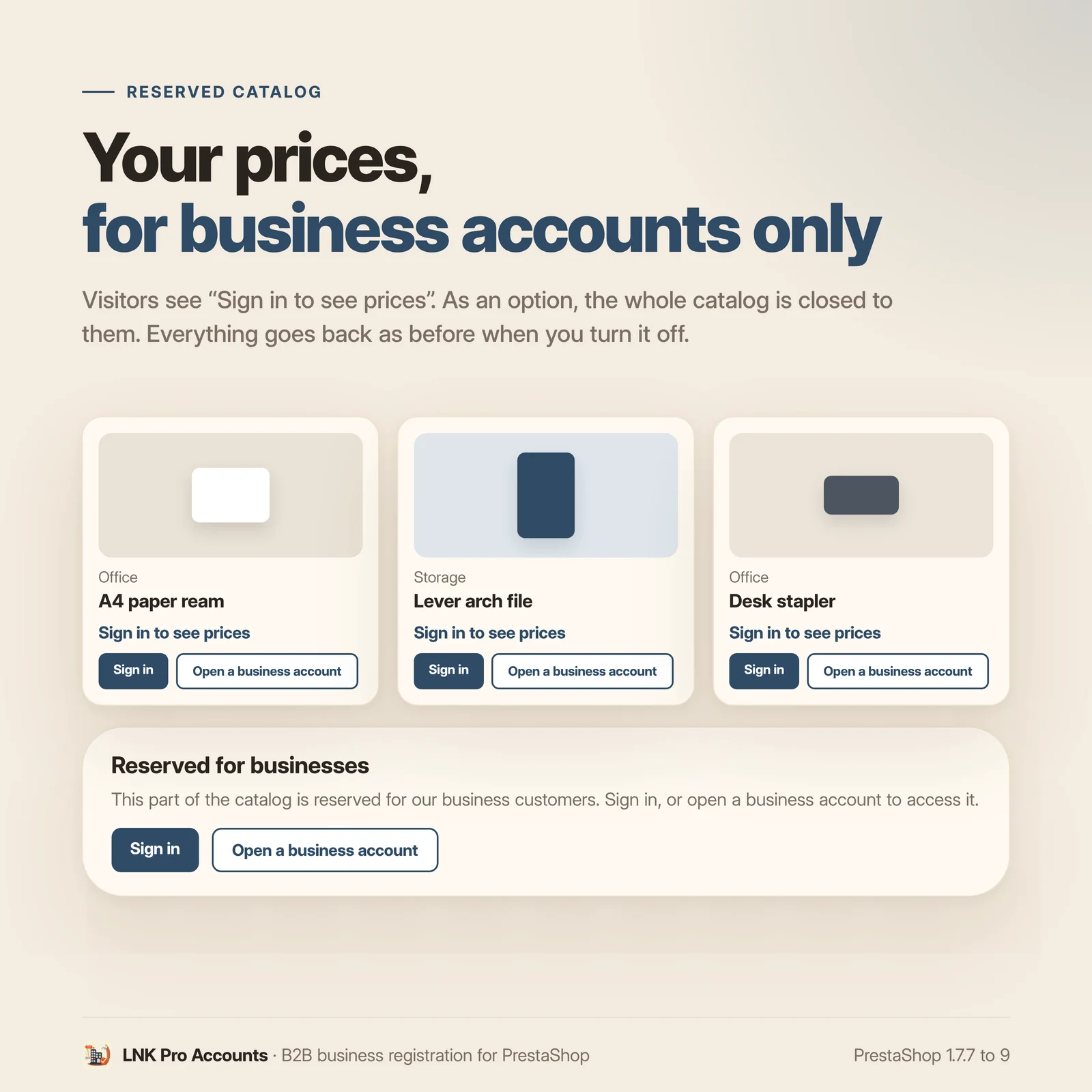
- “Catalog reserved for businesses”: prices are hidden from visitors, through the native “Show prices” setting of the Visitor and Guest groups. Instead of the price, the theme shows “Sign in to see prices”, with the links to log in and to open a pro account.
- “Also hide the catalog from visitors”: categories and products are closed to visitors through native category access (home included, root excepted). They lead to the native “access denied” page (403), completed by the “Reserved for businesses” block.
Everything is put back as before when you turn these options off or uninstall the module.
Anti-bot, only if you turn it on
Google reCAPTCHA (v2 or v3, with an adjustable threshold) or Cloudflare Turnstile, with your own keys. The provider's script only loads on the module's two registration pages, and only when the protection is on.
Your customers' attachments kept safe
The files sent by your customers (certificates, supporting documents) are stored outside the
module folder, in var/lnk_b2baccount/, which a module update does not touch. They are never
served directly: only the back office opens them, for a logged-in employee. Under Apache, an
.htaccess refuses all access. Nginx ignores .htaccess files: add the block given in the
FAQ to your server configuration.
On uninstall, the fields, the values entered by your customers, their attachments and the reminders are kept by default. Deleting them is asked for in two steps, under “Advanced”.
Léger et rapide
Figures measured on the delivered module, gzip-compressed (level 9). The form script: 2.4 KB (2,378 bytes), loaded only on the module's two registration pages. The stylesheet: 1.6 KB (1,551 bytes), loaded only on the login and registration pages (and on the identity, addresses and order pages, where the pro fields are shown). Nothing on the home page, categories or product pages. The four renderings of the theme contract (instead of the price, reserved page, account status, registration link) add no stylesheet and no script of the module: the theme styles them.
A clear settings screen
A single settings page, in tabs, on the common skin of the LNK modules: at most twelve visible settings per screen, rare settings folded under “Advanced”. The form fields are translated in each language of the shop. The module page and the forms read from right to left in Arabic.
For themes and integrators
Theme contract lnk.b2b.account/1, designed for the LNK B2B theme and usable by any theme that
calls its hooks:
displayLnkB2bPriceLogininstead of the price (product card, list view, product page);displayLnkB2bRestrictedin the “access denied” page;displayLnkB2bStatus: “Business account active” or “legal information to complete”, nothing for a visitor, compatible with page caching;{widget name='lnk_b2baccount' mode='link'}: the “Open a business account” link.
Without these hooks, PrestaShop keeps its native behaviour. Templates can be overridden in the theme.
Multistore
Forms, reminders and settings per shop; the module page always shows the scope of what you save. A new shop receives the forms, a deleted shop is cleaned up. The reserved catalogue settings are common to all shops, like PrestaShop's customer groups.
Compatibility with PrestaShop 1.7.7, 8 and 9
| PrestaShop | 1.7.7 → 9.x |
| PHP | 7.1 → 8.4 |
| Delivery | Two packages: 2.9.N for PrestaShop 9, 2.1.N for 1.7.7 to 8.x |
| Contains an override | No |
| Multistore | Yes |
| External calls | VIES (European Commission); INSEE Sirene API with your key; reCAPTCHA or Turnstile if enabled |
Each version is verified by a real installation: PrestaShop 1.7.8 and 8.1 for the 2.1.N package, PrestaShop 9.0 for the 2.9.N package. The tests cover installation, display, the back office and uninstallation.
Frequently asked questions
How do my customers choose between an individual and a pro account?
Two buttons, “I am an individual” and “I am a business”, are added under the login form. Each one leads to its own registration page, with its own form. You can close registration for individuals if you only sell to professionals.
Which fields can I add to the forms?
Text, text area, switch, single or multiple choice list, radio buttons, checkboxes, file upload, information message and date. Each field has its label in each language of the shop and can be required. The values entered show on the customer's page in the back office.
How is the SIRET checked?
The format (14 digits and check key) is verified locally, with no external call. If you turn on the automatic check, the module also asks the INSEE Sirene API whether the establishment exists. This check uses your own API access key, entered in the SIRET tab.
How is the intra-community VAT number checked?
The format is checked while typing, according to the country. If you turn on the automatic check, the number is then verified with VIES, the European Commission service. It needs the PHP soap extension on the server: without it, the VIES check is skipped instead of blocking the registration.
Why does the VAT number need an address?
In PrestaShop, the VAT number belongs to the customer's address. If you ask for the VAT number at registration, also turn on “Address creation” in the Address tab: without an address, the number cannot be saved anywhere.
Does the module apply VAT itself?
No. It puts the pro customer in the groups of their tax zone (shop's country, European Union, outside the European Union). Your tax rules and your group prices then apply: you stay in control of your taxation.
What happens to my professional customers already registered?
The “Existing accounts” tab counts your company accounts and brings them in with one click: they receive the groups of their zone, on top of those they already have (discounts, negotiated prices). A customer without an address, so without a known country, is never moved.
How do I hide my prices from visitors?
Turn on “Catalog reserved for businesses”: the native “Show prices” setting is turned off for the Visitor and Guest groups, and the theme shows “Sign in to see prices”. With “Also hide the catalog from visitors”, categories and products are closed to them and lead to the “access denied” page. When you turn these options off, or on uninstall, everything is put back as before.
Does my theme need to be changed?
For registration, checks and groups, no. The “Sign in to see prices” text, the “Reserved for
professionals” block and the pro account status show if the theme calls the hooks of the
lnk.b2b.account/1 contract (the LNK B2B theme calls them). Without them, the price stays hidden
and the “access denied” page stays PrestaShop's own.
Where are the files sent by my customers stored?
In var/lnk_b2baccount/ at the root of the shop, outside the module folder: an update does not
erase them. They are never served directly; only a logged-in employee opens them from the back
office. Under Apache, an .htaccess refuses all access. Nginx ignores .htaccess files: add this
block to the site configuration. The Nginx configuration recommended by PrestaShop in its recent
versions already denies /var/; this block makes sure of it.
location ^~ /var/lnk_b2baccount/ { deny all; return 403; }
What happens to the data on uninstall?
It is kept: the fields, the values entered by your customers, their attachments and the reminders. To delete everything, tick under “Advanced” “Also delete the data when uninstalling”, then “I confirm the permanent deletion”. The visitors' price and access settings are put back as before in every case.
Does the module make external calls?
Only the ones you turn on: VIES (European Commission) for the VAT number, the INSEE Sirene API with your key for the SIRET, and Google reCAPTCHA or Cloudflare Turnstile if the anti-bot protection is on. No other.
Does it work in multistore?
Yes. Forms, reminders and settings belong to each shop, and the module page always shows the scope of what you save. A new shop receives the forms, a deleted shop is cleaned up. The reserved catalogue is common to all shops, like PrestaShop's customer groups.
Does the module slow down my shop?
No. The 2.4 KB script (compressed) only loads on the module's two registration pages, the 1.6 KB stylesheet only on the login, registration, account and checkout pages. Nothing on the home page, categories or product pages.
In which languages does it ship?
In French, English and Arabic (right to left), plus Spanish and German. The labels of your fields are entered in each language of the shop.
Release history
-
Version 2.9.1 PrestaShop 9
New
- Emails in Arabic, right to left: the module's six emails (account created, account pending, reminder, account approved, and the two merchant notices), in HTML and plain text.
Fixes
- Customer emails in the customer's language, subject included, even when sent from the back office (account approval, SIRET and VAT reminders): the employee's language no longer leaks in, and the list of missing details follows too. The merchant notice keeps the shop's language.
- Stated weight in the listing and FAQ, measured on the delivered package (gzip level 9): 3.9 KB in all, stylesheet 1.6 KB (1,551 bytes), script 2.4 KB (2,378 bytes).
-
First version from the LNKBOOT factory, taken over from the original module. Branch 9: PrestaShop 9.0 to 9.x only. PrestaShop 1.7.7 to 8.x use the
prestashop/legacybranch (2.1.0).Security
- Security probes replayed for each version on the module's public entry points: Ajax actions, reminder address without a token or with a wrong token, registration forms, pro presentation page, direct access to attachments.
New
- Catalog reserved for businesses: prices hidden from visitors through the native setting of the Visitor and Guest groups, “Sign in to see prices” instead of the price; option “Also hide the catalog from visitors” through native category access (home included, root excepted), native “access denied” page completed by the “Reserved for businesses” block; everything put back as before when turned off and on uninstall.
- Theme contract
lnk.b2b.account/1: hooksdisplayLnkB2bPriceLogin,displayLnkB2bRestricted,displayLnkB2bStatus(“Business account active” or “legal information to complete”, nothing for a visitor) and link{widget name='lnk_b2baccount' mode='link'}, with no stylesheet or script of the module. - Multistore: forms, reminders and settings per shop, scope shown, forms copied into a new shop, rows of a deleted shop erased.
- Arabic, from right to left, in the back office and on the forms.
- Option “Also delete the data when uninstalling”, in two steps, under “Advanced”.
Changes
- Customers' attachments stored outside the module folder, in
var/lnk_b2baccount/, never served directly; those of previous versions are moved there on update. - Data kept on uninstall by default (fields, values entered, attachments, reminders).
- New back office on the common skin of the LNK modules: at most twelve visible settings per screen, rare settings under “Advanced”.
- Front on the common design of the LNK modules: registration, business fields of the identity page, account type choice and business invitation in checkout use
lnk-b2baccount__…classes, theme colors through the--lnk-*variables, neutral values otherwise (no imposed color). - Translations completed: 89 strings of the code and 18 of the front office that were translated nowhere; labels of the fields created on install and names of the pro groups written in the language of each row.
-
Version 2.1.1 PrestaShop 1.7.6 to 8.x
New
- Emails in Arabic, right to left: the module's six emails (account created, account pending, reminder, account approved, and the two merchant notices), in HTML and plain text.
Fixes
- Customer emails in the customer's language, subject included, even when sent from the back office (account approval, SIRET and VAT reminders): the employee's language no longer leaks in, and the list of missing details follows too. The merchant notice keeps the shop's language.
- Stated weight in the listing and FAQ, measured on the delivered package (gzip level 9): 3.9 KB in all, stylesheet 1.6 KB (1,551 bytes), script 2.4 KB (2,378 bytes).
Show the previous version
-
First version from the LNKBOOT factory, taken over from the original module. Branch 1: PrestaShop 1.7.7 to 8.x. PrestaShop 9 has its own package (2.9.0), with the same business code.
Security
- Security probes replayed for each version on the module's public entry points: Ajax actions, reminder address without a token or with a wrong token, registration forms, pro presentation page, direct access to attachments.
New
- Catalog reserved for businesses: prices hidden from visitors through the native setting of the Visitor and Guest groups, “Sign in to see prices” instead of the price; option “Also hide the catalog from visitors” through native category access (home included, root excepted), native “access denied” page completed by the “Reserved for businesses” block; everything put back as before when turned off and on uninstall.
- Theme contract
lnk.b2b.account/1: hooksdisplayLnkB2bPriceLogin,displayLnkB2bRestricted,displayLnkB2bStatus(“Business account active” or “legal information to complete”, nothing for a visitor) and link{widget name='lnk_b2baccount' mode='link'}, with no stylesheet or script of the module. - Multistore: forms, reminders and settings per shop, scope shown, forms copied into a new shop, rows of a deleted shop erased.
- Arabic, from right to left, in the back office and on the forms.
- Option “Also delete the data when uninstalling”, in two steps, under “Advanced”.
Changes
- Customers' attachments stored outside the module folder, in
var/lnk_b2baccount/, never served directly; those of previous versions are moved there on update. - Data kept on uninstall by default (fields, values entered, attachments, reminders).
- New back office on the common skin of the LNK modules: at most twelve visible settings per screen, rare settings under “Advanced”.
- Front on the common design of the LNK modules: registration, business fields of the identity page, account type choice and business invitation in checkout use
lnk-b2baccount__…classes, theme colors through the--lnk-*variables, neutral values otherwise (no imposed color). - Translations completed: 89 strings of the code and 18 of the front office that were translated nowhere; labels of the fields created on install and names of the pro groups written in the language of each row.
- Translations through PrestaShop's historic system, the only one 1.7.7 reads (files
translations/fr.php,en.php,ar.php,es.phpandde.php).