 Module · LNK Free Cart Shipping
Free shipping from a cart amount, on PrestaShop
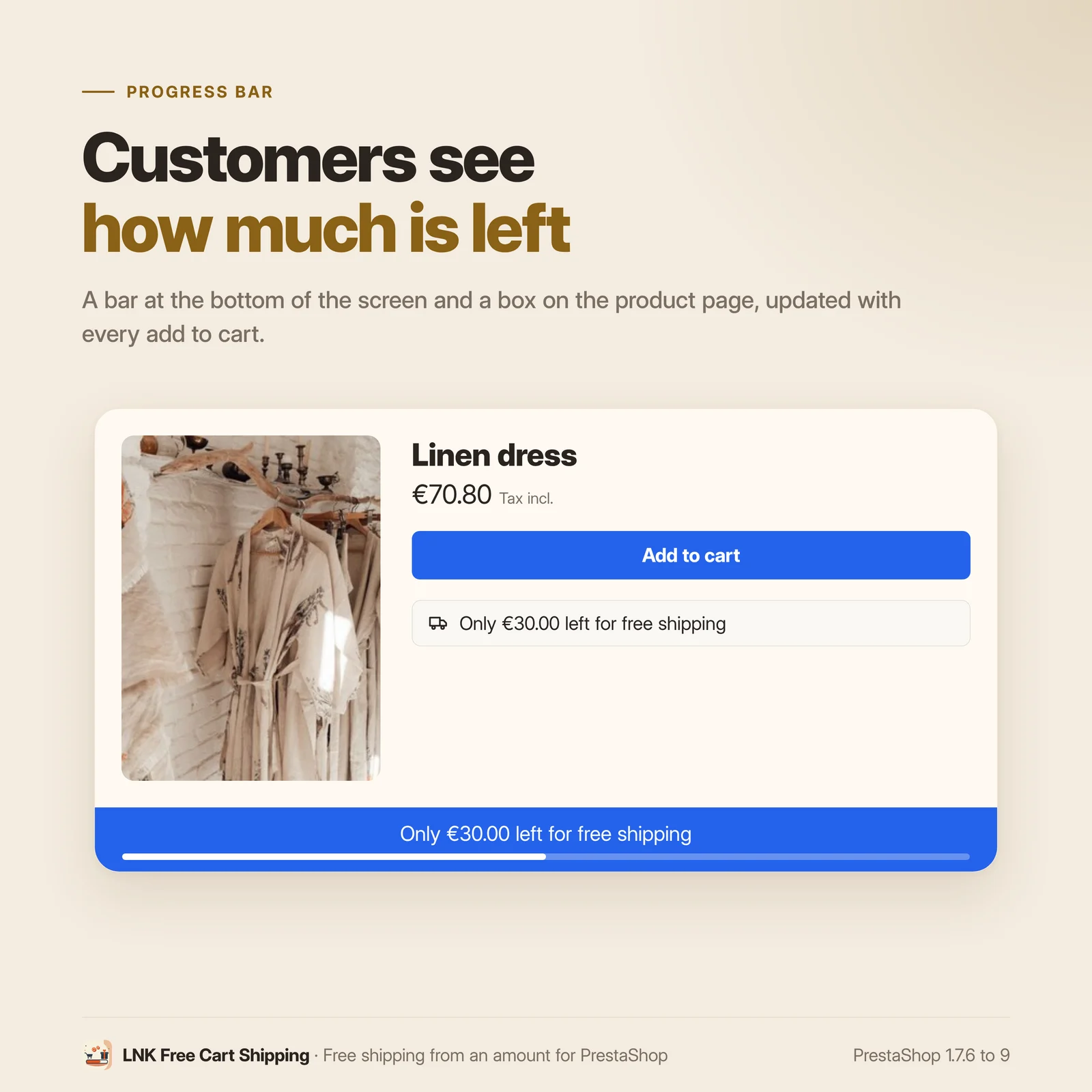
LNK Free Cart Shipping offers shipping from a cart amount, for the carriers, countries, customer groups and dates you choose. A progress bar tells the customer how much is left to add, and updates on every addition to the cart. Free shipping goes through PrestaShop's native cart rules: no override.
- Version 10.1.1 · PrestaShop 1.7.6 to 8.x
- Version 10.9.1 · PrestaShop 9
- PrestaShop 1.7.6 to 9.x
- PHP 7.1 to 8.4
- No override
Screenshots
Key points
- Free shipping from an amount, tax excluded or included, in every currency
- Rules by carrier, country, group, customer and period
- Free shipping through native cart rules, with no override
- Progress bar in four positions, updated on every addition to the cart
- Boxes on the product page and in the cart
- Confetti when the threshold is reached, optional
- Four styles, or your theme's colours
- Messages in every language, Arabic from right to left
- Live preview on desktop and mobile
- Update from 1.0.0 without losing the rules
- PrestaShop 1.7.6 to 9.x, PHP 7.1 to 8.4
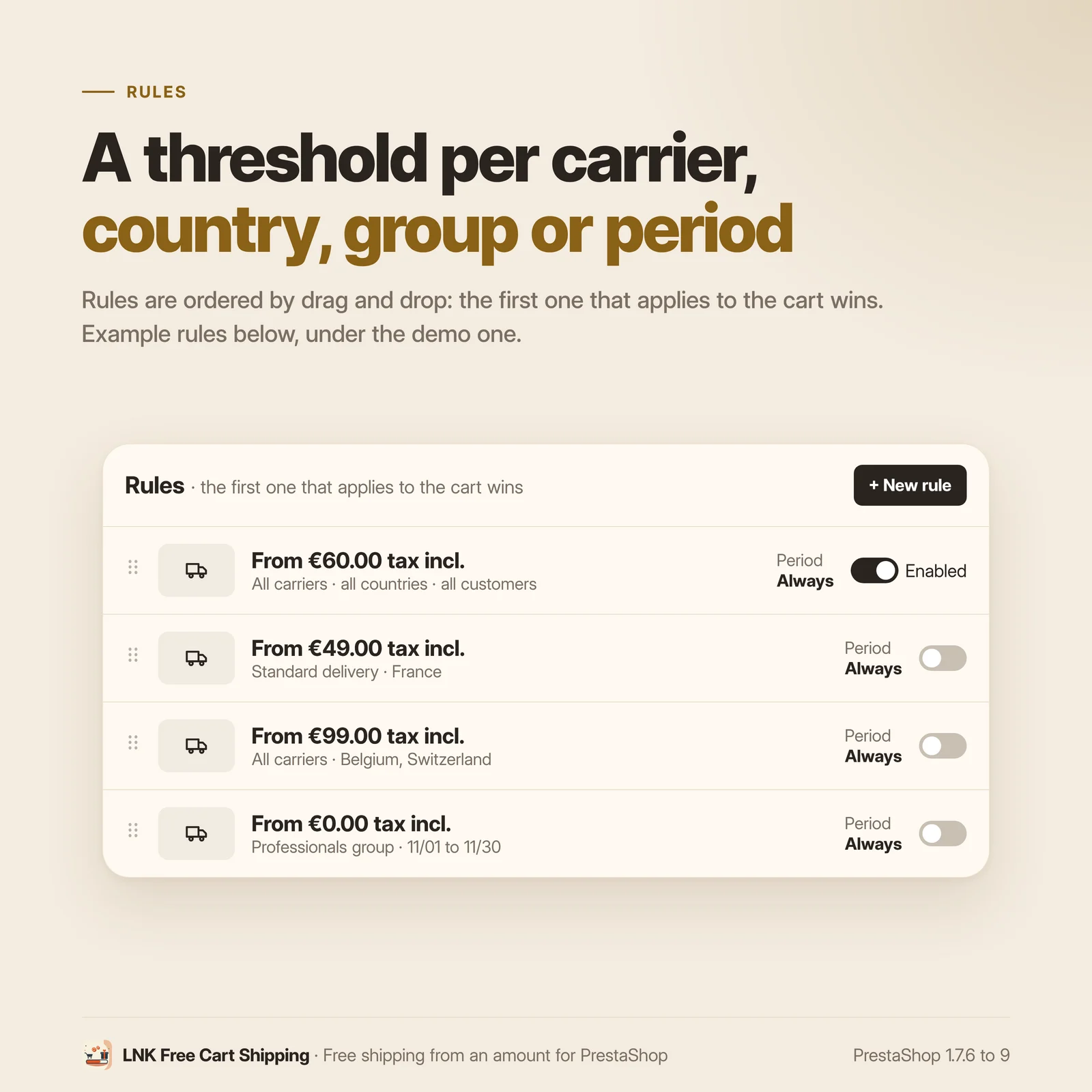
- Unlimited rules, the first one that applies to the cart wins
Free shipping, without touching the shipping calculation
PrestaShop can offer shipping from an amount, but with a single threshold for the whole shop,
no carrier, no country and nothing shown to the customer. Modules that go further often replace
the shipping cost calculation with an override of Cart, which conflicts with other modules and
breaks with PrestaShop updates.
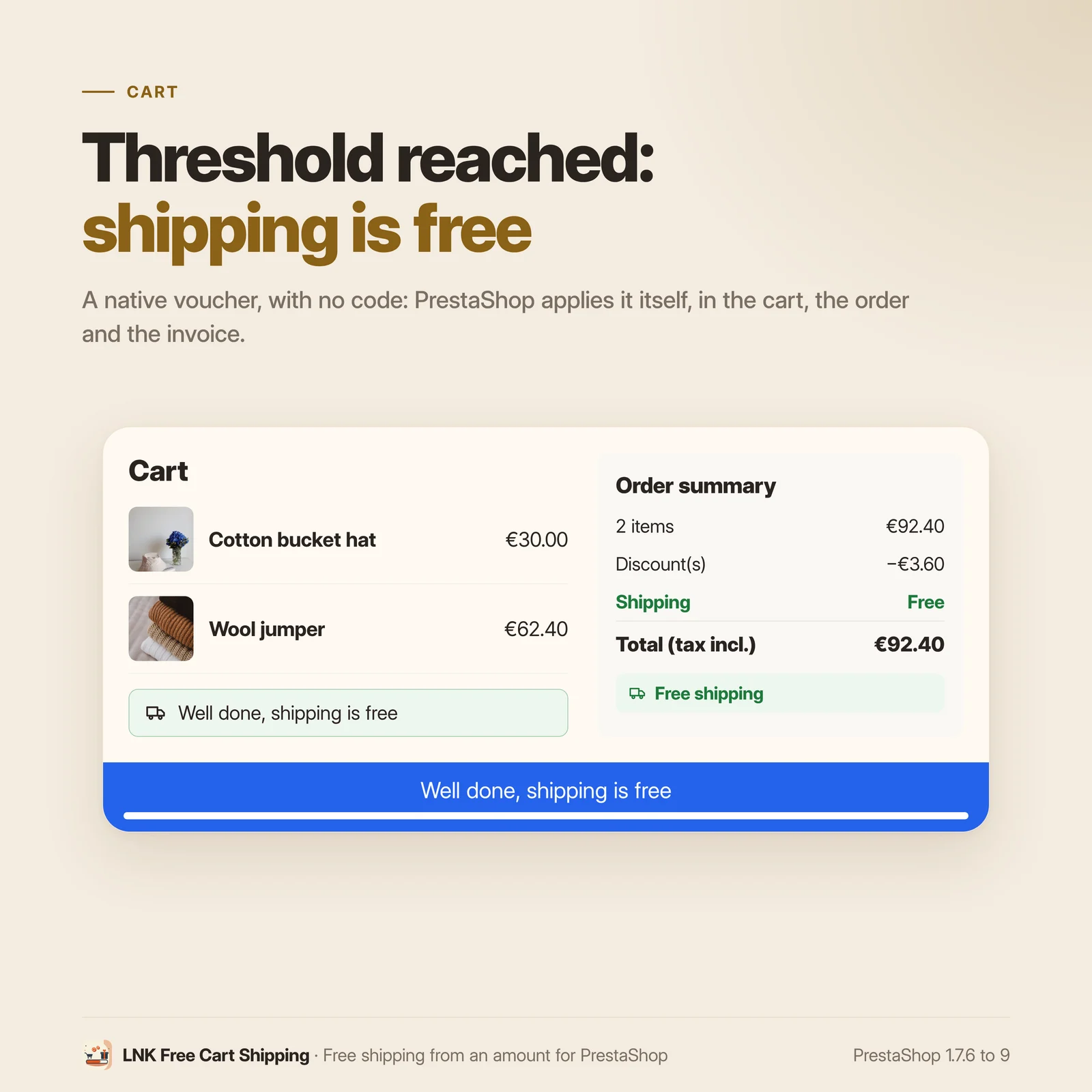
Here, each rule keeps a native "Free shipping" cart rule up to date, without a code: PrestaShop applies it by itself and shows it in the cart, the order and the invoice.
Rules by carrier, country, group and period
For each rule:
- the threshold, on the amount of the products, tax excluded or included, converted into the customer's currency;
- the carriers concerned, or all;
- the delivery countries, or all;
- the customer groups, or a single customer;
- the dates, if needed, for a time-limited operation.
Rules are ordered by drag and drop: the first one that applies to the cart wins. The threshold of PrestaShop's Shipping > Preferences acts as the default rule when none applies.
A bar that shows what is left to add
The message of each rule is written in each language with {rest} (remaining amount),
{threshold} and {carrier}. The bar goes in one of four positions:
- fixed at the bottom of the screen;
- fixed at the top of the screen;
- banner under the header;
- card in a bottom corner, right or left (mirrored by itself in Arabic).
You choose the pages: home, categories, product pages, cart, other pages. Boxes repeat the message on the product page and in the cart. When the threshold is reached, confetti celebrate it, unless you turn them off.
Up to date on every addition to the cart
When the customer adds or removes a product, the bar and the boxes update without reloading the page. The amount is read by the server, never cached. With an empty cart, the bar stays hidden; an option shows it then with a fixed text, without an amount.
Léger et rapide
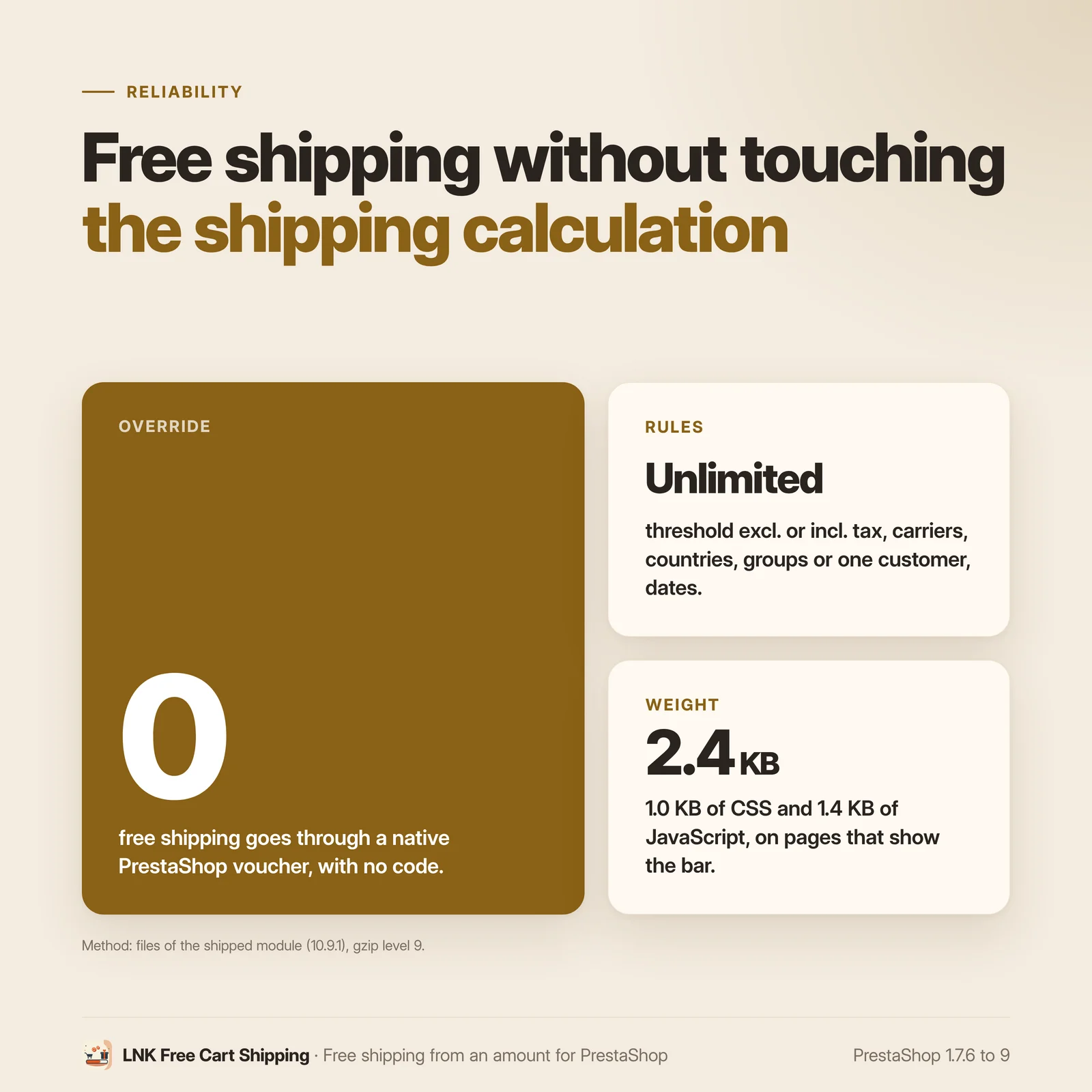
Figures measured on the delivered module, compressed (level 9). A 1.0 KB stylesheet and a 1.4 KB script, loaded only on the pages that show the bar or a box. The confetti use the browser's Web Animations API, with no library, and never run for a visitor who asks for reduced motion. No added font, no external resource.
Four styles, or your theme's colours
Theme colours, Sober, Contrast, or three chosen colours (background, text, progress). A live preview shows the bar and the box on desktop and mobile while you set them up, rendered by the shop's templates and stylesheet.
With LNK Announcement Bar
The fixed text of each rule, without an amount, can join the messages of LNK Announcement Bar: a single bar at the top of the shop, compatible with page caching. A checkbox turns it off.
For themes and integrators
Neutral markup (.lnkfcs, BEM), documented CSS variables (--lnk-freecartshipping-bg,
--lnk-freecartshipping-text, --lnk-freecartshipping-accent), templates of the bar and the
box that can be overridden in the theme. Positions in logical properties: in Arabic, the bar
reads from right to left with no setting.
Compatible with PrestaShop 1.7, 8 and 9
| PrestaShop | 1.7.6 → 9.x |
| PHP | 7.1 → 8.4 |
| Delivery | Two archives: 10.9.N for PrestaShop 9, 10.1.N for 1.7.6 to 8.x |
| Back office | Native Symfony on PrestaShop 9, classic admin controller below |
| Contains an override | No |
| Multistore | Yes: each rule picks its shops, with its own order and on/off switch in each shop; native cart rules limited to the shops where the rule is active |
| Several rules | Yes: unlimited rules, each with its threshold, carriers, countries, groups, customer and period; the first one that applies to the cart wins |
| External resources | None |
The update from version 1.0.0 of the module carries over the rules, their messages, their cart
rules and the display settings, and removes the old override of Cart without touching those of
other modules. Each version is verified by a real installation: PrestaShop 1.7.8 and 8.1 for the
10.1.N archive, PrestaShop 9.0 for the 10.9.N archive.
Frequently asked questions
How do I offer free shipping from a cart amount on PrestaShop?
In Shipping > LNK Free Cart Shipping, create a rule with its threshold (for example €60 tax included), choose the carriers, countries and customer groups if needed, then save. Shipping becomes free as soon as the cart reaches the threshold, and the bar shows the customer the amount left to add.
Does the module change the shipping cost calculation?
No. Each rule keeps a native "Free shipping" cart rule up to date, without a code, which PrestaShop applies by itself. The module contains no override: shipping is still calculated by PrestaShop and your carriers.
Can I limit free shipping to a carrier or a country?
Yes. Each rule can target one or more carriers and one or more delivery countries. When a carrier is edited in PrestaShop, the cart rules that target it are updated.
Can I offer it to a customer group, a single customer or over a period?
Yes. A rule can target customer groups, or a single customer by their email address, and carry start and end dates. Rules are ordered by drag and drop: the first one that applies to the cart wins.
Is the threshold tax excluded or included, and in which currency?
Your choice, rule by rule. The threshold applies to the amount of the products and is converted into the customer's currency at the shop's rate.
Where is the progress bar shown?
In one of four positions: fixed at the bottom of the screen, fixed at the top, banner under the header, or card in a bottom corner, right or left. You choose the pages (home, categories, product pages, cart, other pages). Boxes repeat the message on the product page and in the cart.
Does the bar update when the customer adds a product?
Yes, without reloading the page. When the threshold is reached, confetti celebrate it; you can turn them off, and they never run for a visitor who asks for reduced motion.
Does the module slow down my shop?
No. The stylesheet weighs 1.0 KB and the script 1.4 KB compressed, loaded only on the pages that show the bar or a box. No font or external resource is added.
I use version 1.0.0 of the module: what happens to my rules?
They are carried over by a simple update in the module manager: thresholds, messages, carriers,
countries, groups, cart rules and display settings. The old override of Cart is removed from
the shop's file, those of other modules stay in place.
Does it work with LNK Announcement Bar?
Yes. The fixed text of each rule, without an amount, can join the messages of the Announcement Bar, which stays compatible with page caching. A "Show in the Announcement Bar" checkbox, on by default, lets you turn it off.
Does it work in several languages, in multistore and on PrestaShop 9?
Yes. Messages are entered in each language, and the bar follows the writing direction: in Arabic, it reads from right to left. The module comes in two archives: 10.9.N for PrestaShop 9 and 10.1.N for PrestaShop 1.7.6 to 8.x, with the same features. In multistore, each rule picks its shops; its order and on/off switch are specific to each shop, and its native cart rule only applies in the shops where it is active. A new shop takes over the rules of the shop it was copied from. In “All shops”, the list shows the rules of every shop, and the bar settings state the shop or group they apply to.
How do I go back if the module does not suit me?
Uninstall it: your rules, their cart rules and your settings are deleted, and the bar disappears from the shop. The module contains no override and does not change your theme.
Can I create several free shipping rules?
Yes, as many as you want. Each rule has its threshold (tax incl. or excl.), carriers, countries, customer groups, a given customer if needed and its period. You sort them in the order you want: for a given cart, the first rule that applies wins, and the bar shows its threshold. In multistore, this order is specific to each shop.
Release history
-
Version 10.9.1 PrestaShop 9
New
- Multistore: each rule picks its shops (“Shops” checkboxes in the editor), with an order and an on/off switch specific to each shop. A shop created by copying another takes over its rules; a deleted shop takes its rows with it. In “All shops”, the list shows the rules of every shop with their shops; the order is changed shop by shop. The bar settings state the shop or group they apply to.
Fixes
- A rule's native cart rule now only applies in the shops where the rule is active: a shop created later offered free shipping without the bar.
- Deleting a shared rule in one shop deleted its cart rule and its carriers, countries and groups for every shop: it is now only removed from that shop.
- A modified carrier updates the cart rules of every shop, no longer only those of the current shop.
- Sorting or switching off a rule in one shop also changed the other shops.
-
Version 10.9.0 PrestaShop 9
Full rework of the Free Shipping Bar module (1.0.0) as LNK Free Cart Shipping. Branch 9: PrestaShop 9.0 to 9.x only. PrestaShop 1.7.6 to 8.x use the
prestashop/legacybranch (10.1.0).Numbering: 10.9.N on branch 9 and 10.1.N on the 1.7.6 to 8.x branch, above every version of the first module (1.0.0, 7.0.0.0, 8.0.0.0 and 9.0.0.0 depending on the branch), so that PrestaShop offers the update to every shop that has it.
New
- Native PrestaShop threshold (Shipping > Preferences) shown as the default rule.
- Cart rules rewritten when a carrier is edited (new id, same reference).
- Progress bar in the shop, in four positions: fixed at the bottom, fixed at the top, banner under the header, card in a bottom corner (at the start or end of the line, mirrored by itself in Arabic). Chosen pages, updated on every cart change.
- Boxes on the product page and in the cart.
- Empty cart option (off by default): the bar then shows the fixed text.
- Confetti when the threshold is reached, optional (on by default), never for visitors who ask for reduced motion.
- Styles: theme colours, sober, contrast, chosen colours (
--lnk-freecartshipping-*variables); a chosen background without a text colour gets black or white, whichever reads best. - Bridge with LNK Announcement Bar: the fixed text of the rule joins its messages, without an amount, compatible with page caching; a checkbox turns it off (on by default).
- Bar page, apart from the rules: position, boxes and style shared by all the rules.
- Live preview in the editor of a rule and on the bar page, desktop and mobile.
- Translated display name: LNK Livraison offerte, LNK Free Cart Shipping, LNK الشحن المجاني (technical name unchanged).
- Display settings of 1.0.0 carried over: eight positions brought down to four, pages, boxes and colours.
Changes
- Free shipping through native PrestaShop cart rules only: each rule keeps its own “Free shipping” cart rule up to date (minimum amount tax excluded or included, carriers, countries, groups, customer, dates, shops). The
Cartoverride and the hook on the shipping cost are removed. - Rules with link tables (carriers, countries, groups), utf8mb4 tables, priority order by drag and drop.
- Messages as plain text with
{rest},{threshold}and{carrier}, without HTML, in French, English and Arabic. - Back office on the common look of the LNK modules: list of the rules, editor with sections, summary of the rule.
- Update from 1.0.0: rules, messages and cart rules taken over (countries added to the cart rules),
Cartoverride removed from the file of the shop, old files, logs and tabs deleted.
-
Version 10.1.1 PrestaShop 1.7.6 to 8.x
New
- Multistore: each rule picks its shops (“Shops” checkboxes in the editor), with an order and an on/off switch specific to each shop. A shop created by copying another takes over its rules; a deleted shop takes its rows with it. In “All shops”, the list shows the rules of every shop with their shops; the order is changed shop by shop. The bar settings state the shop or group they apply to.
Fixes
- A rule's native cart rule now only applies in the shops where the rule is active: a shop created later offered free shipping without the bar.
- Deleting a shared rule in one shop deleted its cart rule and its carriers, countries and groups for every shop: it is now only removed from that shop.
- A modified carrier updates the cart rules of every shop, no longer only those of the current shop.
- Sorting or switching off a rule in one shop also changed the other shops.
Show the previous version
-
Version 10.1.0 PrestaShop 1.7.6 to 8.x
Full rework of the Free Shipping Bar module (1.0.0) as LNK Free Cart Shipping. Branch 1: PrestaShop 1.7.6 to 8.x. PrestaShop 9 uses the
mainbranch (10.9.0).Numbering: 10.9.N on branch 9 and 10.1.N on the 1.7.6 to 8.x branch, above every version of the first module (1.0.0, 7.0.0.0, 8.0.0.0 and 9.0.0.0 depending on the branch), so that PrestaShop offers the update to every shop that has it.
New
- Native PrestaShop threshold (Shipping > Preferences) shown as the default rule.
- Cart rules rewritten when a carrier is edited (new id, same reference).
- Progress bar in the shop, in four positions: fixed at the bottom, fixed at the top, banner under the header, card in a bottom corner (at the start or end of the line, mirrored by itself in Arabic). Chosen pages, updated on every cart change.
- Boxes on the product page and in the cart.
- Empty cart option (off by default): the bar then shows the fixed text.
- Confetti when the threshold is reached, optional (on by default), never for visitors who ask for reduced motion.
- Styles: theme colours, sober, contrast, chosen colours (
--lnk-freecartshipping-*variables); a chosen background without a text colour gets black or white, whichever reads best. - Bridge with LNK Announcement Bar: the fixed text of the rule joins its messages, without an amount, compatible with page caching; a checkbox turns it off (on by default).
- Bar page, apart from the rules: position, boxes and style shared by all the rules.
- Live preview in the editor of a rule and on the bar page, desktop and mobile.
- Translated display name: LNK Livraison offerte, LNK Free Cart Shipping, LNK الشحن المجاني (technical name unchanged).
- Display settings of 1.0.0 carried over: eight positions brought down to four, pages, boxes and colours.
Changes
- Free shipping through native PrestaShop cart rules only: each rule keeps its own “Free shipping” cart rule up to date (minimum amount tax excluded or included, carriers, countries, groups, customer, dates, shops). The
Cartoverride and the hook on the shipping cost are removed. - Rules with link tables (carriers, countries, groups), utf8mb4 tables, priority order by drag and drop.
- Messages as plain text with
{rest},{threshold}and{carrier}, without HTML, in French, English and Arabic. - Back office on the common look of the LNK modules: list of the rules, editor with sections, summary of the rule.
- Update from 1.0.0: rules, messages and cart rules taken over (countries added to the cart rules),
Cartoverride removed from the file of the shop, old files, logs and tabs deleted.