 Module · LNK Stock and Locations
LNK Stock and Locations, the stock of each warehouse and the bin location of each product
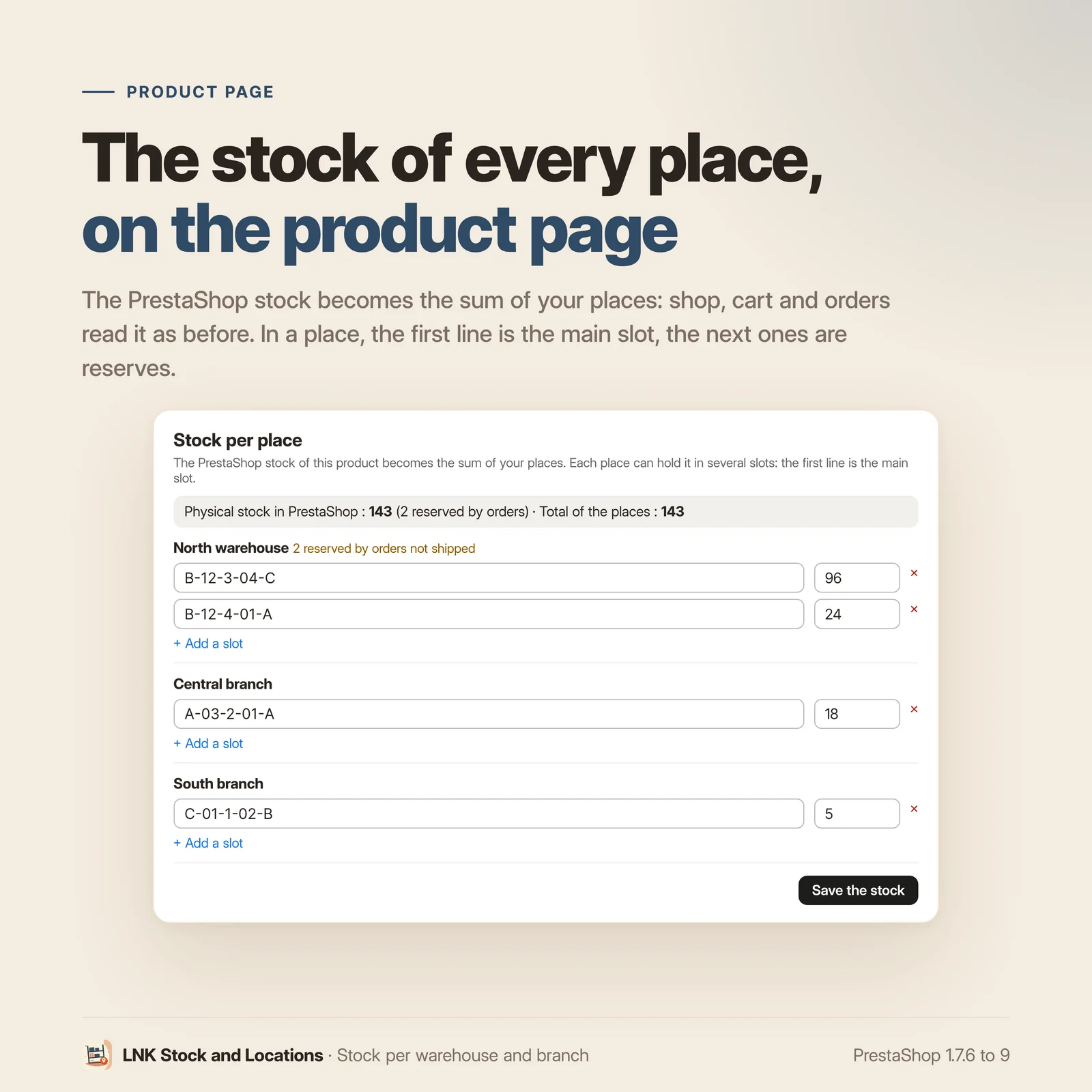
Your goods sit in two warehouses and three branches, and PrestaShop knows only one figure per product. LNK Stock and Locations keeps the stock of each place, and in each place the exact slot of each product: aisle B, bay 12, level 3. The PrestaShop stock becomes the sum of your places: the shop, the cart and the orders keep reading it as before.
- Version 1.1.0 · PrestaShop 1.7.6 to 8.x
- Version 1.9.0 · PrestaShop 9
- PrestaShop 1.7.6 to 9.x
- PHP 7.1 to 8.4
- No override
Screenshots
Key points
- Stock per warehouse, branch or depot, one shop per place.
- Custom storage slots, created in one go in picking order.
- Several slots per product and per place: main slot and reserves.
- Search for what is stored at an address.
- PrestaShop stock kept as the sum of the places, native stock movements.
- The ERP is the reference: webservice or database, never overwritten.
- Orders split by delivery zone, one parcel per place, tracking of each parcel.
- Pick-up at the branch, with a pick-up code by e-mail.
- Availability per branch on the product page, the customer's "My branch", without price or exact quantity.
- API for ERPs through the native webservice, rights per key and rate limits.
- Two-step CSV import, scheduled import from an address.
- Picking list in picking order, labels with barcode.
- Full journal of every change.
- Guard against the old advanced stock management of PrestaShop 1.6.
- Uninstall without touching the stock.
- Multistore, French, English and Arabic (right to left).
- PrestaShop 1.7.6 to 9, no override, 0 bytes in the shop.
Multi warehouse management in PrestaShop
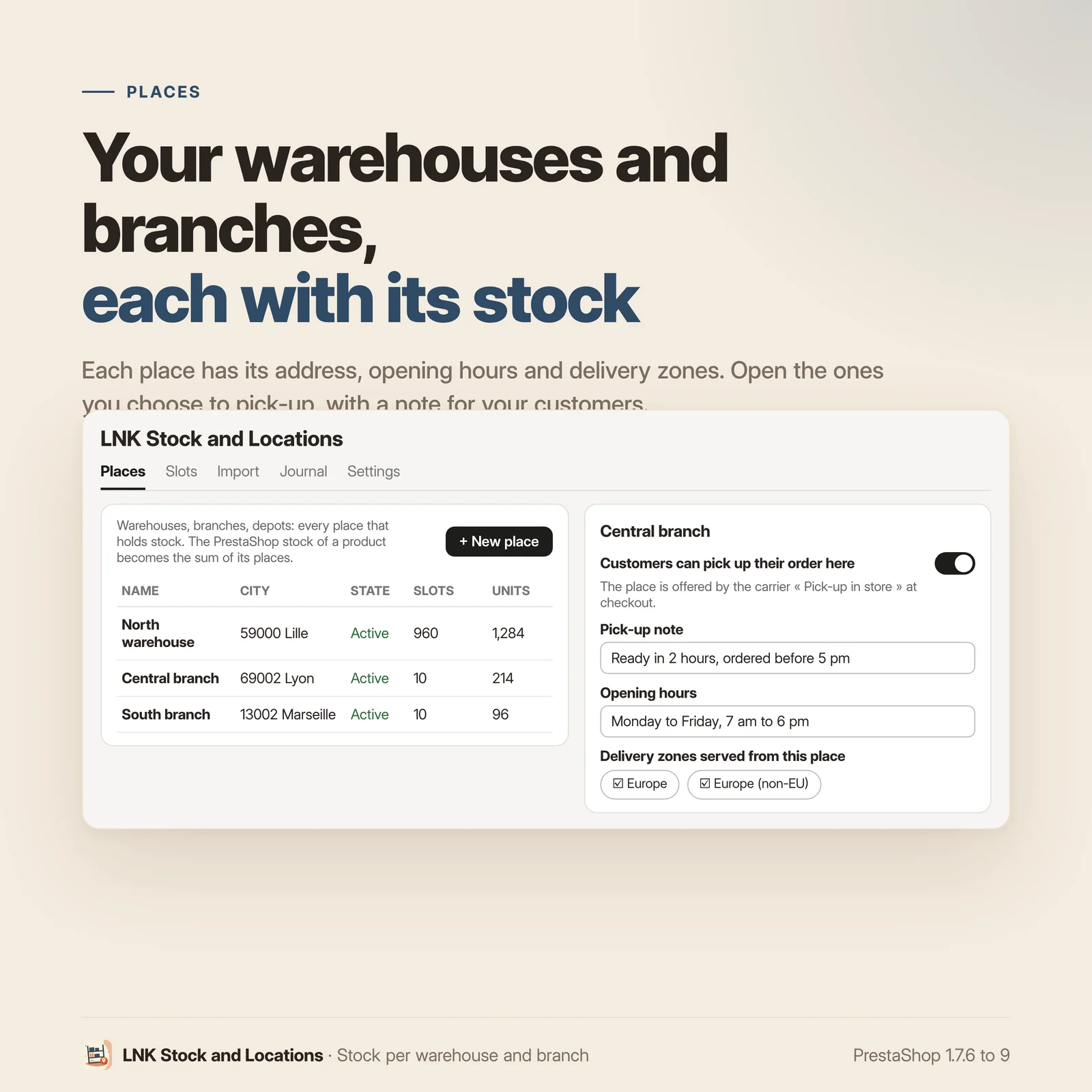
Create your places: warehouses, branches, depots, each with its name in French, English and Arabic, its address, its phone number and its opening hours. On the page of each product, a tab shows the stock per warehouse, next to the PrestaShop stock. For a product with combinations, each combination has its own split, and PrestaShop keeps the product total.
Warehouse bin locations your way
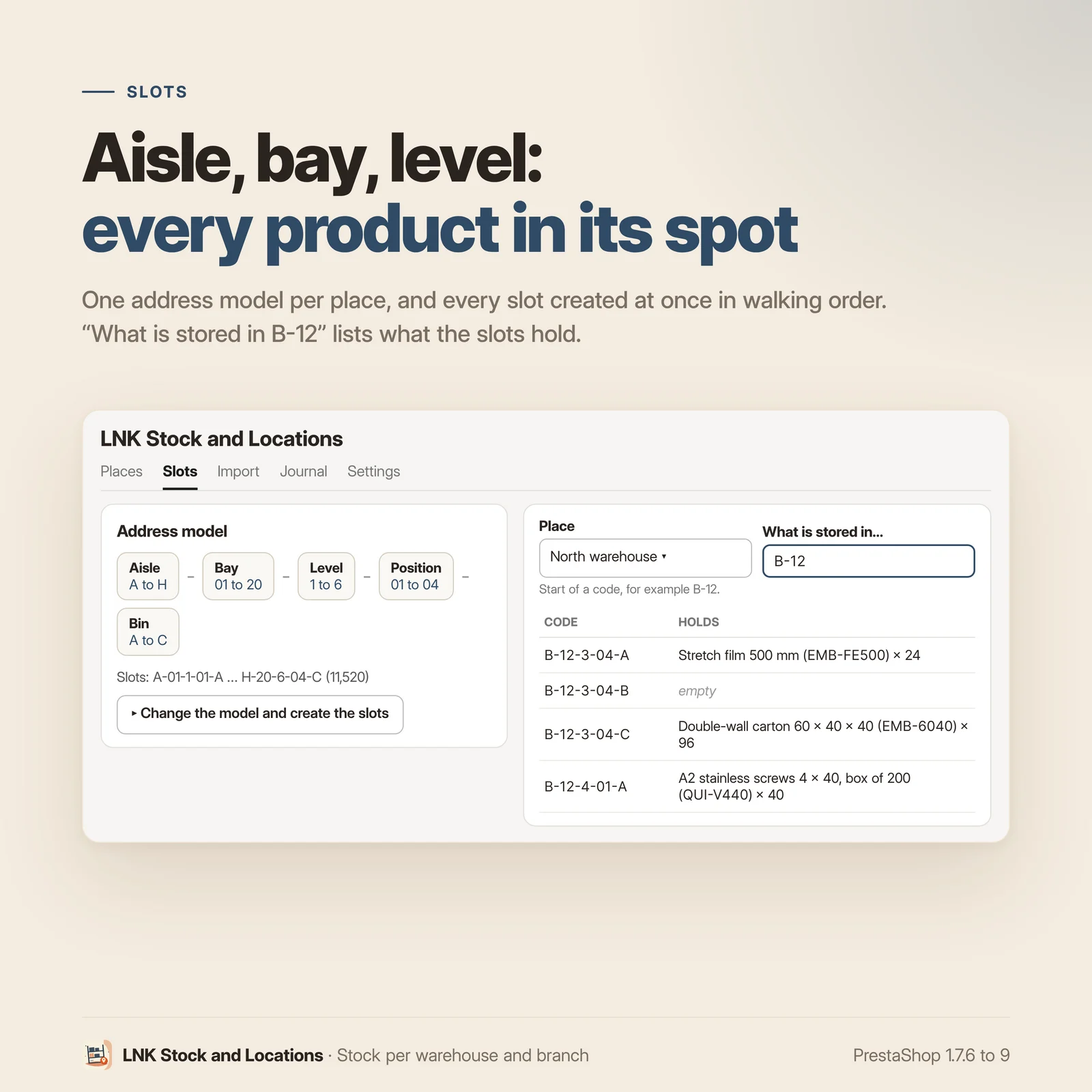
Each place has its address template. You choose and order the parts: zone, aisle, bay, level, position, bin, or a part with your own name; each in numbers or letters, with its range and its separator. Aisles A to H, bays 01 to 20 and levels 1 to 6 give A-01-1 to H-20-6: the 960 slots are created in one go, in picking order. A product can be stored in several slots of the same place: a main slot, then reserves. The search "what is stored in B-12?" lists the content of the slots, and the native PrestaShop "Location" field receives the main slot, for your documents and your other modules.
Your ERP is the reference
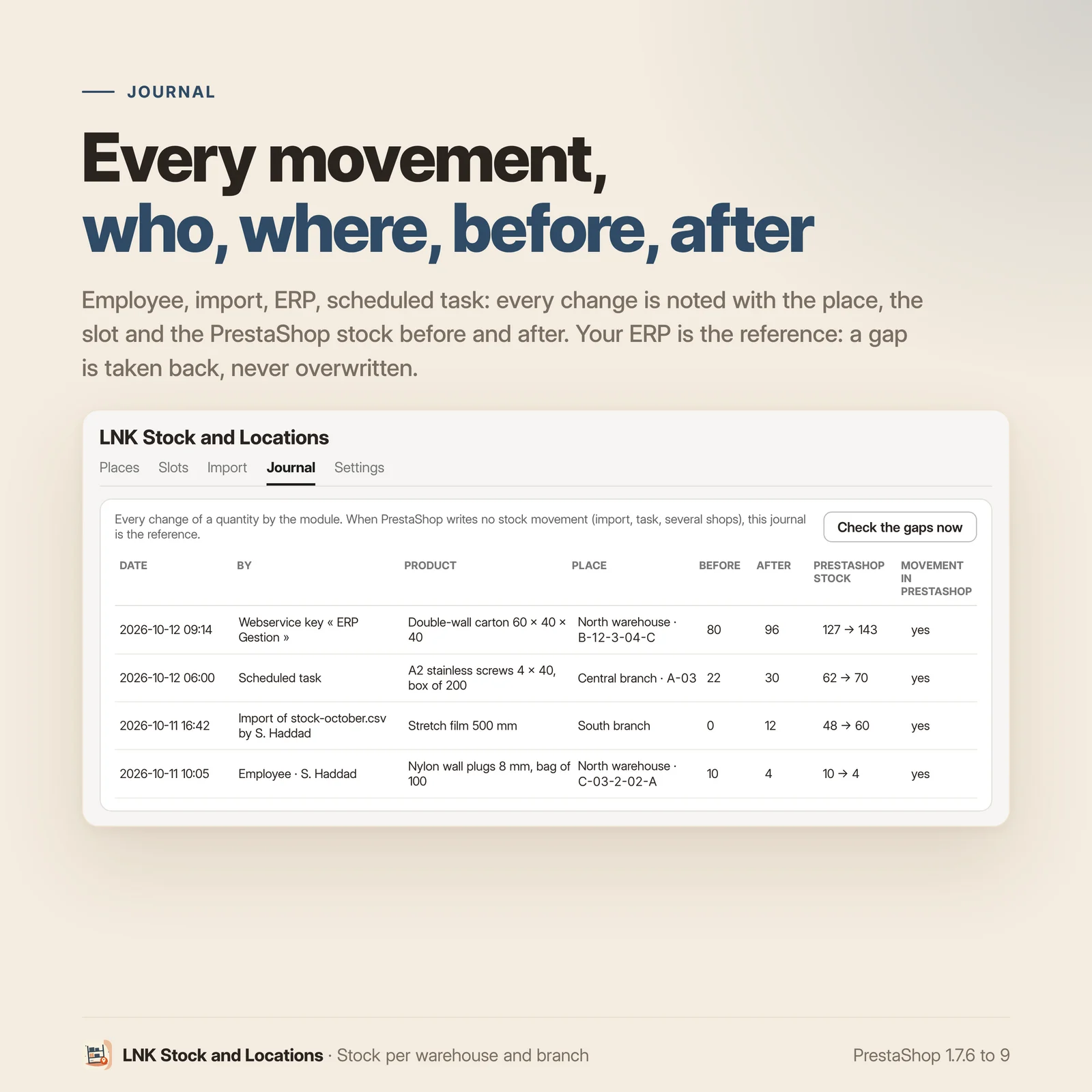
If your ERP writes the stock into PrestaShop, through the webservice or directly in the database, the module never overwrites it. The gap is taken back into the default place and recorded in the journal: at once for the webservice, the product page and the Stock page; when the product page is opened, or with a click on "Check the gaps now", for a direct write in the database. A product page opened before the ERP's update is refused on save: nothing is overwritten, you only have to reload.
One order, several parcels
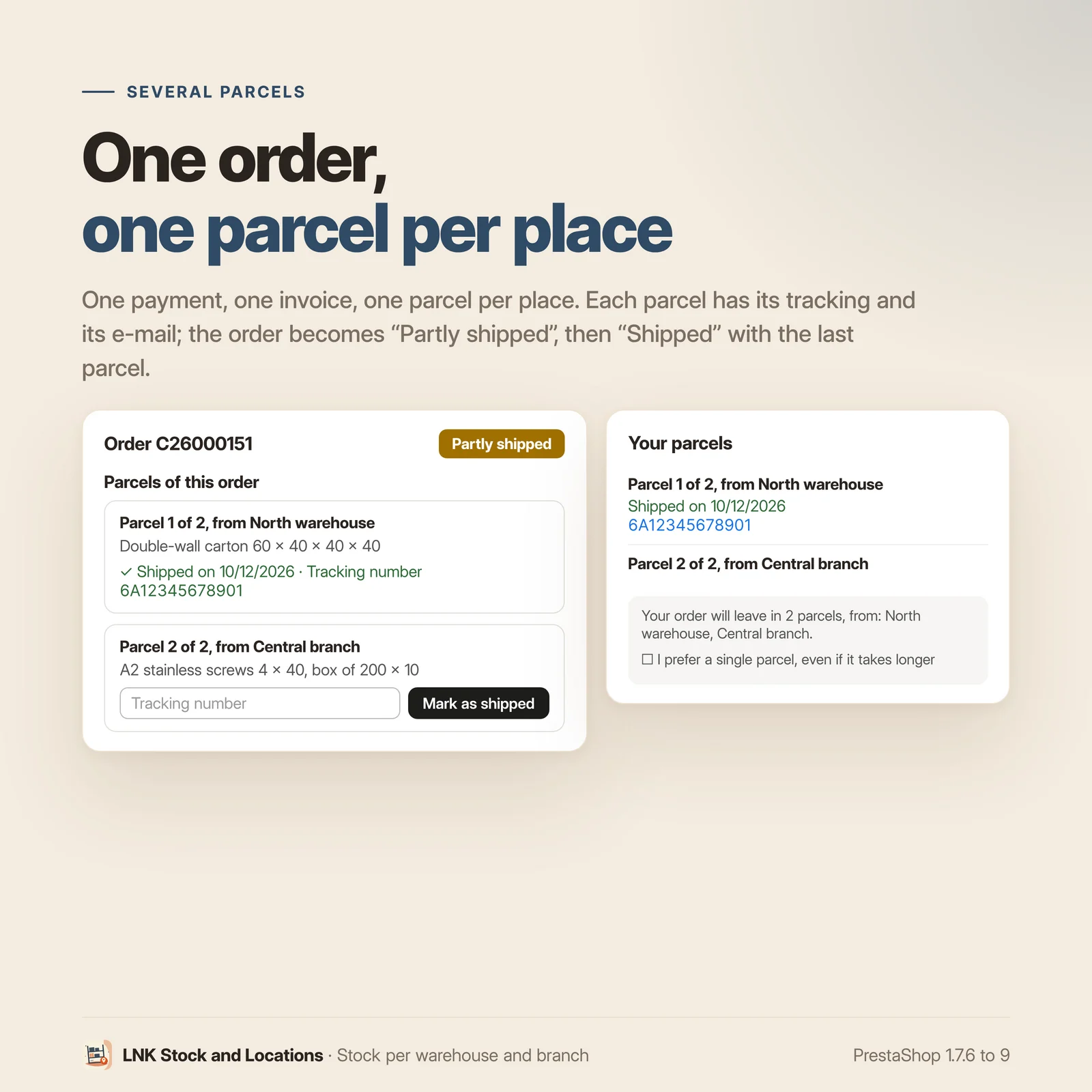
An order shipping from two warehouses stays a single PrestaShop order: one payment, one invoice, with one parcel per place. Each line is taken first from the places serving the customer's delivery zone. On the order page, each parcel has its "Mark as shipped" button and its tracking number; the customer receives an e-mail for each parcel and tracks each one from their account. When ordering, they can prefer a single parcel, even if it takes longer.
Pick-up at the branch
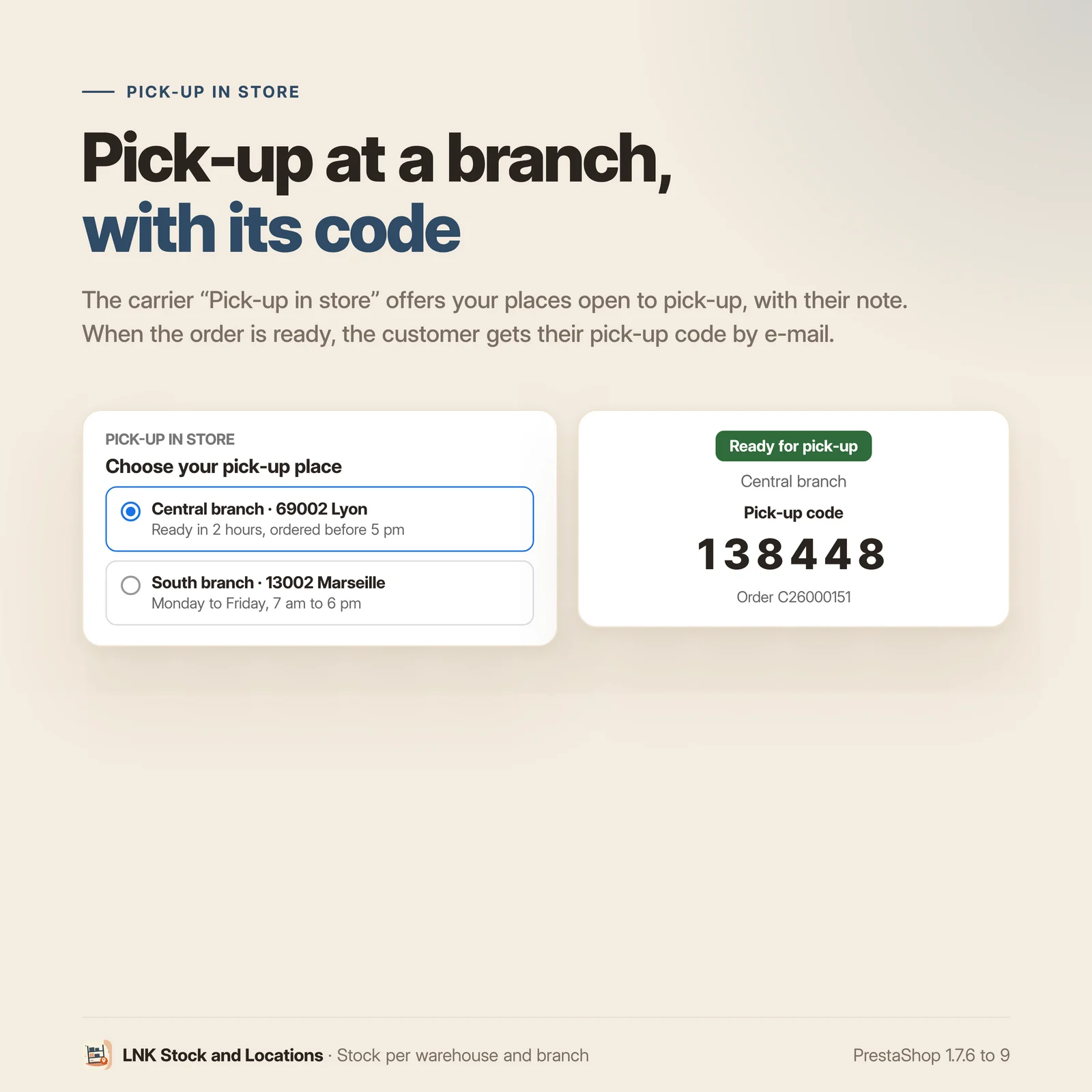
Open the places of your choice for pick-up, with a note such as "Ready tomorrow from 7 am". The "Pick-up in store" carrier offers them when ordering, and tells the customer whether everything is available at the chosen place. When the order is ready, the customer receives an e-mail with their pick-up code. You can also add extra shipping for each additional parcel.
Availability in each branch
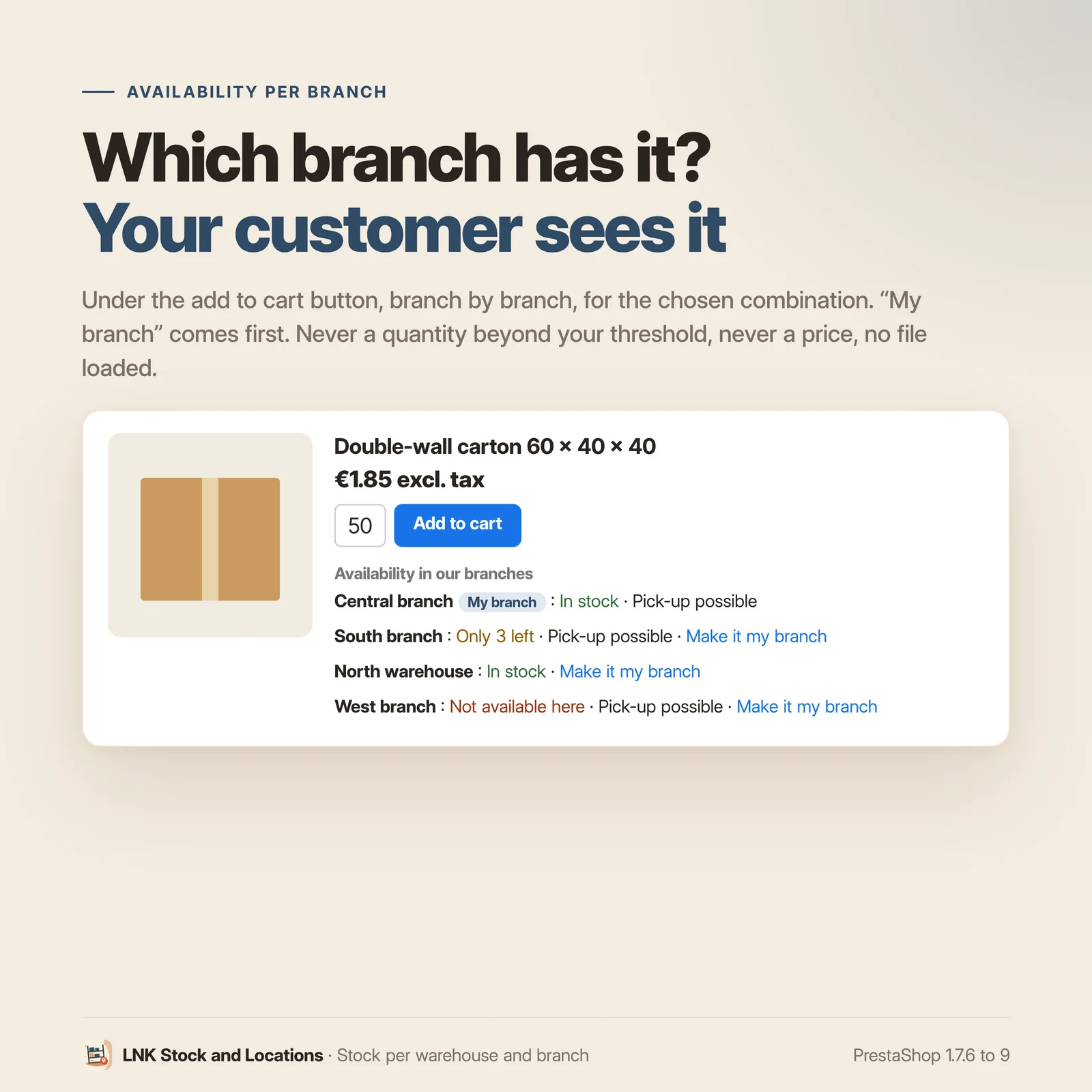
On the product page, your customers see where the product is available: "In stock", "Only 3 left" or "Not available here", branch by branch, for the chosen combination. They choose "My branch", which comes first and is offered to them for pick-up. No exact quantity beyond your threshold, no price, no file loaded: your theme dresses the block.
An API for your ERP
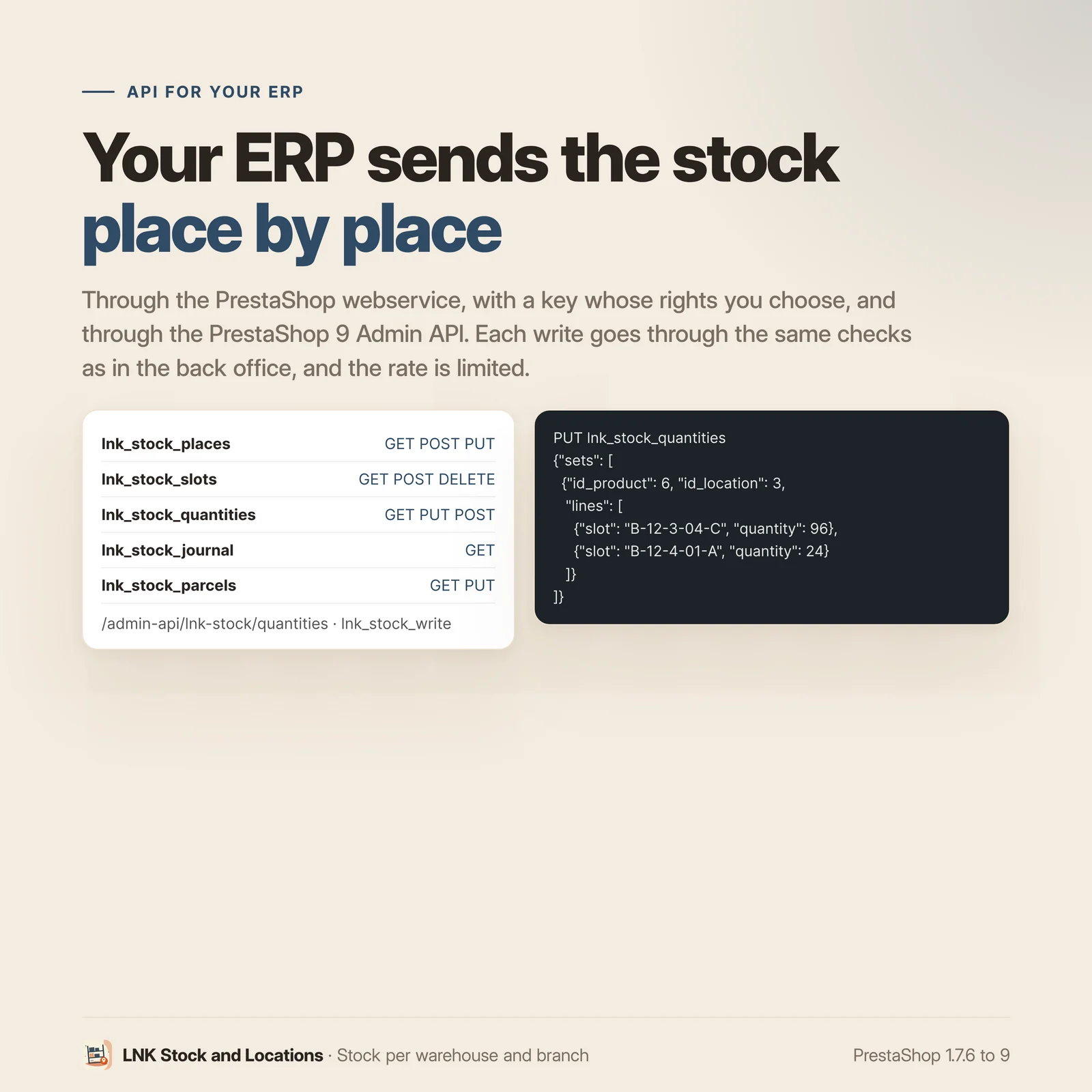
Your ERP sends the stock per place and per slot through the PrestaShop webservice, with a key whose rights you choose. Each write goes through the same checks as in the back office; an ERP that runs wild is slowed down without ever overloading the shop.
CSV import and order picking
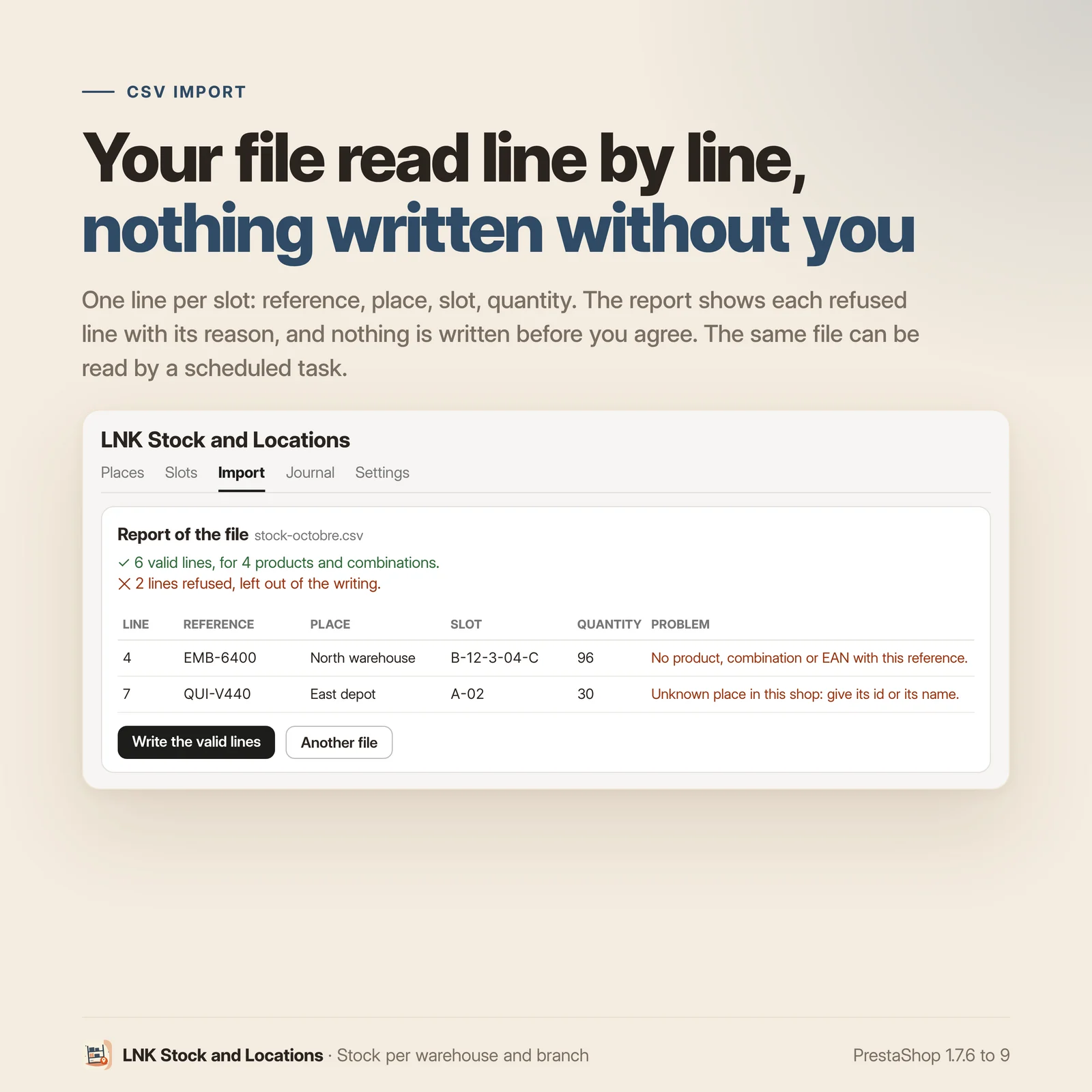
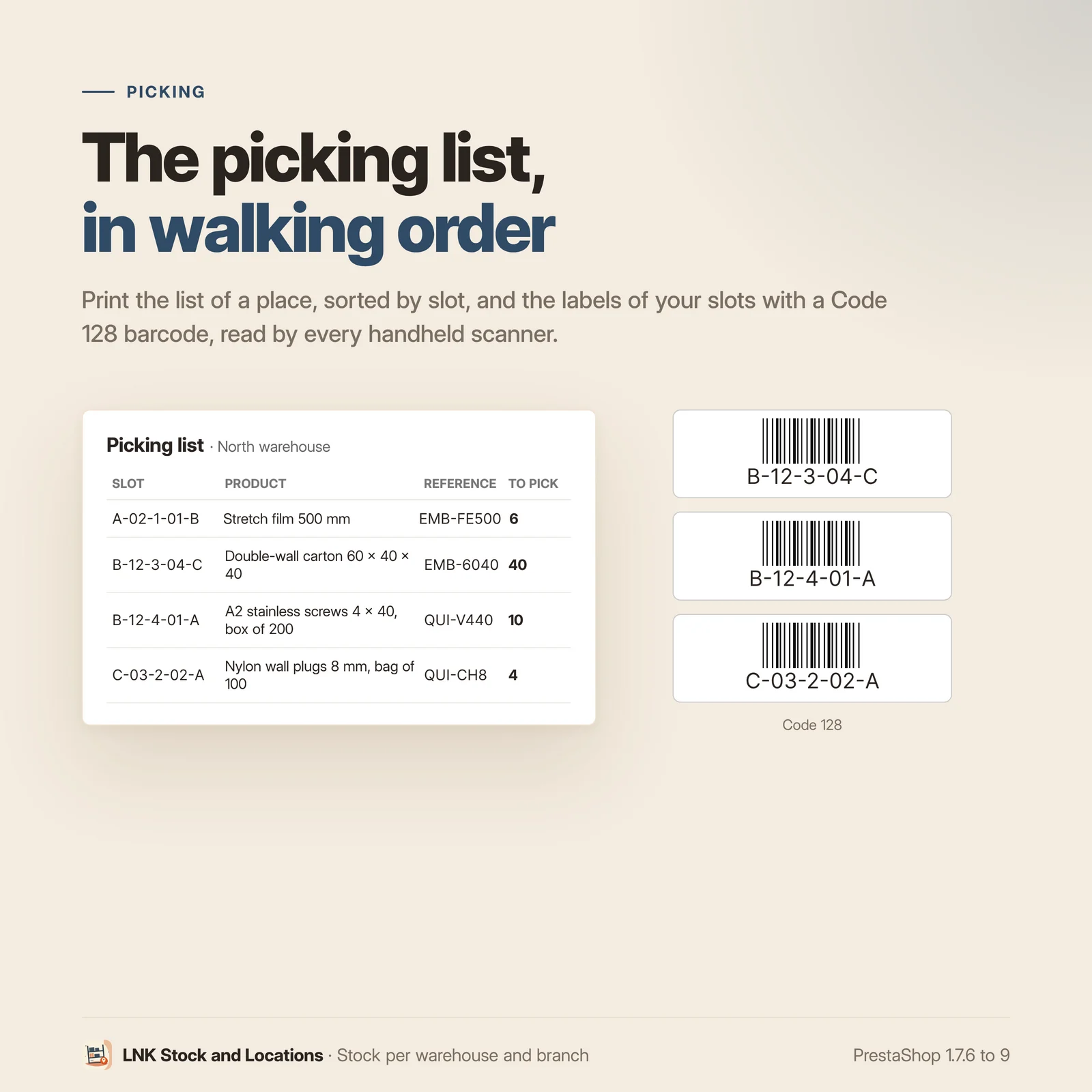
Import your stock per place and per slot from a CSV file: the module reads the file, shows each refused line with its reason, and writes nothing before you agree. The same file can be read on its own at an address of your ERP or your supplier, by a scheduled task. To prepare orders, print the list of a place in the picking order of the slots, and the labels of your slots with their barcode.
A journal of every movement
Every change is recorded: who (employee, import, ERP, scheduled task, change made in PrestaShop), the place and the slot, the quantity before and after, the PrestaShop stock before and after. When possible, PrestaShop also writes a native stock movement, with the reason "LNK Stock adjustment", visible in the movements of the Stock page.
A shop coming from PrestaShop 1.6
The advanced stock management of PrestaShop 1.6 disappeared from the screens in 1.7, but a migrated shop may have kept it on in the database, and PrestaShop 1.7 still reads it in places. The module detects it, explains it, and offers to turn it off in one click. It touches nothing without that click.
Safe by design
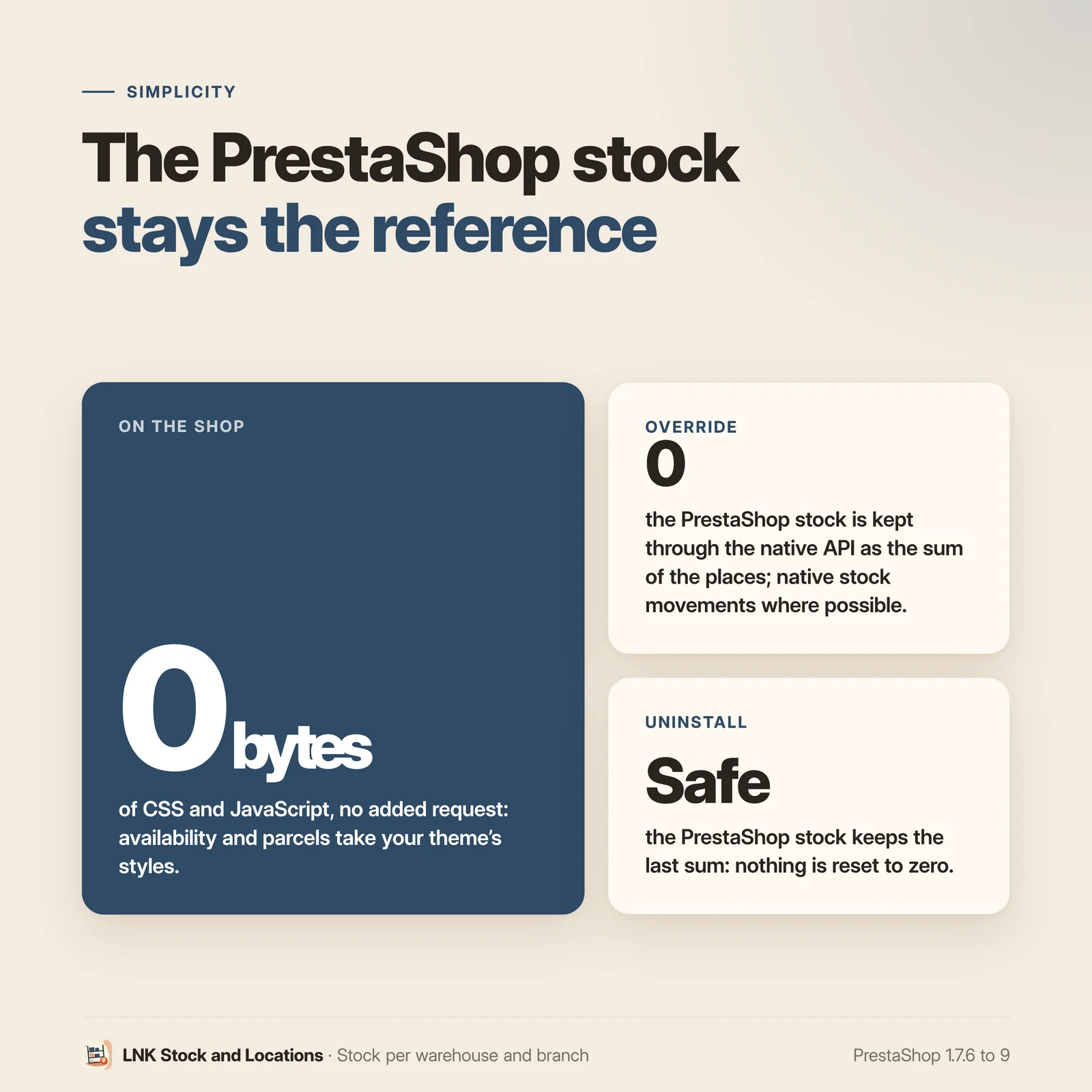
Every check is done before writing, then everything is written in one block: if something fails, the shop stays exactly as it was. In the "All shops" context, the module writes nothing. On uninstall, the PrestaShop stock keeps the last sum: nothing is reset to zero. Proven on the bench on PrestaShop 1.7.6 and 9.2.
Light and fast
0 bytes of CSS and JavaScript loaded on the front office, no request added. In the shop, the module only shows the parcels message at checkout and the list of parcels in the customer account, when an order ships from several places, with the styles of your theme.
Compatible with PrestaShop 1.7.6, 8 and 9
Two versions of the module, one per generation: 1.1 for PrestaShop 1.7.6 to 8.x, 1.9 for PrestaShop 9, with a page under Catalog and a tab on the product page. Multistore: places per shop, and the shared stock of a shop group. No override, no external call.
Frequently asked questions
How do I manage stock per warehouse or per branch in PrestaShop?
Create your places (warehouses, branches, depots) on the LNK Stock and Locations page, under Catalog. Then, on the page of each product, spread its stock over the places. The PrestaShop stock becomes the sum of the places: the shop, the cart and the orders keep reading it as before. When the module starts to follow a product, it first has PrestaShop recount what the pending orders reserve: the stock taken over is the real stock, and the journal shows no gap that is not a real one.
How do I name the storage slots of my warehouse?
Each place has its address template: you choose and order the parts (zone, aisle, bay, level, position, bin, or a part with your own name), each in numbers or letters, with its range and its separator. For example, aisles A to H, bays 01 to 20 and levels 1 to 6 give A-01-1 to H-20-6. All the slots are created in one go, in picking order.
Can a product be stored in several places in the warehouse?
Yes: in each place, one main slot and as many reserves as needed, each with its quantity. The search "what is stored in B-12?" lists the content of the slots.
My ERP writes the stock into PrestaShop. Will the module overwrite it?
No. The ERP, or PrestaShop, is right. A quantity changed through the webservice, directly in the database, on the product page or on the PrestaShop Stock page is taken back into the default place and recorded in the journal; the module never rewrites the PrestaShop stock to correct it. If a product page was open before this change, saving it is refused: just reload it.
Are the PrestaShop stock movements kept?
Yes. Each change made from the product page writes a native stock movement, with the reason "LNK Stock adjustment", visible in the movements of the Stock page. When PrestaShop cannot write one (import, scheduled task), the module's journal is the record: who, when, before, after.
My shop comes from PrestaShop 1.6 and the module flags the "advanced stock management". What should I do?
PrestaShop 1.6 had an advanced stock management per warehouse. It disappeared from the screens in 1.7, but a migrated shop may have kept it on in the database, and PrestaShop 1.7 still reads it in places (cart split by warehouse). The module spreads nothing while it is on. The button "Turn off the advanced stock management of PrestaShop 1.6", on the module page, turns it off for all shops; your quantities do not change. Nothing is done without this click.
Where does an order ship from when I have several warehouses?
Each line is taken first from the places serving the customer's delivery zone (the default place first), then, if these places do not have enough, completed from the other places. You declare the zones served on each place; with no zone declared, every place serves every zone. The order page shows which place each line ships from. The goods leave their places when the order moves to "Shipped", and come back if the order is cancelled after shipping.
Does an order shipping from two warehouses arrive in two parcels?
Yes, and it stays a single PrestaShop order: one payment, one invoice. On the order page, each parcel has its list, its "Mark as shipped" button and its tracking number. The customer receives an e-mail for each parcel and sees their tracking in their account. The order moves to "Partly shipped", then to "Shipped" with the last parcel. When ordering, the customer can ask for "a single parcel, even if it takes longer": everything then ships from a single place. Shipping costs stay those of PrestaShop, once per order.
A parcel is returned to me: how do I put it back in stock?
On the order page, "Parcel returned: put back in stock" puts its goods back into the place it shipped from and into the PrestaShop stock, with a "Product return" movement. Do not cancel the order afterwards: PrestaShop would put the same goods back in stock a second time. To refund, issue a credit slip.
Can my customers come and pick up their order at the branch?
Yes. Tick "Customers can pick up their order here" on the places concerned, with a note such as "Ready tomorrow from 7 am". The "Pick-up in store" carrier, created by the module and free by default, then offers these places when ordering; the customer sees whether everything is available at the chosen place. The order is taken first from this place. Move it to "Ready for pick-up": the customer receives an e-mail with their pick-up code; then to "Collected" once they have come by.
Can I charge shipping per parcel?
Yes, with the "Extra shipping per additional parcel" setting: an amount excluding tax added to the shipping for each parcel beyond the first, never on pick-up. It relies on a hook of PrestaShop 1.7.7 and later: on 1.7.6, shipping stays as PrestaShop computes it.
Can my ERP send the stock per place and per slot?
Yes, through the PrestaShop webservice, with a key whose rights you choose. The module adds its resources to it: places, slots, stock per place and per slot, journal and parcels. Each write goes through the same checks as in the back office, and the journal records it under the name of the key. A write that is too large, or an ERP that sends too many calls per minute, is refused without writing anything: the shop stays available. On PrestaShop 9, the Admin API also offers this data, with read and write scopes; it requires HTTPS and is not available in multistore (a limit of PrestaShop 9). The guide for your integrator is in docs/API.md.
Can I import my stock from a file?
Yes, in the "Import" tab: a CSV file with one line per slot (reference, place, slot, quantity), whose template can be downloaded on the same page. The reference can be that of the product, of the combination or the EAN; the place, its ID or its name. The module first reads the file and shows each refused line with its reason; nothing is written before you click "Write the valid lines". For a product, the lines of a place replace what this place held; the other places keep theirs.
If your ERP or your supplier drops this file at an address (http, https, ftp or ftps), enter it in the advanced settings: the cron task of your host calls the address shown in the "Import" tab, for example every hour, and the valid lines are written. The last run and its result are shown on the page.
Does the module help me prepare orders?
Yes. In the "Slots" tab, the "Picking list" of a place gives what the orders still expect, product by product, in the picking order of the slots, with a checkbox per line. The "Labels of the slots shown" print three per row on A4, with a Code 128 barcode read by any handheld scanner (can be turned off in the settings).
Does it work with multistore?
Each place belongs to one shop. If your shops share their stock (shop group), the shared stock is the sum of the places of all these shops. Stock is written shop by shop: in the "All shops" context, the module writes nothing.
What happens if I uninstall the module?
The PrestaShop stock keeps the last sum written: nothing is reset to zero. The places, the slots and the journal of the module are deleted. The "Pick-up in store" carrier and the order states of the module are removed from the lists, but stay readable in past orders; they come back as they were if you reinstall the module.
Does the module show anything in the shop?
Yes, where it is useful, with the styles of your theme and without loading any file:
- on the product page, under the add to cart button, the availability in each branch: "In stock", "Only 3 left" or "Not available here". Never a quantity beyond the threshold (5 by default, adjustable), never a price. It follows the chosen combination;
- the customer chooses "My branch": it comes first, stays kept for their account, and it is offered by default for pick-up in store;
- the choice of the pick-up place at checkout, the parcels message when an order ships from several places, the parcels or the pick-up in the customer account.
Your theme can also show an availability line in product lists and the choice of the branch in the header: the guide for your integrator is in docs/THEME-CONTRACT.md. A setting turns off the display on the product page.
Release history
-
Version 1.9.0 PrestaShop 9
New
- Stock places (warehouse, branch, depot), one shop each: name in three languages, address, phone and opening hours folded away.
- Storage slots: address template per place (zone, aisle, bay, level, position, bin or a part with your own name, in numbers or letters, with range and separator), creation in one go in picking order, manual addition, search for what is stored at an address, deletion of empty slots.
- Product page tab: stock of the product or of each combination per place and per slot, main slot first, then reserves.
- PrestaShop stock kept as the sum of the places, written through the native API with a "LNK Stock adjustment" stock movement whenever PrestaShop can write one; native "Location" field filled with the main slot of the default place.
- The ERP or PrestaShop is right: a quantity changed on the product page, the Stock page, through the webservice or in SQL is taken back into the default place, never overwritten; "Check the gaps now" button; a product page opened before a change is refused on saving.
- Start of tracking a product: reservations of pending orders recounted by PrestaShop first, no false gap in the journal.
- Checks before any writing and a single transaction; nothing is written in the "All shops" context.
- Journal of every change (who, before and after, PrestaShop stock, native movement or not).
- Orders: each line is taken from the places serving the delivery zone (the default place first), then completed from the other places if needed (adjustable); the goods leave their places on shipping and come back if the order is cancelled after shipping; "Places of this order" block on the order page; quantity reserved per place on the product page.
- Delivery zones served by each place.
- Parcels: an order stays a single PrestaShop order, with one parcel per place; on the order page, each parcel with its lines, "Mark as shipped" with its tracking number, an e-mail to the customer for each parcel (fr, en, ar), "Partly shipped" state then "Shipped" with the last parcel; "Parcel returned: put back in stock" puts the goods back into their place and into the PrestaShop stock.
- Customer account: the order details show each parcel, its state and its tracking link.
- Checkout: "Your order will leave in N parcels" and the choice "I prefer a single parcel, even if it takes longer".
- Pick-up in store: "Pick-up in store" carrier created on installation (free by default, adjustable like any carrier, removed on uninstallation); places open for pick-up with their note ("ready tomorrow from 7 am"); choice of the place at checkout, with "Everything is available here" or "Part of your order comes from another place first"; order taken first from the pick-up place; "Being prepared for pick-up", "Ready for pick-up" (e-mail to the customer with a pick-up code, fr, en, ar) and "Collected" states.
- API for ERPs, through the native PrestaShop webservice (rights per key): places, slots, stock per place and per slot (written only through the central writing of the module, source "ERP" and name of the key in the journal), journal, parcels (shipping with tracking); maximum size per write and number of writes per minute and per key; guide docs/API.md.
- Admin API of PrestaShop 9: places, stock per place and per slot (read, and write through the central writing), journal, parcels (shipping with tracking), scopes lnk_stock_read and lnk_stock_write, same limits (413, 429).
- Import of a CSV file (reference of the product, of the combination or EAN; place by ID or by name; slot; quantity) in two steps: a report line by line, then writing of the valid lines through the central writing of the module, source "Import" in the journal; template to download; UTF-8 or Windows-1252, semicolon, comma or tab separator, 20 MB and 50,000 lines at most.
- Scheduled import: the file is read at an http, https, ftp or ftps address (advanced setting) by a cron task that calls the module's address with its token; last run shown; source "Scheduled task" in the journal.
- Picking list of a place, to print: what the orders still expect, product by product, in the picking order of the slots.
- Slot labels, to print, with a Code 128 barcode ("Barcode on slot labels" setting).
- Pick-up in store: a place refused at validation (closed to pick-up, or no place) is reported to the customer in the place block, in the multi-step checkout as in the one-page checkout of PrestaShop 9 (ps_onepagecheckout).
- Shop: availability of each product or combination per branch under the add to cart button (setting, on by default; "In stock", "Only N left" from an adjustable threshold, "Not available here", reservations deducted, never a price), redrawn when the combination changes; branch of the customer kept for their account or the visitor, first in the block, offered by default for pick-up; hooks displayLnkStockAvailability and displayLnkStockListing, lnk_stock widget (availability, listing, agency modes) with the guard of the theme contract (docs/THEME-CONTRACT.md); no file loaded in the shop.
- Extra shipping per additional parcel (setting, excluding tax, PrestaShop 1.7.7 and later), never on pick-up.
- Guard against the old advanced stock management of PrestaShop 1.6: warning and a button to turn it off, never a silent change.
- Uninstallation without touching the PrestaShop stock.
- Multistore: places per shop, shared stock of a shop group, settings per shop, per group or common.
- French, English and Arabic (right to left).
-
Version 1.1.0 PrestaShop 1.7.6 to 8.x
New
- Stock places (warehouse, branch, depot), one shop each: name in three languages, address, phone and opening hours folded away.
- Storage slots: address template per place (zone, aisle, bay, level, position, bin or a part with your own name, in numbers or letters, with range and separator), creation in one go in picking order, manual addition, search for what is stored at an address, deletion of empty slots.
- Product page tab: stock of the product or of each combination per place and per slot, main slot first, then reserves.
- PrestaShop stock kept as the sum of the places, written through the native API with a "LNK Stock adjustment" stock movement whenever PrestaShop can write one; native "Location" field filled with the main slot of the default place.
- The ERP or PrestaShop is right: a quantity changed on the product page, the Stock page, through the webservice or in SQL is taken back into the default place, never overwritten; "Check the gaps now" button; a product page opened before a change is refused on saving.
- Start of tracking a product: reservations of pending orders recounted by PrestaShop first, no false gap in the journal.
- Checks before any writing and a single transaction; nothing is written in the "All shops" context.
- Journal of every change (who, before and after, PrestaShop stock, native movement or not).
- Orders: each line is taken from the places serving the delivery zone (the default place first), then completed from the other places if needed (adjustable); the goods leave their places on shipping and come back if the order is cancelled after shipping; "Places of this order" block on the order page; quantity reserved per place on the product page.
- Delivery zones served by each place.
- Parcels: an order stays a single PrestaShop order, with one parcel per place; on the order page, each parcel with its lines, "Mark as shipped" with its tracking number, an e-mail to the customer for each parcel (fr, en, ar), "Partly shipped" state then "Shipped" with the last parcel; "Parcel returned: put back in stock" puts the goods back into their place and into the PrestaShop stock.
- Customer account: the order details show each parcel, its state and its tracking link.
- Checkout: "Your order will leave in N parcels" and the choice "I prefer a single parcel, even if it takes longer".
- Pick-up in store: "Pick-up in store" carrier created on installation (free by default, adjustable like any carrier, removed on uninstallation); places open for pick-up with their note ("ready tomorrow from 7 am"); choice of the place at checkout, with "Everything is available here" or "Part of your order comes from another place first"; order taken first from the pick-up place; "Being prepared for pick-up", "Ready for pick-up" (e-mail to the customer with a pick-up code, fr, en, ar) and "Collected" states.
- API for ERPs, through the native PrestaShop webservice (rights per key): places, slots, stock per place and per slot (written only through the central writing of the module, source "ERP" and name of the key in the journal), journal, parcels (shipping with tracking); maximum size per write and number of writes per minute and per key; guide docs/API.md.
- Import of a CSV file (reference of the product, of the combination or EAN; place by ID or by name; slot; quantity) in two steps: a report line by line, then writing of the valid lines through the central writing of the module, source "Import" in the journal; template to download; UTF-8 or Windows-1252, semicolon, comma or tab separator, 20 MB and 50,000 lines at most.
- Scheduled import: the file is read at an http, https, ftp or ftps address (advanced setting) by a cron task that calls the module's address with its token; last run shown; source "Scheduled task" in the journal.
- Picking list of a place, to print: what the orders still expect, product by product, in the picking order of the slots.
- Slot labels, to print, with a Code 128 barcode ("Barcode on slot labels" setting).
- Pick-up in store: a place refused at validation (closed to pick-up, or no place) is reported to the customer in the place block.
- Shop: availability of each product or combination per branch under the add to cart button (setting, on by default; "In stock", "Only N left" from an adjustable threshold, "Not available here", reservations deducted, never a price), redrawn when the combination changes; branch of the customer kept for their account or the visitor, first in the block, offered by default for pick-up; hooks displayLnkStockAvailability and displayLnkStockListing, lnk_stock widget (availability, listing, agency modes) with the guard of the theme contract (docs/THEME-CONTRACT.md); no file loaded in the shop.
- Extra shipping per additional parcel (setting, excluding tax, PrestaShop 1.7.7 and later), never on pick-up.
- Guard against the old advanced stock management of PrestaShop 1.6: warning and a button to turn it off, never a silent change.
- Uninstallation without touching the PrestaShop stock.
- Multistore: places per shop, shared stock of a shop group, settings per shop, per group or common.
- French, English and Arabic (right to left).