LNK Prices Excl. and Incl. VAT, both prices and the right VAT mention on your shop
A business buyer compares your prices excluding VAT, a consumer pays including VAT, and a customer in Switzerland or Réunion pays no French VAT. LNK Prices Excl. and Incl. VAT shows the other amount next to every price, the totals excl. VAT, VAT and incl. VAT in the cart and on the order, and, when a price has no VAT, the legal reason with the article it rests on.
- Version 1.1.0 · PrestaShop 1.7.6 to 8.x
- Version 1.9.0 · PrestaShop 9
- PrestaShop 1.7.6 to 9.x
- PHP 7.1 to 8.4
- No override
Screenshots
Key points
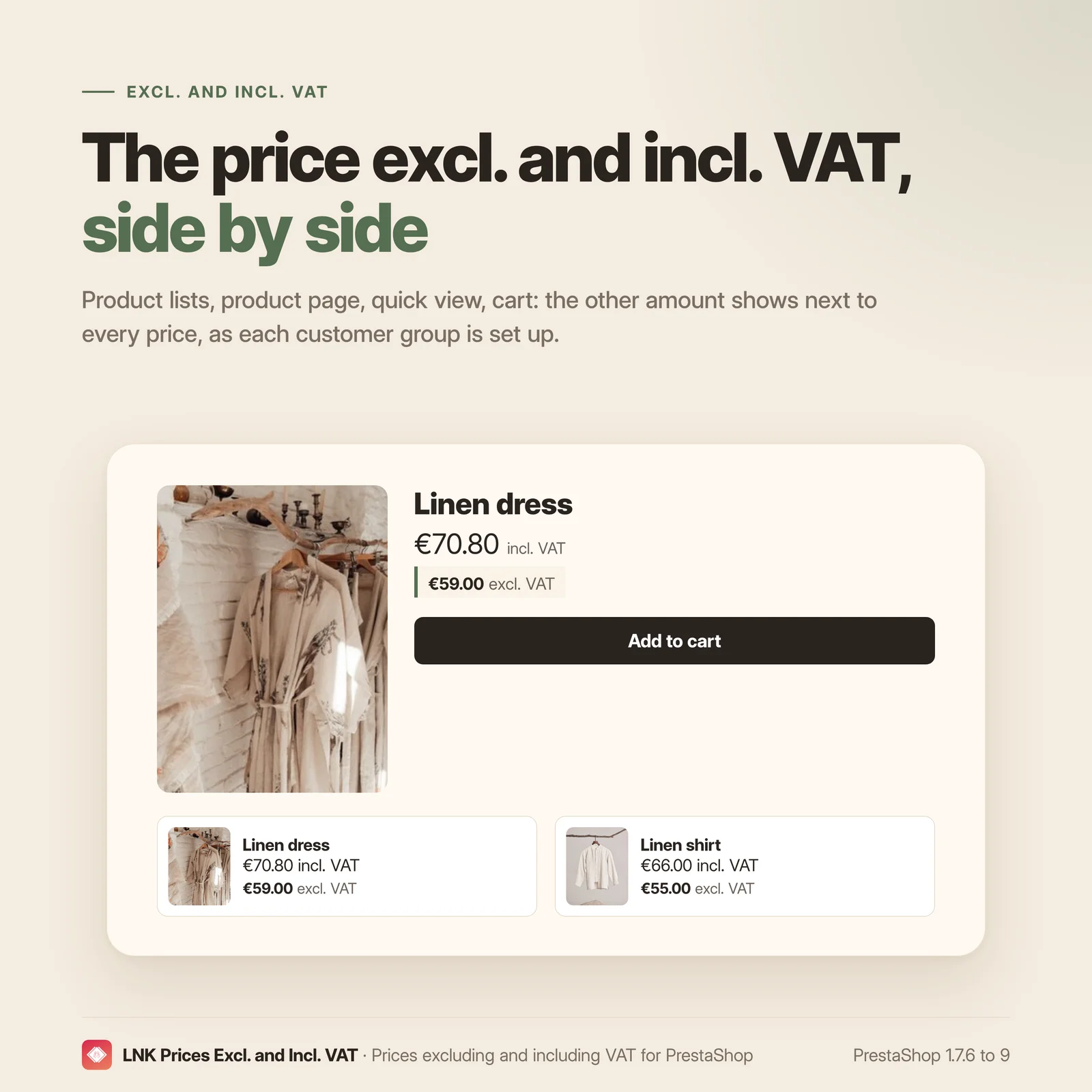
- The price excl. or incl. VAT next to every price: lists, product page, quick view, cart.
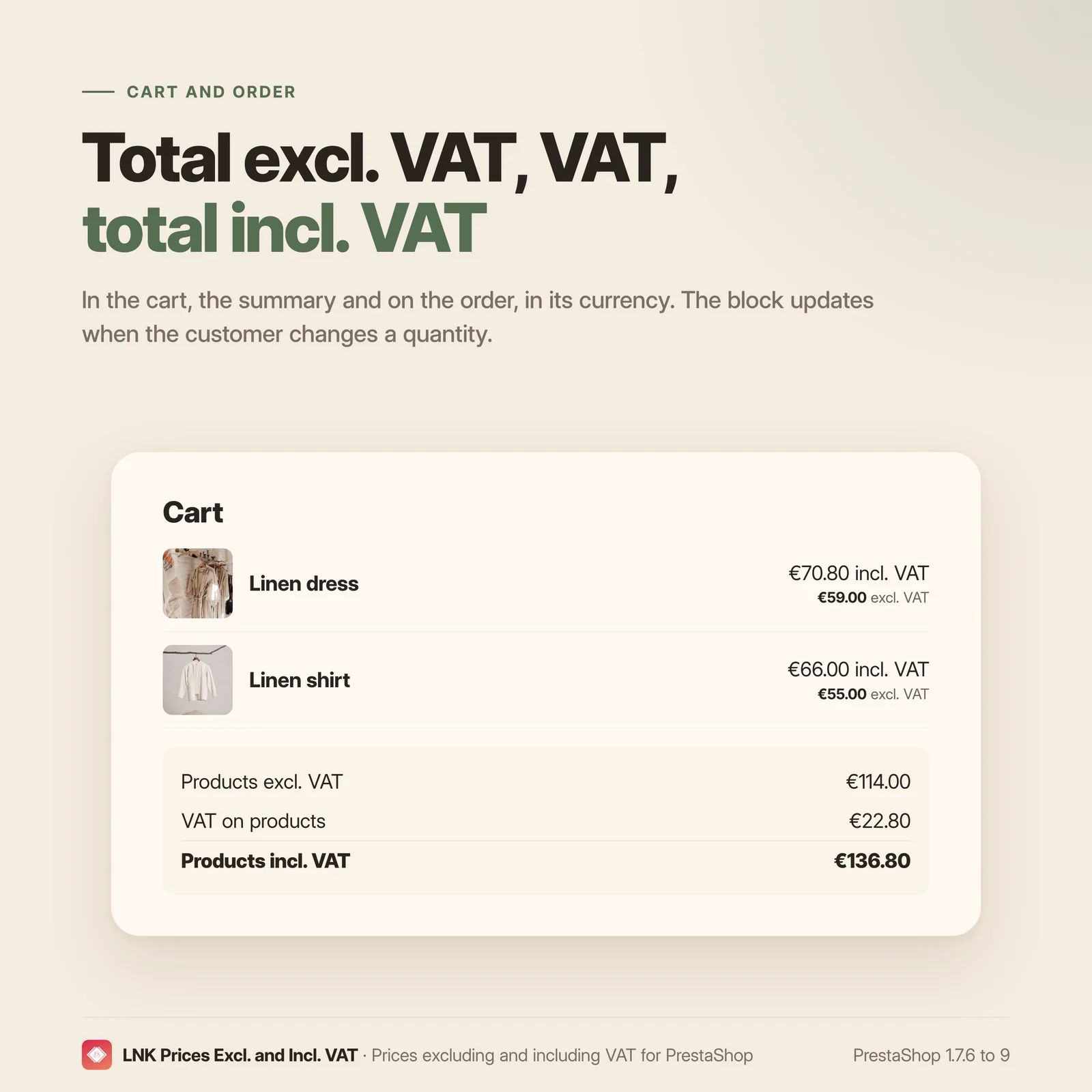
- Totals excl. VAT, VAT and incl. VAT in the cart, the order summary and on the order.
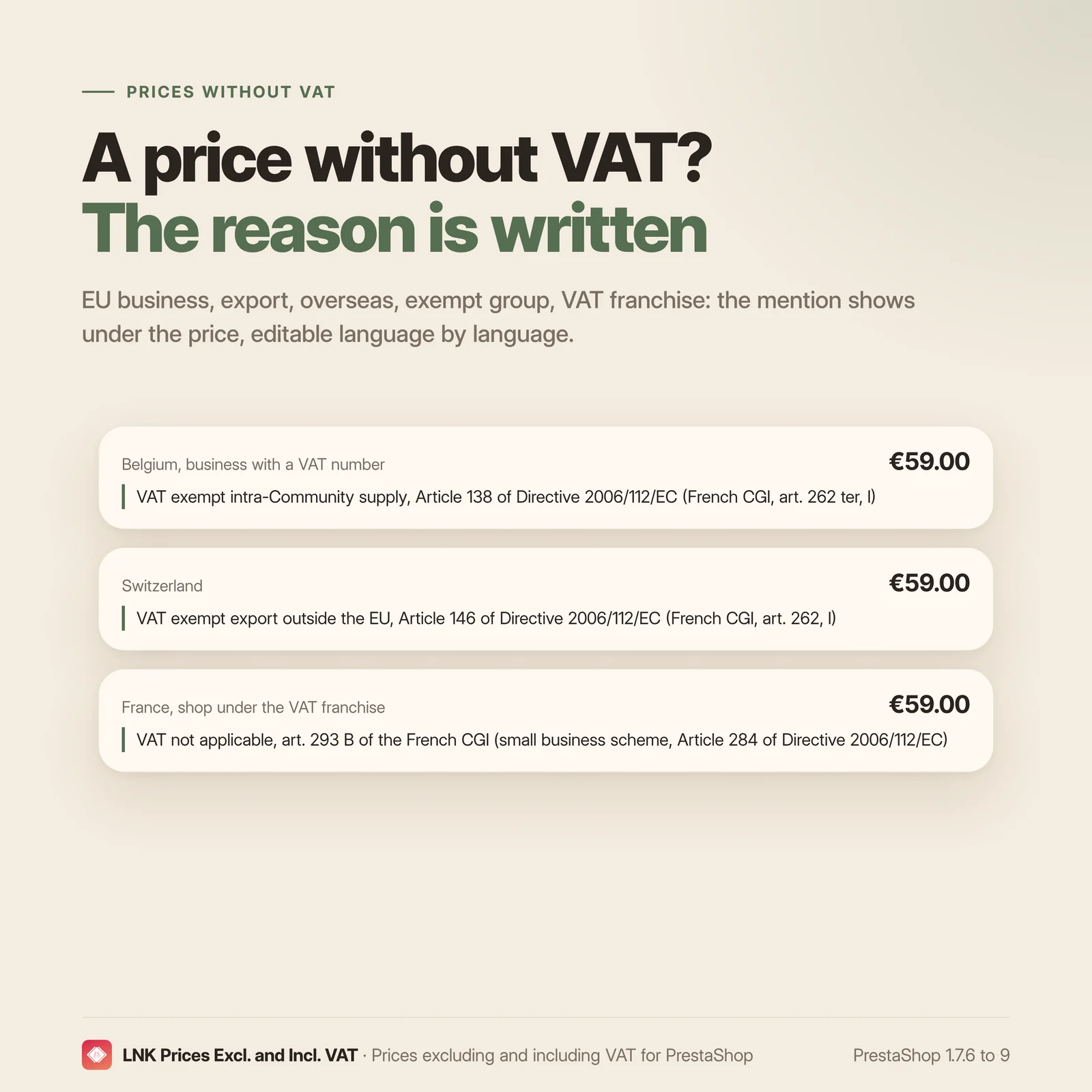
- The legal reason for a VAT-free price, with the article of the French Tax Code.
- Intra-Community supply, export outside the EU, overseas in two cases, exempt group.
- Micro-business: mention "VAT not applicable, art. 293 B of the French CGI", a single price.
- Monaco treated like France.
- Automatic switch to the Code of taxes on goods and services on 1 January 2027.
- Live preview by case and by customer group, price check page.
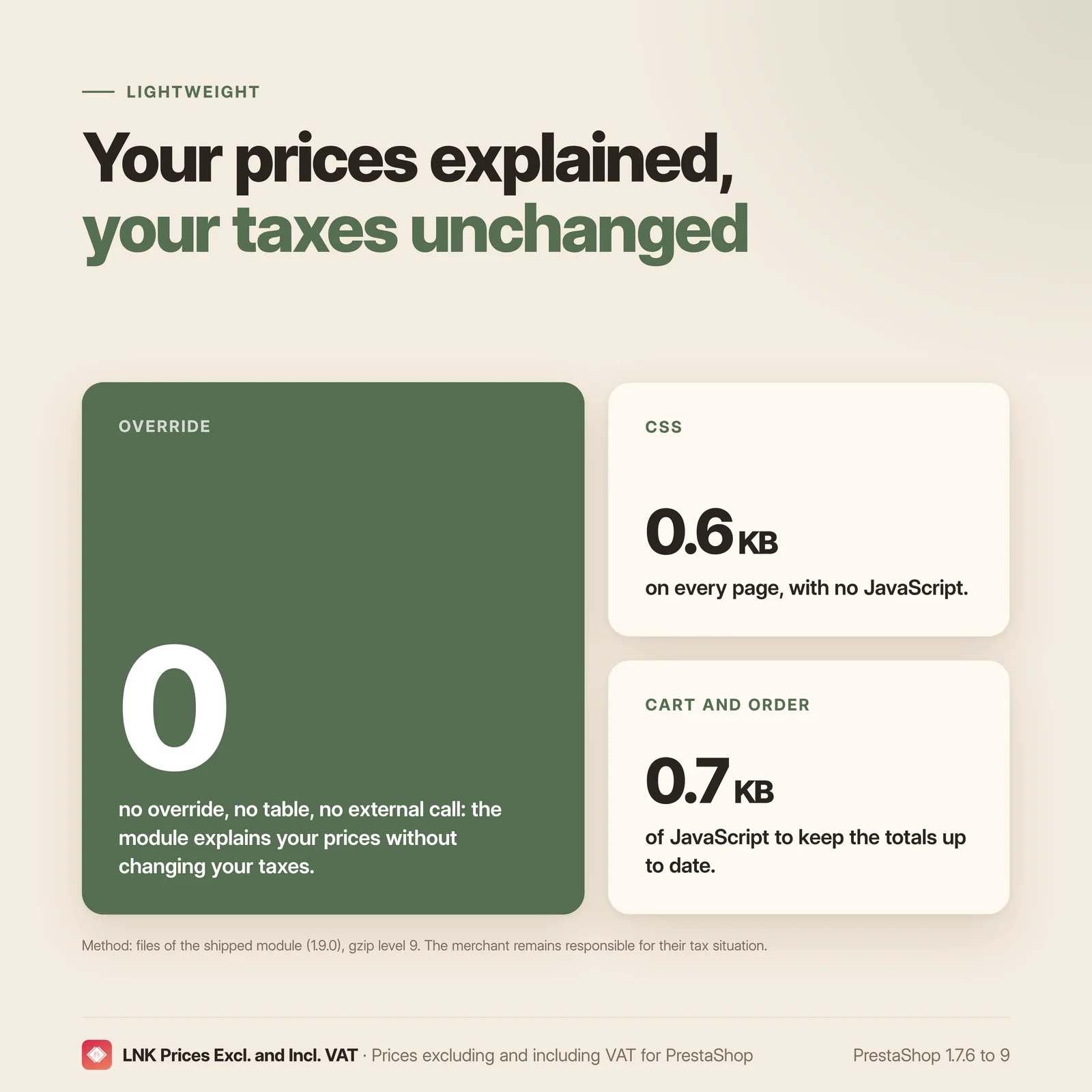
- 0.6 KB of CSS on the shop, no JavaScript outside the cart and the order.
- No override, no table, no external call.
- Multistore: settings per shop, per group or shared, with the scope shown.
- French, English and Arabic (right to left).
- PrestaShop 1.7.6 to 9.
The second price wherever the customer looks
Product lists, product page, quick view, cart lines: the module adds the other amount, excl. VAT when the customer sees prices incl. VAT, and incl. VAT when they see prices excl. VAT, as set for each PrestaShop customer group. The amount always follows the price shown by your theme, including quantity, volume discount or group price.
Totals excl. VAT, VAT and incl. VAT in the cart and on the order
In the cart and the order summary, a block gives the total of the products excl. VAT, the VAT and the total incl. VAT. On the order confirmation and in the order history, the order totals, in the order's currency. The cart block updates when the customer changes a quantity.
The legal reason for a VAT-free price
When a price has no VAT, the module says why, with the article of the French Tax Code (CGI):
- supply to a business in another EU country with a VAT number (art. 262 ter, I);
- export outside the European Union (art. 262, I);
- shipment to Guadeloupe, Martinique or Réunion (art. 262, I and 294, 2), with the local VAT and the octroi de mer that may be due on arrival;
- shipment to French Guiana or Mayotte, where VAT does not apply (art. 294, 1);
- VAT-exempt customer group, with the legal basis you enter.
Monaco follows French VAT: a VAT-free price for Monaco is never presented as an export. On 1 January 2027, VAT moves from the CGI to the Code of taxes on goods and services (CIBS): the mentions shipped with the module switch to the new articles on their own.
Micro-business under the VAT franchise
One checkbox is enough: each price shows on its own, without "excl. VAT" or "incl. VAT" and without a VAT line, with the mandatory mention "VAT not applicable, art. 293 B of the French CGI".
A live preview, case by case
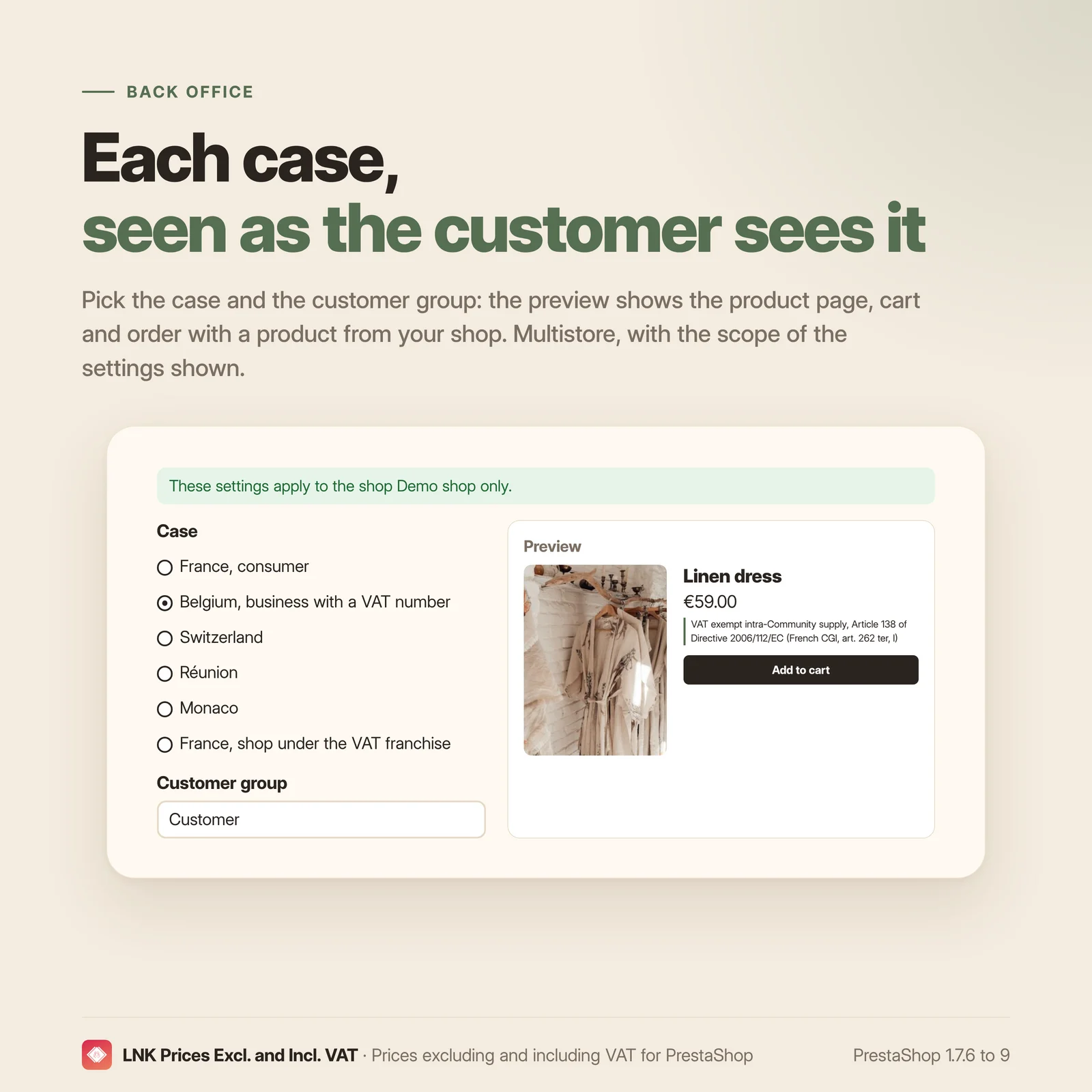
The back office shows the product page, the cart and the order as the customer sees them, with a product from your shop. Pick the case (France consumer, Belgian business, Switzerland, Réunion, Monaco, VAT franchise) and the customer group: the preview follows your texts even before you save them. The price check page shows, for your best sellers, what each customer group sees depending on the delivery country.
Light and fast
Figures measured on the shipped module, compressed with gzip (level 9). On every page: 0.6 KB of CSS, no JavaScript. On the cart and the order only: 0.7 KB of JavaScript to keep the totals block up to date. The price lines are rendered by the server, with no extra request.
Compatible with PrestaShop 1.7.6, 8 and 9
Two versions of the module, one per generation: 1.1 for PrestaShop 1.7.6 to 8.x, 1.9 for PrestaShop 9, with a native settings page in each back office, under International. Classic and Hummingbird themes, with a template your theme can override. No override, no table, no external call.
Frequently asked questions
Does the module change my taxes?
No. Prices, taxes and their rules stay those of PrestaShop and your modules. The module shows the other amount, excl. or incl. VAT, the VAT totals, and explains a VAT-free price. If a price should carry VAT and does not, fix the tax rule in International › Taxes.
Are the VAT mentions correct?
They were checked on Légifrance and the BOFiP on 8 October 2026, for a French shop selling goods. They are default texts: you remain solely responsible for your tax situation and for the mentions shown on your prices and invoices. Check them and adapt them, with your accountant if needed. Each mention can be edited language by language, and an empty mention shows nothing.
What happens on 1 January 2027?
VAT leaves the French Tax Code (CGI) for the Code of taxes on goods and services (CIBS) (ordonnance n° 2025-1247). The mentions shipped for intra-Community supply, export and the VAT franchise switch to the new articles on their own (L. 213-12 and L. 223-3). A mention you have edited is never touched. The old references remain valid on invoices until 30 June 2028.
When does the module show "VAT exemption, art. 262 ter, I of the CGI"?
When the price has no VAT and the delivery address is in another EU country with a VAT number. The exemption requires the buyer to be registered for VAT in another Member State (number checked in VIES), the goods to actually leave France, and you to file the recapitulative statement. For goods, the invoice does not carry the mention "Autoliquidation" (reverse charge): the buyer self-assesses the acquisition in their own country. The module does not check the number; your VAT module decides on the VAT-free price.
What about a consumer in another EU country?
A distance sale to an EU consumer carries French VAT below 10 000 € of sales per year, then the VAT of the customer's country, declared through the One-Stop Shop (OSS). A VAT-free price for an EU consumer is therefore a tax rule error: the module then shows the neutral mention "No VAT applied to this price".
How are the French overseas departments handled?
A shipment from mainland France to Guadeloupe, Martinique or Réunion is exempt like an export (art. 262, I and 294, 2 of the CGI); the customer may pay the local VAT and the octroi de mer on arrival. In French Guiana and Mayotte, VAT does not apply (art. 294, 1); octroi de mer may be due. Each case has its own mention. Saint Barthélemy, Saint Martin, Saint Pierre and Miquelon, French Polynesia, New Caledonia and Wallis and Futuna take the export mention.
My shop is a micro-business: what should I do?
Tick "My shop is under the VAT franchise". Each price shows on its own, without "excl. VAT" or "incl. VAT" and without a VAT line, with the mention "VAT not applicable, art. 293 B of the French CGI". Showing a VAT amount would make you liable for that VAT: the module never does so in this mode.
What about Monaco?
Monaco is within the French VAT territory: a delivery to Monaco carries French VAT, as in France. The module never presents a price for Monaco as an export, and the preview warns you if your tax rules leave Monaco out.
Can I show prices excl. VAT to my business customers?
Yes. The main price follows the setting of each PrestaShop customer group (prices excl. or incl. VAT), and the module adds the other amount. For consumers, the price incl. VAT must remain the main price (arrêté du 3 décembre 1987); the price excl. VAT shows next to it.
Does the module work with multistore?
Yes. Settings apply to all shops, to a group or to a single shop, and the page always shows their scope and the shops that have their own settings. A new shop takes over the settings of the copied shop; a deleted shop takes its settings away.
Can I change the look of the price lines?
Yes. The module sets no colour and no size: your theme decides. To change the template, copy
views/templates/hook/line.tpl into themes/<votre thème>/modules/lnk_pricedisplay/views/templates/hook/.
What is left if I uninstall the module?
Nothing. The module has no table and no override: uninstalling removes its settings and its tab.
Release history
-
Version 1.9.0 PrestaShop 9
New
- The price excluding or including VAT next to every price: product lists, product page, quick view, cart lines. It follows the price the theme shows (quantity, tiered price, group price).
- Excl. VAT, VAT and incl. VAT totals in the cart and the checkout summary, and the order totals on its confirmation and in the order history, in the order currency.
- Legal reason of a price without VAT, with the article of the French Tax Code (CGI): intra-Community supply (art. 262 ter, I), export (art. 262, I), Guadeloupe, Martinique and Réunion (art. 262, I and 294, 2), French Guiana and Mayotte (art. 294, 1), VAT-exempt customer group. Mentions checked on Légifrance and BOFiP, editable language by language.
- VAT franchise (micro-business): a single price, without VAT lines, with the mention "VAT not applicable, art. 293 B of the French CGI".
- Automatic switch to the French CIBS on 1 January 2027 for the shipped mentions (art. L. 213-12 and L. 223-3); a mention you changed stays as it is.
- Settings page on the common look of LNK modules, under International, with a live preview of the product page, the cart and the order, per case (France, Belgian business, Switzerland, Réunion, Monaco, VAT franchise) and per customer group.
- Price audit: what the product page shows per customer group and delivery country.
- Multistore: settings for all shops, a group or one shop, with their scope shown; a new shop takes over those of the copied shop.
- French, English and Arabic, right to left included.
Changes
- Takeover of the "display price" module (1.0.0): Monaco follows French VAT, and overseas departments get two mentions depending on whether local VAT applies.
-
Version 1.1.0 PrestaShop 1.7.6 to 8.x
New
- The price excluding or including VAT next to every price: product lists, product page, quick view, cart lines. It follows the price the theme shows (quantity, tiered price, group price).
- Excl. VAT, VAT and incl. VAT totals in the cart and the checkout summary, and the order totals on its confirmation and in the order history, in the order currency.
- Legal reason of a price without VAT, with the article of the French Tax Code (CGI): intra-Community supply (art. 262 ter, I), export (art. 262, I), Guadeloupe, Martinique and Réunion (art. 262, I and 294, 2), French Guiana and Mayotte (art. 294, 1), VAT-exempt customer group. Mentions checked on Légifrance and BOFiP, editable language by language.
- VAT franchise (micro-business): a single price, without VAT lines, with the mention "VAT not applicable, art. 293 B of the French CGI".
- Automatic switch to the French CIBS on 1 January 2027 for the shipped mentions (art. L. 213-12 and L. 223-3); a mention you changed stays as it is.
- Settings page on the common look of LNK modules, under International, with a live preview of the product page, the cart and the order, per case (France, Belgian business, Switzerland, Réunion, Monaco, VAT franchise) and per customer group.
- Price audit: what the product page shows per customer group and delivery country.
- Multistore: settings for all shops, a group or one shop, with their scope shown; a new shop takes over those of the copied shop.
- French, English and Arabic, right to left included.
Changes
- Takeover of the "display price" module (1.0.0): Monaco follows French VAT, and overseas departments get two mentions depending on whether local VAT applies.