 Module · LNK Withdrawal
The online withdrawal form for your PrestaShop shop
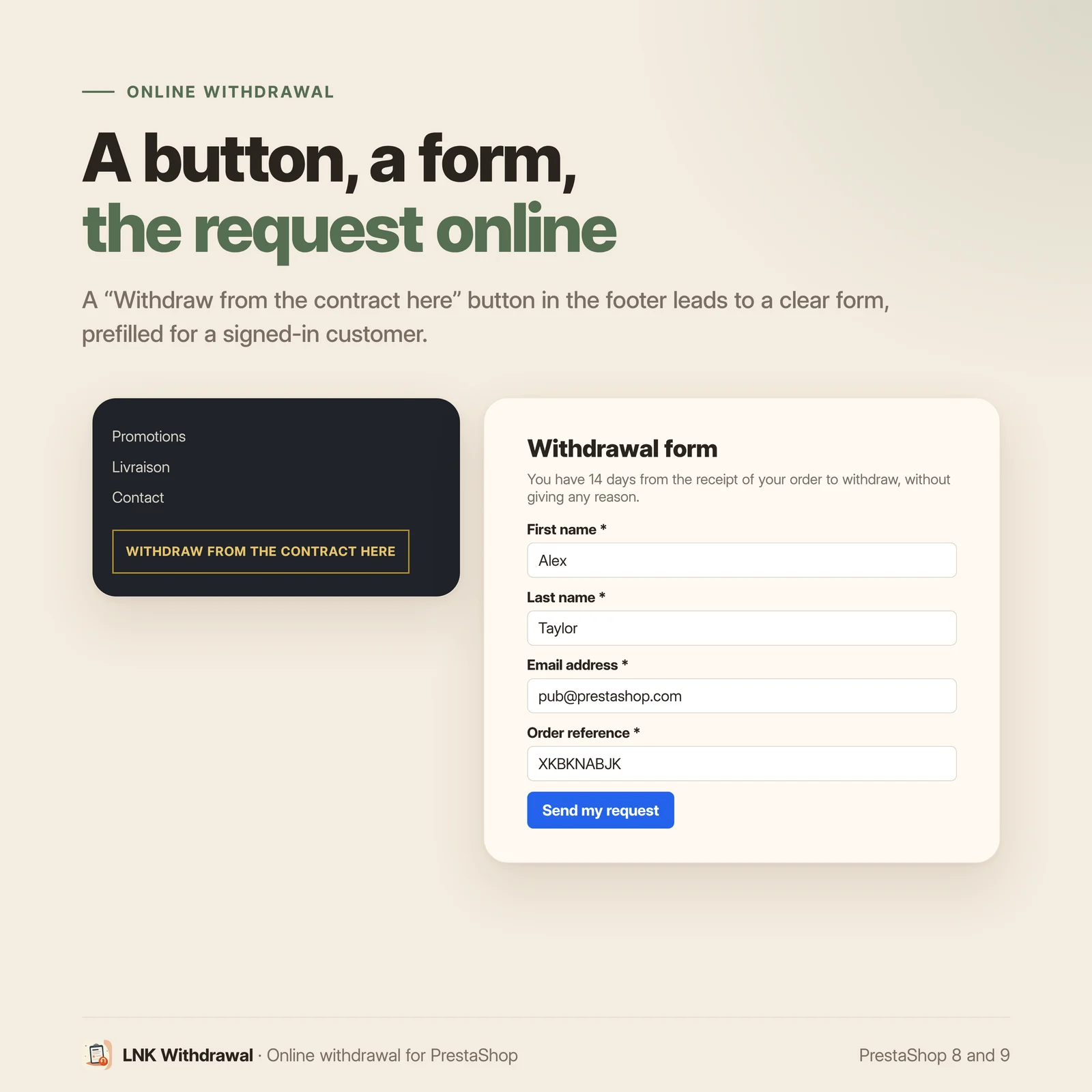
Since 19 June 2026, an online shop in France must let the consumer withdraw directly online and acknowledge receipt on a durable medium. LNK Withdrawal installs the whole journey: a button, a two-step form, a timestamped acknowledgement with the declaration as a PDF, and a register of requests in the back office, under Customer Service.
- Version 3.1.0 · PrestaShop 1.7.6 to 8.x
- Version 3.9.0 · PrestaShop 9
- PrestaShop 8.0 to 9.x
- PHP 7.2 to 8.4
- No override
Screenshots
Key points
- Online withdrawal form compliant with L.221-21 and D.221-5
- Two-step journey: the confirmation is the withdrawal, its date is authoritative
- Timestamped acknowledgement by e-mail, declaration attached as a PDF
- Full or partial withdrawal, the customer lists the items
- The order check flags, it never blocks
- Timestamped log of every request, status changed in the employee's name
- List filtered by status, search, acknowledgement sent again
- CSV export of the current filter, edit permission required, cells neutralised
- Live preview of the settings, on desktop and mobile
- Configurable automatic purge (GDPR), tables kept on uninstall
- Anti-bot: honeypot field and limit per IP address
- PrestaShop 8.0 to 9.x, no override, in French, English and Arabic
What the law requires since June 2026
Article L.221-21 of the French Consumer Code and decree D.221-5 require the trader to provide an online withdrawal feature, and to send the consumer without delay an acknowledgement of receipt on a durable medium. The obligation applies since 19 June 2026.
Three things must therefore exist on the shop: a visible and unambiguous entry point, a form that records the request, and a proof of receipt sent to the customer. An e-mail address in the legal notice fulfils none of the three.
A two-step journey, so that the date is authoritative
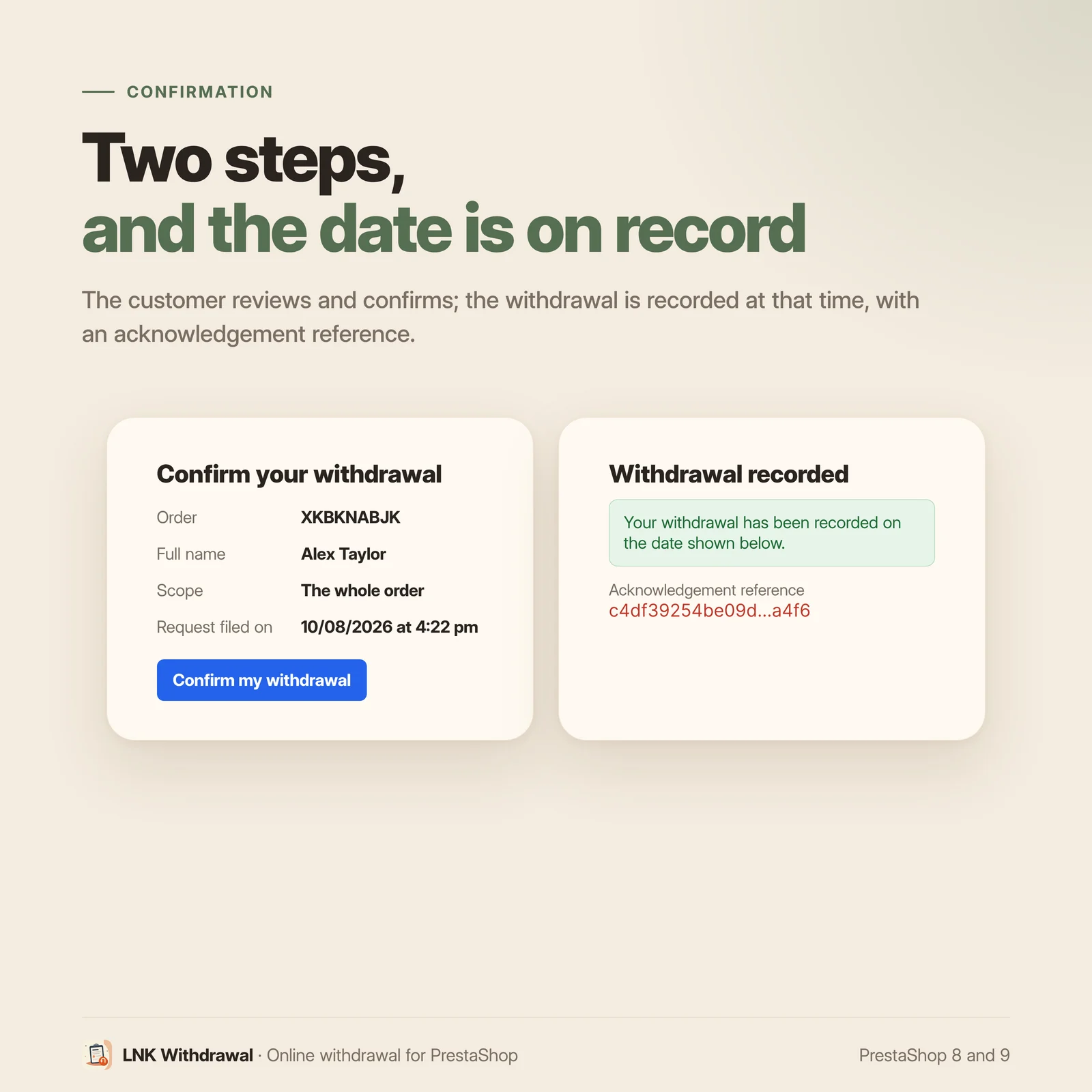
The customer fills in the form: name, postal address, e-mail, order reference, and the scope of the withdrawal, the whole order or some of the items. Nothing is final at this first step: a second screen restates the declaration, and the confirmation click is the withdrawal. That date is the one recorded, in the shop's time zone.
The acknowledgement leaves at once by e-mail, with the declaration attached as a PDF, and the shop receives its copy. If sending fails, the withdrawal remains valid: the customer keeps the reference on screen and the shop is warned.
The order check flags, it never blocks
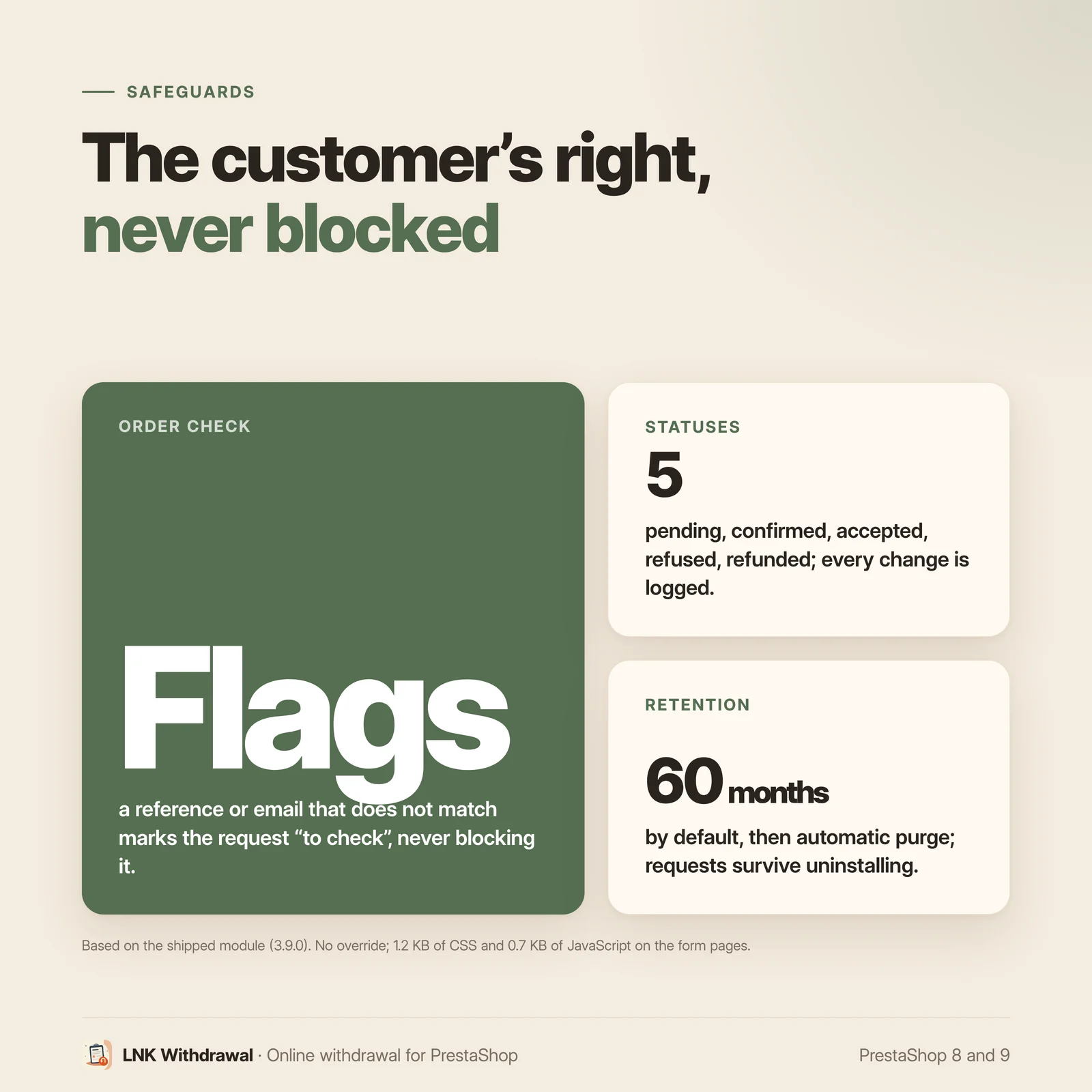
The module can match the order reference with the e-mail entered. If the match fails, the request is saved anyway and marked "to check". A guest order, an address changed since, a reference copied with a typo: none of this can prevent a right from being exercised.
A honeypot field and a limit of five submissions per hour and per IP address keep bots away without bothering a real customer. The confirmation link is an unguessable token, valid for 30 days by default.
A register in the back office, under Customer Service
Requests have their page under Customer Service > LNK Withdrawal, with the common skin of the LNK modules:
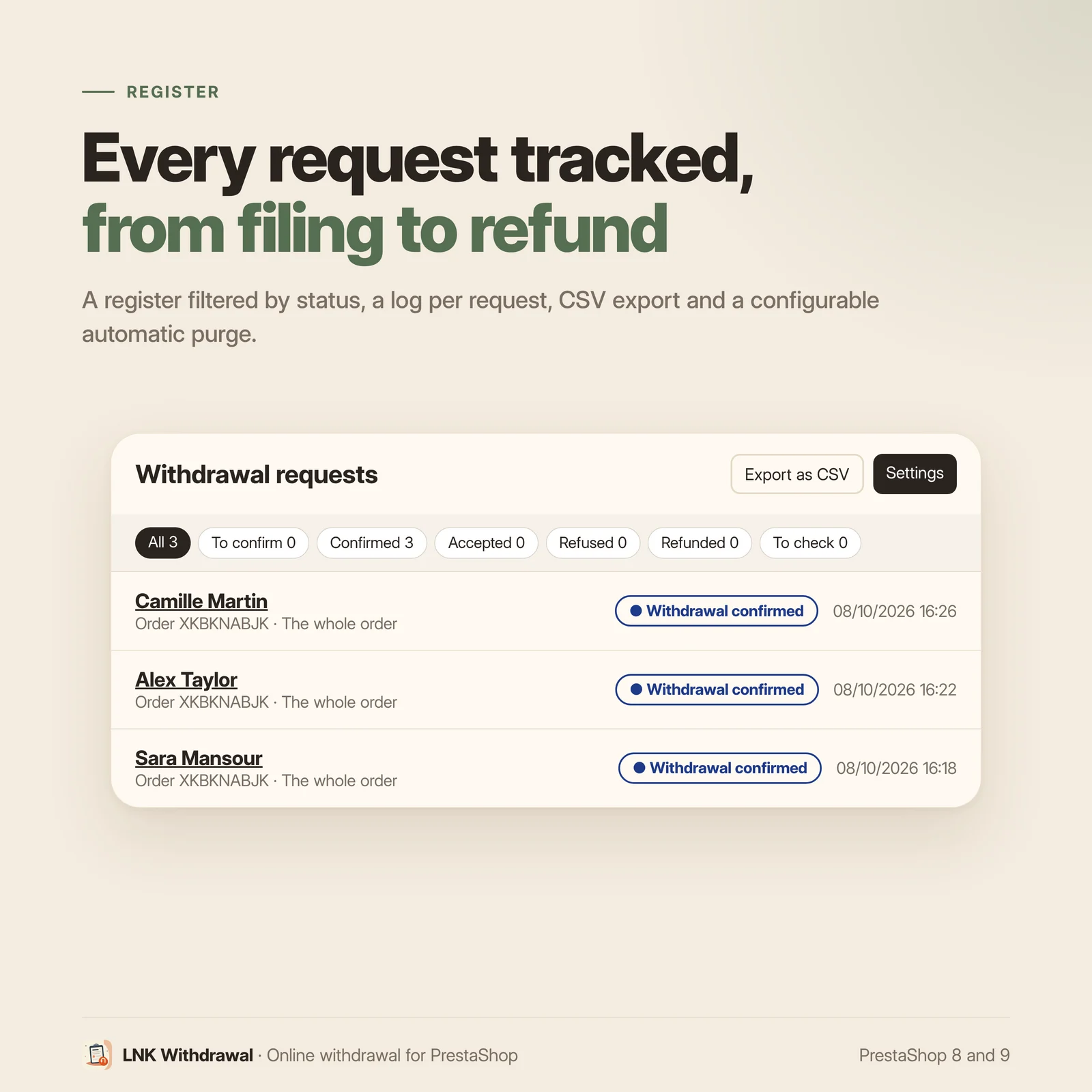
- the list, filtered by status with the count of each filter (to confirm, confirmed, accepted, refused, refunded, to check), a search by reference, name or e-mail, and the number of requests in progress;
- the request detail: customer, order, scope, the exact declaration confirmed by the customer, the acknowledgement (date, reference, IP address, browser) and the timestamped log of every step;
- the actions: change the status, noted in the log with the employee's name, and send the acknowledgement again to the customer.
CSV export of requests
A button exports the requests of the current filter to CSV, ready for a spreadsheet. They are personal data, so the export is framed:
- it requires the edit permission on the page, a read permission is not enough;
- every export is written to the PrestaShop log, with the employee, the filter and the number of requests;
- cells starting with
=,+,-or@are neutralised: a text typed in the form cannot become a formula in the spreadsheet.
Settings with a live preview
Settings are grouped in sections: button and journey (labels in each language, colour), location (footer, customer account), acknowledgement (template, sender, copy to the shop), periods and retention. On the right, a live preview shows the button, the form and the confirmation page while you type, on desktop or mobile, and enlarges to full width.
The entry point goes where you want: a button in the footer, a link in a column of the official "Link list" module, or nowhere if you place it yourself. A link is also added to the customer account. The acknowledgement uses the module template or your shop's e-mail theme.
Evidence kept, data limited
Tables are not dropped on uninstall: a withdrawal request is evidence, it must survive the removal of a piece of software. Conversely, an automatic purge deletes, log included, the requests older than the chosen period (60 months by default, the commercial limitation period; 0 to purge nothing). A confirmed request still awaiting your decision is never purged.
Léger et rapide
Figures measured on the shipped module, gzip compressed (level 9). A 1.0 KB stylesheet for the button and the form, loaded on the shop pages since the button can appear in the footer of each of them. A 0.66 KB script, loaded only on the form and confirmation pages. No font added, no external resource.
Compatible with PrestaShop 8 and 9
| PrestaShop | 8.0 → 9.x |
| PHP | 8.1 → 8.4 for PrestaShop 9 |
| Delivery | Two archives: 3.9.N for PrestaShop 9, 3.1.N for PrestaShop 8.0 to 8.x |
| Back office | Native Symfony on PrestaShop 9, classic admin controller on PrestaShop 8 |
| Contains an override | No |
| Languages | French, English and Arabic shipped complete, right to left in Arabic |
| External resources | None |
Every version is verified by a real installation: PrestaShop 8.1 for the 3.1.N archive, PrestaShop 9.0 for the 3.9.N archive. The tests cover installation, back office and uninstallation.
Frequently asked questions
Is the online withdrawal form really mandatory?
Yes, in France since 19 June 2026. Article L.221-21 of the Consumer Code requires the trader to offer the consumer a way to withdraw online, and decree D.221-5 sets out how, including the acknowledgement of receipt on a durable medium.
Is a "contact us" link enough?
No. The text requires a dedicated feature to exercise the withdrawal online, and an acknowledgement of receipt. A generic contact form provides neither.
How does the withdrawal work for the customer?
They click the button, fill in the form (name, postal address, e-mail, order reference, scope), then confirm on a second screen that restates their declaration. That confirmation click is the withdrawal: they immediately receive the acknowledgement by e-mail, with their declaration as a PDF.
Can the customer withdraw from part of the order only?
Yes. The form offers withdrawal from the whole order or from some of the items, with a field to name the items and their quantity.
What if the customer gets the order reference wrong?
The request is saved anyway, and marked "to check" in the list. The module cannot prevent a right from being exercised because a technical check failed.
Where are the requests in the back office?
Under Customer Service > LNK Withdrawal. The list is filtered by status, with the count of each filter, and searched by reference, name or e-mail. The request detail shows the confirmed declaration, the acknowledgement and the timestamped log; there you change the status and can send the acknowledgement again.
Can I export the requests?
Yes, to CSV, for the current filter. The export requires the edit permission on the page, it is written to the PrestaShop log with the employee's name, and cells starting with = + - or @ are neutralised so that no typed text becomes a formula in the spreadsheet. This file contains personal data: keep it only for the time of your processing.
How long is the data kept?
As long as you decide. An automatic purge deletes, log included, the requests older than the chosen period: 60 months by default, the commercial limitation period, or 0 to purge nothing. A confirmed request awaiting your decision is never purged.
What happens if I uninstall the module?
Requests already received stay in the database: they are evidence, they must remain available even if you change solutions. The settings and the menu entry are removed.
Do I need to change my theme?
No. The module places the button in the footer itself, or a link in a column of the official "Link list" module, and a link in the customer account. A live preview shows the button, the form and the confirmation while you set the labels and the colour.
Can the acknowledgement look like my other e-mails?
Yes. It uses the module template, or the shop's e-mail theme once its templates are generated in Design > Email theme. Until they are, the acknowledgement goes out with the module template, and is never missed.
Is it compatible with PrestaShop 8 and 9?
Yes, with two archives: 3.9.N for PrestaShop 9, 3.1.N for PrestaShop 8.0 to 8.x. The module overrides no core class.
Does it slow down my shop?
No. The stylesheet of the button weighs 1.0 KB compressed; the 0.66 KB script is loaded only on the form and confirmation pages. No external resource.
Does it work in multistore?
Yes. Each shop has its own settings and retention period: the automatic purge only removes that shop's requests, according to its own period. In the “All shops” context, the list shows every shop's requests with its name, and the CSV export adds a Shop column.
Release history
-
Version 3.9.0 PrestaShop 9
New
- CSV export of the requests of the current filter, ready for a spreadsheet (semicolon, UTF-8). Edit permission required, every export written to the PrestaShop log with the employee, and cells starting with = + - @ neutralised against formula injection.
- Live preview to the right of the settings: footer button, form and confirmation page, with the colour and labels entered, on desktop or mobile, enlarged to full width.
- Complete translations of the module in French, English and Arabic (back office, shop, e-mails).
Changes
- Back office on the common skin of the LNK modules: list filtered by status with the count of each filter, search by reference, name or e-mail; request detail in sections (request, declaration, acknowledgement, log) with status change and acknowledgement resend; settings in sections (button and journey, location, acknowledgement, periods and retention).
- The tab becomes Customer Service > LNK Withdrawal, with a translated name; the former tab is moved and renamed on upgrade.
- "Configure" in the module manager leads to the settings of this page.
- 3.9.N archive for PrestaShop 9; PrestaShop 8 now has its own archive, 3.1.N.
Fixes
- Shop in English or Arabic: dates without French words (“06/10/2026 21:32”), texts of the form, the confirmation and the acknowledgement translated into English, button and confirmation labels set in each language at installation, “Full name” in the summary.
- In Arabic (and in Persian or Urdu), the button label is no longer spaced letter by letter: the spacing broke the joined letters.
- Multistore: the deletion of old requests applies the retention of each shop to that shop's requests only (a shop keeping them longer could lose some). In the “All shops” context, the list shows the requests of every shop with its name, and the export adds a Shop column.
Removed
- The former Symfony grid and its Twig templates. The upgrade from 2.2.0 deletes their files, as well as the configuration copied from
config/ps9. Data and schema unchanged.
Upgrade notes
- Version 2.2.0 did not work on PrestaShop 8: uninstall it, then install 3.1.0. Requests already received stay in the database.
-
Version 3.1.0 PrestaShop 1.7.6 to 8.x
New
- CSV export of the requests of the current filter, ready for a spreadsheet (semicolon, UTF-8). Edit permission required, every export written to the PrestaShop log with the employee, and cells starting with = + - @ neutralised against formula injection.
- Live preview to the right of the settings: footer button, form and confirmation page, with the colour and labels entered, on desktop or mobile, enlarged to full width.
- Complete translations of the module in French, English and Arabic (back office, shop, e-mails).
Changes
- Back office on the common skin of the LNK modules: list filtered by status with the count of each filter, search by reference, name or e-mail; request detail in sections (request, declaration, acknowledgement, log) with status change and acknowledgement resend; settings in sections (button and journey, location, acknowledgement, periods and retention).
- The tab becomes Customer Service > LNK Withdrawal, with a translated name; the former tab is moved and renamed on upgrade.
- "Configure" in the module manager leads to the settings of this page.
- 3.9.N archive for PrestaShop 9; PrestaShop 8 now has its own archive, 3.1.N.
Fixes
- Shop in English or Arabic: dates without French words (“06/10/2026 21:32”), texts of the form, the confirmation and the acknowledgement translated into English, button and confirmation labels set in each language at installation, “Full name” in the summary.
- In Arabic (and in Persian or Urdu), the button label is no longer spaced letter by letter: the spacing broke the joined letters.
- Multistore: the deletion of old requests applies the retention of each shop to that shop's requests only (a shop keeping them longer could lose some). In the “All shops” context, the list shows the requests of every shop with its name, and the export adds a Shop column.
Removed
- The former Symfony grid and its Twig templates. The upgrade from 2.2.0 deletes their files, as well as the configuration copied from
config/ps9. Data and schema unchanged.
Upgrade notes
- Version 2.2.0 did not work on PrestaShop 8: uninstall it, then install 3.1.0. Requests already received stay in the database.
-
Version 2.2.0 PrestaShop 1.7.6 to 8.x
New
- Shop e-mail theme. The acknowledgement can use the shop's e-mail theme instead of the module template. Layouts for
modernandclassicare registered through theactionListMailThemeshook and generated from Design > Email theme > Generate. - Acknowledgement template setting: module template (default) or shop theme.
- XLIFF catalogues for the e-mail layouts (
Modules.Lnkretractation.Emails) in French, English and Arabic. - Framework-free
src/Policyandsrc/Supportlayers, covered by PHPUnit (33 tests) and analysed by PHPStan at level 8.
Changes
- Module templates moved from
mails/<iso>/tomails/custom/<iso>/:mails/<iso>/is the folder where PrestaShop's generator writes its templates, it can no longer hold hand-written files. - The shop logo appears in the module template. PrestaShop attaches it to every message anyway; a template that did not use it left an orphan attachment at the bottom of the message.
- Multi-line values (postal address, scope) keep their line breaks in the PDF table.
Fixes
- Acknowledgement not received when the shop e-mail is a Gmail or Outlook address: the sender is set in the module, and the case is documented. Messages claiming to come from those domains but sent from the shop's server are dropped by the recipient, usually without even reaching the spam folder.
Upgrade notes
upgrade-2.2.0.phpremoves the module templates left inmails/<iso>/, recognised by a marker, without ever touching a template already generated by a theme. It registers theactionListMailThemeshook and sets the new setting to the module template, unchanged.
- Shop e-mail theme. The acknowledgement can use the shop's e-mail theme instead of the module template. Layouts for
Show the 2 previous versions
-
Version 2.1.0 PrestaShop 1.7.6 to 8.x
New
- Postal address in the form, required, prefilled from the customer's default address, and carried into the declaration, the PDF and the back office.
- Partial withdrawal: the consumer can return only part of the order and name the items concerned.
- PDF acknowledgement attached to the e-mail (TCPDF through PrestaShop's
PDFGenerator). A generation failure is logged and never prevents the e-mail. - Acknowledgement resend from the request detail, logged with the employee.
- Retention period (
LNK_RETRACT_RETENTION_MONTHS, 60 by default) with an opportunistic daily purge, no scheduled task. - Confirmation link validity (
LNK_RETRACT_LINK_TTL_DAYS, 30 by default). After it, an unconfirmed request can no longer be confirmed and the consumer is invited to file a new one. - Grid column and filter for requests to check.
Changes
- The order check no longer blocks a request. A failed match marks it
needs_reviewand logs the reason; the internal copy carries[à vérifier]in its subject. Refusing to record the exercise of a right because a technical check failed would itself be a breach. - All dates are shown in the shop's time zone.
Upgrade notes
upgrade-2.1.0.phpaddscustomer_address,items_scopeandneeds_reviewto the request table if missing, and sets the two new settings.
-
Version 2.0.0 PrestaShop 1.7.6 to 8.x
Complete rewrite for PrestaShop 8 and 9, from the logic of an in-house module for PrestaShop 1.5.
New
- Two-step withdrawal journey with a timestamped acknowledgement of receipt.
- Symfony back office: filterable grid, request detail, status changes, complete event log.
- Button in the footer, or link in a
ps_linklistcolumn, as chosen. - Multilingual labels, honeypot field, limit per IP address, unguessable tokens.
- Tables kept on uninstall.