 Module · LNK Customer Price Lists
LNK Customer Price Lists, your negotiated prices imported as PrestaShop specific prices
Your negotiated prices live in a spreadsheet: one customer pays €12.50 excluding tax, one group gets 15% off a range, one distributor has a price from 10 cartons. In PrestaShop, you have to enter them one by one, product by product. LNK Customer Price Lists imports them from your file, as native specific prices, with a line-by-line report before writing anything.
- Version 1.1.0 · PrestaShop 1.7.6 to 8.x
- Version 1.9.0 · PrestaShop 9
- PrestaShop 1.7.6 to 9.x
- PHP 7.1 to 8.4
- No override
Screenshots
Key points
- Your negotiated prices, imported from a CSV as native specific prices.
- Per customer (email or ID) or per customer group.
- Fixed price excluding tax, discount as a percentage or an amount, minimum quantity, dates.
- Products, combinations and EAN.
- Line-by-line report before any writing, nothing guessed.
- Prices set by hand never changed.
- Discount excluding tax by default, effect excluding and including tax in the report.
- Rollback of the last import, history.
- Export in the import format, for the round trip with Excel.
- Writing in batches for large files.
- Multistore, French, English and Arabic (right to left).
- PrestaShop 1.7.6 to 9, no override, 0 bytes in the shop.
Import specific prices from a CSV
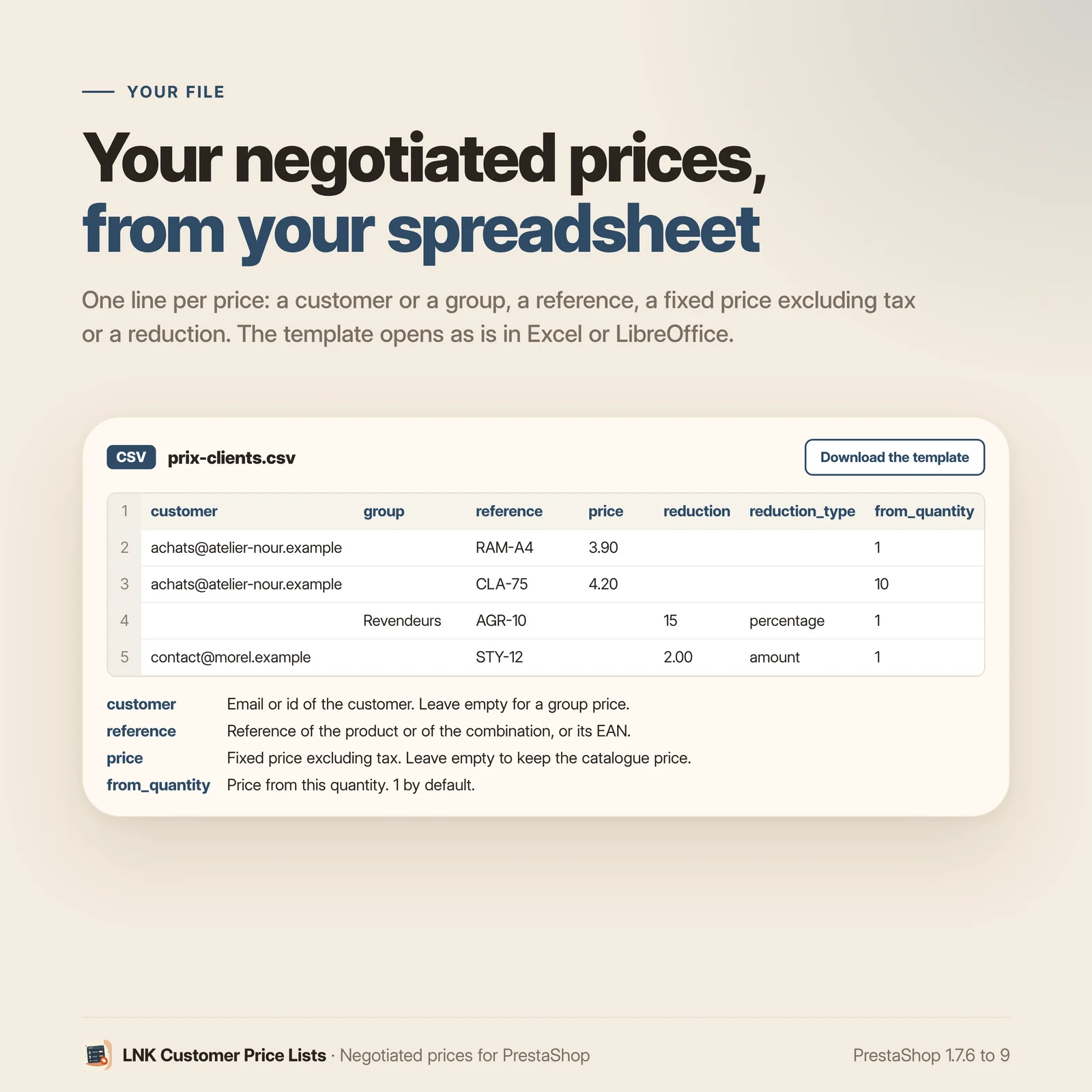
One line per price: a customer (email or ID) or a group, a reference (product, combination or EAN), then a fixed price excluding tax or a discount as a percentage or an amount. Optional: a minimum quantity, start and end dates, a shop. The file template can be downloaded from the module page, and it opens in Excel or LibreOffice as it is: semicolon, comma or tab separator recognised, accents kept (UTF-8 or Windows-1252).
A report before any writing
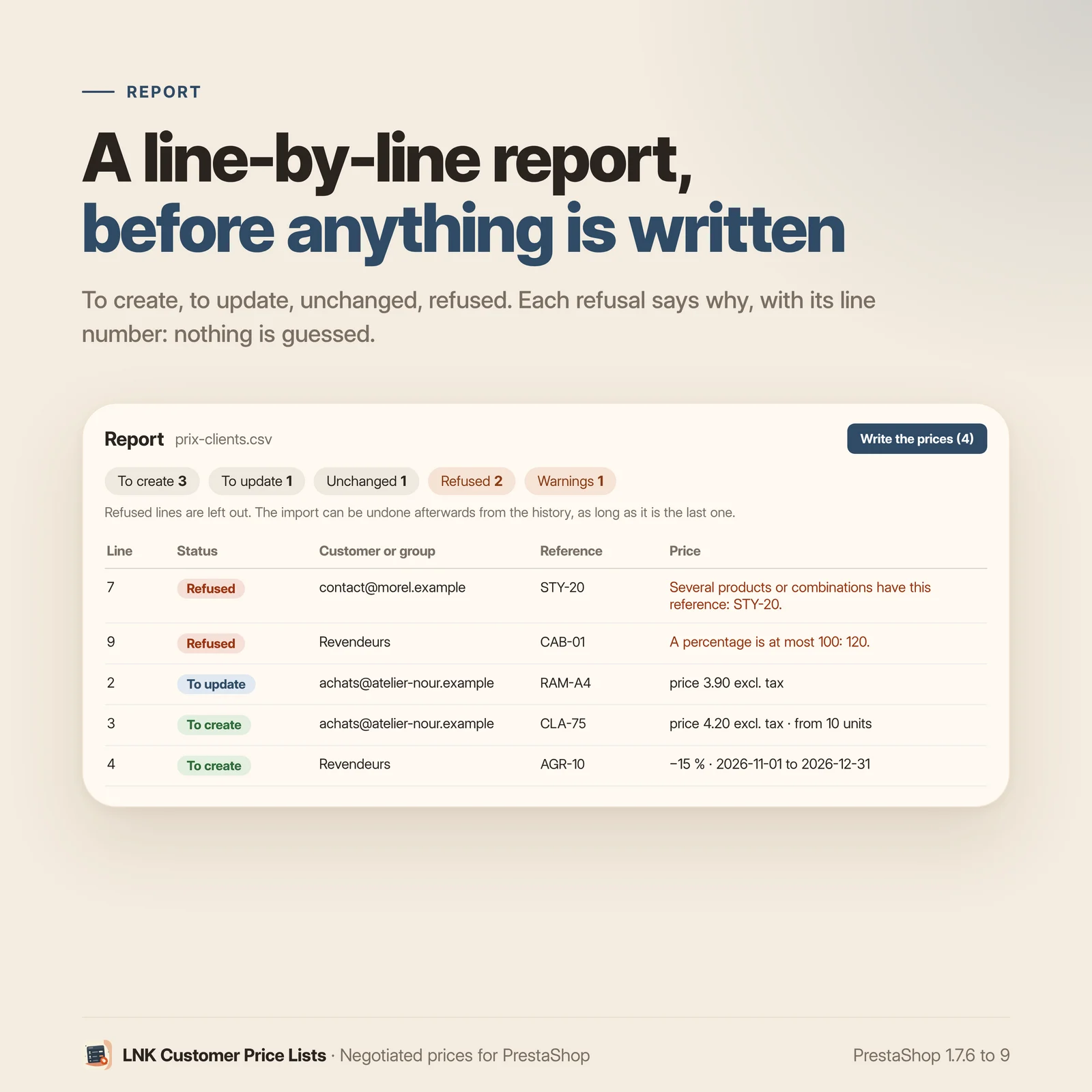
The module reads the file and shows what it is going to do, without writing anything: to create, to update, unchanged, refused. Each refused line says why, with the line number: unknown customer, reference carried by two products, percentage above 100, badly written date, same price twice in the file. Nothing is guessed: an ambiguous line is refused rather than applied to the wrong product. You fix the file, you upload it again, and you write when the report suits you.
Native specific prices, calculated by PrestaShop
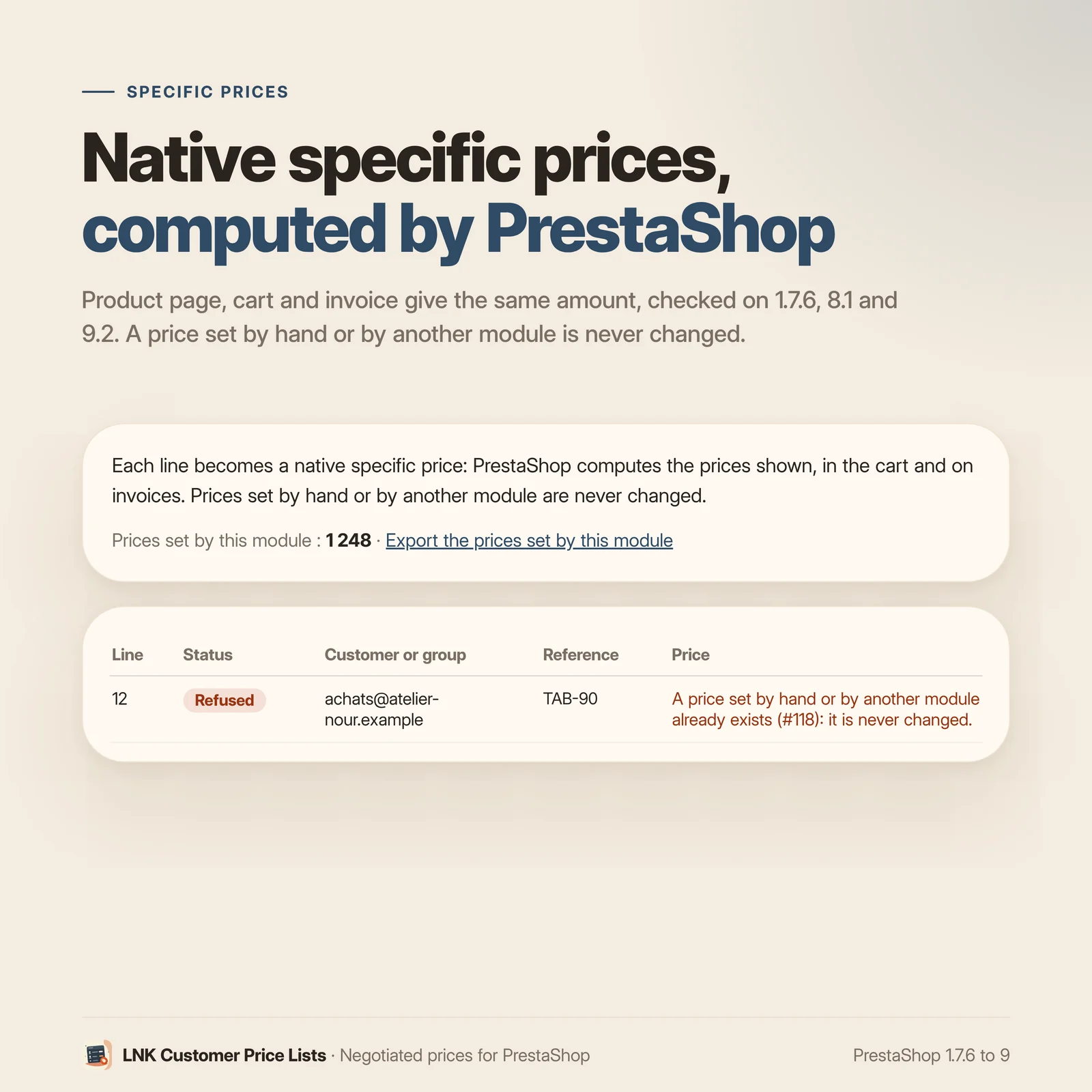
Each line becomes a PrestaShop specific price, the one in the Pricing tab of the product page. PrestaShop calculates the prices shown, in the cart and on the invoice: the module adds no calculation. Checked on the bench on 1.7.6, 8.1 and 9.2: the product page and the cart give the same amount.
The module only touches the prices it set itself. A price entered by hand or by another module is never changed: the line that would target it is refused, with the reference of the existing price.
Discount excluding or including tax, with no surprise for the business customer
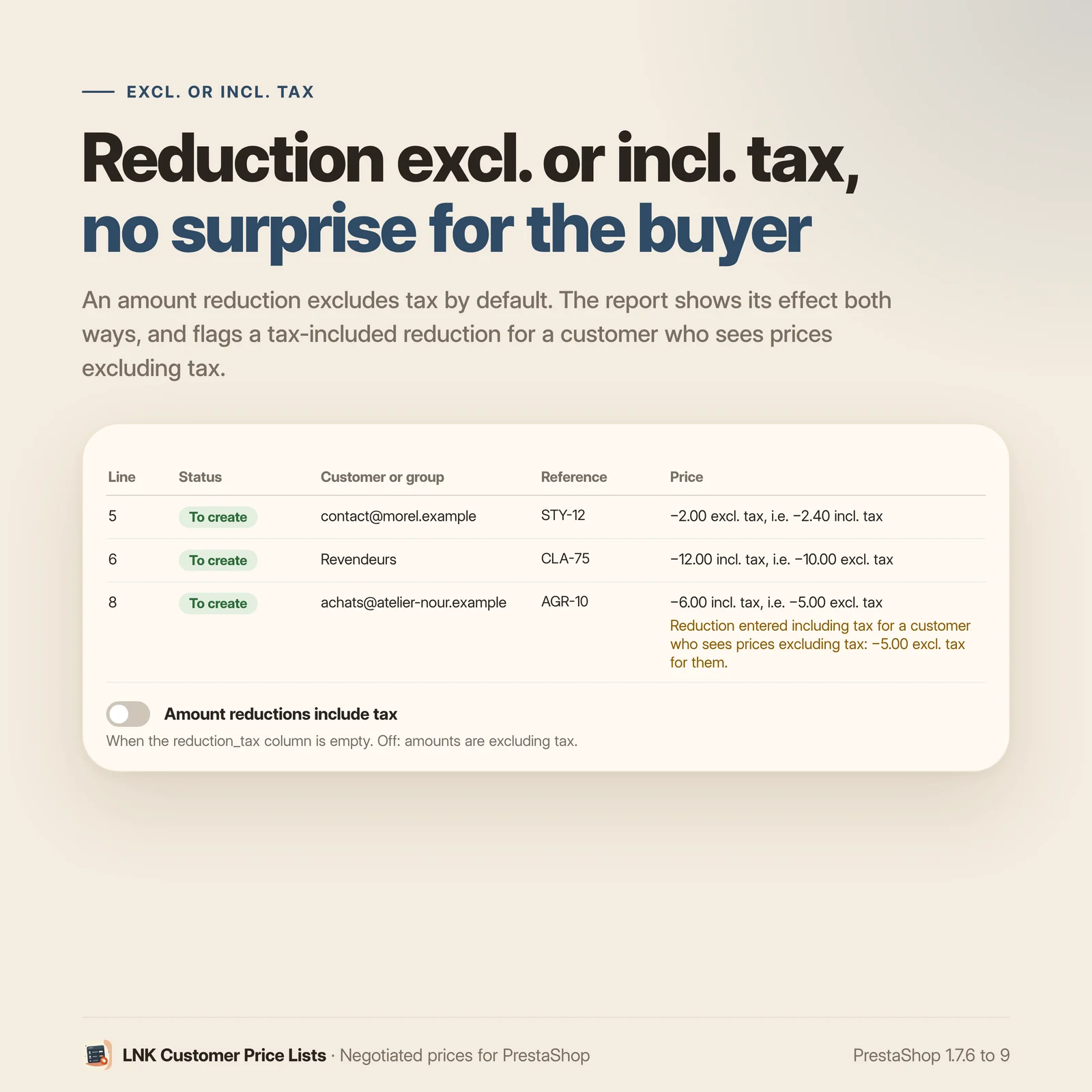
An amount discount is excluding tax by default; the reduction_tax column lets you set it
including tax, and the report shows its effect in both ("−12.00 excl. tax, i.e. −14.40 incl.
tax"). For a customer or a group that sees prices excluding tax, a discount entered including tax
is flagged: it takes less off than expected for the business customer, and the report says so
before writing.
Rollback and history
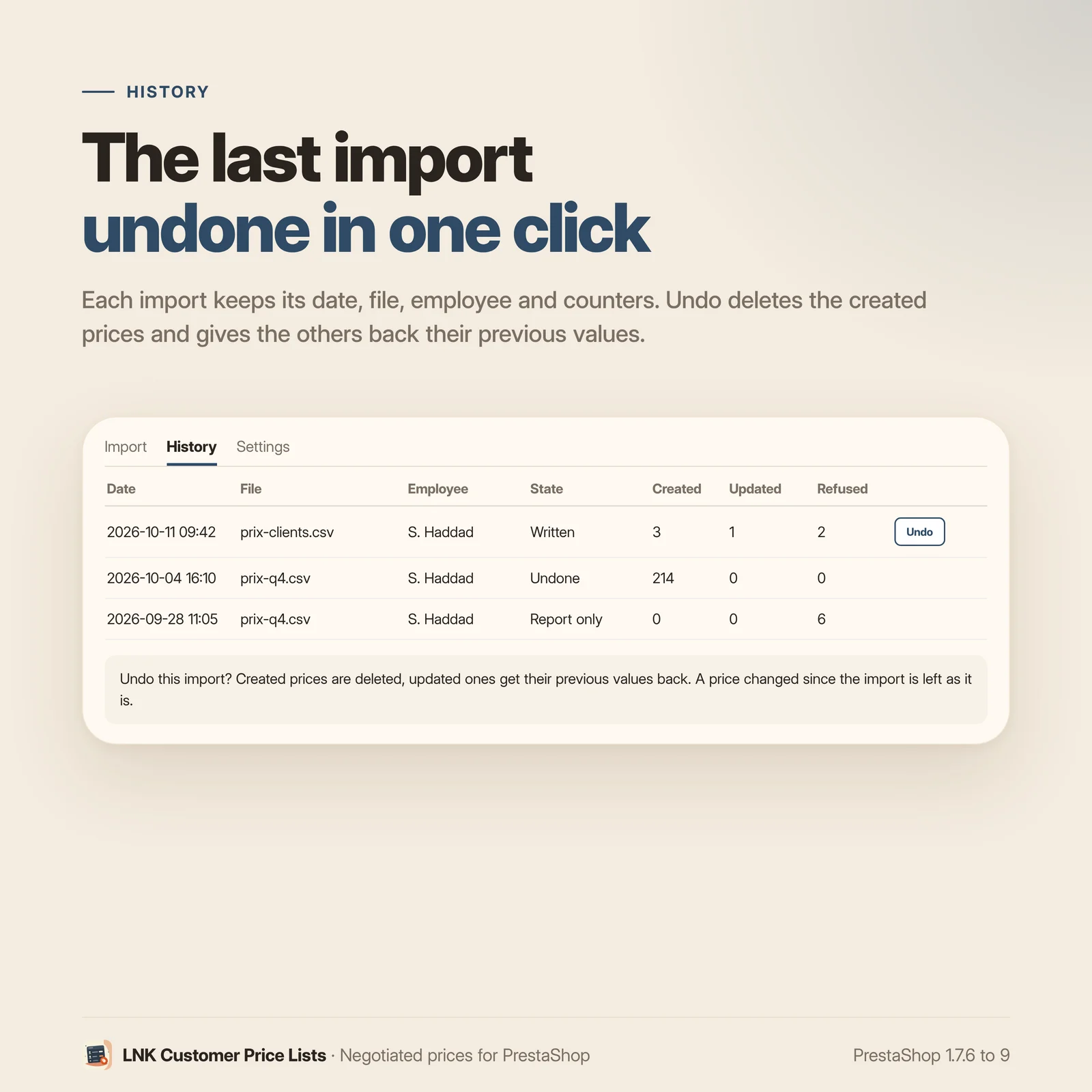
The history keeps each import: date, file, employee, prices created, updated and refused. The last import can be undone in one click: created prices are deleted, updated prices get their previous value back. A price changed since the import is left as it is.
Export your prices to rework them
The export gives the prices set by the module, in the import file format. Open it in your spreadsheet, change the prices, upload it again: identical lines are recognised as unchanged, only the others are updated.
Large files
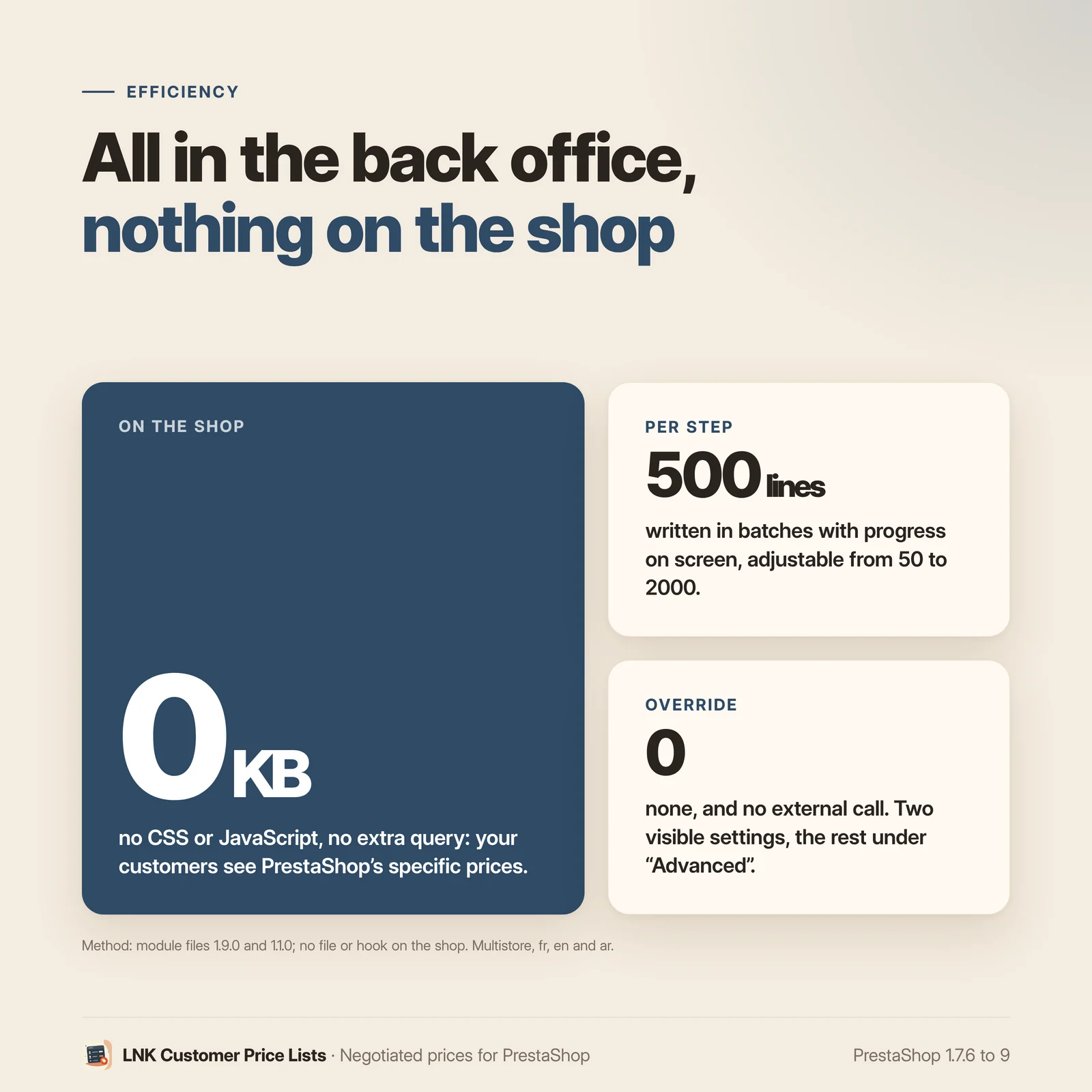
Writing is done in batches (500 lines by default, adjustable), with the progress on screen: each batch is a short request, to stay under the hosting's execution time. If your host still cuts it off, lower the batch size in the advanced settings. The file is read in memory, never saved on the server. Default limit: 50,000 lines and 20 MB per file.
Light and fast
Nothing in the shop: 0 bytes of CSS and JavaScript loaded on the front office, no request added. The module only works in the back office; your customers see PrestaShop's specific prices, served as usual.
Compatible with PrestaShop 1.7.6, 8 and 9
Two versions of the module, one per generation: 1.1 for PrestaShop 1.7.6 to 8.x, 1.9 for PrestaShop 9, with a native page in each back office, under Catalog. No override, no external call.
Frequently asked questions
How do I import prices per customer into PrestaShop?
With a CSV file, one line per price: the customer (email or ID) or the group, the product reference, then a fixed price excluding tax or a discount. Upload it on the LNK Customer Price Lists page (Catalog), read the report, then write. The file template can be downloaded from the same page.
What is the difference with PrestaShop's CSV import?
PrestaShop's native import creates products, customers or categories, but not specific prices per customer or per group. The module adds exactly that, with a report before writing, a history and rollback of the last import.
Does the module calculate prices?
No. Each line becomes a PrestaShop specific price, the one in the Pricing tab of the product page, and PrestaShop calculates the price shown, the cart and the invoice. Checked on 1.7.6, 8.1 and 9.2: the product page and the cart give the same amount.
What happens to the prices I entered by hand?
Nothing: they are never changed. The module only updates the prices it set itself. A line of the file that would target a price entered by hand or by another module is refused, and the report gives the reference of the existing price.
Can I check before writing?
Yes, it is mandatory. The module first reads the file and shows what it is going to create, update or leave unchanged, and what it refuses, line by line with the cause. Nothing is written until you have clicked "Write the prices". Refused lines are left out.
How do I undo an import?
From the history, with one click on the last import: created prices are deleted, updated prices get their previous value back. A price changed since the import is left as it is. Only the last import can be undone, so that an import another one relies on is never undone.
Is an amount discount excluding or including tax?
Excluding tax by default, which is what a business buyer expects. The reduction_tax column (1 or
0) sets it including or excluding tax line by line, and a setting changes the default. The report
shows the effect excluding and including tax, and flags a discount set including tax for a
customer who sees prices excluding tax.
Does the module handle combinations and EAN?
Yes. The reference column accepts the reference of a product, that of a combination, or an EAN.
A reference carried by several products is refused rather than guessed: use unique references, or
use the EAN.
My file comes from Excel: do I need to convert it?
No. The separator (semicolon, comma, tab) is recognised, as well as UTF-8 and Excel's Windows-1252: accents are kept. Numbers can be written with a comma or a dot.
What happens with a large file?
Writing is done in batches of 500 lines (adjustable from 50 to 2,000), with the progress on screen, to stay under the hosting's execution time. The default limit is 50,000 lines and 20 MB per file; it can be raised up to 200,000 lines. The file is read in memory, never saved on the server.
Does it work with multistore?
Yes. An optional shop column targets a shop; without it, the price applies to the shop of the
context. If the context covers several shops, the report asks you to choose. The history and the
export follow the shops of the context.
Does the module contain an override?
No. No override: the module makes no change to the PrestaShop core, and calls no external service.
What is left if I uninstall the module?
Your prices stay: they are PrestaShop specific prices, which keep applying. Uninstalling removes the import history, the settings and the tab. To remove the prices too, undo the last import beforehand, or delete them in PrestaShop.
Release history
-
Version 1.9.0 PrestaShop 9
New
- Import of negotiated prices from a CSV file, as native specific prices: per customer (email or ID) or per group, on a product reference, a combination reference or an EAN; fixed price excluding tax or discount as a percentage or an amount; optional minimum quantity, dates and shop.
- Report before any writing: to create, to update, unchanged, refused, with the cause of each refusal; an ambiguous line is refused, never guessed.
- Prices entered by hand or by another module are never changed.
- Amount discount excluding tax by default; effect excluding and including tax in the report, and a warning for a discount including tax that targets a customer who sees prices excluding tax.
- Writing in batches with the progress on screen, for large files.
- Import history and rollback of the last import.
- Export of the prices set by the module, in the import format.
- Module page under Catalog, on the common look of LNK modules: import, history, settings; file template to download.
- Multistore: shop column, settings per shop, per group or common.
- French, English and Arabic (right to left).
-
Version 1.1.0 PrestaShop 1.7.6 to 8.x
New
- Import of negotiated prices from a CSV file, as native specific prices: per customer (email or ID) or per group, on a product reference, a combination reference or an EAN; fixed price excluding tax or discount as a percentage or an amount; optional minimum quantity, dates and shop.
- Report before any writing: to create, to update, unchanged, refused, with the cause of each refusal; an ambiguous line is refused, never guessed.
- Prices entered by hand or by another module are never changed.
- Amount discount excluding tax by default; effect excluding and including tax in the report, and a warning for a discount including tax that targets a customer who sees prices excluding tax.
- Writing in batches with the progress on screen, for large files.
- Import history and rollback of the last import.
- Export of the prices set by the module, in the import format.
- Module page under Catalog, on the common look of LNK modules: import, history, settings; file template to download.
- Multistore: shop column, settings per shop, per group or common.
- French, English and Arabic (right to left).