 Module · LNK Quotes
Your customers request a quote and order at the agreed price
LNK Quotes adds quote requests to your PrestaShop shop, from the button all the way to the order. Your customer requests a quote from the product page or from their cart; you set your prices excluding tax line by line in the back office; they accept in their account and order at the quoted price through the usual checkout. Nothing to type again, no voucher to hack together.
- Version 1.1.0 · PrestaShop 1.7.6 to 8.x
- Version 1.9.0 · PrestaShop 9
- PrestaShop 1.7.7 to 9.x
- PHP 7.1 to 8.4
- No override
Screenshots
Key points
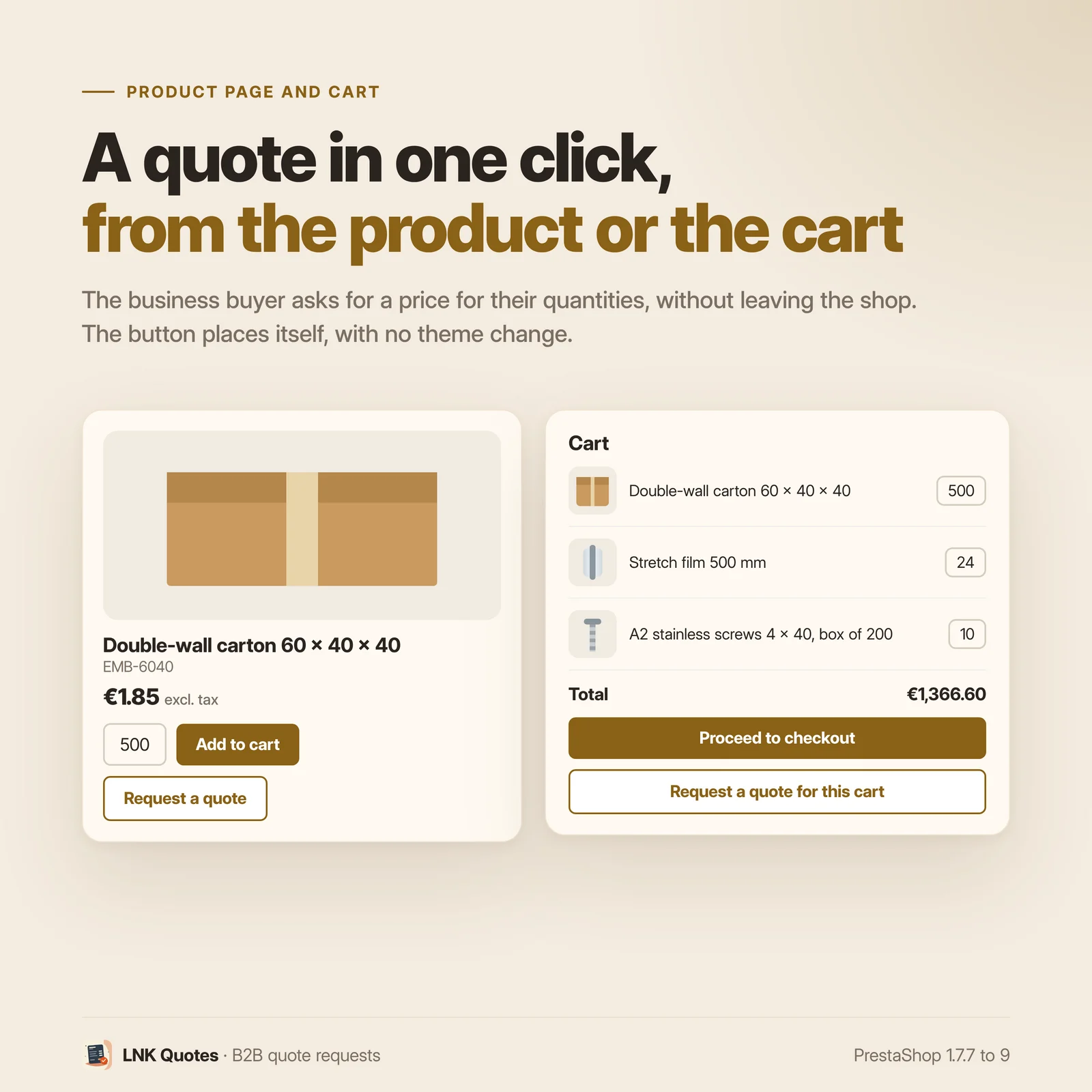
- “Request a quote” button on the product page, with the chosen combination and quantity
- Quote for the whole cart in one click
- Attachment (PDF or image, 5 MB), stored safely and re-encoded
- Line by line proposal in the back office: prices excluding tax, quantities, validity, message
- “My quotes” in the customer account, with the status of each quote
- Order at the quoted price through native specific prices, limited to this cart
- Order linked to the quote, expiry with no scheduled task
- “Quote only” products, without changing the product
- Emails to the merchant and the customer, each in their own language
- 1.4 KB compressed in total, only on the product page, the cart and the request
- French, English, Arabic right to left
- PrestaShop 1.7.7 to 9.x, PHP 7.1 to 8.4, no override, multistore
A quote requested in seconds
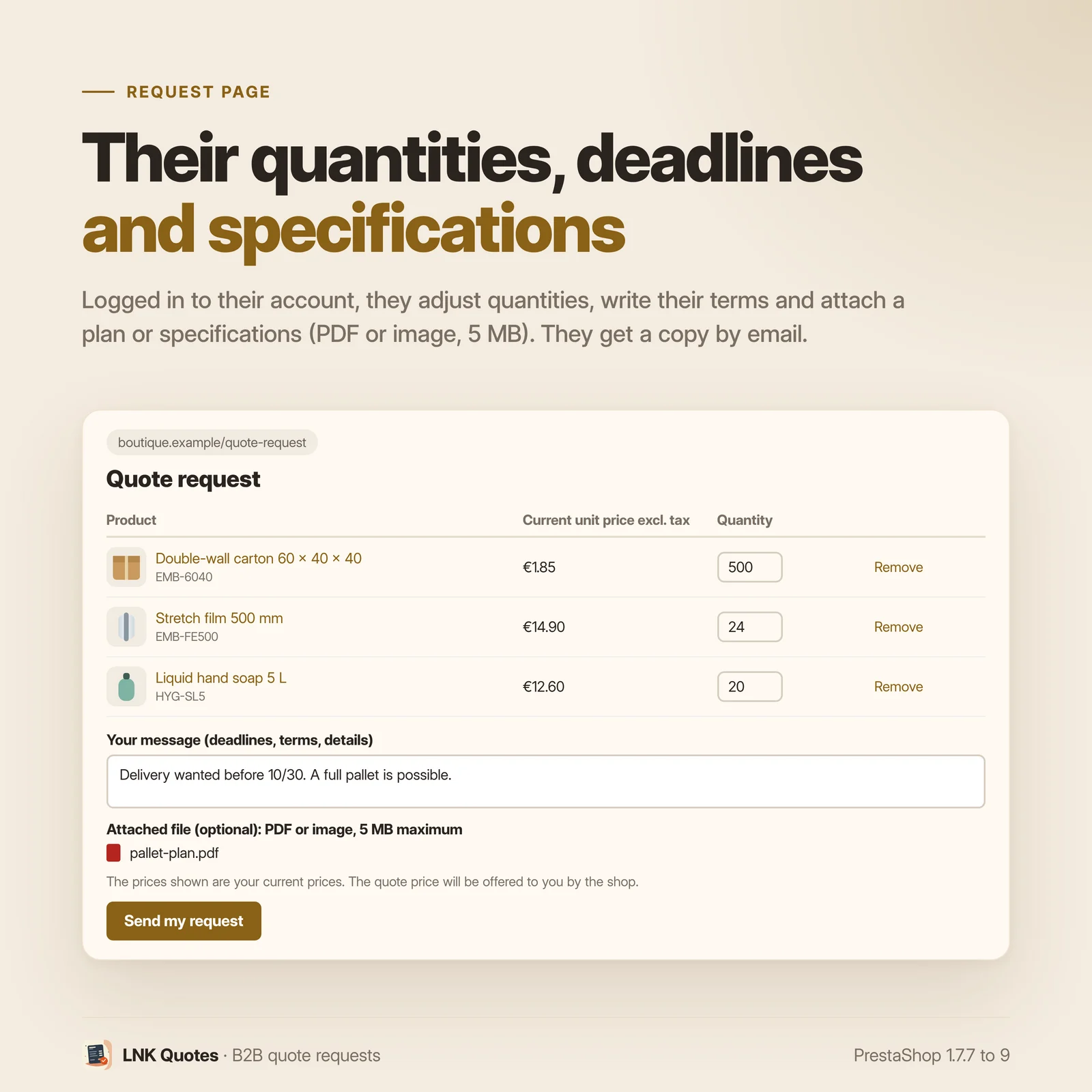
A “Request a quote” button shows on the product page, next to the add to cart, with the combination and quantity the customer has chosen. In the cart, “Request a quote for this cart” takes all its lines. The request form shows them with their current price: the customer adjusts the quantities, removes a line, writes a message and can attach a file (drawing, specifications, photo).
Requests are kept to signed in customers, since an accepted quote becomes a cart of their account. A visitor is sent to the login page, then brought back to the form with the product, combination and quantity they had chosen. You receive an email, the customer an acknowledgement.
Your proposal, line by line
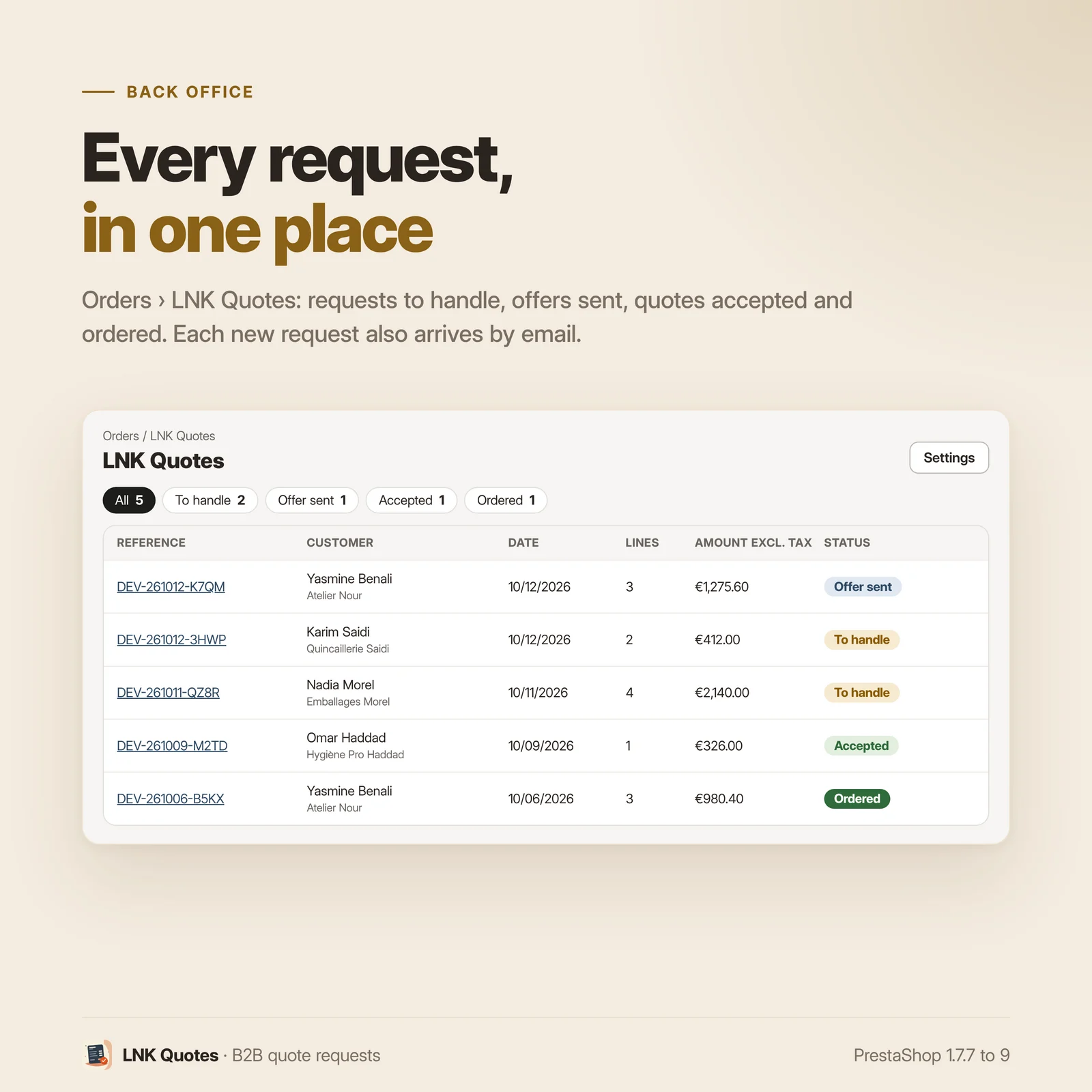
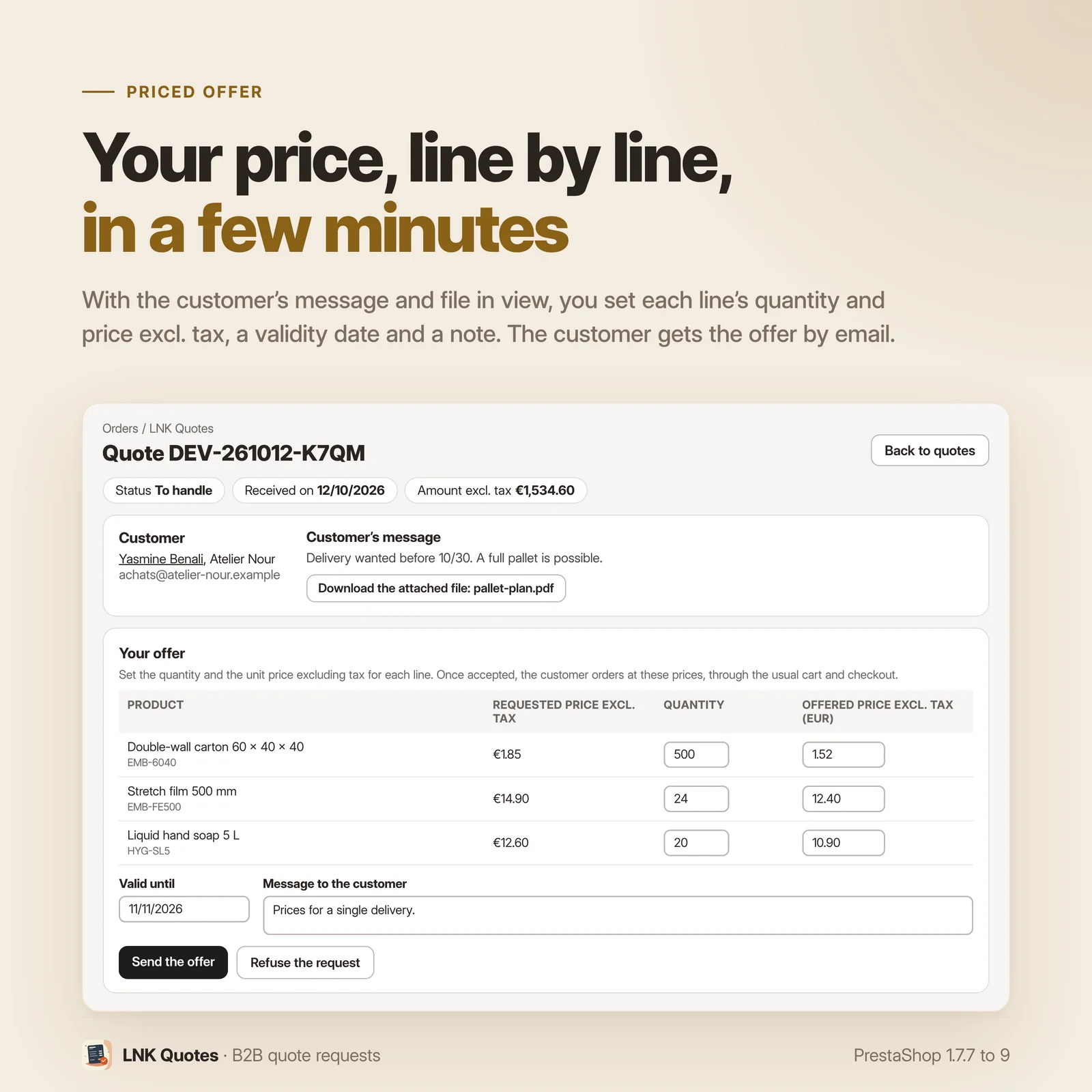
Requests arrive in Orders, LNK Quotes, filtered by status. For each quote you see the customer, their company, their message and their attachment. You set the quantity and unit price excluding tax of each line, prefilled with the price the customer saw, then the validity date (30 days by default, adjustable from 1 to 365) and a message. “Send the offer” emails the customer the lines, prices, total excluding tax and the link to their quote.
You can send a corrected proposal again as long as the customer has not accepted it, or refuse the request with a message. An accepted or closed quote becomes read only.
Accepted, then ordered at the quoted price
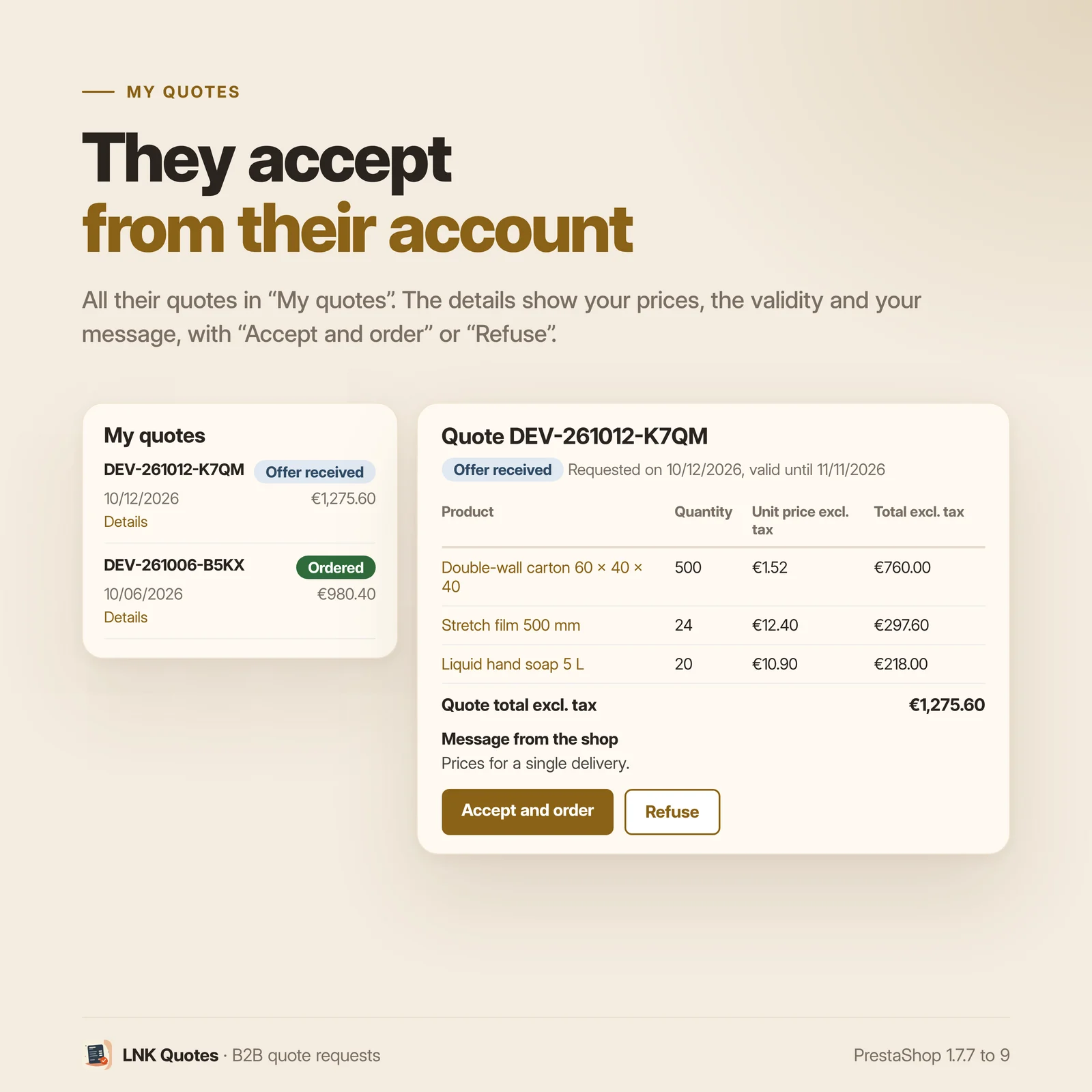
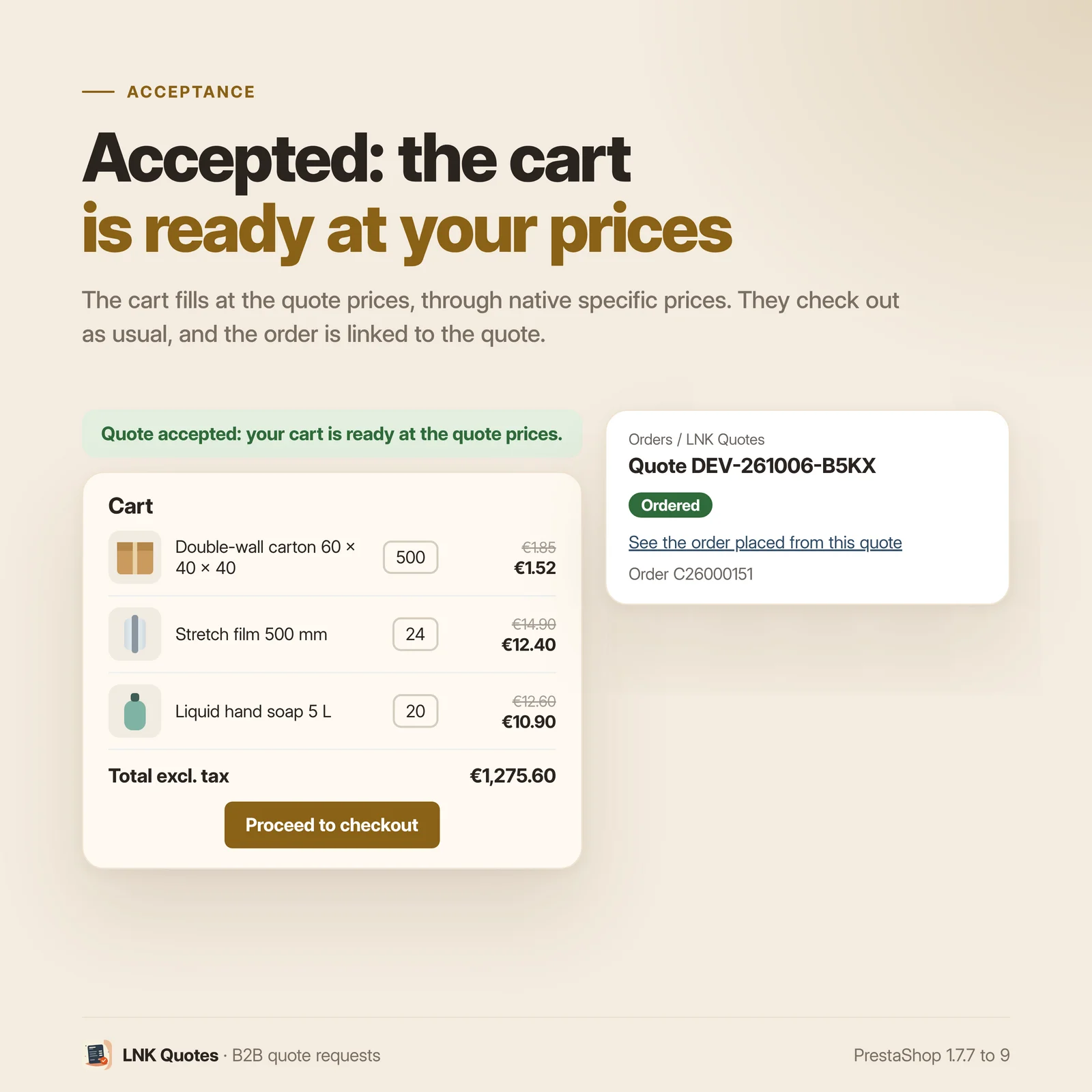
In their account, the customer finds “My quotes”: reference, date, amount excluding tax and status of each quote (sent, offer received, accepted, ordered, refused, expired). On the detail page, “Accept and order” creates their cart with the lines of the quote and opens the native PrestaShop checkout. They choose shipping and payment as usual; your taxes and carriers apply.
The quoted prices go through the native specific prices of PrestaShop, limited to this cart, this customer and this shop, from the proposed quantity. They serve no other order and no other customer. The validated order is linked to the quote, which becomes “ordered”, and you open it in one click from the quote.
The customer can also refuse the proposal. Once the validity date has passed, the quote becomes “expired” and its specific prices are removed, with no scheduled task to install: the module checks it each time quotes are viewed.
Products sold on quote only
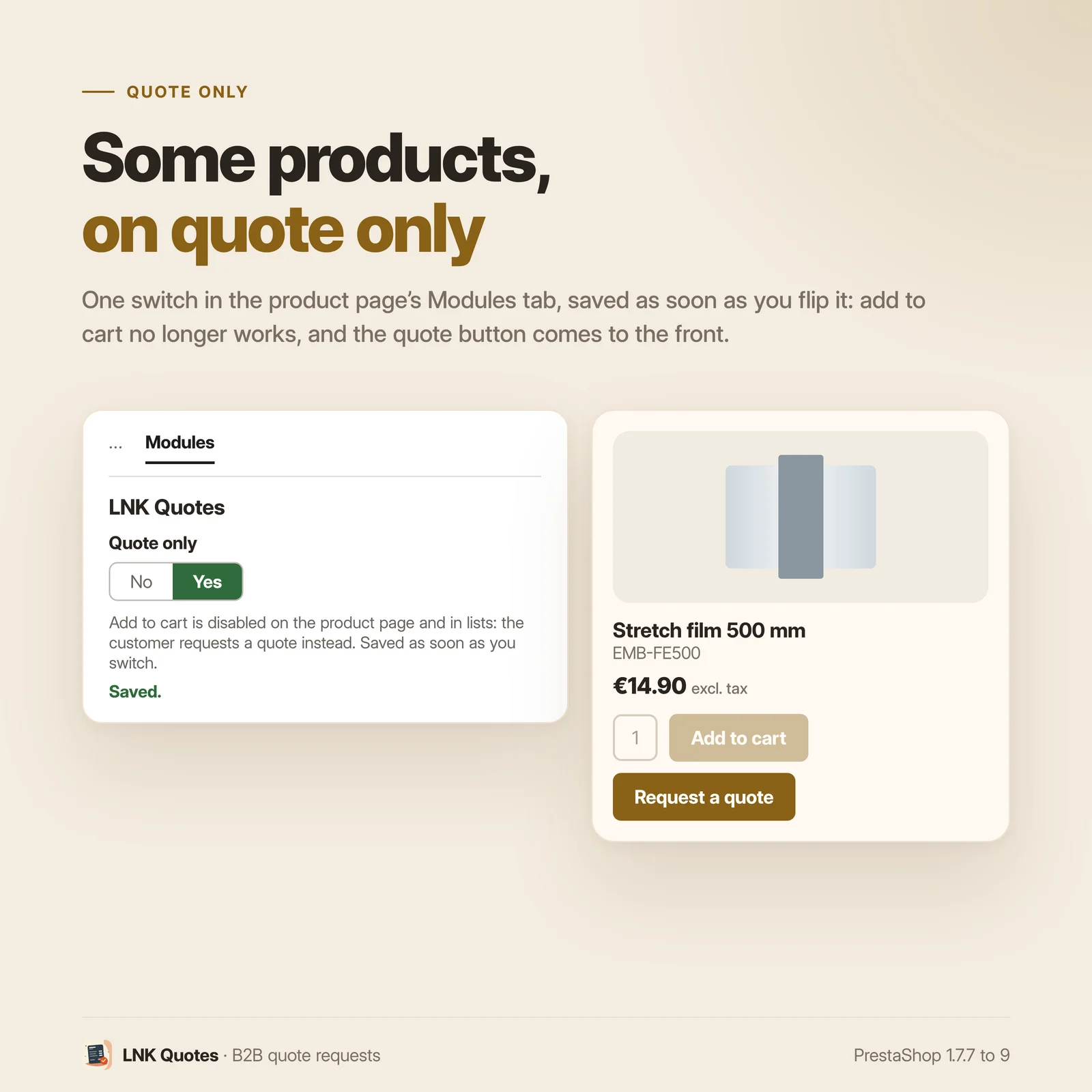
A “Quote only” switch in the Modules tab of the product page, saved as soon as you flip it. The product stays online, but the add to cart is disabled on its page and in product lists (the theme greys out or hides the button), and the quote button becomes the main button. The module does not change the product: turn the switch off or disable the module, and the add to cart comes back.
A server side safeguard removes this product from any cart that is not the cart of an accepted quote, whatever the way it was added (product page, list, quick order, another module). The customer sees a message inviting them to request a quote.
You can also show the quote button on these products only: setting “Request a quote button”.
Attachments kept safe
A PDF or an image (JPEG, PNG, WebP), 5 MB at most. Images are checked then fully re-encoded,
which wipes any hidden content; each file gets a random name. They are stored outside the module
folder, in var/lnk_quote/, and only the back office downloads them. Under Apache, a .htaccess
refuses any direct access. Nginx ignores .htaccess files: add the block given in the FAQ to
your server configuration. The attachment can be turned off with a switch in the settings.
A deleted customer, by you or following a GDPR request, takes their quotes, their attachments and the specific prices of their quote cart with them. An order already placed keeps its record in PrestaShop.
Léger et rapide
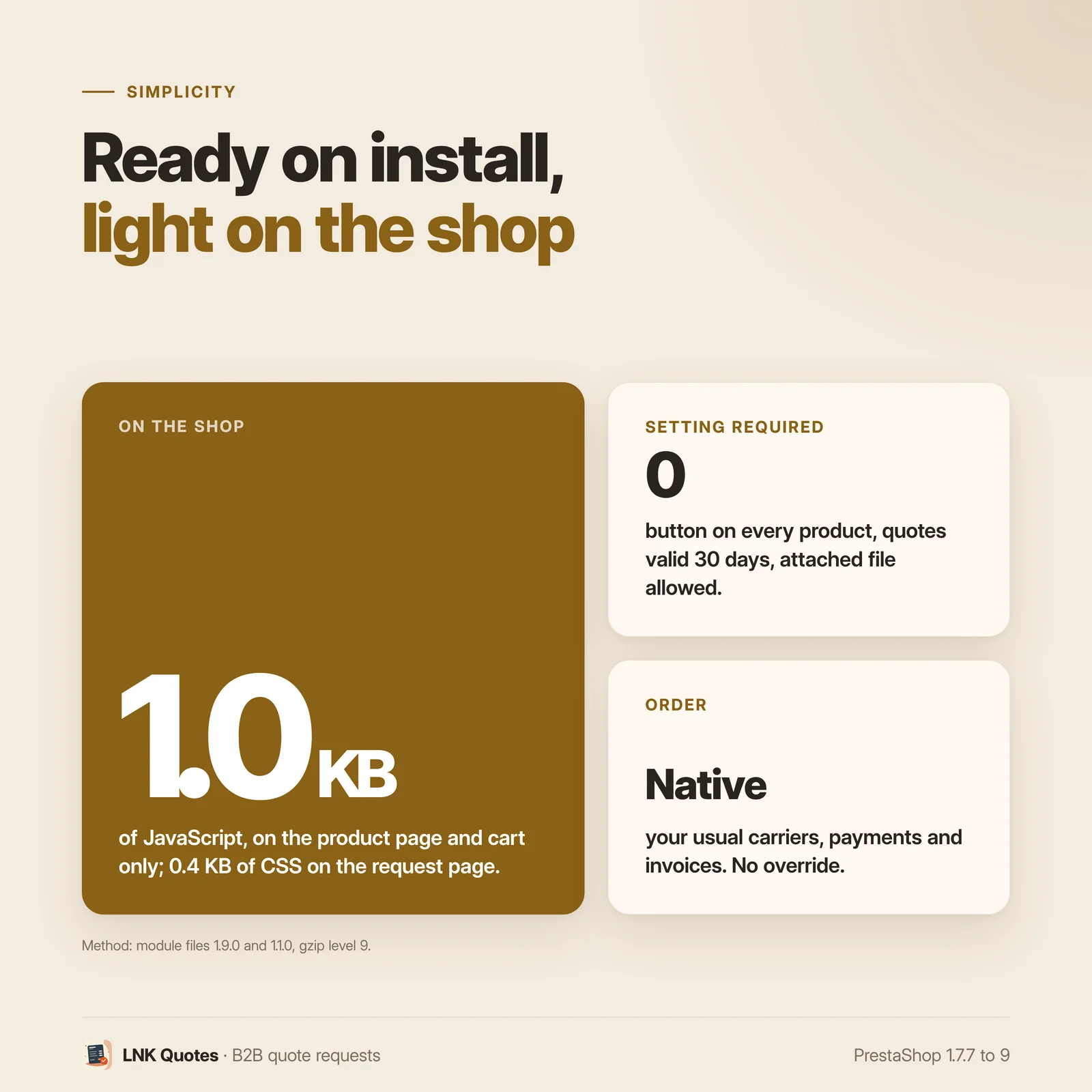
Figures measured on the shipped module, gzip compressed (level 9). The script: 1.0 KB (997 bytes), loaded on product pages, the cart page and the quote request page. The stylesheet: 0.4 KB (428 bytes), loaded only on the quote request page. Nothing on the home page or categories; the “My quotes” pages and the detail of a quote add no stylesheet or script from the module. No library, no jQuery, no external resource: the theme styles the button and the pages.
A clear settings screen
Four visible settings, on the shared look of LNK modules: where to show the button (all products or quote only products), the default validity of a quote, the email that receives new requests (the shop's if left empty) and the attachment. Two rare settings are folded under “Advanced”. The module page, the customer pages and the emails read right to left in Arabic.
For themes and integrators
Theme contract lnk.quote.button/1, designed for the LNK B2B theme and usable by any theme:
{hook h='displayLnkQuoteButton' product=$product context='product'}on the product page;{hook h='displayLnkQuoteButton' context='cart'}in the cart (nothing if the cart is empty);- JavaScript events
lnk:quote:addedandlnk:quote:sent; - templates of the button, the form, “My quotes” and the detail can be overridden in the theme.
Without the contract, the product page button shows in the native displayProductAdditionalInfo
spot (classic, hummingbird, third party themes). The cart button needs the hook call in the cart
template. A theme that places the button itself turns the native spot off in its theme.yml
(LNK_QUOTE_NATIVE_HOOKS: 0), or from “Advanced”.
Multistore
Each quote belongs to its shop: the customer only sees their own in the shop they are in, and the back office lists the quotes of the selected shops. Settings per shop, with the scope always shown; the “Quote only” switch applies to the selected shops. A deleted shop takes its quotes with it.
Compatibility with PrestaShop 1.7.7, 8 and 9
| PrestaShop | 1.7.7 → 9.x |
| PHP | 7.1 → 8.4 |
| Delivery | Two archives: 1.9.N for PrestaShop 9, 1.1.N for 1.7.7 to 8.x |
| Contains an override | No |
| Multistore | Yes |
| External calls | None |
Package 1.9.0 was tried on PrestaShop 9.2 (classic theme): request, proposal, acceptance, order linked to the quote, expiry, quote only products. Package 1.1.0 was tried on PrestaShop 8.1. On 1.7.7, the add to cart button stays visible on a quote only product, and the server safeguard refuses the addition.
Frequently asked questions
How do my customers request a quote?
With the “Request a quote” button on the product page, which takes the chosen combination and quantity, or with “Request a quote for this cart”, which takes all the lines of the cart. The request form lets them adjust the quantities, remove a line, write a message and attach a file. You receive an email, the customer an acknowledgement.
Do customers need an account to request a quote?
Yes. An accepted quote becomes a cart of the customer's account, so requests are kept to signed in customers. A visitor is sent to the login page, then brought back to the form with the product, combination and quantity they had chosen.
How do I answer a quote request?
In Orders, LNK Quotes, open the request: you set the quantity and unit price excluding tax of each line, the validity date and a message, then “Send the offer”. The customer receives it by email with a link to their quote. You can send it again corrected as long as they have not accepted it, or refuse the request with a message.
How does the customer order at the quoted price?
In their account, “My quotes”, they open the quote and click “Accept and order”. The module creates their cart with the lines of the quote and opens the native checkout: they choose shipping and payment as usual. The validated order is linked to the quote, which becomes “ordered”.
Can the quoted price benefit another customer or another order?
No. Each price goes through a native PrestaShop specific price limited to the cart of the quote, the customer and the shop, from the proposed quantity. Below that quantity, the usual price comes back. The specific price is removed if the quote is refused or expires.
What happens when the validity date has passed?
The quote becomes “expired” and its specific prices are removed: the customer can no longer accept it. No scheduled task to install, the module checks it each time quotes are viewed, on the customer side as in the back office. The default validity offered is 30 days, adjustable from 1 to 365.
How do I sell a product on quote only?
Flip the “Quote only” switch in the Modules tab of its page in the back office. The add to cart is disabled on the product page and in lists (the theme greys out or hides the button), and the quote button becomes the main button. A server side safeguard also removes this product from any cart that is not the cart of an accepted quote, whatever the way it was added. The product itself is not changed.
Does my theme need to be changed?
For the product page, no: the button shows in the native product information spot (classic,
hummingbird, most themes). The cart button needs one line in the cart template:
{hook h='displayLnkQuoteButton' context='cart'}. The LNK B2B theme already calls both.
Does the module contain an override?
No override. This module makes no change to the PrestaShop core: quoted prices go through native specific prices, the order through the native checkout.
Where are the files attached to requests stored?
In var/lnk_quote/ at the root of the shop, never in the module folder: an update does not erase
them. They are never served directly; only the back office downloads them. Under Apache, the
.htaccess placed at installation refuses any access. Nginx ignores .htaccess files: add this
block inside the server block of your site.
location ^~ /var/lnk_quote/ { deny all; return 403; }
Which files can my customers attach?
A PDF or a JPEG, PNG or WebP image, 5 MB at most. Images are checked then fully re-encoded, which wipes any hidden content, and each file gets a random name. The attachment can be turned off with a switch in the settings.
Is the quote sent as a PDF?
No, not in this version. The customer receives the proposal by email, with the lines, the prices excluding tax, the total and the validity date, and finds it in “My quotes” in their account.
Does the module slow down my shop?
No. The 1.0 KB script (compressed) loads on product pages, the cart and the quote request page; the 0.4 KB stylesheet only on the request page. Nothing on the home page or categories, no jQuery and no external resource.
Does it work with multistore?
Yes. Each quote belongs to its shop: the customer only sees their own in the shop they are in, and the back office lists the quotes of the selected shops. Settings are made per shop, with the scope shown. A deleted shop takes its quotes with it.
What happens to quotes when the module is uninstalled?
They are kept, with their attachments. To delete everything, turn on “Also delete quotes on uninstall” under “Advanced”, then tick the confirmation. Quote only products get their add to cart back as soon as the module is disabled, since it never changed them.
Which languages does it ship in?
French, English and Arabic (right to left). Each email goes out in the language of its recipient: the shop's language for the merchant, the language of the request for the customer.
What happens to the quotes of a deleted customer?
They are deleted with them. When you delete a customer, on your own or following a GDPR request,
their quotes, the quote lines, their attachments in var/lnk_quote/ and the specific prices of the
quote cart are erased. An order already placed keeps its record in PrestaShop, like any order.
Release history
-
Version 1.9.0 PrestaShop 9
First version. Branch 9: PrestaShop 9.0 to 9.x only. PrestaShop 1.7.7 to 8.x use package 1.1.0.
New
- Quote request from the product page (chosen combination and quantity) or from the cart (all its lines), kept to signed in customers, with a return to the form after login; adjustable quantities, removable lines, message and attachment.
- Protected attachment: PDF or JPEG, PNG, WebP image of 5 MB at most, images re-encoded, random name, stored in
var/lnk_quote/and downloaded only from the back office. - Emails in French, English and Arabic: new request to the merchant, acknowledgement to the customer, proposal and refusal to the customer, each in the language of its recipient.
- Back office in Orders, LNK Quotes: list filtered by status, line by line proposal (quantity, unit price excluding tax, validity, message), sent again as long as the quote is not accepted, refusal with a message, link to the order placed.
- “My quotes” and the detail of a quote in the customer account, with the status of each quote.
- Acceptance: customer cart at the quoted prices, through native specific prices limited to this cart, this customer and this shop, then order through the native checkout, linked to the quote; refusal by the customer.
- Expiry when quotes are viewed, with no scheduled task: specific prices removed.
- “Quote only” products: switch in the Modules tab of the product page, add to cart removed from the product page and lists without changing the product, cart safeguard whatever the way the product was added.
- Theme contract
lnk.quote.button/1: hookdisplayLnkQuoteButton(product page and cart), eventslnk:quote:addedandlnk:quote:sent, templates that can be overridden; button in the native product page spot for themes without the contract, settingLNK_QUOTE_NATIVE_HOOKS. - Multistore: quotes and settings per shop, scope shown, quotes of a deleted shop erased.
- Arabic, right to left, in the back office, on the customer pages and in the emails.
- Deleted customer (by the merchant or following a GDPR request): their quotes, quote lines, attachments and the specific prices of the quote cart are deleted; an order already placed keeps its record in the core.
- Quotes kept on uninstall by default; deletion in two steps, under “Advanced”.
-
Version 1.1.0 PrestaShop 1.7.6 to 8.x
First version. Legacy branch: PrestaShop 1.7.7 to 8.x. PrestaShop 9 has its own package (1.9.0), with the same business code.
New
- Quote request from the product page (chosen combination and quantity) or from the cart (all its lines), kept to signed in customers, with a return to the form after login; adjustable quantities, removable lines, message and attachment.
- Protected attachment: PDF or JPEG, PNG, WebP image of 5 MB at most, images re-encoded, random name, stored in
var/lnk_quote/and downloaded only from the back office. - Emails in French, English and Arabic: new request to the merchant, acknowledgement to the customer, proposal and refusal to the customer, each in the language of its recipient.
- Back office in Orders, LNK Quotes: list filtered by status, line by line proposal (quantity, unit price excluding tax, validity, message), sent again as long as the quote is not accepted, refusal with a message, link to the order placed.
- “My quotes” and the detail of a quote in the customer account, with the status of each quote.
- Acceptance: customer cart at the quoted prices, through native specific prices limited to this cart, this customer and this shop, then order through the native checkout, linked to the quote; refusal by the customer.
- Expiry when quotes are viewed, with no scheduled task: specific prices removed.
- “Quote only” products: switch in the Modules tab of the product page, add to cart removed from the product page and lists without changing the product, cart safeguard whatever the way the product was added.
- Theme contract
lnk.quote.button/1: hookdisplayLnkQuoteButton(product page and cart), eventslnk:quote:addedandlnk:quote:sent, templates that can be overridden; button in the native product page spot for themes without the contract, settingLNK_QUOTE_NATIVE_HOOKS. - Multistore: quotes and settings per shop, scope shown, quotes of a deleted shop erased.
- Arabic, right to left, in the back office, on the customer pages and in the emails.
- Deleted customer (by the merchant or following a GDPR request): their quotes, quote lines, attachments and the specific prices of the quote cart are deleted; an order already placed keeps its record in the core.
- Quotes kept on uninstall by default; deletion in two steps, under “Advanced”.