 Module · LNK Tiered Prices
LNK Tiered Prices, your quantity prices visible where buyers decide
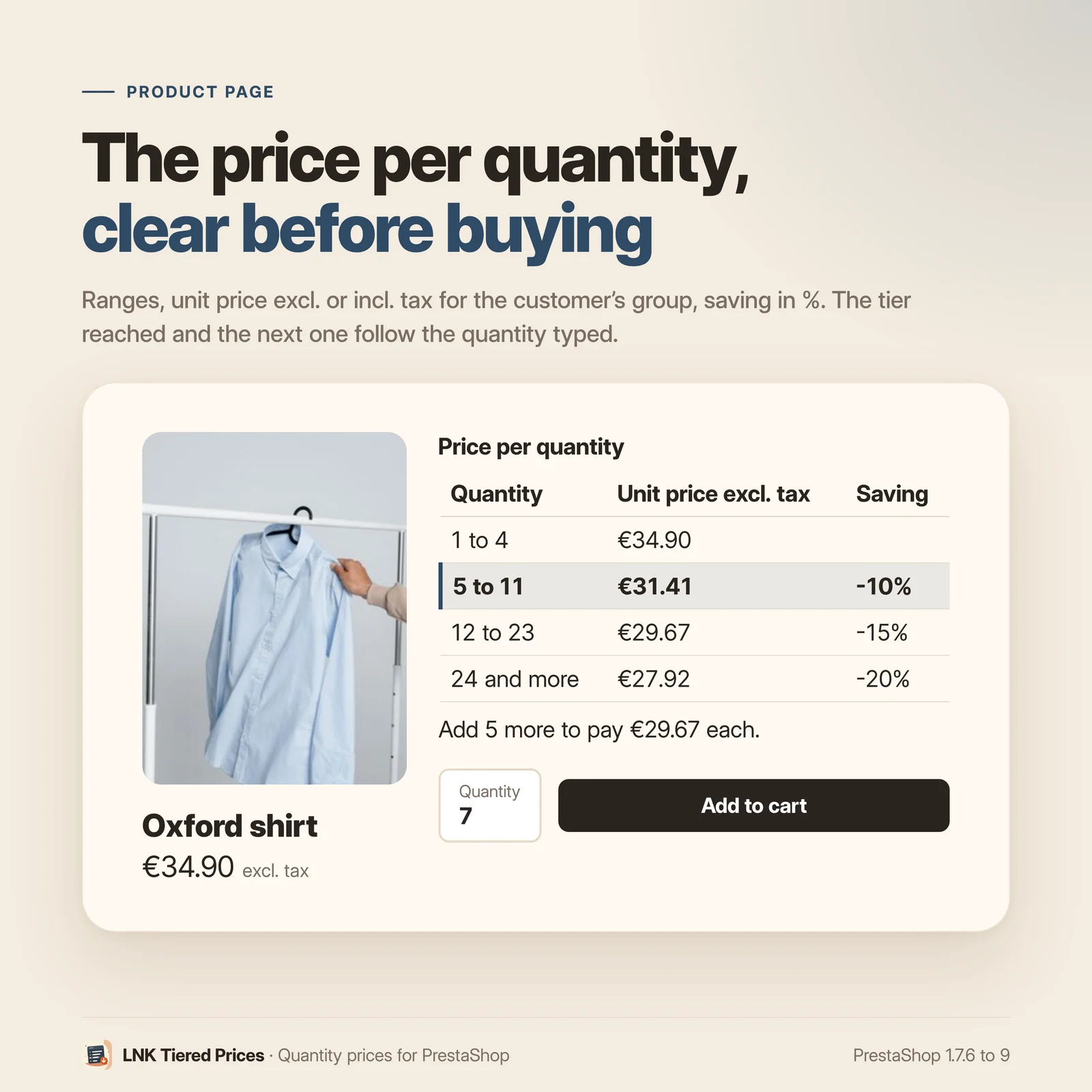
You created prices "from 6" and "from 12" in PrestaShop, but buyers only see them in a small table at the bottom of the product page, and never in lists or in the cart. LNK Tiered Prices shows them where buyers decide: a clear table on the product page, the best price in lists, and in the cart how many more to add to pay less.
- Version 1.1.0 · PrestaShop 1.7.6 to 8.x
- Version 1.9.0 · PrestaShop 9
- PrestaShop 1.7.6 to 9.x
- PHP 7.1 to 8.4
- No override
Screenshots
Key points
- PrestaShop's quantity prices, visible on the product page, in lists and in the cart.
- No price recalculated: amounts come from PrestaShop.
- Ranges, unit price excluding or including tax according to the group, saving in %.
- Tier reached and next tier, updated with the quantity.
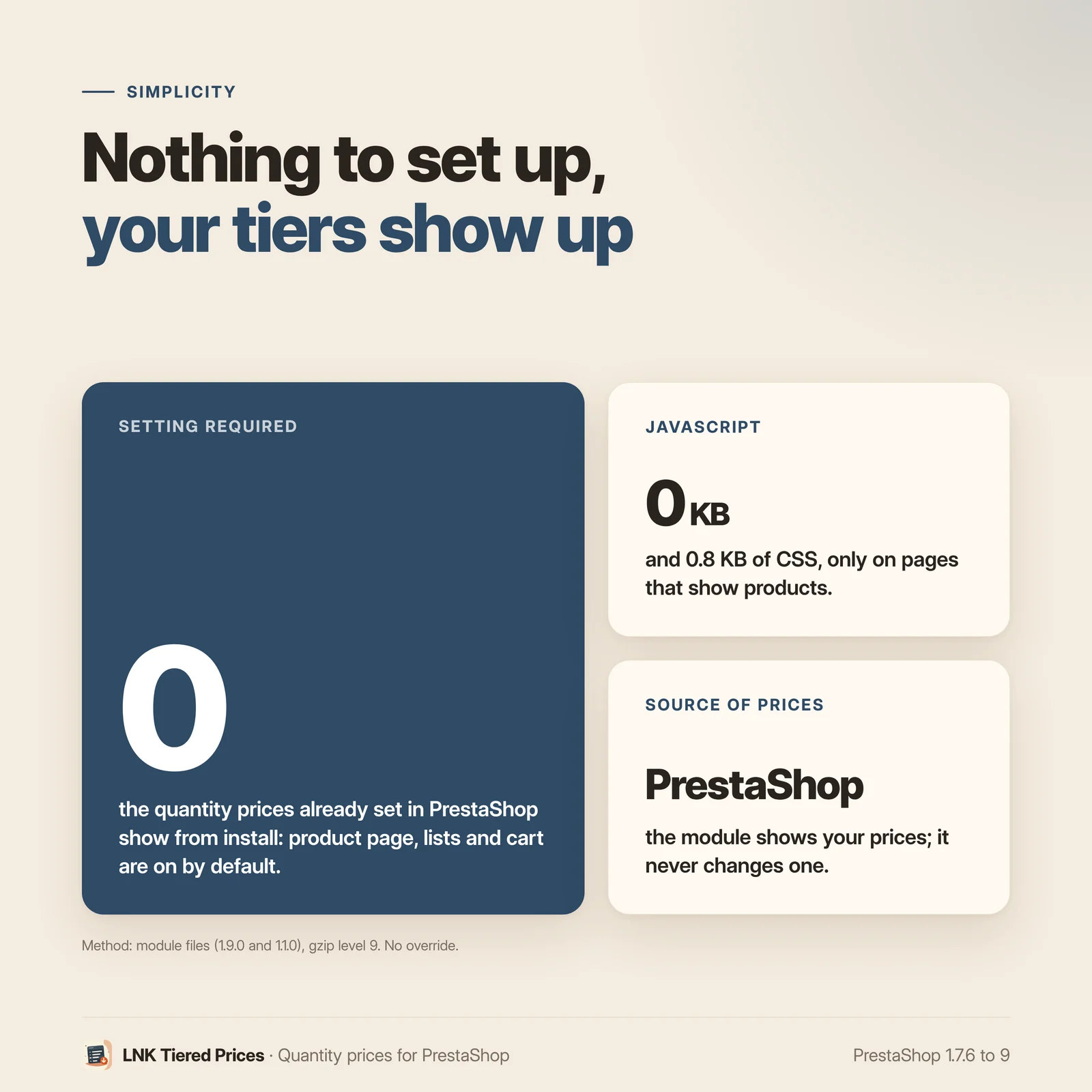
- Nothing to set up: your existing tiers show on installation.
- Nothing shown when a tier is not cheaper.
- 0.8 KB of CSS, no JavaScript.
- Multistore: settings per shop, per group or common.
- French, English and Arabic (right to left).
- PrestaShop 1.7.6 to 9, no override.
Nothing to set up
Install the module: the quantity prices you already created show at once, on the product page, in lists and in the cart. Tiers remain those of PrestaShop (Catalog › Products › Pricing › Specific prices, "starting at" a quantity). The module calculates no price: each amount comes from PrestaShop's calculation, the one the cart will apply.
What the module adds to your theme's table
Classic and Hummingbird already show a volume discounts table: the quantity, the price or discount, and the amount saved. The module does not claim to invent it. It adds:
- readable ranges: "1 to 5", "6 to 11", "12 and more";
- the unit price excluding or including tax according to the customer's group, and the saving in %;
- the tier reached for the quantity typed, and "Add 5 more to pay €8.20 each";
- the update when the buyer changes the combination or the quantity, with no script added;
- a table that only shows when a tier is really cheaper: if a promotion makes your tiers more expensive, the module shows nothing rather than a misleading table.
An option hides the theme's table on pages where the module shows its own, so the buyer does not see two.
The best price in lists
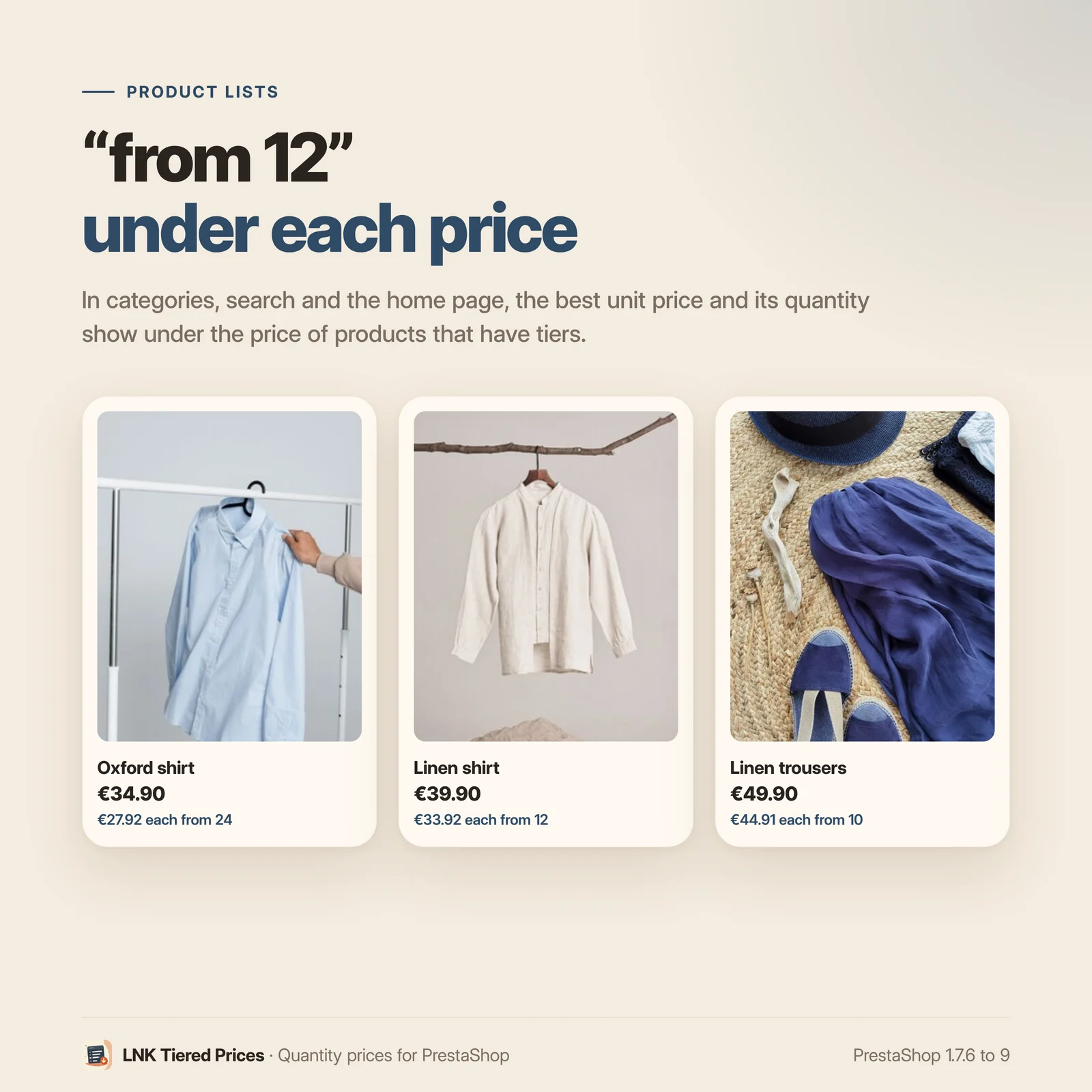
Under the price of each product that has tiers: "€8.20 each from 12". In categories, search, the home page and brand pages.
The next tier in the cart
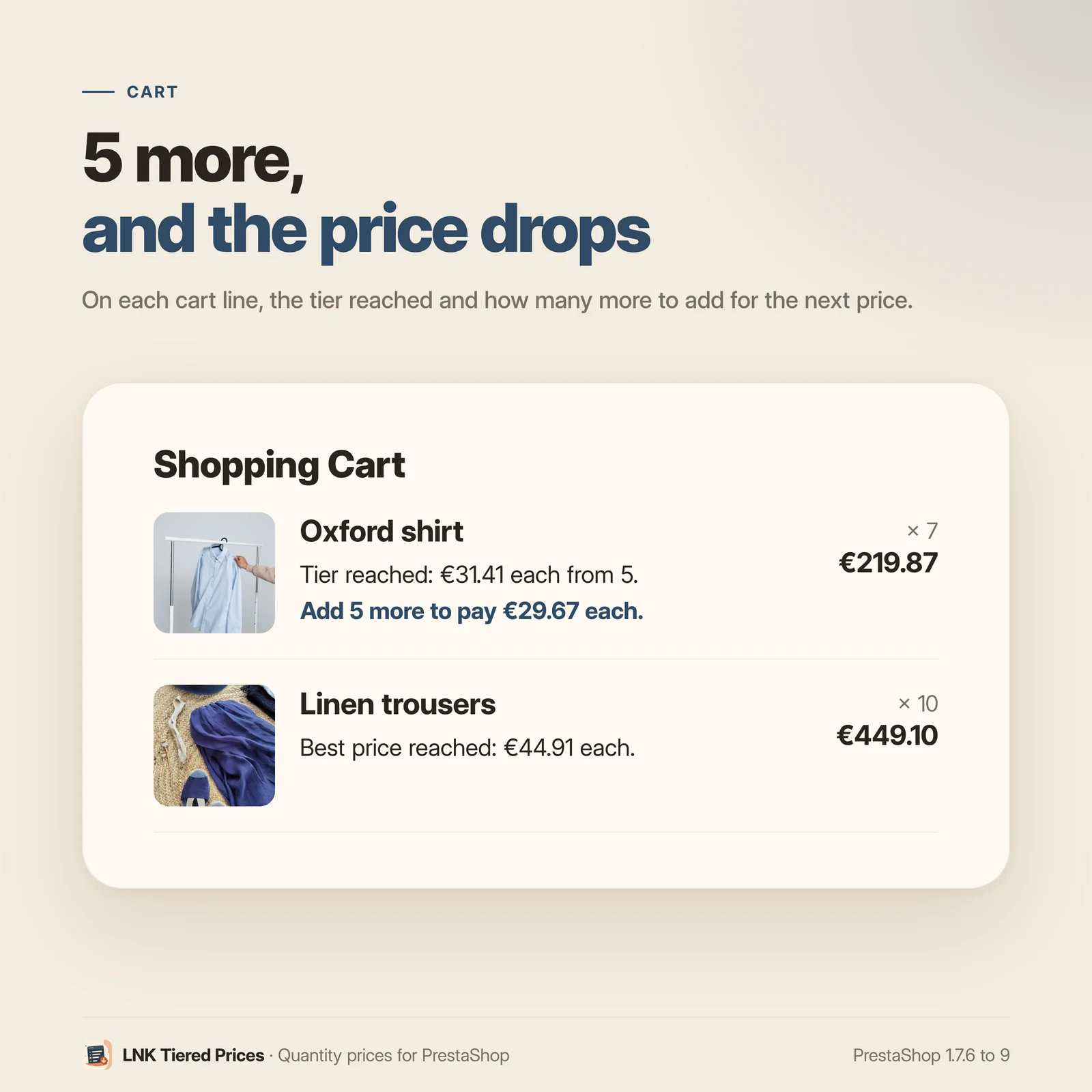
On each cart line: the tier reached, and how many more for the next price. The module counts quantities like PrestaShop: per combination or for the whole product, according to your quantity discount setting.
A live preview
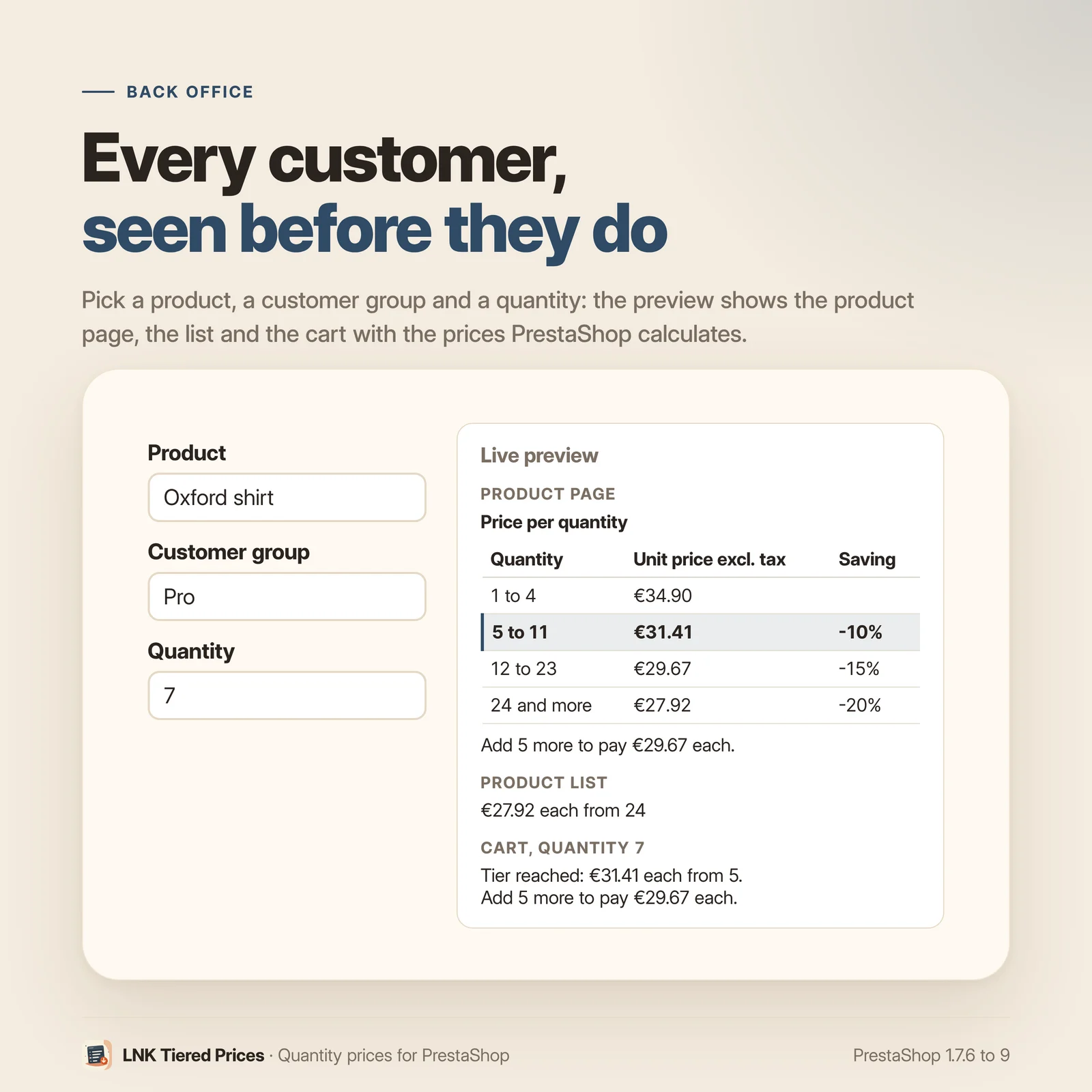
The back office shows the product page, the list and the cart as the customer sees them, for a product of your shop, a customer group and a quantity you choose. Preview prices are calculated by PrestaShop for that group.
Light and fast
Figures measured on the delivered module, compressed (zlib, level 9): 0.8 KB of CSS on pages that show products, no JavaScript, no stylesheet on other pages. No request added in the browser: blocks are rendered by the server.
Compatible with PrestaShop 1.7.6, 8 and 9
Two versions of the module, one per generation: 1.1 for PrestaShop 1.7.6 to 8.x, 1.9 for PrestaShop 9, with a native settings page in each back office, under Catalog. Classic and Hummingbird themes with no setting; LNK themes place the blocks through a dedicated hook (theme contract). No override, no table, no external call.
Frequently asked questions
How do I create tiered prices in PrestaShop?
In Catalog › Products, open a product, Pricing tab, then "Specific prices": add a price or a discount "starting at" 6, 12 or 50 units, for all customers or for a group. LNK Tiered Prices then shows these tiers; it does not create or change them.
Does the module change my prices?
No. Each amount shown is calculated by PrestaShop, with the same calculation as the cart: customer group, currency, taxes and combination included. The module stores no price.
My theme already shows a volume discounts table: what is the module for?
Classic and Hummingbird show the quantity, the price or discount and the amount saved, on the product page only. The module adds ranges ("6 to 11"), the unit price excluding or including tax according to the group, the saving in %, the tier reached and the next one, the best price in lists and the next tier in the cart. An option hides the theme's table where the module shows its own.
Why does no table show on one of my products?
Because no tier there is cheaper than one unit for this customer. This happens when a "starting at 1" promotion is stronger than your tiers: PrestaShop then applies the tier, which is more expensive. The module would rather show nothing than a misleading table; review the product's specific prices.
Are prices shown excluding or including tax?
Like the rest of your shop: according to the display setting of the customer's group (Customers › Groups). If your business group is set to excluding tax, they see prices excluding tax; your consumers, prices including tax.
Does the tier follow the quantity chosen by the buyer?
Yes. When the buyer changes the quantity or the combination, the theme refreshes the product page and the module updates the tier reached and the next one, with no script added. In the cart, each line says how many more to add for the next price.
Are quantities counted per combination?
Like in PrestaShop: according to the "Quantity discounts based on" setting (Shop Parameters › Product Settings), per combination or for the whole product.
Does the module slow my shop down?
No. It adds 0.8 KB of CSS on pages that show products, no JavaScript, and no stylesheet elsewhere. Blocks are rendered by the server.
Does it work with multistore?
Yes. Settings apply to all shops, to a group or to one shop, and the page shows their scope. A new shop takes over the settings of the shop copied. Tiers themselves remain the specific prices of each shop.
Can I change the look of the table?
Yes. The module sets no colour or font: your theme decides. The --lnk-tierprices-* CSS variables
style it without touching the template, and templates can be copied into
themes/<your theme>/modules/lnk_tierprices/views/templates/hook/.
What is left if I uninstall the module?
Nothing. The module has no table and no override: uninstalling removes its settings and its tab. Your specific prices stay intact.
Release history
-
Version 1.9.0 PrestaShop 9
New
- Product page: table of quantity price tiers (ranges, unit price excluding or including tax according to the customer's group, saving in %), tier reached for the quantity typed and next tier, updated when the combination or the quantity changes.
- Product lists: best unit price and its quantity ("€8.20 each from 12").
- Cart: tier reached and how many more for the next price, on each line.
- Option to hide the volume discounts table of the theme where the module shows its own.
- Settings page on the common look of LNK modules, under Catalog, with a live preview per product, customer group and quantity.
- Multistore: settings per shop, per group or common; a new shop takes over those of the shop copied.
- French, English and Arabic (right to left).
-
Version 1.1.0 PrestaShop 1.7.6 to 8.x
New
- Product page: table of quantity price tiers (ranges, unit price excluding or including tax according to the customer's group, saving in %), tier reached for the quantity typed and next tier, updated when the combination or the quantity changes.
- Product lists: best unit price and its quantity ("€8.20 each from 12").
- Cart: tier reached and how many more for the next price, on each line.
- Option to hide the volume discounts table of the theme where the module shows its own.
- Settings page on the common look of LNK modules, under Catalog, with a live preview per product, customer group and quantity.
- Multistore: settings per shop, per group or common; a new shop takes over those of the shop copied.
- French, English and Arabic (right to left).