 Module · LNK Bug Finder
LNK Bug Finder, the free module that spots what blocks your PrestaShop sales
A product page in 500 error, an “Add to cart” button that no longer responds, a payment method that vanishes from the checkout: your customers leave without a word, and you find out days later. LNK Bug Finder watches the buying path of your store, e-mails you when a problem blocks the cart or payment, and measures the speed felt by your real visitors. Free.
- Version 1.1.4 · PrestaShop 1.7.6 to 8.x
- Version 1.9.3 · PrestaShop 9
- PrestaShop 1.7.6 to 9.x
- PHP 7.1 to 8.4
- No override
Screenshots
Key points
- Watches the home page, categories, product pages, cart, checkout and payment.
- Fatal errors and 500 pages, with the file and the module involved.
- Broken add to cart, without false alerts on themes that handle it differently.
- No payment method offered, errors of payment modules.
- Database unreachable, even when the store could not start.
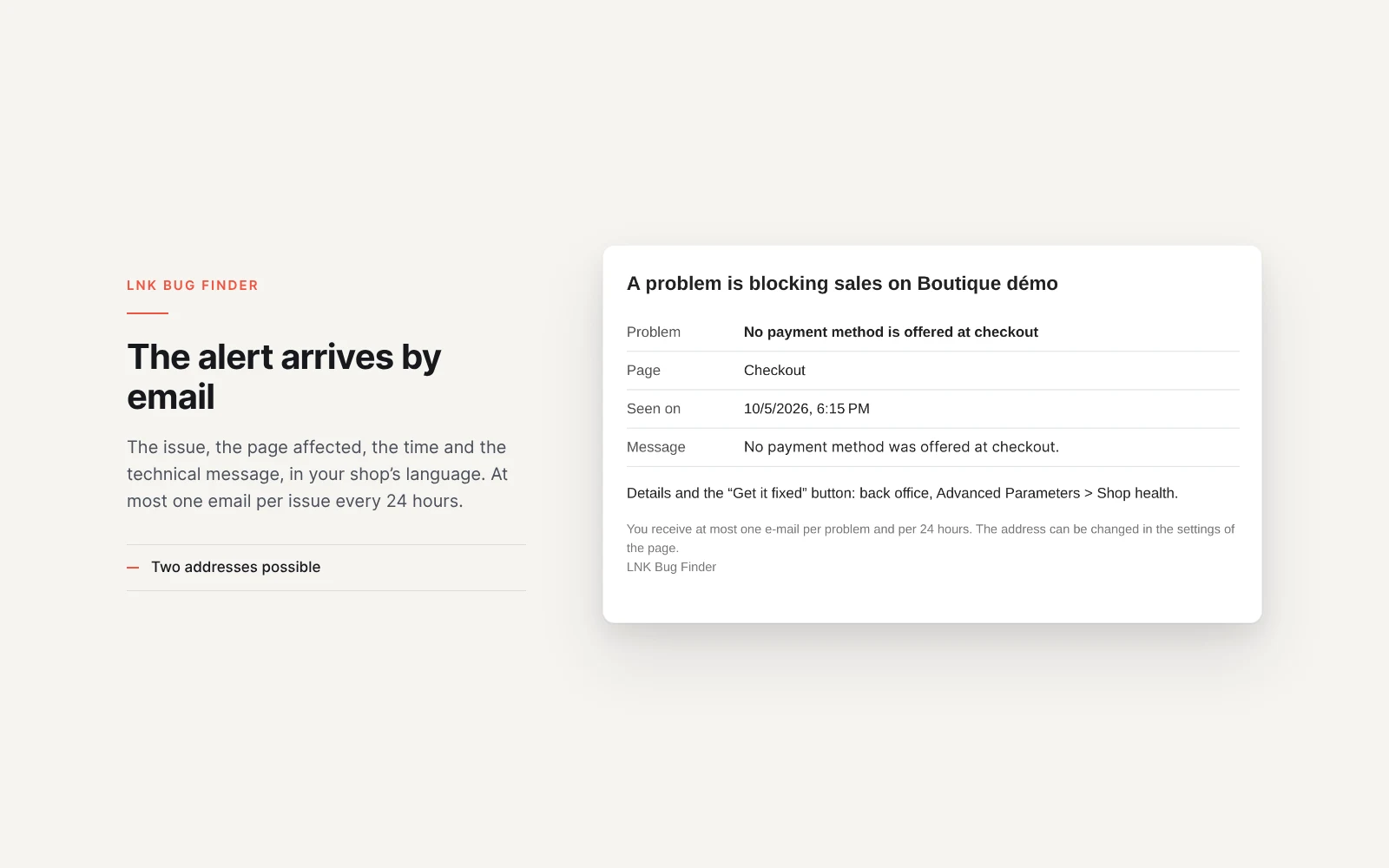
- Immediate alert e-mail for the cart and payment, at most one per problem and per day.
- Core Web Vitals of your real visitors, per page type.
- Weight of each module's files on the buying path.
- “Get it fixed” button, with the content shown before you agree.
- No cookie, no personal data.
- No override, 2.1 KB of JavaScript on the store.
- Translated into French, English, Spanish, Italian, Polish and Arabic.
- PrestaShop 1.7.6 to 9, free.
The errors that cost sales, and only those
The module watches the home page, categories, product pages, the cart, the checkout and the pages of payment modules. It keeps PHP fatal errors, pages in 500 error, errors written by your payment modules in the PrestaShop log, an unreachable database, and JavaScript errors from your store's own files. Warnings, browser extensions, scripts from other sites and robots are ignored. The same error seen a thousand times becomes a single problem, with its 7-day counter and its last occurrence; several errors of the same module in the same second form a single incident.
An add to cart that no longer responds
The module follows every click on the “Add to cart” button and waits for your store's answer. A normal refusal, such as insufficient stock, is ignored. A failure is reported with its error code. If the button does not respond at all, the module only reports it after seeing your theme complete at least one add to cart: a theme that handles the cart its own way never triggers a false alert. Your product pages come from a configurator or a customization module? The module spots these pages and offers to watch them in one click.
A payment method that vanishes
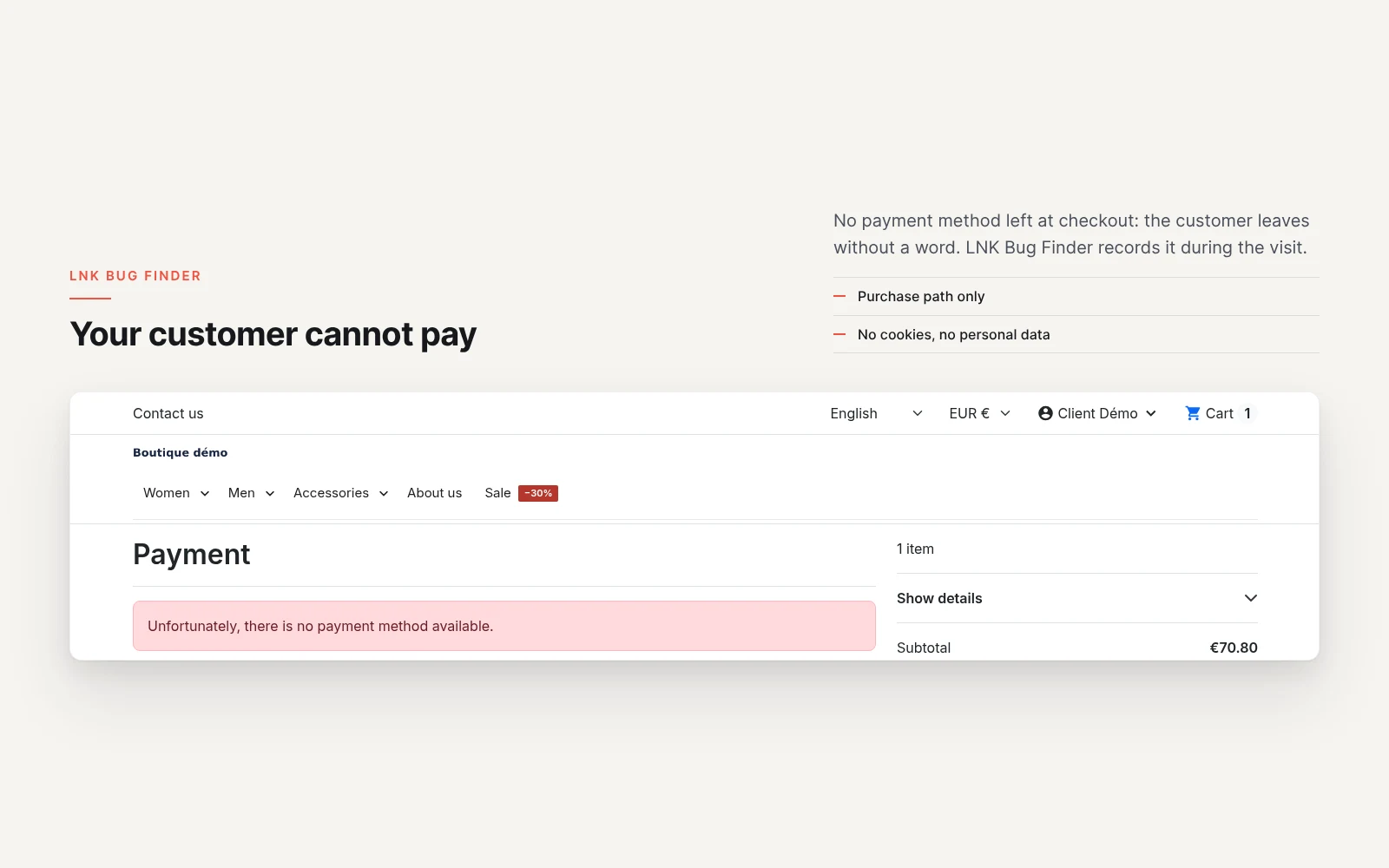
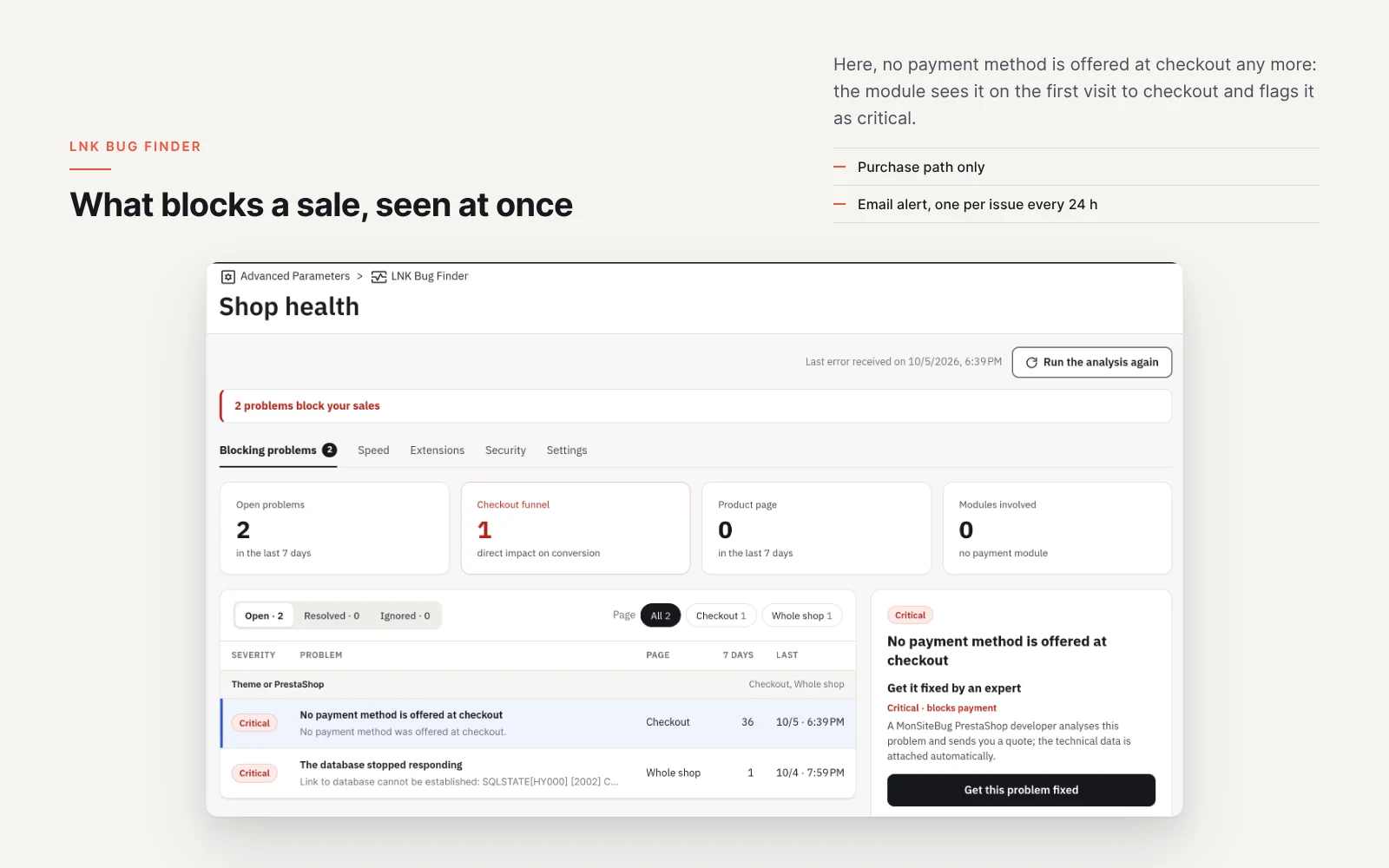
When a payment module crashes while the checkout is displayed, PrestaShop 8 and 9 remove that payment method from the page without writing anything anywhere. LNK Bug Finder reports a checkout left with no payment method at all, and the errors your payment modules write in the PrestaShop log during the buying path.
Light and fast
Figures measured on the shipped module, gzip-compressed (level 9). On the home page, categories, product pages, cart and checkout: 2.1 KB of JavaScript to watch the add to cart. With speed tracking on: 1.2 KB more, which stops at its first line for visits outside the sample. On every other page: nothing. No style sheet on the store.
The module uses neither jQuery nor any library. A page without errors costs your server no database query. The dashboard reads counters that are already computed.
The speed your real visitors get
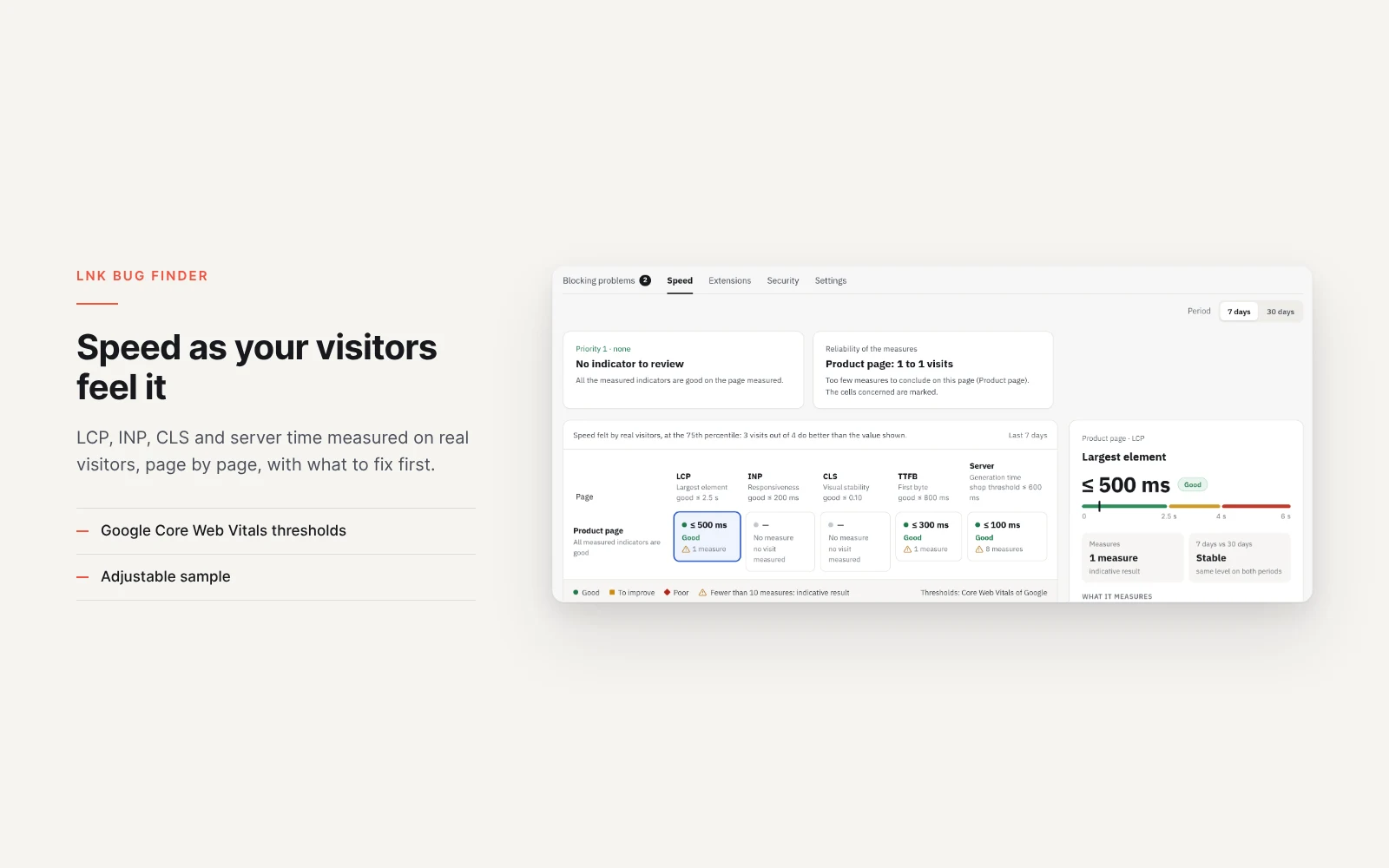
On a sample of visits (10% by default, adjustable), the module measures Google's Core Web Vitals: largest content displayed (LCP), responsiveness (INP), layout stability (CLS) and first byte received (TTFB), together with your server time. Results are given per page type, over 7 and 30 days. Tracking can be turned off in the settings, and the script is then not loaded at all.
The modules that weigh down your pages
The Extensions tab gives the weight of the files each module loads on the pages of the buying path: JavaScript, style sheets and fonts. It also spots files a module inserts without going through PrestaShop. You see at a glance which module weighs down your product pages the most.
Get it fixed in one click
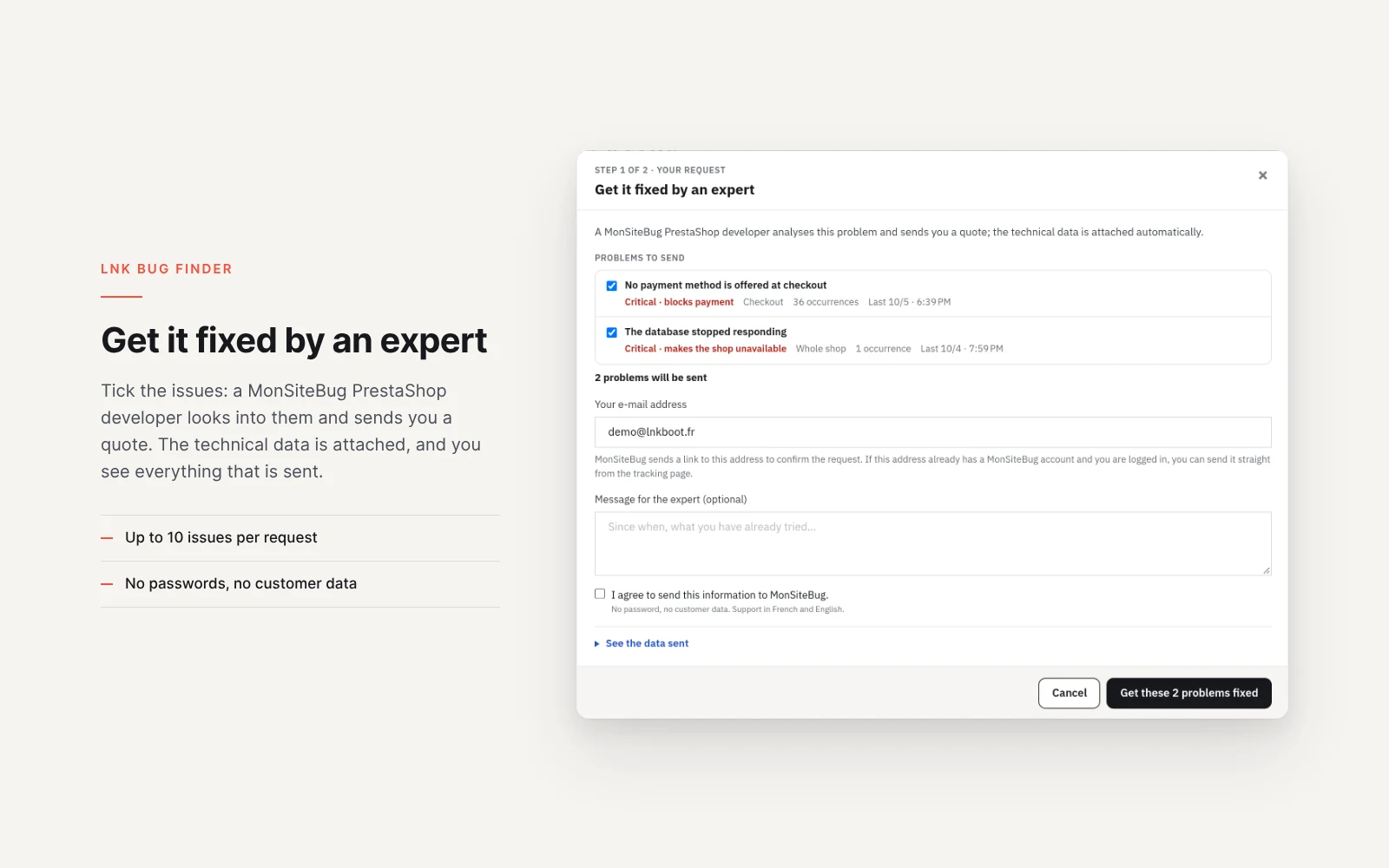
Each problem has a “Get it fixed” button. It shows exactly what will be sent to MonSiteBug: the kind of error, the file, the number of occurrences, the versions of PrestaShop, PHP and your modules. No password, no customer data. Nothing is sent without your agreement, and you confirm the request from your mailbox. Tick up to 10 problems and add a message: everything leaves in a single request. Support in French and English.
Your customers and the GDPR
The module sets no cookie, does not read the session and records no personal data: no e-mail address, no IP address, no customer or order identifier. Error messages are cleaned before being recorded.
Compatible with PrestaShop 1.7.6, 8 and 9
Two versions of the module, one per generation: 1.1 for PrestaShop 1.7.6 to 8.x, 1.9 for PrestaShop 9, with a native page in each back office, under Advanced Parameters. Checked on test stores running PrestaShop 1.7.6, 8.1 and 9.2, with the Classic and Hummingbird themes. No override.
Frequently asked questions
How do I find out why my PrestaShop store shows a 500 error?
Install LNK Bug Finder: every 500 error on a page of the buying path appears in Advanced Parameters > Shop health, with the message, the file, the line and the module involved. Identical errors are grouped, with their number of occurrences over 7 days and the context of the last one: page path, browser, module version.
The “Add to cart” button no longer works: how do I detect it?
The module follows clicks on this button and waits for your store's answer. A failure is reported with its error code, and an e-mail warns you right away. A normal refusal, such as insufficient stock, is not counted as a failure.
My theme handles the add to cart its own way: will I get false alerts?
No. A button that does not respond is only reported after the module has seen your theme complete at least one add to cart in the last 7 days. A theme that does not emit the PrestaShop events therefore never triggers this alert.
Why does a payment method disappear from my checkout page?
In PrestaShop 8 and 9, when a payment module crashes while the checkout is displayed, the core removes it from the page without writing anything in the logs. LNK Bug Finder reports a checkout left with no payment method at all, and the errors your payment modules write in the PrestaShop log during the buying path.
Does the module slow down my store?
It loads 2.1 KB of compressed JavaScript on the home page, categories, product pages, cart and checkout, and 1.2 KB more if speed tracking is on. Nothing on other pages, no style sheet. A page without errors costs no database query.
What happens if my MySQL database goes down?
When MySQL is unreachable at startup, PrestaShop stops before loading modules, but it writes the outage in its log. When the database is back, LNK Bug Finder reads that log again and records the outage, with its start time, its end time and the number of pages affected. What it captures during an outage is kept in a protected file, then written to the database.
What data is sent when I click “Get it fixed”?
The request window shows exactly what leaves, folded under “See the data sent”: the kind of error, the sentence describing the problem (it gives the ticket its title), the cleaned message, the file, the number of occurrences, the versions of PrestaShop, PHP and the active modules, the e-mail address you choose and your message if you write one. You tick up to 10 problems: they leave in a single request. No password, no customer data. Nothing is sent without your agreement, and you confirm the request from your mailbox.
Is the module GDPR compliant?
It sets no cookie, does not read the session and records no personal data: no customer e-mail address, no IP address, no order number. The sending limit of the script is computed on a fingerprint of the beginning of the IP address, never stored in clear.
Does the module look for security flaws?
No. LNK Bug Finder deals with what blocks a sale. The Security tab presents PrestaSecure, which looks for known vulnerabilities and malicious code in a PrestaShop store.
Is the module compatible with PrestaShop 9?
Yes. Version 1.9 is made for PrestaShop 9, with a native page in its back office. Version 1.1 covers PrestaShop 1.7.6 to 8.x. Both were checked on test stores running PrestaShop 1.7.6, 8.1 and 9.2, with the Classic and Hummingbird themes.
Do I need to change my theme?
No. The module has no override and does not touch your theme. It uses the native hooks of PrestaShop and loads its script through the PrestaShop API.
How do I uninstall the module cleanly?
Uninstall it from the Module Manager: its tables, settings, tab and backup file are removed. Nothing of the module remains in your store.
Release history
-
Version 1.9.3 PrestaShop 9
Changes
- The menu tab is named “LNK Bug Finder” in every language, like the module (it was “Shop health”). The page keeps its title.
-
Version 1.9.2 PrestaShop 9
New
- Shop health page redesigned in four tabs, with a detail panel on the right.
- Blocking problems: figure cards (open, checkout funnel, product page, modules involved), filters by status and by page, problems grouped by module.
- Correlated incident: several errors of the same module in the same second form an incident, the following ones are marked "linked".
- Problem panel: full message, resolution hint, context (page path, browser, module version), copy of the technical report.
- "Get it fixed by an expert": under the title of the problem, a block with the impact of a Critical problem and a button that opens the request window; at the top of the health page, a banner, without button, when Critical problems are open.
- Request window to MonSiteBug: open problems to tick (10 at most, Critical ones ticked by default, correlated incidents grouped), address, optional message and consent, then a confirmation with the tracking link. The ticked problems leave in a single request. The data sent can still be viewed, folded: a readable summary, then the raw JSON. Each problem leaves with its sentence for the merchant, which gives the MonSiteBug ticket its title. When the request cannot leave (local or test address), the window still opens and gives the reason.
- Speed: 7 or 30 day period, page by indicator grid at the 75th percentile, indicative result under 10 measures, and a panel with the threshold gauge, trend and leads on the PrestaShop side.
- Extensions: weight split between theme, core and modules, quick gain, and modules that load their files on pages where none of their display hooks is used.
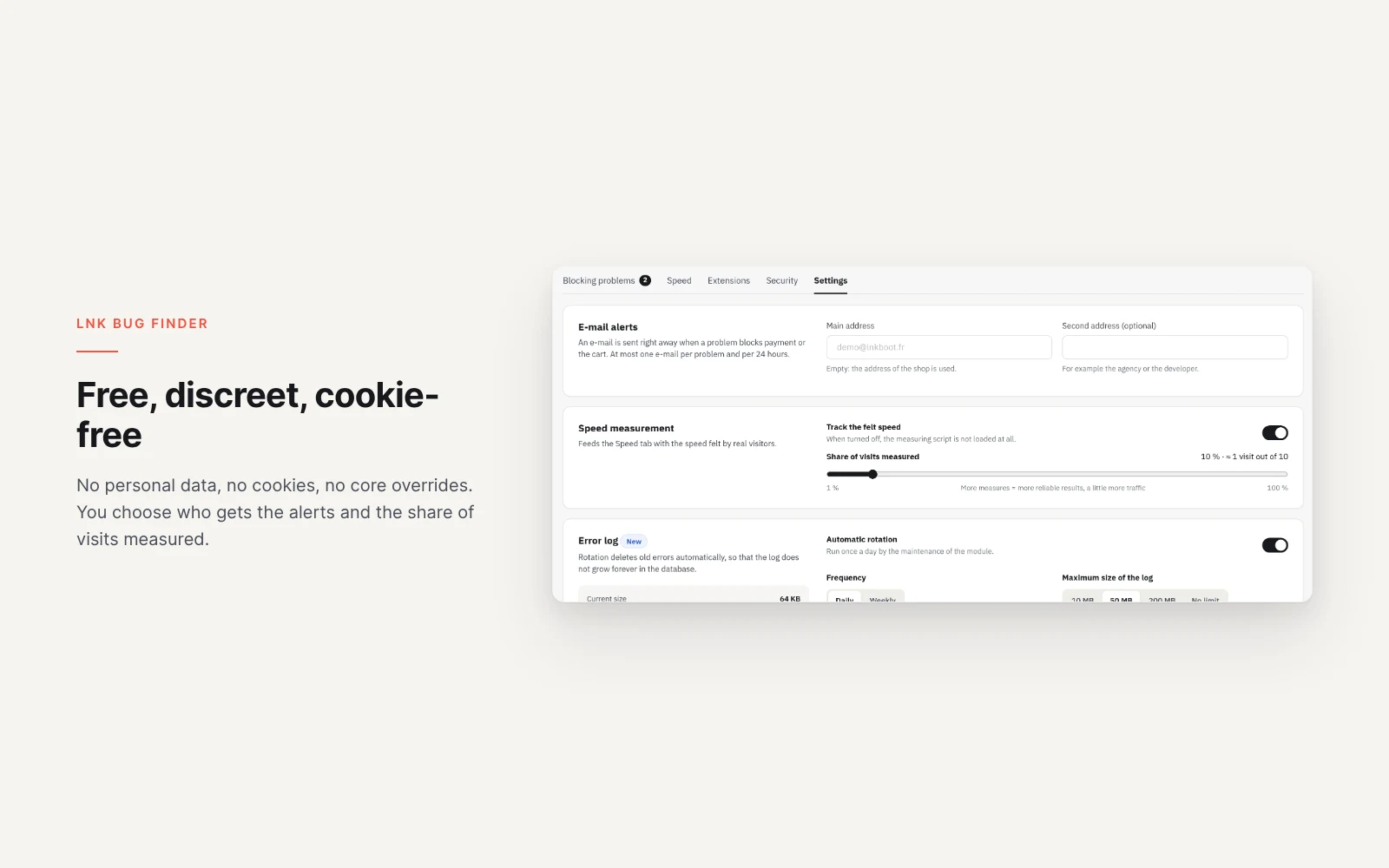
- Configurable error log: rotation once a day by the maintenance of the module, maximum size, retention of open and resolved problems, compressed CSV archive in var/logs, download and confirmed purge.
- Dashboard widget: header band, refresh in place, button to the health page.
- Sentences for the merchant by kind of problem and page; dates in the format of the employee language.
Changes
- The context of a problem holds no personal data: path without parameters, segments that look like a token or an e-mail address masked, browser reduced to its family and system.
- Module names follow the employee language.
- A problem sent shows "Request sent" in the list, with the date and the tracking link in its panel. The consent screen in the right column is gone.
- Addresses of admin.css, admin.js, sentinel.js and vitals.js versioned by the fingerprint of their content: a cache or a CDN never serves an old file under the same address.
-
Version 1.9.1 PrestaShop 9
New
- Product pages served by a module (product configurator, custom product page): a list of pages, in the settings, watches them like product pages, add to cart sentinel and server errors included.
- Module pages that carry an add to cart button are spotted on the shop and suggested to the merchant, to add or dismiss in one click.
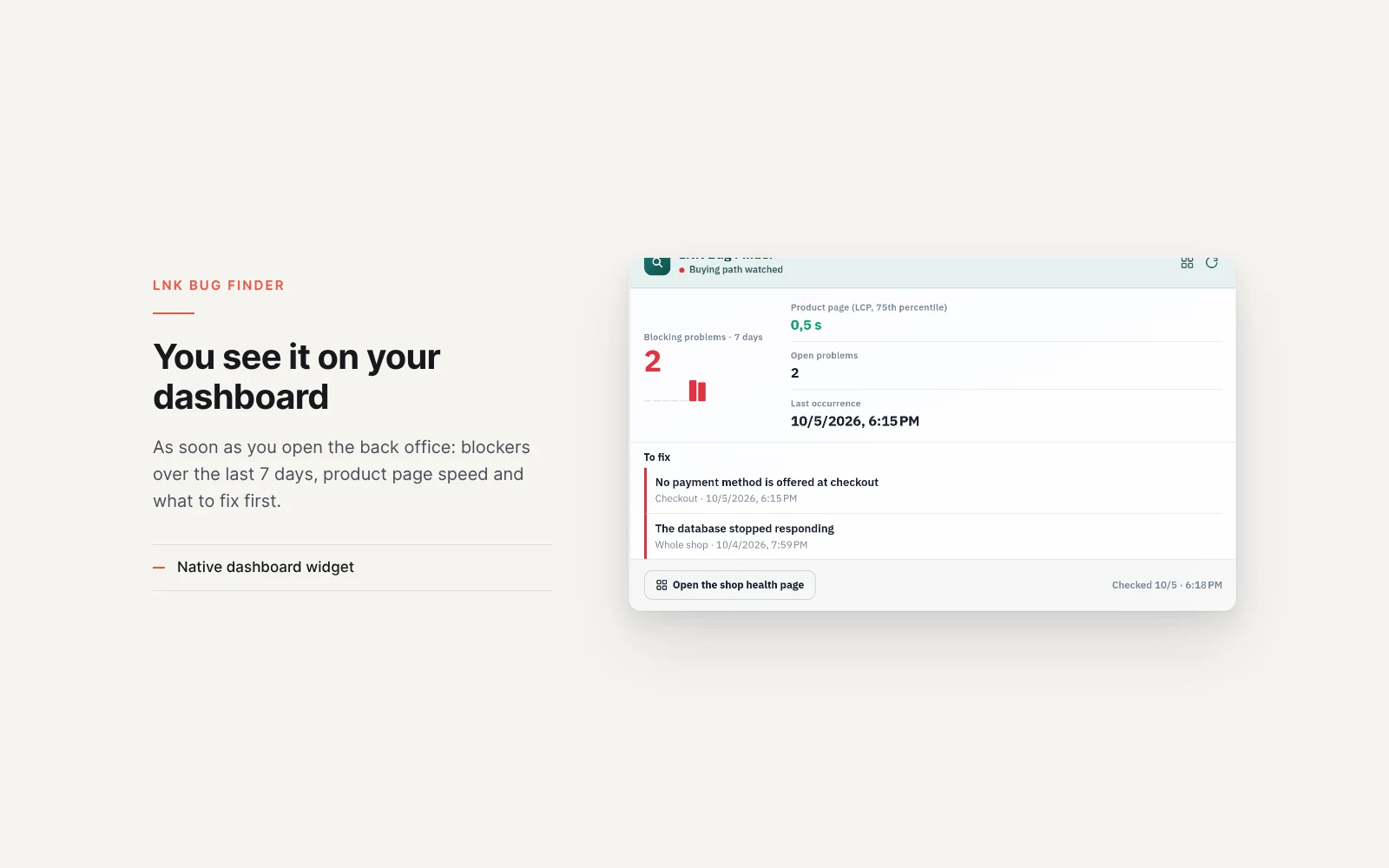
- Dashboard block redesigned: blocking problems over 7 days with their curve, product page speed, and the three blocking problems to fix.
Changes
- The Security tab disappears when PrestaSecure is active on the shop; installed but disabled, it leads to its reactivation.
Fixes
- Shop health page in 404 after an installation from the command line (outdated route cache): the PrestaShop cache is cleared on installation and upgrade, and the module never offers a link to a page that does not exist.
Show the 6 previous versions
-
Version 1.9.0 PrestaShop 9
First version for PrestaShop 9. PrestaShop 1.7.6 to 8.x has its own version, 1.1.0.
New
- Monitoring of the buying path: home page, categories, product pages, cart, checkout and the pages of payment modules.
- Fatal errors and 500 pages, with the file, the line and the module involved; identical errors are grouped.
- Broken add to cart, reported with its error code; a silent button is only reported after a successful add has been seen on the same theme.
- Checkout with no payment method at all, and errors written by payment modules in the PrestaShop log.
- Database unreachable, read back from the PrestaShop log when MySQL returns.
- JavaScript errors of the shop's own files on product pages, the cart and the checkout.
- Immediate alert e-mail for the cart and payment, at most one per problem and per 24 hours, with an optional second address.
- Core Web Vitals of a sample of real visitors and server time, by page type; tracking can be turned off.
- Weight of the files each module loads on the buying path, fonts included.
- Shop health page under Advanced Parameters, and a block on the dashboard.
- “Get it fixed” button: sent to MonSiteBug after agreement, with the content shown beforehand.
- No cookie, no personal data, no override.
-
Version 1.1.4 PrestaShop 1.7.6 to 8.x
Changes
- The menu tab is named “LNK Bug Finder” in every language, like the module (it was “Shop health”). The page keeps its title.
-
Version 1.1.3 PrestaShop 1.7.6 to 8.x
Fixes
- Blocking problems icon in the back office header: on 1.7.6 and 1.7.7, on the Symfony pages (products, orders, modules…), PrestaShop rendered it outside the top bar and it covered the logo. It now sits at the end of the bar, right of the employee account, and keeps the grey of the native icons. On a browser too old to place it without covering anything, it is not shown on these pages.
-
Version 1.1.2 PrestaShop 1.7.6 to 8.x
New
- Shop health page redesigned in four tabs, with a detail panel on the right.
- Blocking problems: figure cards (open, checkout funnel, product page, modules involved), filters by status and by page, problems grouped by module.
- Correlated incident: several errors of the same module in the same second form an incident, the following ones are marked "linked".
- Problem panel: full message, resolution hint, context (page path, browser, module version), copy of the technical report.
- "Get it fixed by an expert": under the title of the problem, a block with the impact of a Critical problem and a button that opens the request window; at the top of the health page, a banner, without button, when Critical problems are open.
- Request window to MonSiteBug: open problems to tick (10 at most, Critical ones ticked by default, correlated incidents grouped), address, optional message and consent, then a confirmation with the tracking link. The ticked problems leave in a single request. The data sent can still be viewed, folded: a readable summary, then the raw JSON. Each problem leaves with its sentence for the merchant, which gives the MonSiteBug ticket its title. When the request cannot leave (local or test address), the window still opens and gives the reason.
- Speed: 7 or 30 day period, page by indicator grid at the 75th percentile, indicative result under 10 measures, and a panel with the threshold gauge, trend and leads on the PrestaShop side.
- Extensions: weight split between theme, core and modules, quick gain, and modules that load their files on pages where none of their display hooks is used.
- Configurable error log: rotation once a day by the maintenance of the module, maximum size, retention of open and resolved problems, compressed CSV archive in var/logs, download and confirmed purge.
- Dashboard widget: header band, refresh in place, button to the health page.
- Sentences for the merchant by kind of problem and page; dates in the format of the employee language.
Changes
- The context of a problem holds no personal data: path without parameters, segments that look like a token or an e-mail address masked, browser reduced to its family and system.
- Module names follow the employee language.
- A problem sent shows "Request sent" in the list, with the date and the tracking link in its panel. The consent screen in the right column is gone.
- Addresses of admin.css, admin.js, sentinel.js and vitals.js versioned by the fingerprint of their content: a cache or a CDN never serves an old file under the same address.
-
Version 1.1.1 PrestaShop 1.7.6 to 8.x
New
- Product pages served by a module (product configurator, custom product page): a list of pages, in the settings, watches them like product pages, add to cart sentinel and server errors included.
- Module pages that carry an add to cart button are spotted on the shop and suggested to the merchant, to add or dismiss in one click.
- Dashboard block redesigned: blocking problems over 7 days with their curve, product page speed, and the three blocking problems to fix.
Changes
- The Security tab disappears when PrestaSecure is active on the shop; installed but disabled, it leads to its reactivation.
-
Version 1.1.0 PrestaShop 1.7.6 to 8.x
First version for PrestaShop 1.7.6 to 8.x. PrestaShop 9 has its own version, 1.9.0.
New
- Monitoring of the buying path: home page, categories, product pages, cart, checkout and the pages of payment modules.
- Fatal errors and 500 pages, with the file, the line and the module involved; identical errors are grouped.
- Broken add to cart, reported with its error code; a silent button is only reported after a successful add has been seen on the same theme.
- Checkout with no payment method at all, and errors written by payment modules in the PrestaShop log.
- Database unreachable, read back from the PrestaShop log when MySQL returns.
- JavaScript errors of the shop's own files on product pages, the cart and the checkout.
- Immediate alert e-mail for the cart and payment, at most one per problem and per 24 hours, with an optional second address.
- Core Web Vitals of a sample of real visitors and server time, by page type; tracking can be turned off.
- Weight of the files each module loads on the buying path, fonts included.
- Shop health page under Advanced Parameters, and a block on the dashboard.
- “Get it fixed” button: sent to MonSiteBug after agreement, with the content shown beforehand.
- No cookie, no personal data, no override.