 Module · LNK Company Staff
Several buyers for each business customer of your PrestaShop shop
LNK Company Staff brings several customer accounts together under one company, on your PrestaShop shop. The company administrator invites colleagues, gives each one a role, sets order limits and splits purchases by site (work site, branch, agency) with a budget. A cart above a limit or a budget goes to a colleague for approval before it becomes an order. The company takes over the business recorded by LNK Pro Accounts, with nothing to type again.
- Version 1.1.0 · PrestaShop 1.7.6 to 8.x
- Version 1.9.0 · PrestaShop 9
- PrestaShop 9 to 9.x
- PHP 8.1 to 8.4
- No override
Screenshots
Key points
- Several customer accounts under one company, by invitation
- Company created from the business recorded in LNK Pro Accounts, nothing to type again
- Five roles ready to use, permissions and names adjustable
- Limits per order and per month, excluding tax, per member or per role
- Cart approval by a colleague, never by the author of the request
- No order created before approval
- Sites (work sites, branches, agencies) with a budget per month, per year or overall
- Delivery addresses shared by the company
- Accounting export as CSV by company, site and period
- Members and limits visible in the back office
- 0.9 KB compressed on the five pages of the module, no script in the shop
- French, English, Arabic from right to left
- PrestaShop 1.7.7 to 9.x, PHP 7.1 to 8.4, no override, multistore
One company, several customer accounts
A company starts from the account of a business customer approved in LNK Pro Accounts, a required module. In their account, on the “My company” page, the customer clicks “Create my company”: the name is filled in with their registered business name. From the back office, you can also create the company of a customer chosen by e-mail or ID. Nothing is automatic: the customer becomes the owner and administrator of the company.
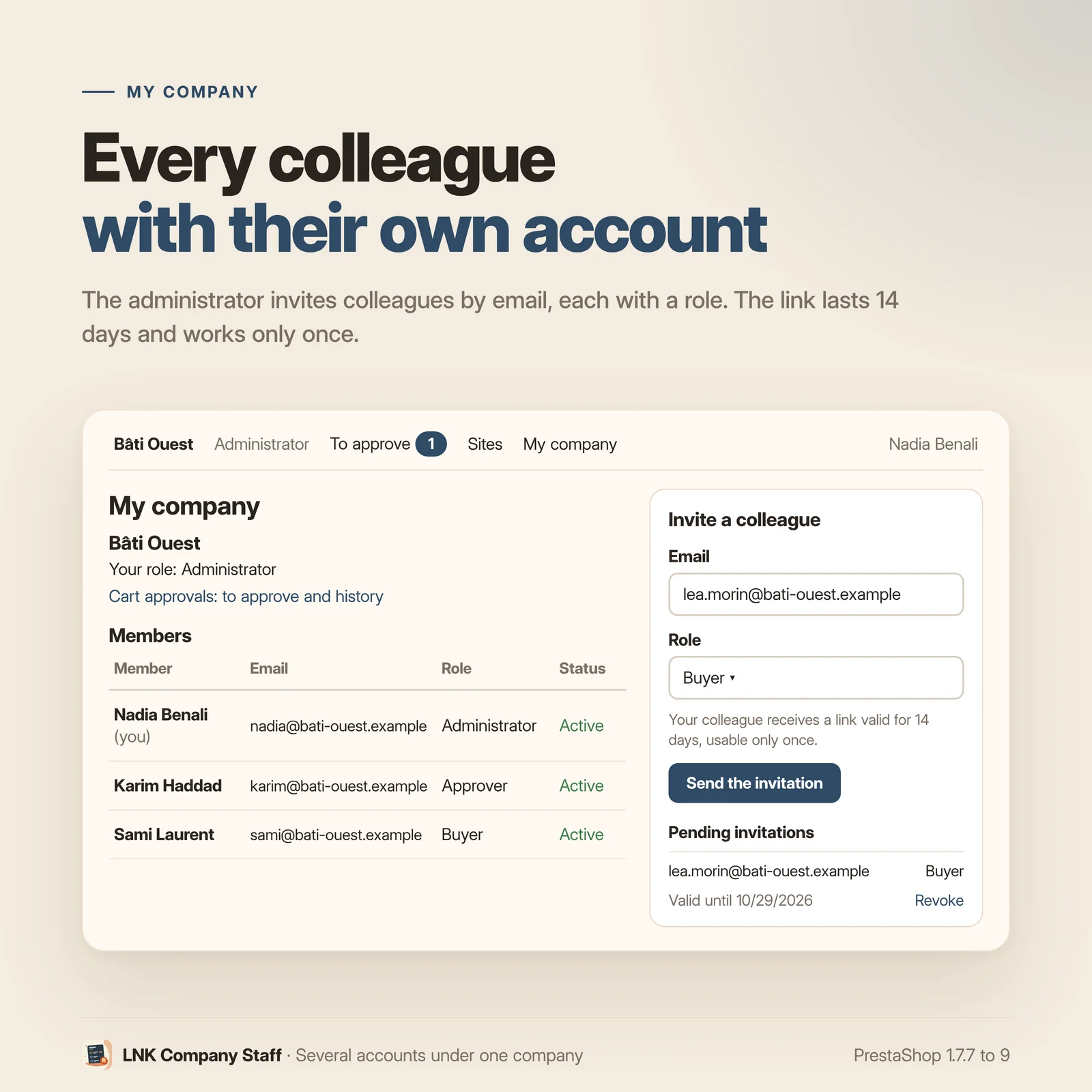
Colleagues join it by invitation: an e-mail and a role, a link valid for 14 days, usable only once, sent by e-mail. The colleague signs in with the invited address, or creates an account from the “Join” page. An invitation can be revoked as long as it has not been used, and the number of invitations per company and per hour is limited (20 by default).
The company always keeps at least one active administrator, and a member never gives a role with more permissions than their own. A removed member becomes an ordinary customer again.
Roles and permissions for each member
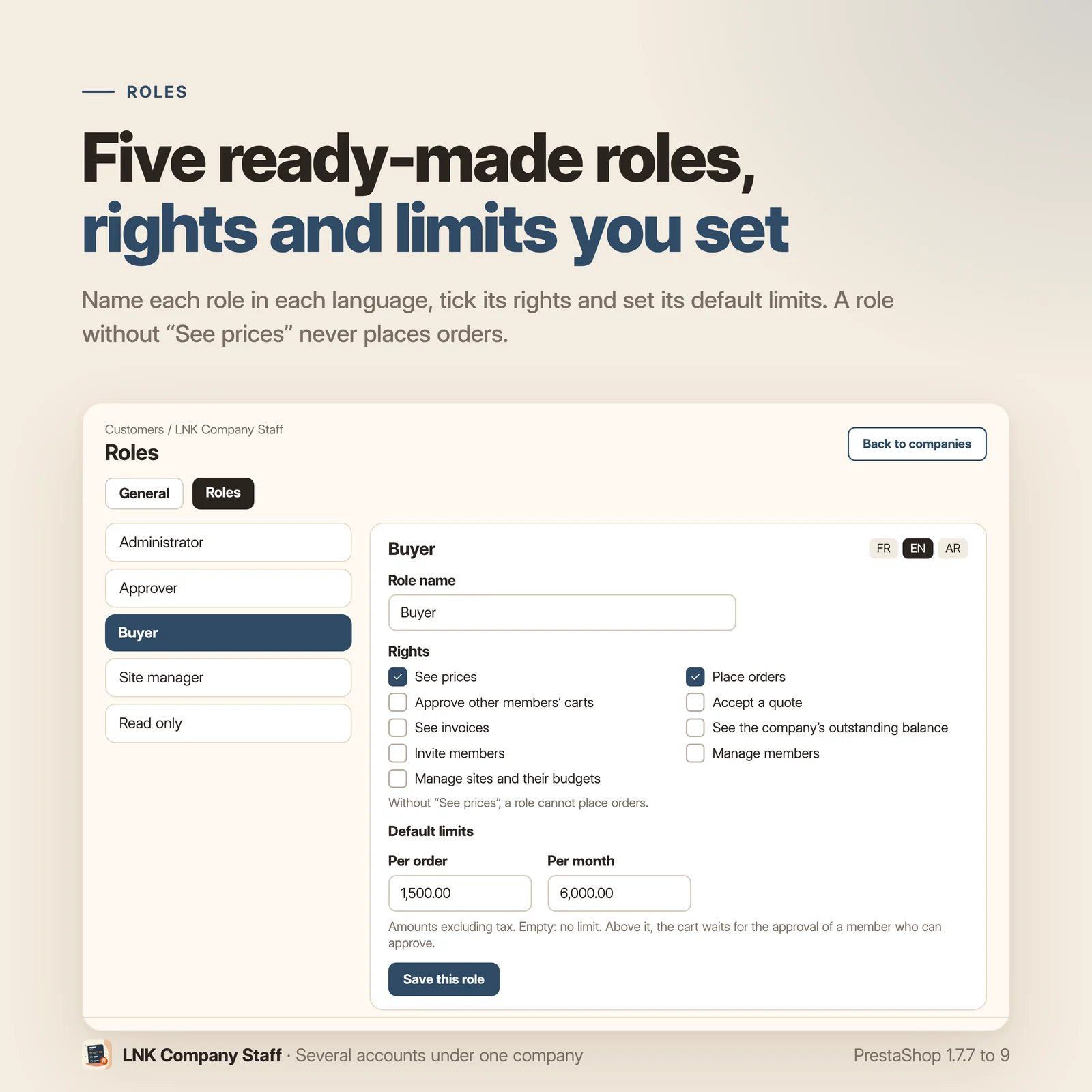
Five roles are created in each shop: Administrator, Approver, Buyer, Site manager and Read only. Under “Settings › Roles”, you name each role in each language, tick its permissions and set its default limits.
The permissions to tick: see prices, place orders, approve other members' carts, accept a quote, see invoices, invite members, manage members, manage sites. Two rules are enforced by the server: the administrator always keeps every permission, and a role without “See prices” never has “Place orders”.
In the shop, a member without “Place orders” fills their cart; the checkout sends them back to the cart with a message. Without “See invoices”, PDF invoices and credit slips are refused. Without “Accept a quote”, accepting a quote from LNK Quotes is refused. A customer who belongs to no company keeps the shop as it is.
Order limits and cart approval
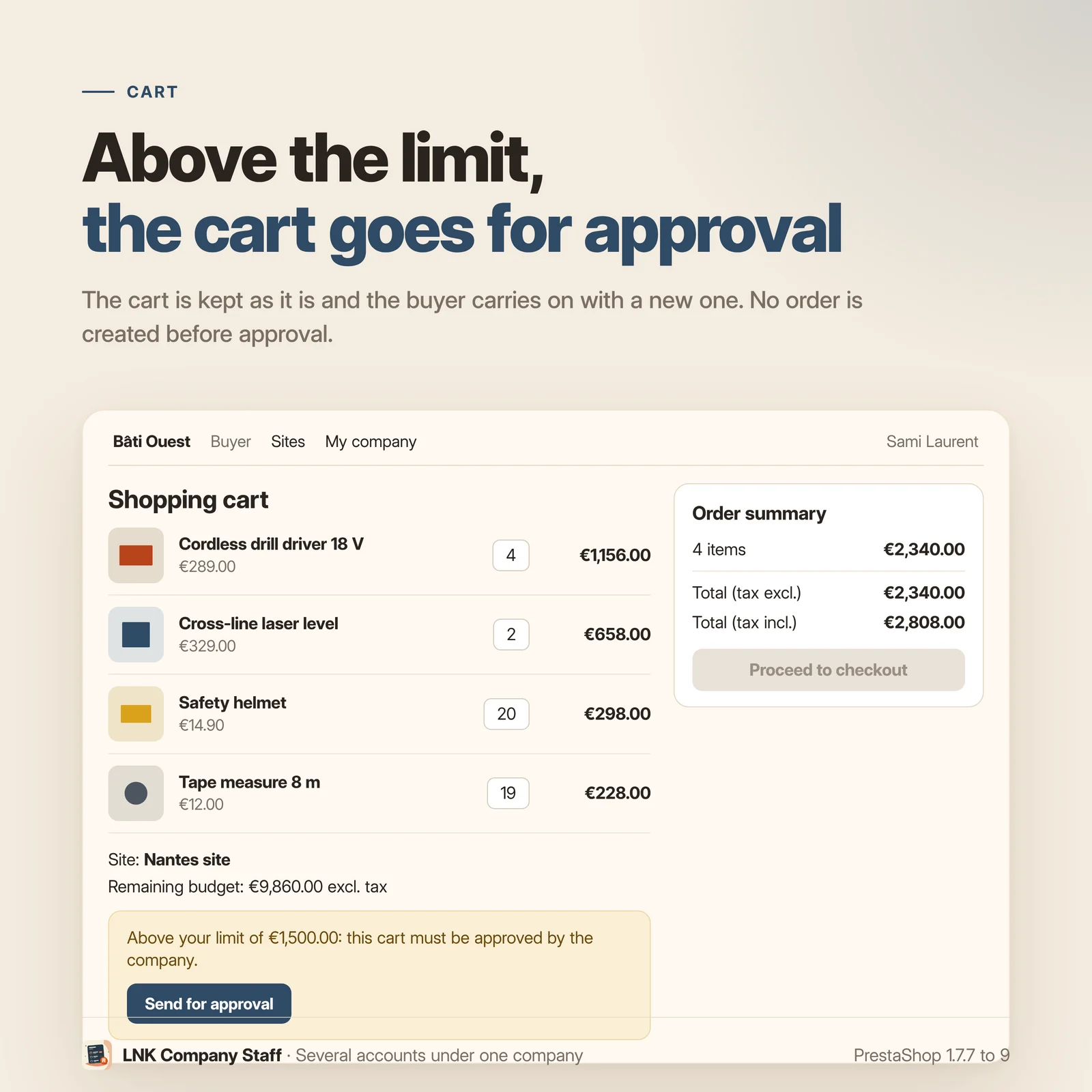
Each member can have a limit per order and a limit per month, excluding tax and shipping, in the shop's default currency: their own, set by the company administrator, otherwise the one of their role. The administrator never has a limit. The month counts the member's orders since the 1st, paid or not, except cancelled, refunded or failed ones.
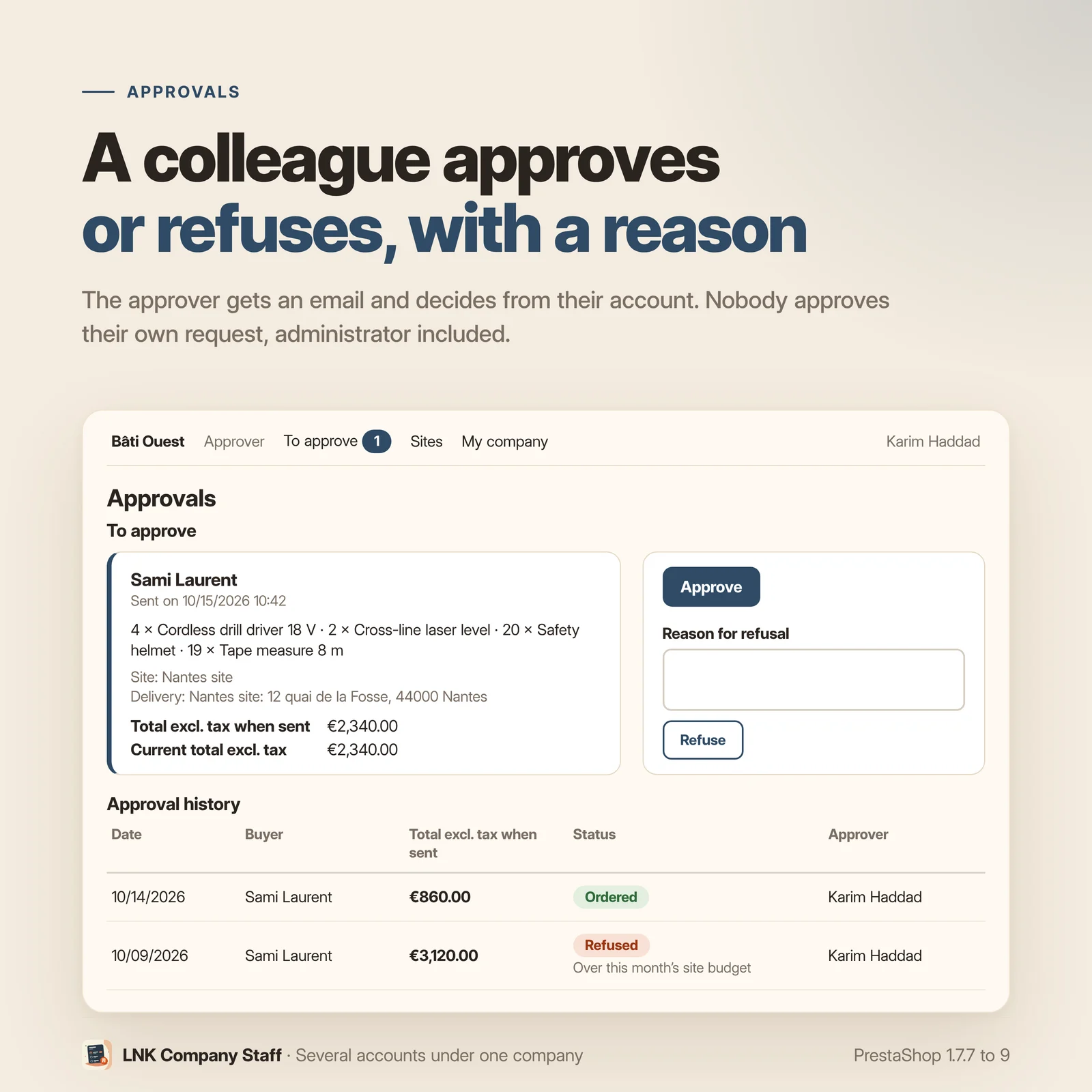
Above a limit, the cart shows “Send for approval”. The cart is then kept as it is and the buyer goes on with a new cart. No order is created before approval: your back office only shows real orders.
A colleague with the approval permission receives an e-mail, opens the “Approvals” page of their account and approves or refuses with a reason. Nobody approves their own request, administrator included. The approved cart goes back to the buyer, who orders it as it is: any change cancels the approval. A request expires after 30 days by default, and a reminder goes to the approvers while it waits (every 2 days by default).
The checkout and the payment modules refuse a cart above a limit that has not been approved. An order created outside the shop by the server notification of a payment provider cannot be blocked without an override: it is logged and written to the company history.
Sites and budgets
You name the site to suit your customers' trade, in the singular and the plural, in each language: “Site” by default, “Work site”, “Branch” or “Agency” if you wish. The chosen word is used everywhere, in the shop and in the e-mails.
A member with “Manage sites” creates the company's sites from the “My company” page: name, delivery address, contact on site, attached members and managers, optional budget excluding tax per month, per year or overall, open or closed.
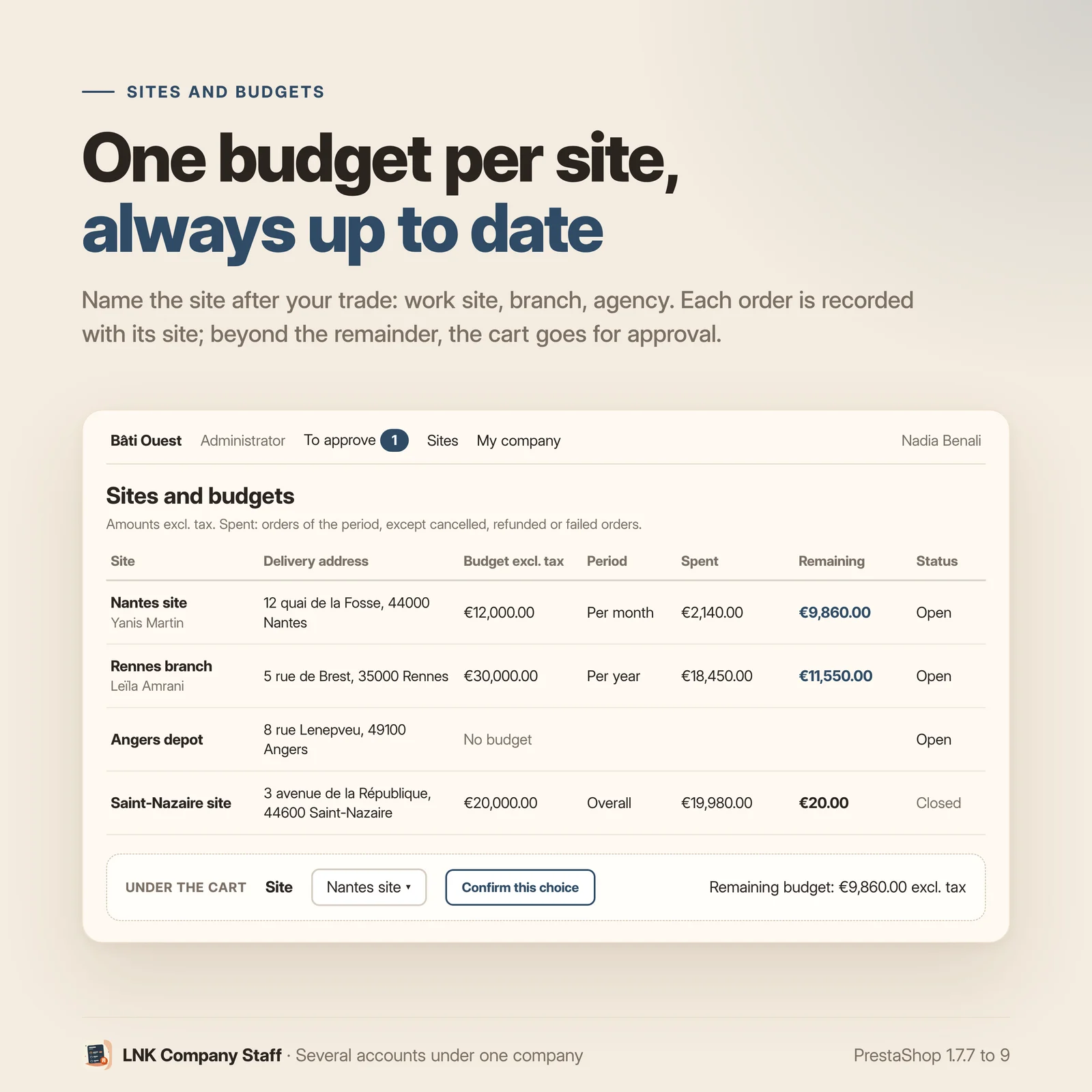
Under the cart, the member chooses the site of their order among those they can access. With only one possible site, it is assigned automatically. The address of the site becomes the delivery address of the cart. Each order is recorded with its company and its site.
The amount spent of a budget counts the site's orders over the period, paid or not, except cancelled, refunded or failed ones. Beyond the remainder, the cart goes for approval, for every member, administrator included. The “Site manager” role approves the carts of the sites they manage. When nobody else can approve, the member who manages the sites raises the budget themselves.
Shared delivery addresses
An administrator shares one of their addresses with the company: each member receives a copy in their address book, kept up to date. A copy already used by an order stays untouched: a new copy replaces it. A copy edited by its member becomes a personal address.
The company's customer area
In their account, each member finds “My company”, the company dashboard, the “Approvals” page and the sites and budgets page.
- Dashboard: orders in progress (the whole company for those who see invoices or manage sites, their sites for a site manager, their own for the others), requests to approve, site budgets.
- Sites and budgets: each readable site, with its budget, its period, the amount spent and the remainder.
- Company bar at the top of the page: company name, member's role, “To approve” with the number of requests they can decide.
Your back office
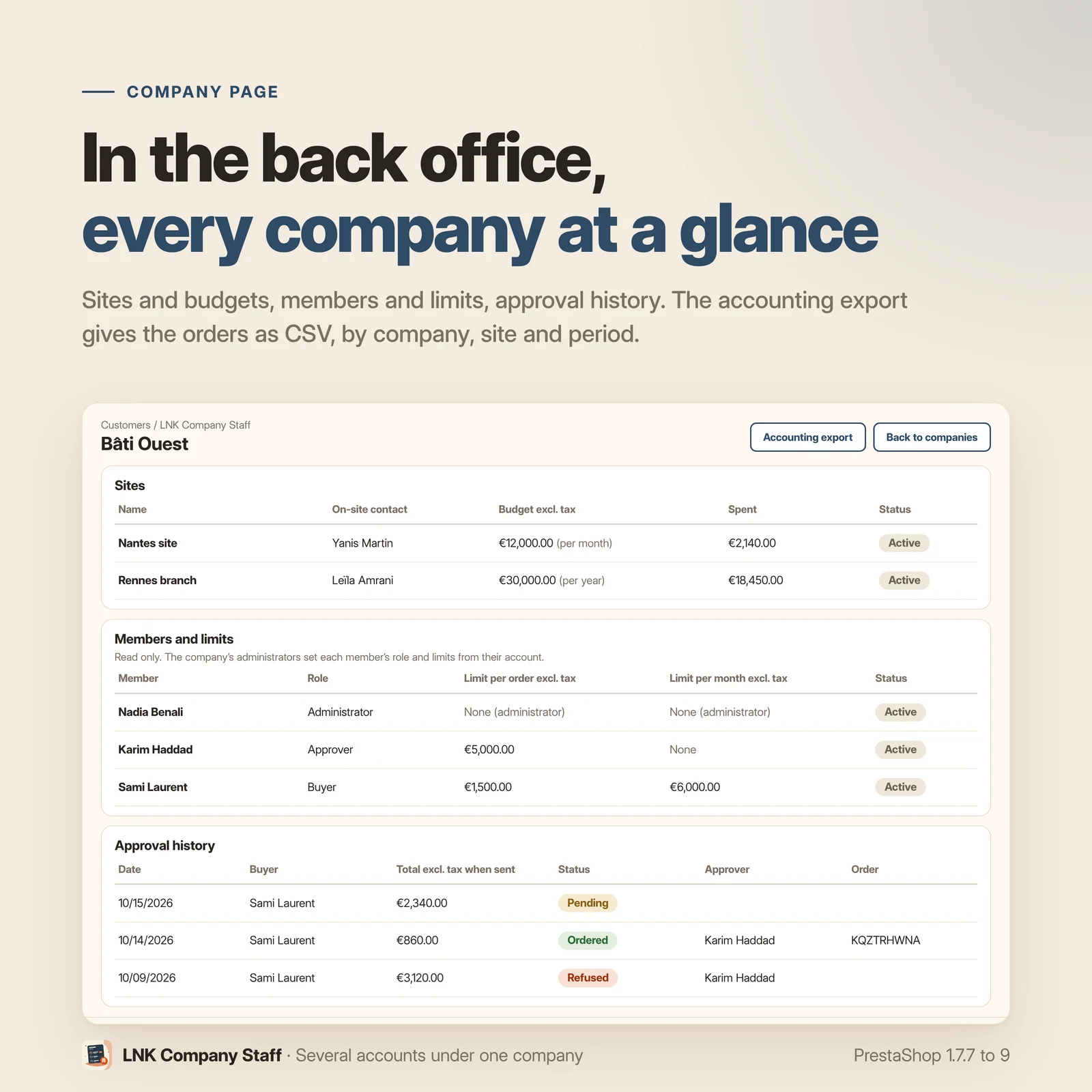
The Customers menu receives “LNK Company Staff”: the list of companies, the creation of a company for a customer, the settings and the roles. The page of each company shows, read only, its members and their limits (the member's own limit, the one of their role, or none for an administrator), its sites and their budgets, and the history of approval requests.
Accounting export: the valid orders of the companies, filtered by company, by site and by period, as CSV (semicolon, UTF-8). Columns: date, reference, company, site, buyer, total excluding and including tax, currency, and the customer reference from LNK Order Reference when that module is active. The file is sent directly, nothing is written to disk.
The screens follow the common skin of the LNK modules, with rare settings folded under “Advanced”.
Hidden prices, what the module covers
For a member whose role does not have “See prices”, prices are emptied on product pages, lists, the cart and the order history. The module hides prices on display; it does not protect confidential data.
Still visible: the amounts of the payment step rendered by the payment modules (the checkout is closed to this member anyway), PrestaShop's e-mails and PDFs, the credit slips and vouchers pages of the customer account, the module's approval e-mails (they carry the cart total), and modules that compute a price outside the core presenters, such as LNK Quick Order.
On PrestaShop 1.7.7 (package 1.1.0), the core does not call the presentation hooks: removing “See prices” there only blocks ordering, prices stay displayed.
Léger et rapide
Figure measured on the delivered file, compressed with gzip (level 9). The stylesheet: 0.9 KB (869 bytes), loaded only on the five pages of the module (My company, Join, Approvals, Dashboard, Sites and budgets). No script in the shop. Nothing on the home page, categories or product pages. The company bar, the site choice and the approval block under the cart, and the indicators widget add no stylesheet or script of the module: the theme styles them.
For themes and integrators
Theme contracts lnk.companies.approval/1 and lnk.companies.front/1, usable by any theme that
calls their hooks:
displayLnkCompanyBar: the company bar, at the top of the page;displayLnkCompanySiteSelect: the site choice, under the cart or on a quick order page;displayLnkCompanyApproval: the approval block under the cart;{widget name='lnk_companies' mode='kpi'}: orders in progress, requests to approve, remaining budget.
Without these hooks, the module renders its blocks in the native positions (top of the page, under the cart); a theme that places them itself turns these renderings off with a single setting. Nothing is rendered for a visitor. Templates can be overridden in the theme.
The other LNK modules read a customer's permissions through two public hooks,
actionLnkPriceVisibility and actionLnkOrderPermission, without depending on this module.
Multistore
Companies, roles, approval requests and settings per shop; the module page saves in the scope shown at the top of the screen. A new shop receives the default roles, a deleted shop is cleaned up.
Compatibility with PrestaShop 1.7.7, 8 and 9
| PrestaShop | 1.7.7 → 9.x |
| PHP | 7.1 → 8.4 |
| Delivery | Two packages: 1.9.N for PrestaShop 9, 1.1.N for 1.7.7 to 8.x |
| Required module | LNK Pro Accounts |
| Contains an override | No |
| Multistore | Yes |
| External calls | None |
Each version is checked by a real installation: PrestaShop 1.7.8 and 8.1 for the 1.1.N package, PrestaShop 9.0 for the 1.9.N package. The tests cover installation, display, back office and uninstallation.
On uninstall, companies, their members, their sites and their approval requests are kept by default. Their deletion is requested in two steps, under “Advanced”.
Frequently asked questions
Is another module needed?
Yes: LNK Pro Accounts, installed and active. PrestaShop refuses the installation without it. A company starts from the account of a business customer approved in LNK Pro Accounts, and its name comes from that customer's registered business name.
How is a company created?
Nothing is automatic. In their account, on the “My company” page, the approved business customer clicks “Create my company”. From the back office, you can also create the company of a customer chosen by e-mail or ID. The customer becomes the owner and administrator of the company.
How does a colleague join the company?
By invitation: an e-mail and a role. The colleague receives a link valid for 14 days, usable only once. They sign in with the invited address, or create their account from the “Join” page. An account that already belongs to another company cannot join.
Which roles are provided, and can I change them?
Five roles are created in each shop: Administrator, Approver, Buyer, Site manager and Read only. Under “Settings › Roles”, you change the name of each role in each language, its permissions and its default limits. The administrator always keeps every permission, and a role without “See prices” never has “Place orders”.
How do order limits work?
A limit per order and a limit per month, excluding tax and shipping, in the shop's default currency. Each member has their own, set by the company administrator, or else those of their role. The administrator never has a limit. The month counts the member's orders since the 1st, paid or not, except cancelled, refunded or failed ones.
What happens when a cart goes over the limit?
The member clicks “Send for approval”. Their cart is kept as it is and they go on with a new cart. The colleagues who can approve receive an e-mail and decide from the “Approvals” page of their account: approve, or refuse with a reason. Nobody approves their own request. The approved cart goes back to the buyer, who orders it as it is: any change cancels the approval.
Can an order go through without approval?
The checkout and the payment modules refuse a cart above a limit that has not been approved, and no order is created before approval. An order created outside the shop, by the server notification of a payment provider, cannot be blocked without an override: it is logged and written to the company history as ordered without approval.
Can an approval request wait forever?
It expires after 30 days by default (adjustable). While it waits, its approvers receive an e-mail reminder at each set delay: 2 days by default, in hours or days, 0 for no reminder.
Is a cron job needed for the reminders?
No. Due reminders go out when someone opens a page of the module. For reminders on the hour, have the cron address shown under “Settings, Advanced” called every hour; it carries a token, and without the right token nothing is sent.
What are sites and budgets for?
To split the company's purchases by work site, branch or agency: you choose the word, in each language. Each site has its delivery address, its members, its managers and an optional budget excluding tax per month, per year or overall. The member chooses the site of their cart, and each order is recorded with its site.
Who approves a cart that goes over a site's budget?
Beyond the remainder of the budget, the cart goes for approval, for every member, administrator included. The “Site manager” role approves the carts of the sites they manage. When nobody else can approve, the member who manages the sites raises the budget themselves on the “My company” page. The amount spent counts the site's orders over the period, except cancelled, refunded or failed ones.
Do members share delivery addresses?
Yes. An administrator shares one of their addresses with the company, and each member receives a copy in their address book, kept up to date. A copy already used by an order stays untouched: a new copy replaces it. A copy edited by its member becomes a personal address.
Can I hide prices from some members?
Yes: remove “See prices” from their role. Prices are emptied on product pages, lists, the cart and the order history, and the role loses “Place orders”. The module hides prices on display; it does not protect confidential data. Still visible: the amounts of the payment step rendered by the payment modules (the checkout is closed to this member), PrestaShop's e-mails and PDFs, the credit slips and vouchers pages, the module's approval e-mails, and modules that compute a price outside the core presenters, such as LNK Quick Order. On PrestaShop 1.7.7 (package 1.1.0), removing “See prices” only blocks ordering: prices stay displayed.
How do I export orders for the accounts?
“Accounting export” button of the company list in the back office: valid orders, filtered by company, by site and by period, as CSV (semicolon, UTF-8). Columns: date, reference, company, site, buyer, total excluding and including tax, currency, and the customer reference from LNK Order Reference when that module is active. Nothing is written to disk.
What does the merchant see in the back office?
The list of companies and, for each one, its members and their limits, read only (the member's own limit, the one of their role, or none for an administrator), its sites and their budgets, and the history of approval requests. The permissions and default limits of each role are set under “Settings › Roles”; the role and own limit of each member, by the company, from the “My company” page.
Does my theme need changes?
No. The module renders the company bar at the top of the page, then the site choice and the
approval block under the cart, in the native positions. A theme can place these blocks itself
through the displayLnkCompanyBar, displayLnkCompanySiteSelect and displayLnkCompanyApproval
hooks, and show the kpi widget; it then turns the native renderings off with a single setting.
Does it work with multistore?
Yes. Companies, roles, approval requests and settings belong to each shop, and the module page saves in the scope shown at the top of the screen. A new shop receives the default roles, a deleted shop is cleaned up.
What happens to the data on uninstall?
It is kept: companies, members, sites and approval requests. To delete everything, turn on “Also delete companies when uninstalling” under “Advanced”, then tick the confirmation. When a customer is deleted, they leave their company: their address shares and copies, their invitations and their approval requests still open go with them.
Does the module slow down my shop?
The 0.9 KB stylesheet (compressed) loads only on the five pages of the module. No script in the shop. Nothing on the home page, categories or product pages.
In which languages does it ship?
In French, English and Arabic (from right to left), e-mails included. Role names and the word “Site” are entered in each language of the shop.
Release history
-
First published version. Branch 9: PrestaShop 9.0 to 9.x only. PrestaShop 1.7.7 to 8.x use the 1.1.0 package. Required module: LNK Pro Accounts.
Security
- Security probes replayed for each version on the module's entry points: wrong, reused or revoked invitation tokens, CSRF token of each action, access by a visitor or by a member of another company, role permissions, four eyes of the approval, choice of a site not allowed, export according to the tab permissions, cron address without a token or with a wrong token.
New
- Company created by a business customer approved in LNK Pro Accounts from the “My company” page of their account, or in the back office for a chosen customer; name taken from their registered business name, nothing automatic.
- Members and invitations: link valid for 14 days, single use, revocable, sent by e-mail; “Join” page for an existing account or a new account; invitations limited per company and per hour (20 by default); always at least one active administrator.
- Company addresses shared by an administrator, copied and kept up to date in each member's address book; a copy used by an order stays untouched.
- Roles and permissions: five default roles in each shop (Administrator, Approver, Buyer, Site manager, Read only), names in each language, permissions to tick and default limits under “Settings › Roles”; the administrator keeps every permission, a role without “See prices” never places an order.
- Front-office safeguard, for members only: checkout, payment modules, PDF invoices and credit slips, acceptance of a quote from LNK Quotes, according to the role's permissions; prices emptied on display for a role without “See prices”.
- Limits per order and per month, excluding tax and shipping, the member's own or those of their role; never a limit for an administrator.
- Cart approval: cart kept as it is, no order created before approval, “Approvals” page (approve, refuse with a reason, resume, withdraw), nobody approves their own request, any change to the approved cart cancels the approval, adjustable expiry (30 days by default).
- Sites and budgets: word “Site” chosen by the merchant in each language, address, contact, members and managers, budget excluding tax per month, per year or overall; site chosen under the cart and recorded with each order; beyond the budget, approval for everyone, administrator included.
- Amount spent of the budgets and of the monthly limit: all orders, paid or not, except cancelled, refunded or failed ones.
- Customer area: “Dashboard” and “Sites and budgets” pages, customer account links, company bar at the top of the page with the number of requests to approve.
- Approver reminders for a pending request: delay adjustable in hours or days (2 days by default), without a scheduled task, or through a cron address with a token; a single reminder per due date.
- Back office: list of companies, company creation, settings, roles; page of each company with its members and their limits, read only, its sites, its budgets and the approval history; accounting export as CSV by company, site and period.
- Theme contracts
lnk.companies.rights/1,lnk.companies.approval/1,lnk.companies.sites/1andlnk.companies.front/1: hooksdisplayLnkCompanyBar,displayLnkCompanySiteSelect,displayLnkCompanyApproval, widget{widget name='lnk_companies' mode='kpi'}, native positions turned off byLNK_COMPANIES_NATIVE_HOOKS; public hooksactionLnkPriceVisibilityandactionLnkOrderPermissionfor the other LNK modules. - E-mails in French, English and Arabic (right to left): invitation, approval request, reminder, cart approved, cart refused.
- Multistore: companies, roles, requests and settings per shop, scope shown, roles copied into a new shop, data of a deleted shop erased.
- Data kept on uninstall by default; deletion in two steps, under “Advanced”.
-
First published version. Branch 1: PrestaShop 1.7.7 to 8.x. PrestaShop 9 uses the 1.9.0 package. Required module: LNK Pro Accounts.
Security
- Security probes replayed for each version on the module's entry points: wrong, reused or revoked invitation tokens, CSRF token of each action, access by a visitor or by a member of another company, role permissions, four eyes of the approval, choice of a site not allowed, export according to the tab permissions, cron address without a token or with a wrong token.
New
- Company created by a business customer approved in LNK Pro Accounts from the “My company” page of their account, or in the back office for a chosen customer; name taken from their registered business name, nothing automatic.
- Members and invitations: link valid for 14 days, single use, revocable, sent by e-mail; “Join” page for an existing account or a new account; invitations limited per company and per hour (20 by default); always at least one active administrator.
- Company addresses shared by an administrator, copied and kept up to date in each member's address book; a copy used by an order stays untouched.
- Roles and permissions: five default roles in each shop (Administrator, Approver, Buyer, Site manager, Read only), names in each language, permissions to tick and default limits under “Settings › Roles”; the administrator keeps every permission, a role without “See prices” never places an order.
- Front-office safeguard, for members only: checkout, payment modules, PDF invoices and credit slips, acceptance of a quote from LNK Quotes, according to the role's permissions; prices emptied on display for a role without “See prices”.
- Limits per order and per month, excluding tax and shipping, the member's own or those of their role; never a limit for an administrator.
- Cart approval: cart kept as it is, no order created before approval, “Approvals” page (approve, refuse with a reason, resume, withdraw), nobody approves their own request, any change to the approved cart cancels the approval, adjustable expiry (30 days by default).
- Sites and budgets: word “Site” chosen by the merchant in each language, address, contact, members and managers, budget excluding tax per month, per year or overall; site chosen under the cart and recorded with each order; beyond the budget, approval for everyone, administrator included.
- Amount spent of the budgets and of the monthly limit: all orders, paid or not, except cancelled, refunded or failed ones.
- Customer area: “Dashboard” and “Sites and budgets” pages, customer account links, company bar at the top of the page with the number of requests to approve.
- Approver reminders for a pending request: delay adjustable in hours or days (2 days by default), without a scheduled task, or through a cron address with a token; a single reminder per due date.
- Back office: list of companies, company creation, settings, roles; page of each company with its members and their limits, read only, its sites, its budgets and the approval history; accounting export as CSV by company, site and period.
- Theme contracts
lnk.companies.rights/1,lnk.companies.approval/1,lnk.companies.sites/1andlnk.companies.front/1: hooksdisplayLnkCompanyBar,displayLnkCompanySiteSelect,displayLnkCompanyApproval, widget{widget name='lnk_companies' mode='kpi'}, native positions turned off byLNK_COMPANIES_NATIVE_HOOKS; public hooksactionLnkPriceVisibilityandactionLnkOrderPermissionfor the other LNK modules. - E-mails in French, English and Arabic (right to left): invitation, approval request, reminder, cart approved, cart refused.
- Multistore: companies, roles, requests and settings per shop, scope shown, roles copied into a new shop, data of a deleted shop erased.
- Data kept on uninstall by default; deletion in two steps, under “Advanced”.