 Module · LNK Complete the Look
LNK Complete the Look, the whole look on every product page
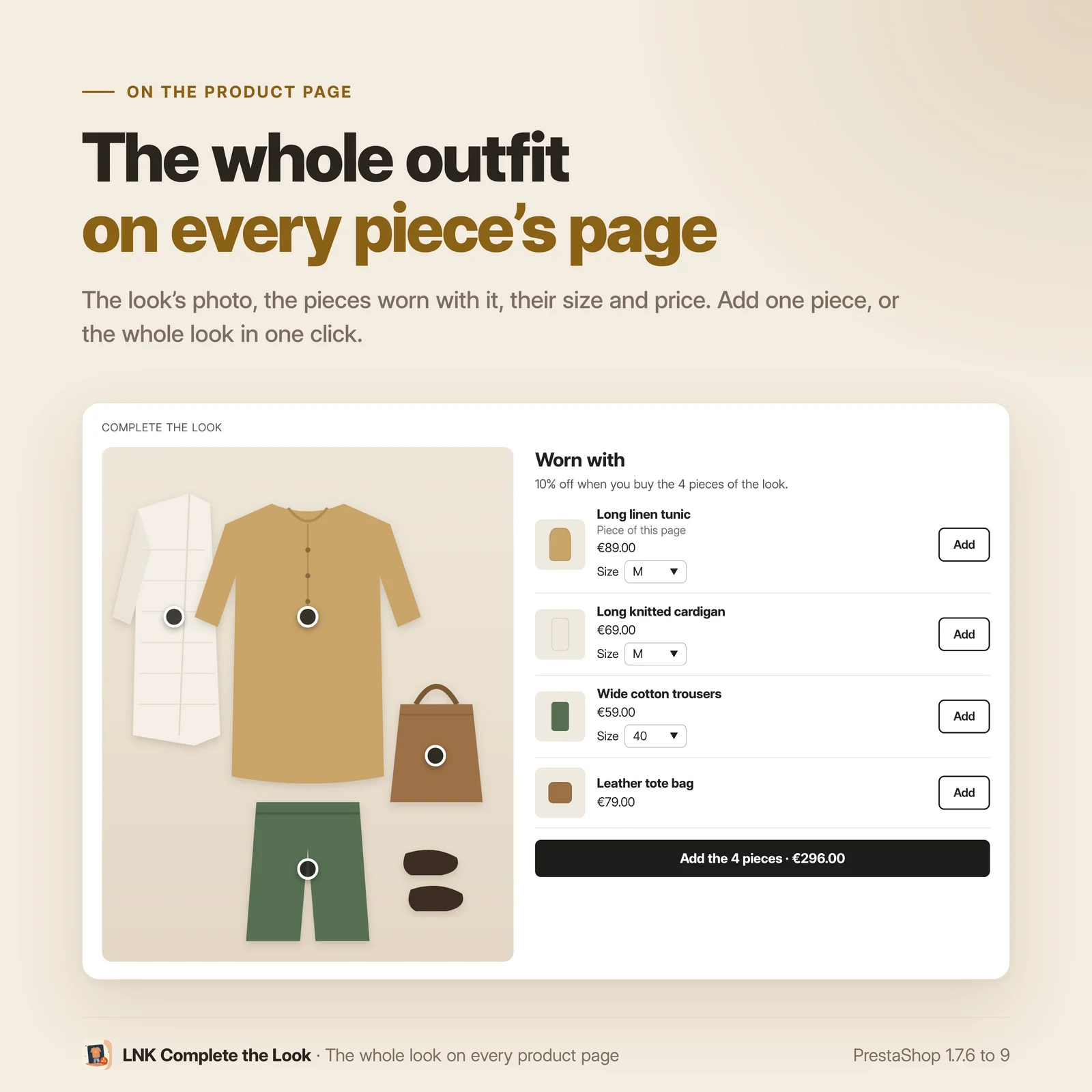
A customer likes the tunic; she does not know what to wear it with. LNK Complete the Look shows, on the page of each piece, the complete outfit as you put it together: the photo of the look, the pieces worn with it, their size and their price. She adds one piece, or the whole look in one click, without leaving the page.
- Version 1.1.0 · PrestaShop 1.7.6 to 8.x
- Version 1.9.0 · PrestaShop 9
- PrestaShop 1.7.6 to 9.x
- PHP 7.1 to 8.4
- No override
Screenshots
Key points
- The complete outfit on the page of each piece: photo, pieces, sizes, prices.
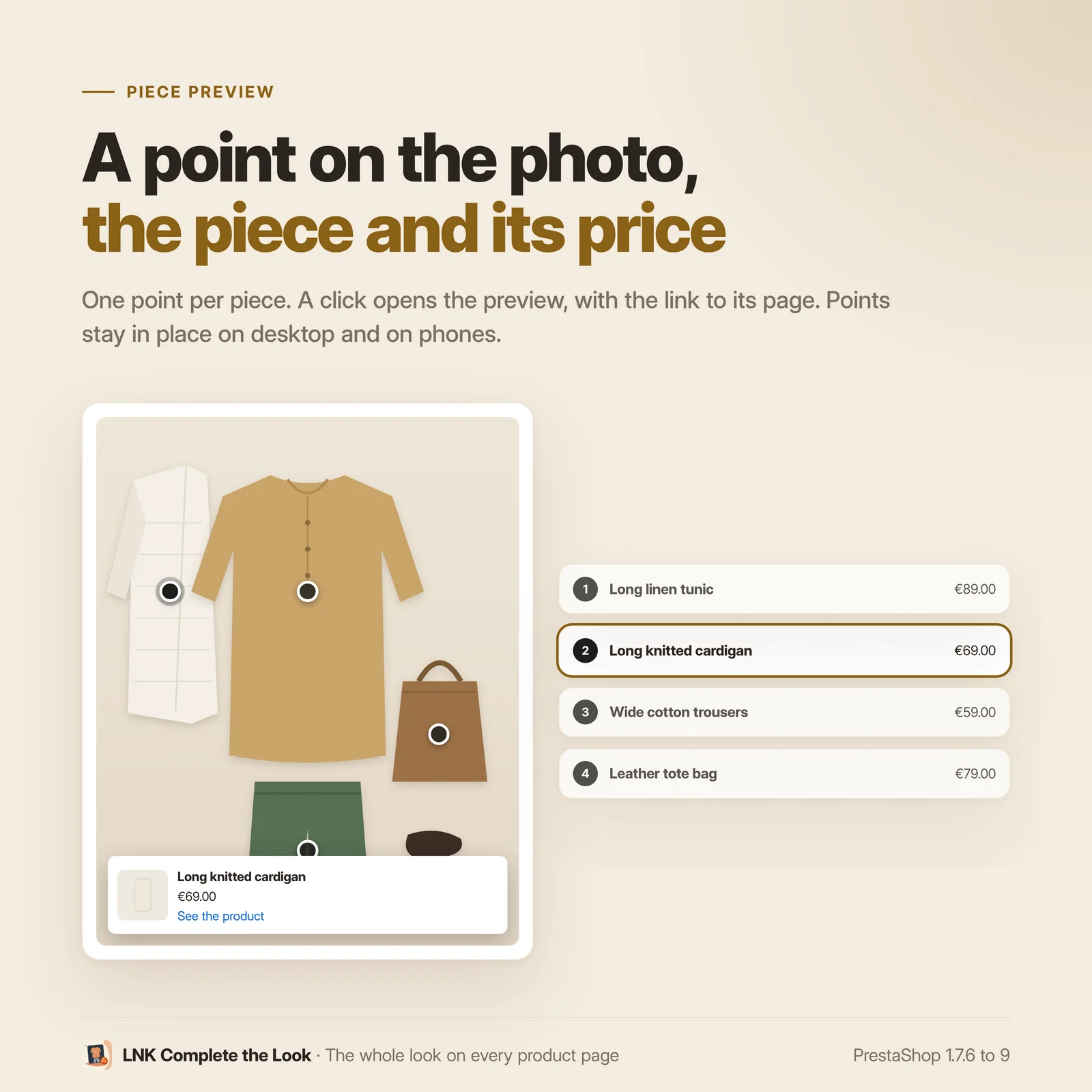
- Clickable points on the photo, set with a click and with the keyboard.
- Size per piece, sold out sizes disabled, total kept up to date.
- One piece or the whole look added, without leaving the page.
- Optional discount for the complete look through a native cart rule, kept up to date.
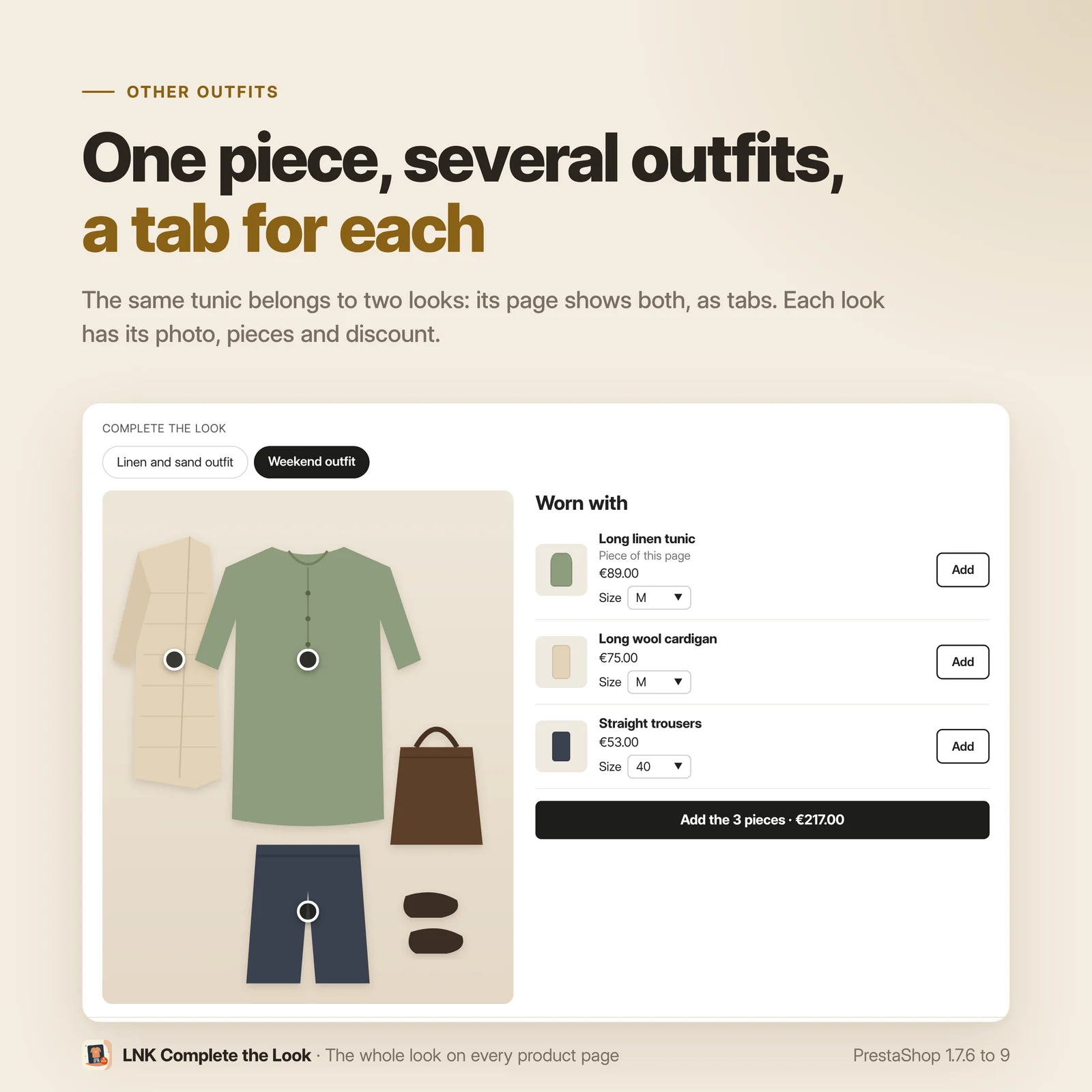
- Several looks per product: "Other outfits" tabs.
- Size recommended by LNK Find My Size.
- 1.3 KB of CSS and 2.4 KB of JavaScript, on the relevant product pages only.
- Works with LNK Company Staff: no price shown to a customer whose prices it hides.
- Multistore: looks per shop.
- French, English and Arabic (right to left).
- PrestaShop 1.7.6 to 9, no override.
A photo of the look, a point on each piece
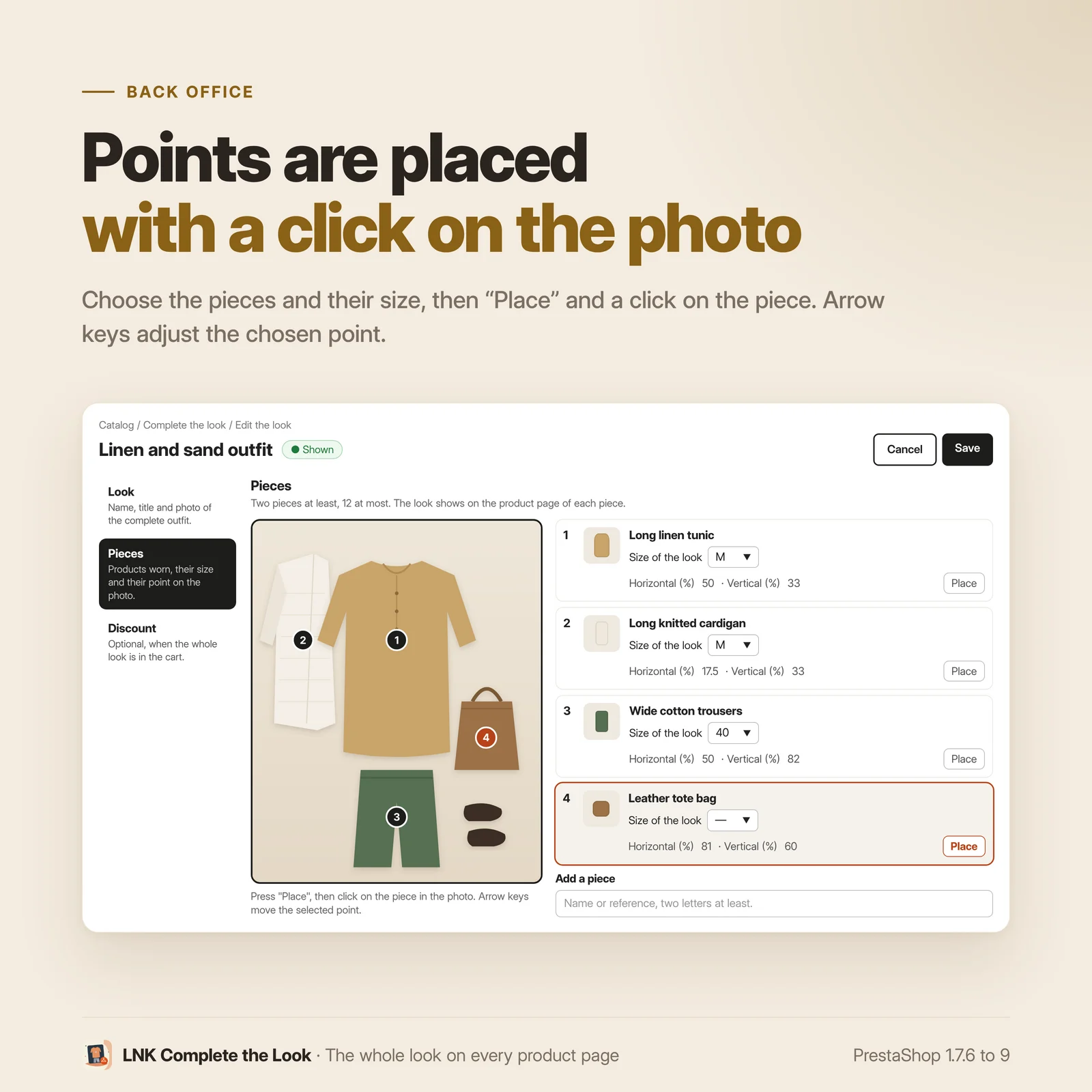
On the photo of the outfit, one point per piece. A click opens the preview of the piece, its price and the link to its product page. The points are set in the back office with a click on the photo, adjusted with the keyboard, and stay in place on a computer as on a phone.
The size of each piece, in the block
Each piece has its own size choice, with the price of the chosen size; a sold out size is disabled. The total of the look follows. With LNK Find My Size, the size recommended to the customer is already chosen.
The whole look in the cart in one click
"Add the 3 pieces · €397.00": the pieces go through the PrestaShop cart, with its stock and quantity rules. Your theme's cart, or LNK Cart Drawer, opens as after an ordinary add. A single piece can be added too, with a discreet button.
A discount for the complete look, if you want one
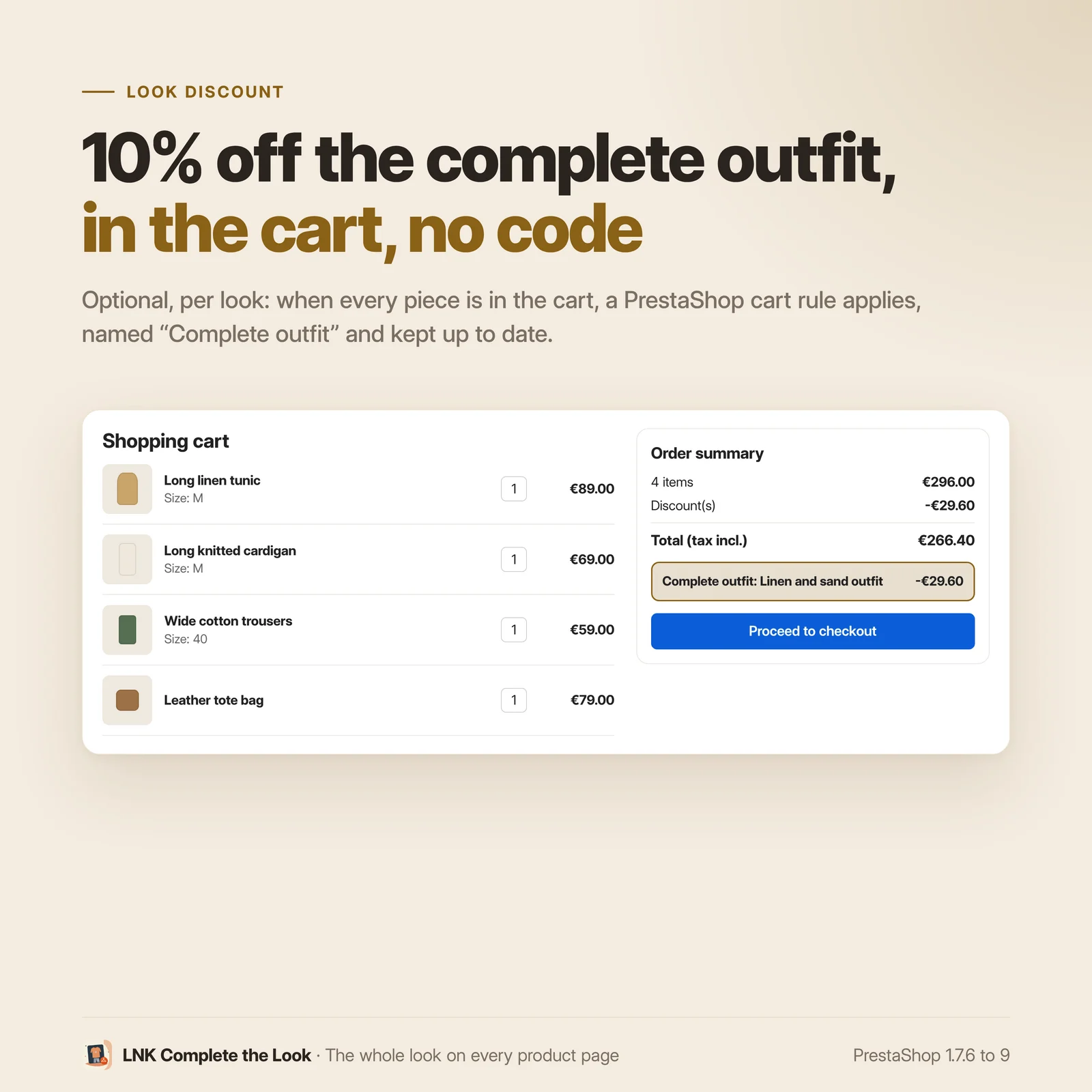
Per look, as an option: a percentage on the pieces or an amount off the order, granted when every piece is in the cart. The module creates the PrestaShop cart rule, names it "Complete outfit: …" in each language and keeps it up to date: a piece removed from the catalogue is removed from the rule. No discount is ever promised that can no longer be obtained.
Several outfits for the same product
A piece can belong to several looks. Its product page then shows "Other outfits" tabs, with the thumbnail of each look.
Light and fast
Figures measured on the delivered module, compressed (zlib, level 9): 1.3 KB of CSS and 2.4 KB of JavaScript, loaded only on the page of a product that has a look. No server call when the page loads; without JavaScript, the block stays a working form.
Accessible, in Arabic and on mobile
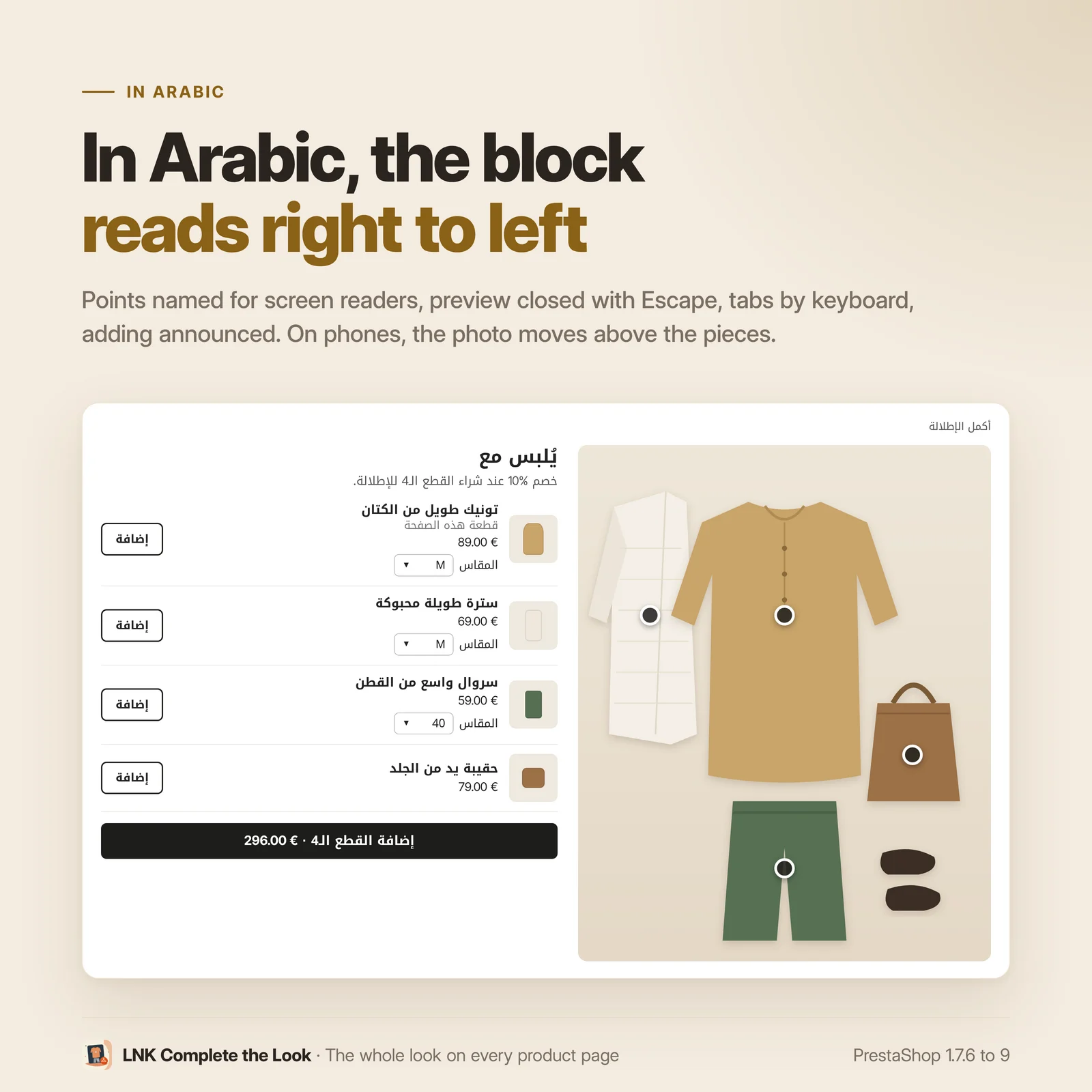
Points named for screen readers, preview closed with Esc, tabs with the keyboard, add announced. In Arabic, the block reads from right to left. On a phone, the photo moves above the pieces.
Compatible with PrestaShop 1.7.6, 8 and 9
Two versions of the module, one per generation: 1.1 for PrestaShop 1.7.6 to 8.x, 1.9 for PrestaShop 9, with native pages in each back office, under Catalog. Classic and Hummingbird themes with no setting; LNK themes place and style the block through their theme contract. No override.
Frequently asked questions
What does the customer see on the product page?
Below the product (or near the add to cart button, as you choose), a "Complete the look" block: the photo of the complete outfit, the pieces worn with their thumbnail, their price and their size, an "Add" button per piece and an "Add the N pieces" button with the total. Points on the photo show each piece; a click opens its preview and the link to its product page.
How is a look created?
In Catalog > LNK Complete the Look: a name, a photo of the outfit, then the pieces, searched by name or reference. For each piece, "Place" then a click on the photo sets its point; the arrow keys adjust it. The look shows on the product page of each of its pieces.
Can a product be in several looks?
Yes. Its product page then shows "Other outfits" tabs, with the thumbnail and the name of each look; they can be browsed with the mouse or the arrow keys.
Does the customer choose the size of each piece?
Yes, in the block, with the price of the chosen size and the total kept up to date. A sold out size is disabled. You can set the preselected size of each piece in the look; otherwise, the product's default size is used. With LNK Find My Size, the size recommended to the customer is preselected and announced.
How does the discount for the complete look work?
As an option, per look: a percentage on the pieces or an amount off the order. The module creates a PrestaShop cart rule for this look, named "Complete outfit: {name of the look}", applied on its own as soon as every piece is in the cart, in any size. If a piece is deleted or disabled, the rule follows; a look that no longer has two pieces for sale keeps its rule disabled. Your own cart rules are never touched.
The discount of a look adds up with your cart rules, and with that of another look made of different pieces: two complete outfits bought, two discounts. Two shown looks cannot have exactly the same pieces: the back office refuses to show the second one, otherwise a single outfit would get two discounts.
Does adding make the customer leave the page?
No. The pieces go through the PrestaShop cart (stock, minimum quantity); the theme's cart, or LNK Cart Drawer, opens and updates as after an ordinary add. Without JavaScript, the block stays a form that leads to the cart page.
Does the block slow down my pages?
No. The stylesheet and the script are loaded only on the page of a product that has a look; elsewhere, nothing. No server call when the page loads.
What happens if a piece is sold out or removed?
A sold out piece stays shown, marked "Sold out", and is not added. A disabled or deleted piece disappears from the block. A look that no longer has two available pieces is no longer shown.
Is the block accessible and translated?
Yes: each point is a named button, the preview closes with Esc, the tabs can be browsed with the keyboard, the result of the add is announced. Texts in French, English and Arabic; in Arabic, the block reads from right to left and the points keep their place on the photo.
Can my theme place and style the block?
Yes. The block is placed by a setting, by a theme hook or by a widget
({widget name='lnk_totallook'}). The template, the stylesheet and the script can be overridden
in the theme folder, the colours with CSS variables. Everything is described in the theme
contract.
Are hidden prices and business account rights respected?
Yes. In catalogue mode, for a customer group without prices, or for an employee whose prices LNK Company Staff hides, the block shows no price and no total. If they are not allowed to order, no add button appears.
Which PrestaShop versions?
PrestaShop 1.7.6 to 8.x (version 1.1) and PrestaShop 9 (version 1.9), Classic and Hummingbird themes. No override, no external call. Multistore: each shop has its own looks.
Release history
-
Version 1.9.0 PrestaShop 9
New
- Looks built in the back office: photo of the complete outfit, pieces taken from the catalogue, default size of each piece, name and title in each language. A look shows on the product page of each of its pieces.
- "Complete the look" block on the product page: photo, pieces with size, price and "Add", "Add the N pieces · total" button. Several looks: "Other outfits" tabs.
- Points on the photo, one per piece, placed with a click or the keyboard in the back office, as a percentage; each one opens the preview of the piece in the shop.
- One piece or the whole look added without leaving the page, through the native cart; the theme's cart and LNK Cart Drawer updated. Without script, the form works on its own.
- Optional discount for the complete look through a native cart rule, one per look, kept up to date when a piece is deleted or disabled; two shown looks never have exactly the same pieces (one discount per outfit).
- Size recommended by LNK Find My Size when it is installed.
- Contract lnk.totallook.look/1 for other modules, contract lnk.companies.rights/1 respected (prices hidden, ordering not allowed).
- Stylesheet and script loaded only on the page of a product that has a look. French, English and Arabic.
-
Version 1.1.0 PrestaShop 1.7.6 to 8.x
New
- Looks built in the back office: photo of the complete outfit, pieces taken from the catalogue, default size of each piece, name and title in each language. A look shows on the product page of each of its pieces.
- "Complete the look" block on the product page: photo, pieces with size, price and "Add", "Add the N pieces · total" button. Several looks: "Other outfits" tabs.
- Points on the photo, one per piece, placed with a click or the keyboard in the back office, as a percentage; each one opens the preview of the piece in the shop.
- One piece or the whole look added without leaving the page, through the native cart; the theme's cart and LNK Cart Drawer updated. Without script, the form works on its own.
- Optional discount for the complete look through a native cart rule, one per look, kept up to date when a piece is deleted or disabled; two shown looks never have exactly the same pieces (one discount per outfit).
- Size recommended by LNK Find My Size when it is installed.
- Contract lnk.totallook.look/1 for other modules, contract lnk.companies.rights/1 respected (prices hidden, ordering not allowed).
- Stylesheet and script loaded only on the page of a product that has a look. French, English and Arabic.