 Module · LNK Wishlist
LNK Wishlist, the PrestaShop wishlist that does not slow down your pages
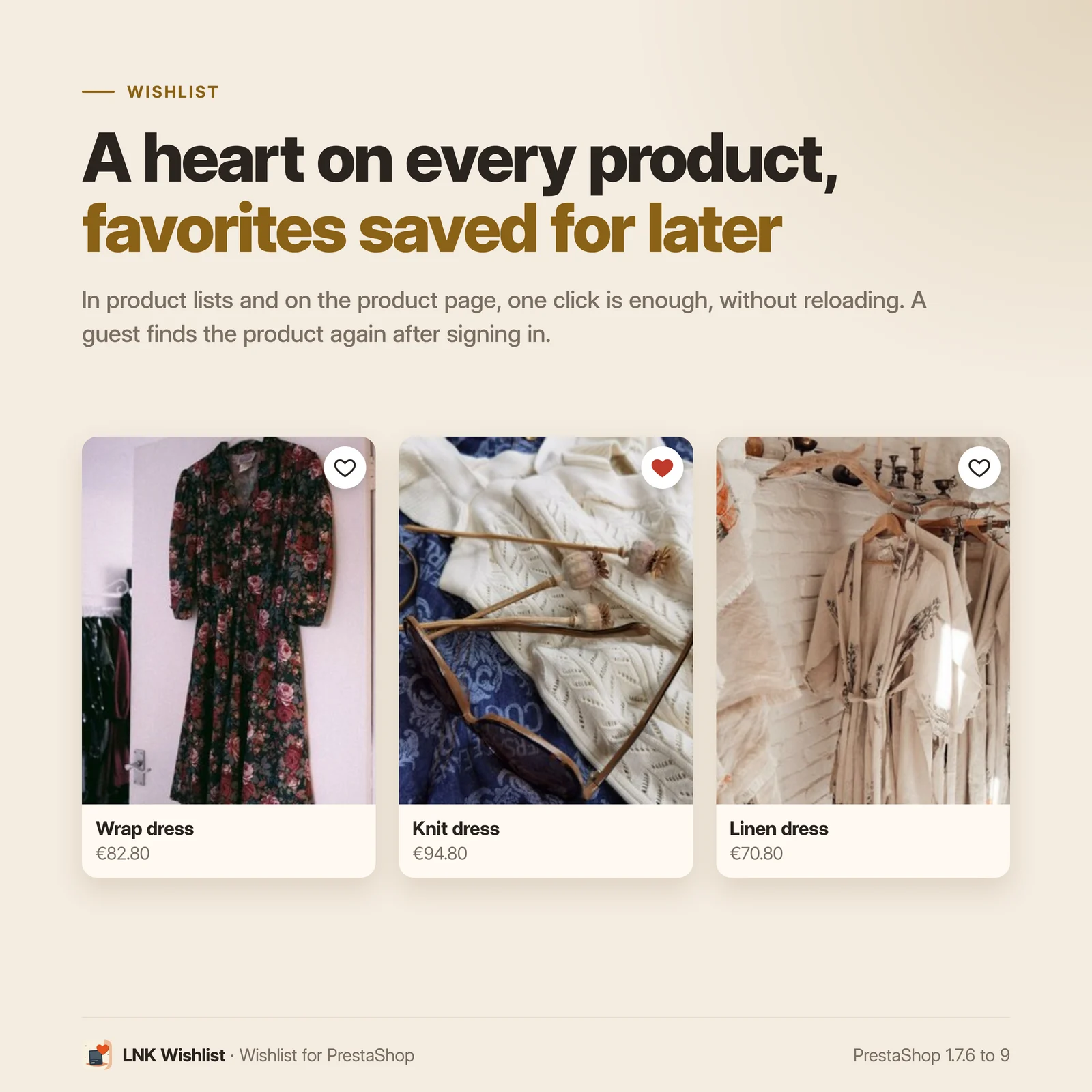
A heart on every product, a My wishlist page in the customer account, and favorites reminded below the cart at the moment the customer decides. LNK Wishlist replaces the wishlist shipped with PrestaShop, imports its lists on install, and loads only 3.0 KB of JavaScript on your pages.
- Version 1.1.6 · PrestaShop 1.7.6 to 8.x
- Version 1.9.6 · PrestaShop 9
- PrestaShop 1.7.6 to 9.x
- PHP 7.1 to 8.4
- No override
Screenshots
Key points
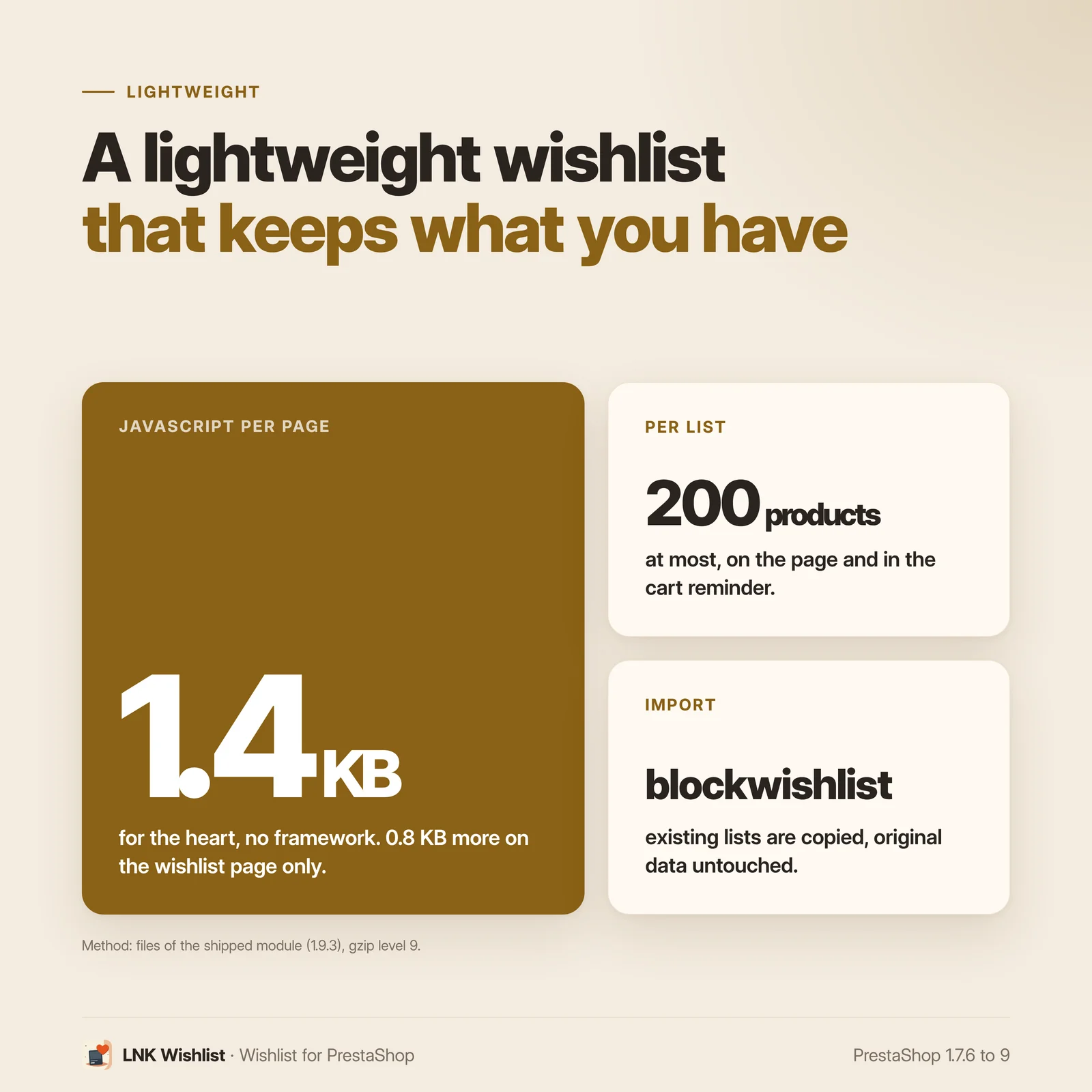
- 3.0 KB of compressed JavaScript on the shop pages, no jQuery, no framework.
- Import of blockwishlist lists on install, read-only.
- A My wishlist page in the customer account: up to 20 named lists per customer, 200 products each, a whole list added to the cart in one click.
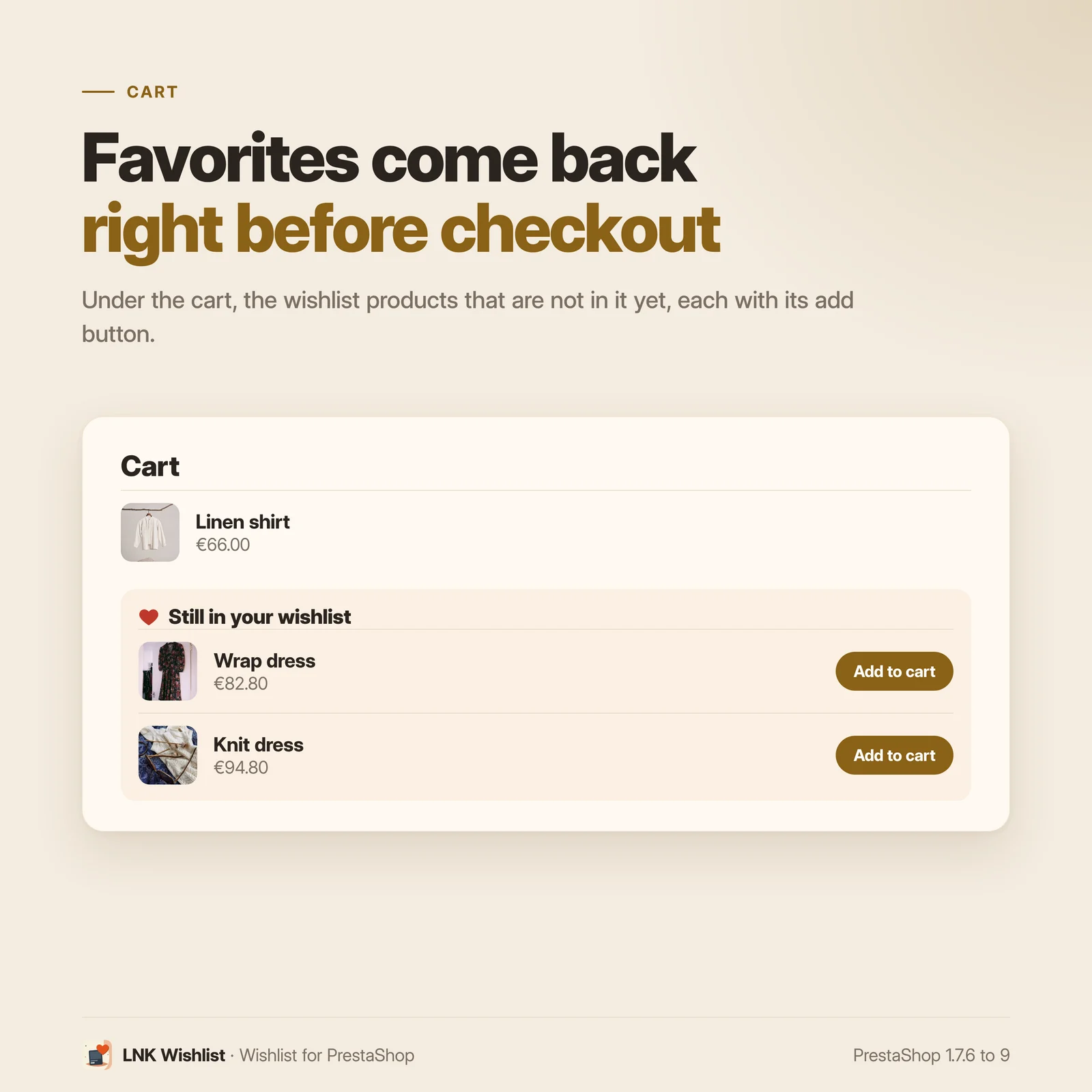
- Favorites reminded below the cart, with one-click add.
- An email reminder of the products left in the list, off by default, with an unsubscribe link.
- A message after each addition or removal, with "Undo".
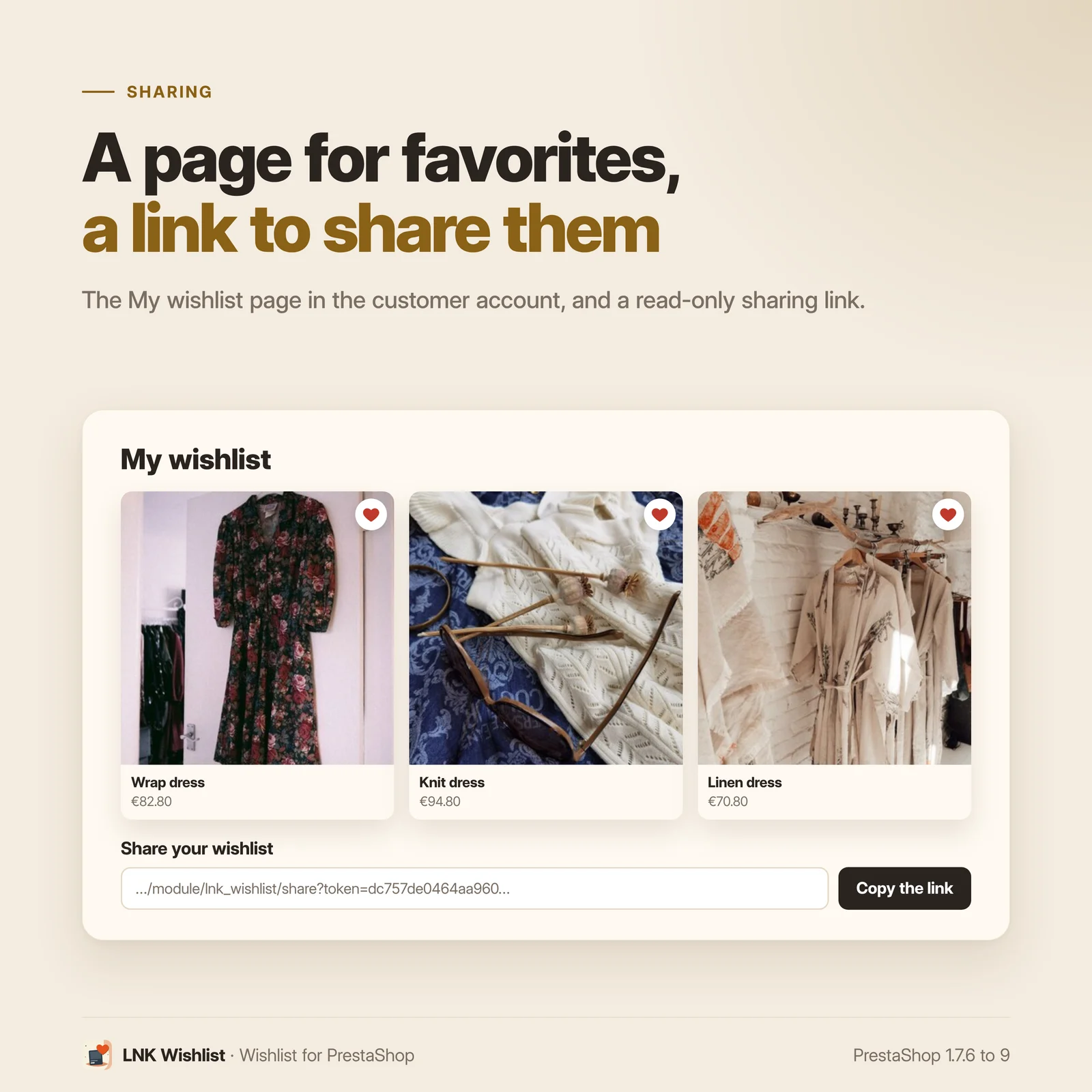
- A read-only share link for the list.
- A heart on product pages and on list thumbnails.
- The visitor finds their product again after logging in.
- The customer's lists visible in their back-office record.
- Export and erasure of the lists with the GDPR module.
- No override, no external call.
- Multistore: each shop has its own lists and settings.
- Translated into French and Arabic.
- PrestaShop 1.7.6 to 9.
Replace blockwishlist without losing your customers' lists
The wishlist module shipped with PrestaShop loads its scripts on every page of the shop, whether a customer uses it or not: 157 KB of compressed JavaScript, including a GraphQL library. LNK Wishlist imports on install the lists your customers already created in it. The data of the old module is only read, never changed: it can be reactivated as it was.
Light and fast
Figures measured on the shipped module, compressed with gzip (level 9). On every shop page: 3.0 KB of JavaScript and 2.6 KB of CSS. On the My wishlist page only: 1.7 KB of JavaScript and 1.9 KB of CSS more. In the cart, when the reminder is on: 0.8 KB of JavaScript more, the reminder being rendered by the server.
The module uses neither jQuery nor any framework. A click on a heart sends a single request, and the state of the hearts comes with the page, with no extra call. For comparison, blockwishlist, the module shipped with PrestaShop, loads 157 KB of compressed JavaScript on every page.
A My wishlist page in the customer account
Customers find their favorites in their customer account, shown with your theme's product thumbnails. They remove a product in one click, and can share their list through a read-only link, excluded from search engine indexing.
Several lists, and a whole list to the cart
A customer can sort products into several named lists ("Lyon site", "Workshop", "Gifts"), up to 20. On the product page, they choose the list of the heart; on their page, they switch from one list to another, rename it, delete it or make it their main list, the one of the hearts on product lists and of the cart reminder. A button adds the whole list to the cart at once, at the minimum quantity of each product; the cart says what it refuses. Each list has its own share link.
Favorites reminded in the cart
Below the cart, up to four products of the wishlist that are not in it yet, with an "Add to cart" button. Only active products available for sale are shown. The number is set in the back office, and the reminder can be turned off.
An email reminder of the products left in the list
A customer who has not come back receives an email with the products still in their wishlist. Those that moved come first: price drop, promotion, back in stock. You choose the delay before the first reminder, the interval between two reminders and their maximum number per product; a product that was ordered or removed from the list is no longer offered. The reminder is off on installation. The "Send me a sample" button shows you the email with your products before you turn it on. Every email carries an unsubscribe link, and the customer can subscribe again from their page. In multistore, each shop turns it on for its own customers, with its own links.
Built for logged-in customers
The wishlist is tied to the customer account. A visitor who taps a heart sees a window inviting them to sign in or create an account, then the product is added to their list on return, without having to look for it again. Each addition or removal is confirmed by a short message, with "Undo" after a removal.
Compatible with PrestaShop 1.7.6, 8 and 9
Two versions of the module, one per generation: 1.1 for PrestaShop 1.7.6 to 8.x, 1.9 for PrestaShop 9, with a native settings page in each back office. The heart goes through the native positions of the Classic and Hummingbird themes. No override, no external call.
Frequently asked questions
How do I replace the PrestaShop wishlist (blockwishlist)?
Install LNK Wishlist, then disable blockwishlist without uninstalling it. On install, LNK Wishlist imports the lists your customers created in blockwishlist. The settings page warns you as long as both modules are active, to avoid two buttons on the same product page.
Are my customers' lists kept?
Yes. Lists and their products are copied on install, with their dates and quantities. The data of blockwishlist is only read, never changed. The import can be run again from the settings page: it brings in the lists created in blockwishlist since, without duplicates. A list already imported is not read again, so products the customer has removed from it do not come back.
Why does blockwishlist slow down my shop?
It loads its scripts on every page, including a GraphQL library: 157 KB of compressed JavaScript, whether a customer uses the wishlist or not. LNK Wishlist loads 3.0 KB on the shop pages, and its heavier code only on the wishlist page.
Can a visitor who is not logged in add a product?
They go through the login or account creation. On return, the product they had chosen is added to their list, without having to look for it again.
Where do customers find their wishlist?
In their customer account, on the My wishlist page, and through a link in the My account block of the footer. The list uses your theme's product thumbnails.
How does the cart reminder work?
Below the cart, the module shows up to four products of the wishlist that are not in it yet, with an "Add to cart" button. Only active products available for sale are shown. The number can be set from 1 to 12, and the reminder can be turned off.
Can customers share their list?
Yes, through a link shown on their page. The shared list is read-only, shows no information about its owner, and is not indexed by search engines.
Do I need to change my theme?
No. The heart goes through the native positions of the Classic and Hummingbird themes, on product pages and on thumbnails. To place the heart elsewhere on the thumbnail, a dedicated hook exists; we add it for free on request.
Is the module compatible with PrestaShop 9?
Yes. Version 1.9 is made for PrestaShop 9, with a settings page native to its back office. Version 1.1 covers PrestaShop 1.7.6 to 8.x. The front office is the same in both.
Does customer data comply with the GDPR?
The lists are exported and erased with the rest of the customer's data by PrestaShop's official GDPR module. The module sends no data outside your shop.
Does the module install overrides?
No. It has no override folder and does not modify the PrestaShop core.
What happens if I uninstall the module?
Its tables, settings and tab are removed. The data of blockwishlist stays intact: you can reactivate it at any time.
Does the module work with multistore?
Yes. Each shop has its own lists: a customer's lists belong to each shop, and a share link only opens in its shop. Settings apply to all shops, to a group or to a single shop, and the page always shows their scope and the shops that have their own settings. A new shop takes over the settings of the copied shop; a deleted shop takes its lists away.
Which languages is the module translated into?
French, English and Arabic (right to left), on the shop and in the back office. In another language (Spanish, German…), the texts show in English: you can translate them yourself in International > Translations > Installed modules translations, module LNK Wishlist.
How do I turn on the email reminder?
The email reminder is off by default. On the module settings page, in the "Email reminder" section, turn the switch on and choose the delay before the first reminder, the delay between two reminders and the maximum number of reminders per product. The "Send me a sample" button sends a sample email to your employee address, with products from your shop.
Sending is triggered by a cron job: copy the line shown in the section (of the form
curl -s "<shop>/module/lnk_wishlist/cron?token=…") into your host's scheduler and run it every
hour. Every email contains an unsubscribe link; the customer can also subscribe again from the
"My wishlist" page. A product that was ordered, removed from the list or already reminded the
maximum number of times is no longer offered. The reminder covers the customer's main list, the
one the hearts on product thumbnails fill: their other named lists are not reminded. If your shop
has no English and a customer's language has no email template, the email goes out in the shop's
default language.
Can my customers have several lists?
Yes, up to 20 named lists. On their page, customers create a list, switch from one to another, rename it, delete it or make it their main list: the one of the hearts on product lists and of the cart reminder. On the product page, they choose the list of the heart. "Add the whole list to my cart" adds its products at once, at the minimum quantity of each; products refused by the cart (stock, sale turned off) are named.
Release history
-
Version 1.9.6 PrestaShop 9
New
- Audience measurement: a product added to a wishlist is reported to LNK Conversion Tracking when it is installed ("add_to_wishlist" event: GA4, Meta, TikTok, Microsoft, with the visitor's consent). Without that module, nothing changes. A product already in the list is not counted twice.
Changes
- Arabic: the numbers of the settings page (lists, products, customers, days, ignored entries) and of the shared list take the correct form from 0 to 100 and beyond (dual, plural from 3 to 10, singular after 10); French and English keep their rule.
- French error messages of the settings worded the same way: "Nombre maximum de produits affichés : saisissez un nombre entier de 1 à 12.", like those of the email reminder.
Fixes
- Module description: 3.0 KB of JavaScript per page, the measured weight (it said 2 KB).
- Documentation: real back-office labels ("Heart on product thumbnails", cart reminder settings, and the four email reminder settings added to the installation guide), French name "LNK Liste d’envies", FAQ no. 15: the email reminder covers only the customer's main list. Installation, hooks, compatibility and theme contract also exist in English and Arabic.
- Menu name in the back office: a language added after the installation (Arabic on a shop installed in French) showed "LNK Liste d’envies" in French. It now gets the name in its own language, and the update fixes the one that was only a copy. A name you changed is never touched.
-
Version 1.9.5 PrestaShop 9
New
- Email reminder (off by default): an email to customers whose wishlist has stayed unchanged, with the products that moved first (price drop, back in stock, promotion). Delay, interval and number of reminders can be set, with a "send me a sample" button, a cron line to copy on the settings page, and an unsubscribe link in every email and on the list page.
- Multistore: each shop turns the reminder on for its own customers, with links on its own domain.
- Named lists: a customer creates up to 20 lists on their My wishlist page, switches from one to another with tabs, renames them, deletes them (with a confirmation) and chooses their main list, the one of the hearts on product lists and of the cart reminder. A deleted list that was the main one gives its place to the oldest one.
- Product page: a customer with several lists chooses under the heart the list where the product goes; the heart shows the state of the chosen list.
- "Add the whole list to my cart": the products of the list at once, at the quantity of the list raised to the minimum quantity, default combination for a product saved without a combination; the cart says what it refuses and the products not added are named.
- Share link of its own for each list.
Changes
- Weights of the marketplace page and of the FAQ taken from the budget tool, email reminder and named lists included: 3.0 KB of JavaScript and 2.6 KB of CSS on the shop pages, 1.7 KB and 1.9 KB more on the list page, 0.8 KB of JavaScript more in the cart when the reminder is on.
-
Version 1.9.4 PrestaShop 9
New
- Multistore: settings apply to all shops, a group or one shop, with their scope shown, the shops that have their own settings named, and a box to align them. Figures of the page and customer record limited to the chosen shops, with the Shop column.
- A new shop takes over the settings of the copied shop; a deleted shop takes its lists away.
Changes
- Default settings common to all shops: a shop associated with the module after installation also gets the heart and the cart reminder (they were missing when the installation was done from a single shop). Set up on update, without touching the own settings of a shop.
- A list only shows the products active and visible in the shop, and a combination must belong to the shop to be added.
Fixes
- blockwishlist import with multistore: a list already imported is no longer wrongly counted as “ignored”, and only the products of the list's shop are imported.
Show the 11 previous versions
-
Version 1.9.3 PrestaShop 9
Changes
- Settings page on the common layout of LNK modules: Cart reminder, Product lists and Import sections, fields and buttons like the other LNK modules, number of lists and saved products at the top.
- Preview of the cart reminder on the right, rendered by the shop template and stylesheet with products of your shop: it follows the switch and the number of favorites before saving. Same settings, same data.
-
Version 1.9.2 PrestaShop 9
Changes
- Display name "LNK Wishlist" in the module list and in the menu (French: LNK Liste d’envies; Arabic: LNK قائمة الأمنيات), replacing "LNK Wishlist".
- L'NKBOOT licence of use (one store per licence, general terms of sale of addons.lnkboot.fr).
- Heart colours: variables --lnk-wishlist-text and --lnk-wishlist-accent, falling back on the theme base (--lnk-text, --lnk-accent). The former names --lnk-wishlist-color and --lnk-wishlist-active are still read, and a value set by the theme is no longer overridden by the module.
Fixes
- Stylesheets and scripts served with a fingerprint of their content (shop and back office): after an update, a cache or CDN no longer serves the old file.
-
Version 1.9.1 PrestaShop 9
Fixes
- Module logo fixed.
-
Version 1.9.0 PrestaShop 9
First version for PrestaShop 9. PrestaShop 1.7.6 to 8.x has its own version, 1.1.0.
New
- A heart on product pages and thumbnails, 1.4 KB of compressed JavaScript, no jQuery, no framework.
- A My wishlist page in the customer account, with a read-only share link.
- Favorites missing from the cart reminded below the cart, four at most, with no extra script.
- A visitor goes through the login, then the chosen product is added to their list on return.
- Import of blockwishlist lists on install, read-only, can be run again without duplicates.
- The customer's lists in their back-office record, export and erasure with the GDPR module.
- Settings page native to the PrestaShop 9 back office.
-
Version 1.1.6 PrestaShop 1.7.6 to 8.x
New
- Audience measurement: a product added to a wishlist is reported to LNK Conversion Tracking when it is installed ("add_to_wishlist" event: GA4, Meta, TikTok, Microsoft, with the visitor's consent). Without that module, nothing changes. A product already in the list is not counted twice.
Changes
- Arabic: the numbers of the settings page (lists, products, customers, days, ignored entries) and of the shared list take the correct form from 0 to 100 and beyond (dual, plural from 3 to 10, singular after 10); French and English keep their rule.
- French error messages of the settings worded the same way: "Nombre maximum de produits affichés : saisissez un nombre entier de 1 à 12.", like those of the email reminder.
Fixes
- Module description: 3.0 KB of JavaScript per page, the measured weight (it said 2 KB).
- Documentation: real back-office labels ("Heart on product thumbnails", cart reminder settings, and the four email reminder settings added to the installation guide), French name "LNK Liste d’envies", FAQ no. 15: the email reminder covers only the customer's main list. Installation, hooks, compatibility and theme contract also exist in English and Arabic.
- Menu name in the back office: a language added after the installation (Arabic on a shop installed in French) showed "LNK Liste d’envies" in French. It now gets the name in its own language, and the update fixes the one that was only a copy. A name you changed is never touched.
-
Version 1.1.5 PrestaShop 1.7.6 to 8.x
New
- Email reminder (off by default): an email to customers whose wishlist has stayed unchanged, with the products that moved first (price drop, back in stock, promotion). Delay, interval and number of reminders can be set, with a "send me a sample" button, a cron line to copy on the settings page, and an unsubscribe link in every email and on the list page.
- Multistore: each shop turns the reminder on for its own customers, with links on its own domain.
- Named lists: a customer creates up to 20 lists on their My wishlist page, switches from one to another with tabs, renames them, deletes them (with a confirmation) and chooses their main list, the one of the hearts on product lists and of the cart reminder. A deleted list that was the main one gives its place to the oldest one.
- Product page: a customer with several lists chooses under the heart the list where the product goes; the heart shows the state of the chosen list.
- "Add the whole list to my cart": the products of the list at once, at the quantity of the list raised to the minimum quantity, default combination for a product saved without a combination; the cart says what it refuses and the products not added are named.
- Share link of its own for each list.
Changes
- Weights of the marketplace page and of the FAQ taken from the budget tool, email reminder and named lists included: 3.0 KB of JavaScript and 2.6 KB of CSS on the shop pages, 1.7 KB and 1.9 KB more on the list page, 0.8 KB of JavaScript more in the cart when the reminder is on.
Fixes
- PrestaShop 1.7.6: the My wishlist page and the shared list stopped on an error as soon as a list had a product (productlist.tpl template missing from 1.7.6 themes); the miniatures are then laid out one by one.
- Shop stylesheets and scripts can be overridden by the theme (themes/<theme>/modules/lnk_wishlist/views/…), like the other LNK modules.
-
Version 1.1.4 PrestaShop 1.7.6 to 8.x
New
- Multistore: settings apply to all shops, a group or one shop, with their scope shown, the shops that have their own settings named, and a box to align them. Figures of the page and customer record limited to the chosen shops, with the Shop column.
- A new shop takes over the settings of the copied shop; a deleted shop takes its lists away.
Changes
- Default settings common to all shops: a shop associated with the module after installation also gets the heart and the cart reminder (they were missing when the installation was done from a single shop). Set up on update, without touching the own settings of a shop.
- A list only shows the products active and visible in the shop, and a combination must belong to the shop to be added.
Fixes
- blockwishlist import with multistore: a list already imported is no longer wrongly counted as “ignored”, and only the products of the list's shop are imported.
-
Version 1.1.3 PrestaShop 1.7.6 to 8.x
Changes
- Settings page on the common layout of LNK modules: Cart reminder, Product lists and Import sections, fields and buttons like the other LNK modules, number of lists and saved products at the top.
- Preview of the cart reminder on the right, rendered by the shop template and stylesheet with products of your shop: it follows the switch and the number of favorites before saving. Same settings, same data.
-
Version 1.1.2 PrestaShop 1.7.6 to 8.x
Changes
- Display name "LNK Wishlist" in the module list and in the menu (French: LNK Liste d’envies; Arabic: LNK قائمة الأمنيات), replacing "LNK Wishlist".
- L'NKBOOT licence of use (one store per licence, general terms of sale of addons.lnkboot.fr).
- Heart colours: variables --lnk-wishlist-text and --lnk-wishlist-accent, falling back on the theme base (--lnk-text, --lnk-accent). The former names --lnk-wishlist-color and --lnk-wishlist-active are still read, and a value set by the theme is no longer overridden by the module.
Fixes
- Stylesheets and scripts served with a fingerprint of their content (shop and back office): after an update, a cache or CDN no longer serves the old file.
-
Version 1.1.1 PrestaShop 1.7.6 to 8.x
Fixes
- Module logo fixed.
-
Version 1.1.0 PrestaShop 1.7.6 to 8.x
First version for PrestaShop 1.7.6 to 8.x. PrestaShop 9 has its own version, 1.9.0.
New
- A heart on product pages and thumbnails, 1.4 KB of compressed JavaScript, no jQuery, no framework.
- A My wishlist page in the customer account, with a read-only share link.
- Favorites missing from the cart reminded below the cart, four at most, with no extra script.
- A visitor goes through the login, then the chosen product is added to their list on return.
- Import of blockwishlist lists on install, read-only, can be run again without duplicates.
- The customer's lists in their back-office record, export and erasure with the GDPR module.
- Settings page in the classic PrestaShop 1.7 and 8 back office.