 Module · LNK Cart Drawer
LNK Cart Drawer, the side cart that keeps your customers on the page
After an add to cart, the PrestaShop window mostly invites the customer to leave: to the cart, or to close it without seeing anything. LNK Cart Drawer opens the cart on the side of the page. The customer sees what they just added, changes a quantity, sees what is left for free shipping, then keeps shopping or checks out.
- Version 1.1.0 · PrestaShop 1.7.6 to 8.x
- Version 1.9.0 · PrestaShop 9
- PrestaShop 1.7.6 to 9.x
- PHP 7.1 to 8.4
- No override
Screenshots
Key points
- Side cart opened on every add, or with the cart button.
- Quantities, removal and subtotal without leaving the page.
- "Checkout" and "View cart" buttons, minimum purchase reminded.
- Free shipping bar taken from LNK Free Cart Shipping.
- Optional upsells: accessories of the products in the cart.
- Theme's cart replaced in one click, restored as it was on the way back.
- Content requested on opening only: 1.8 KB of CSS, 3.7 KB of JavaScript.
- Accessible: modal window, focus kept, Esc, 44 pixel targets.
- Works with LNK Company Staff: no price shown to a customer whose prices it hides.
- Multistore: settings and replacement shop by shop.
- French, English and Arabic (right to left).
- PrestaShop 1.7.6 to 9, no override.
A side cart on every add
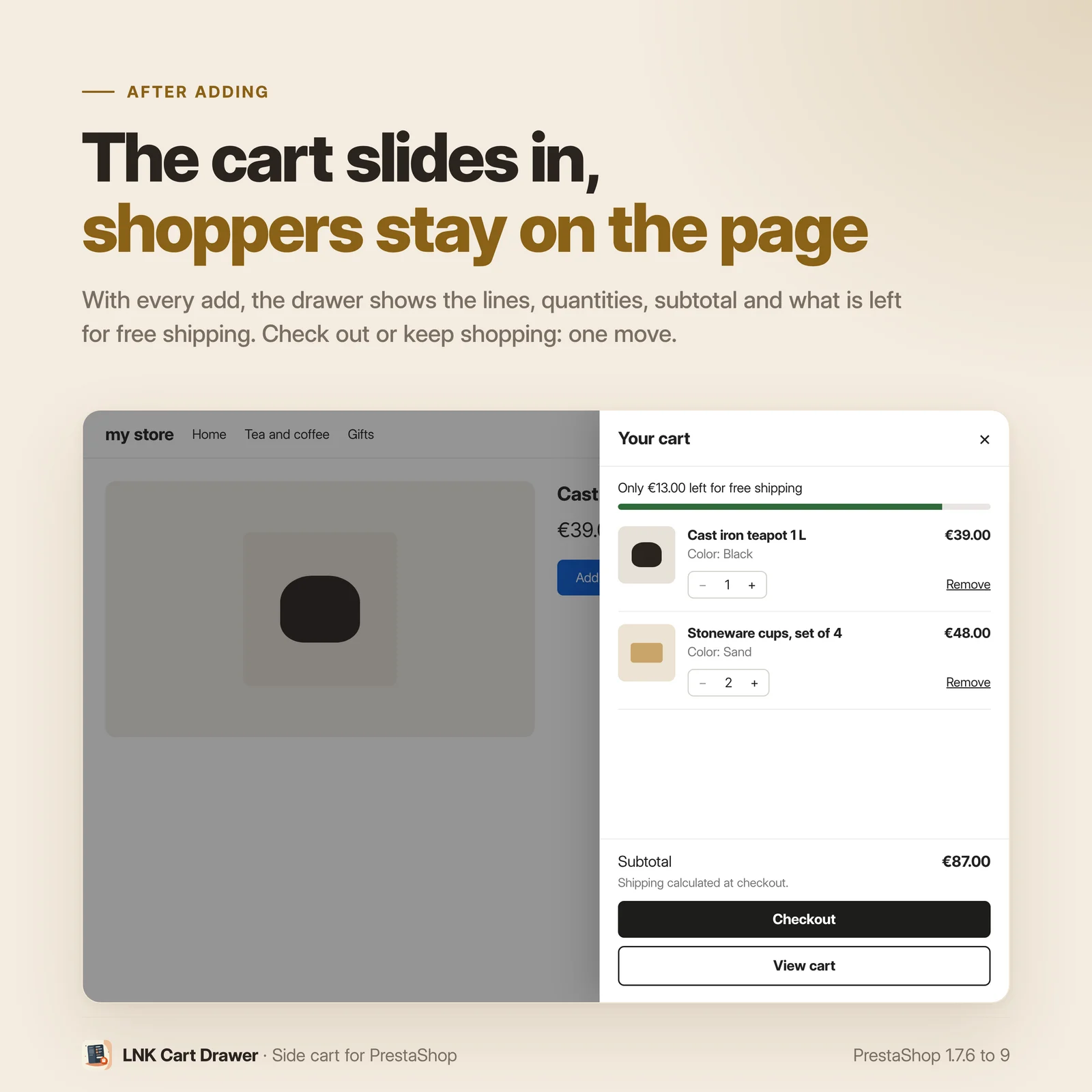
The drawer slides in from the edge of the page as soon as a product is added, from the product page, a product list or any PrestaShop add to cart button. Each line shows the image, the name, the combination, the price and the quantity. The subtotal follows, with the "Checkout" and "View cart" buttons. The header cart button opens it too, with the number of items.
Quantities and removal without leaving the page
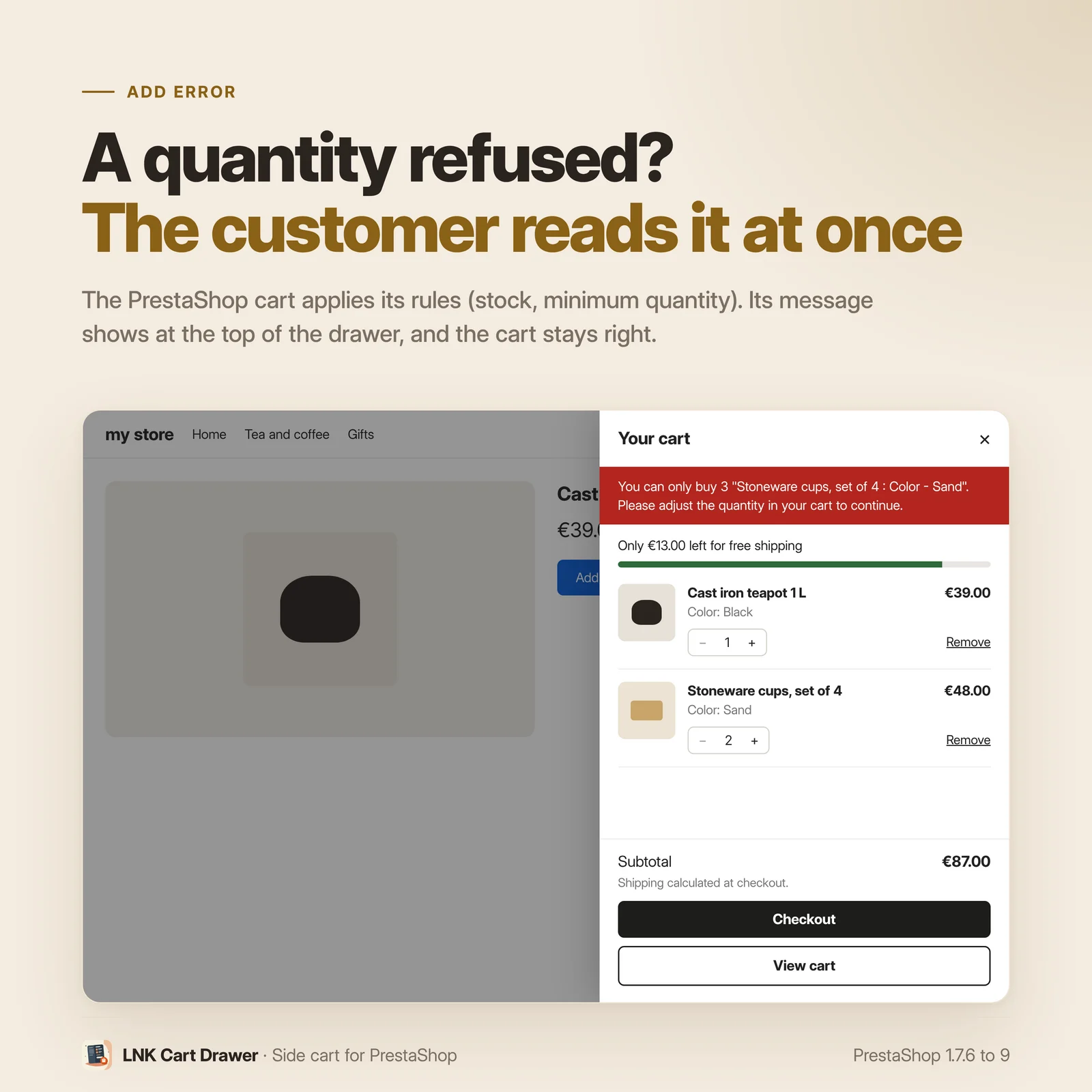
Minus, plus, or a typed quantity: the PrestaShop cart applies its rules (minimum sale quantity, stock) and everything updates, counter included. A line is removed in one click. The shop's minimum purchase is reminded as long as it is not reached.
The free shipping bar
With LNK Free Cart Shipping, a bar at the top of the drawer shows what is left before free shipping, then announces it once the threshold is reached. Threshold, rules per country, group or carrier and texts stay those of Free Cart Shipping: nothing to enter twice.
Upsells, if you want them
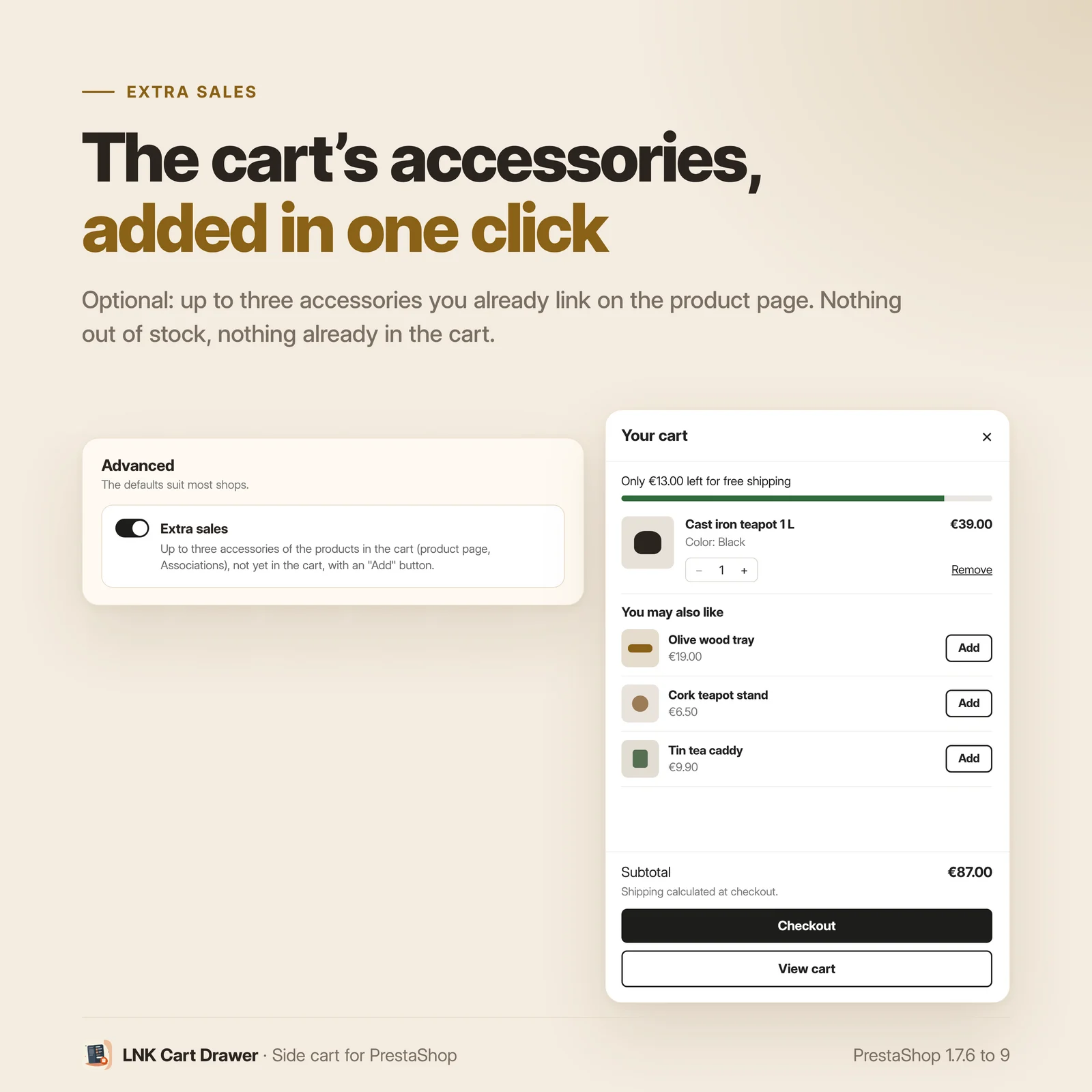
As an option, off by default: up to three accessories of the products in the cart, the ones you already link on the product page, with an "Add" button. Nothing made up, and nothing suggested that is out of stock or already in the cart.
The theme's cart replaced, never doubled
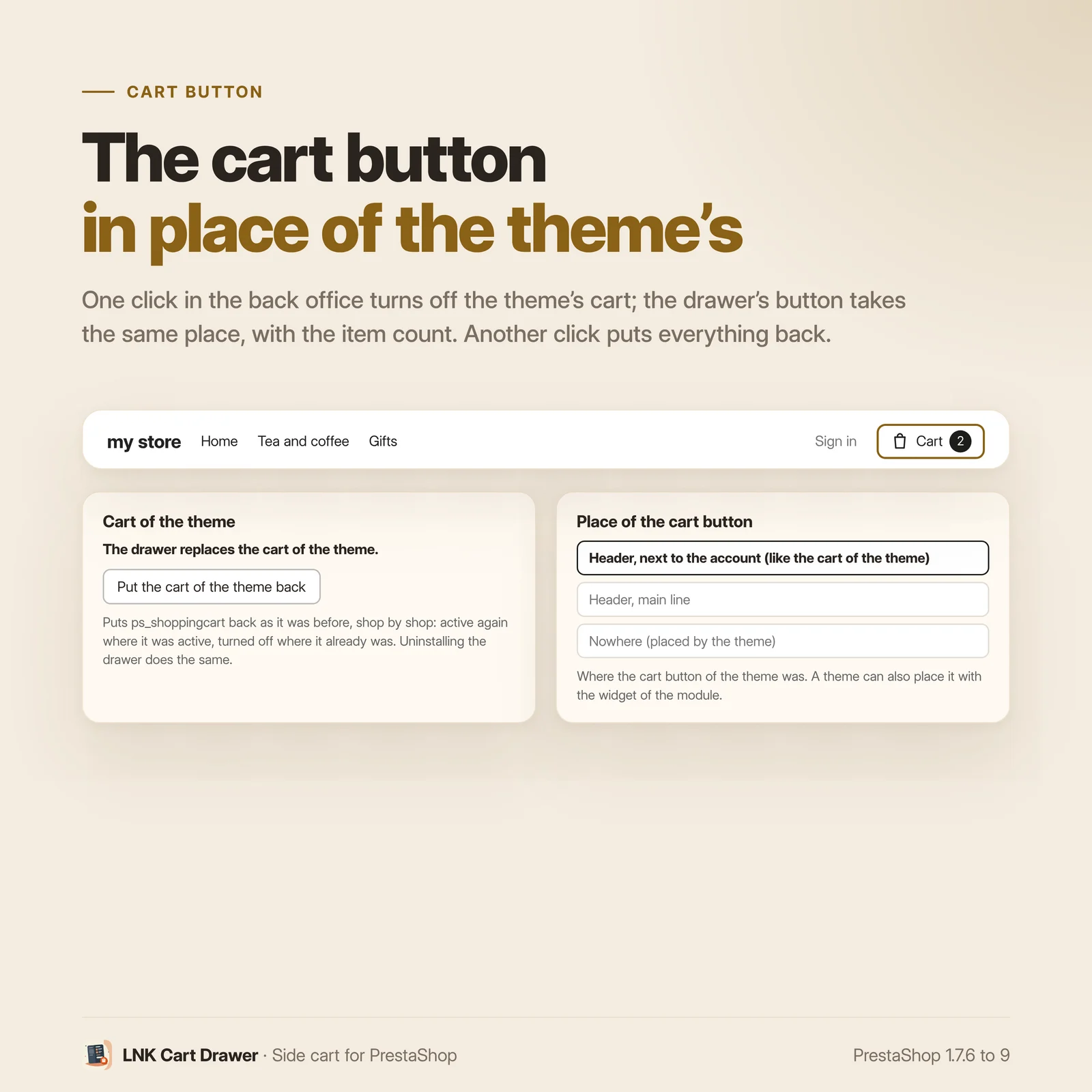
One click in the back office turns off the theme's cart (ps_shoppingcart) in the current shop; the drawer takes its place and its button sits in the same spot. Its state is recorded first: another click, or uninstalling, puts it back exactly as it was. Nothing is uninstalled.
Light and fast
Figures measured on the delivered module, compressed (zlib, level 9): 1.8 KB of CSS and 3.7 KB of JavaScript. The drawer content is requested only when it opens: no server call when a page loads. On the cart and checkout pages, only the counter follows.
Accessible, in Arabic and on mobile
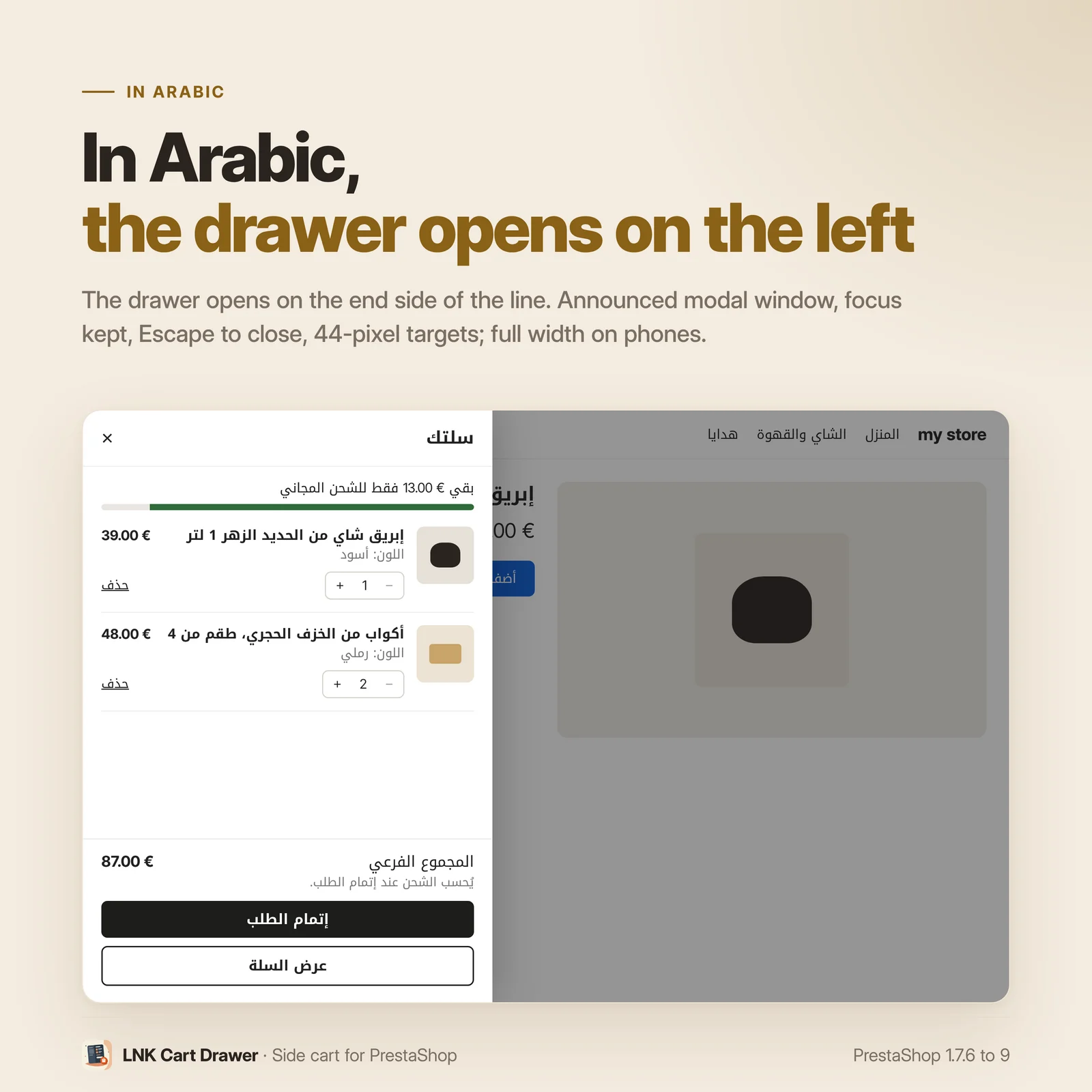
Announced modal window, focus kept in the drawer, Esc to close, 44 pixel targets, animations off for visitors who reduce them. The drawer opens on the end side of the line: on the left in Arabic. On a phone, it takes the full width.
Compatible with PrestaShop 1.7.6, 8 and 9
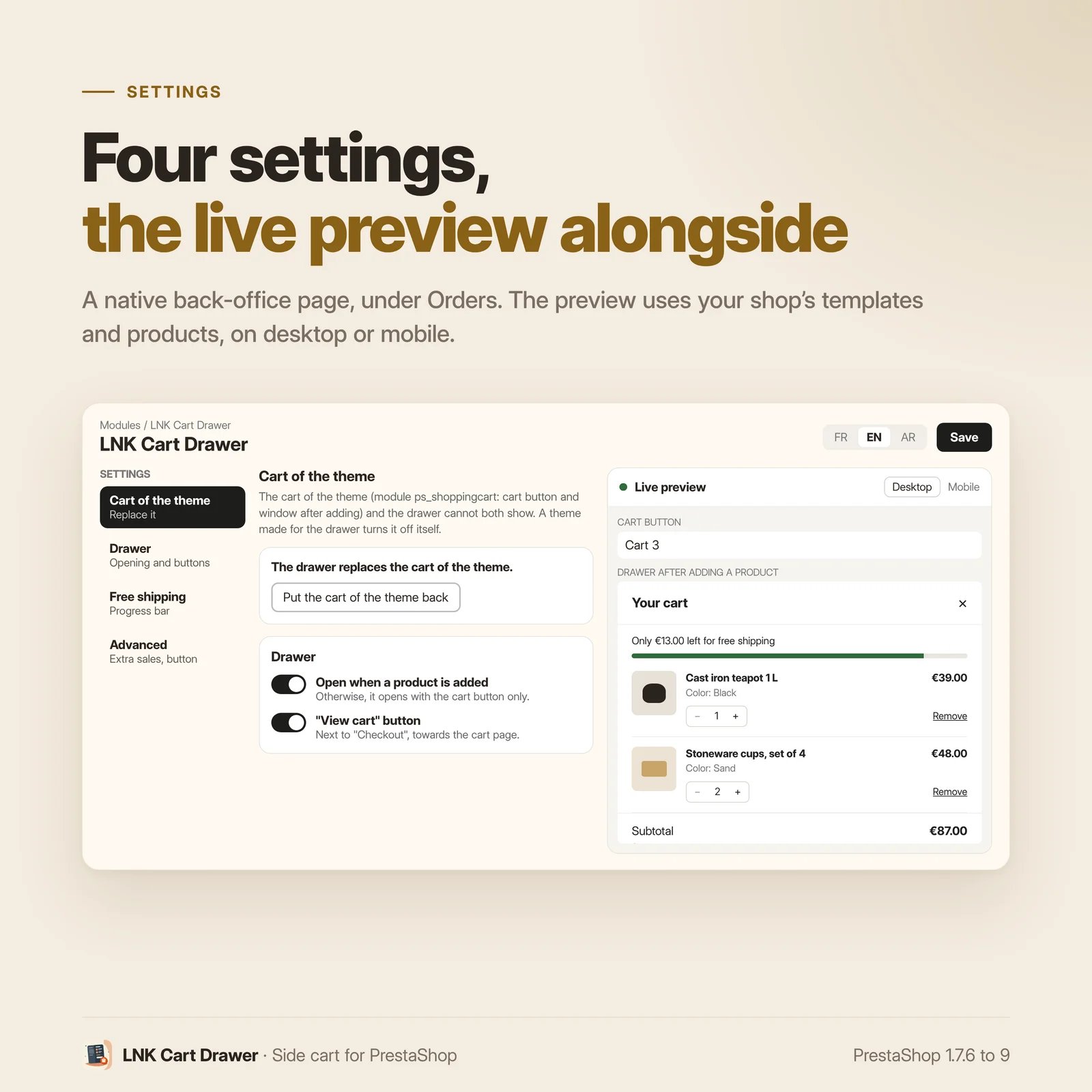
Two versions of the module, one per generation: 1.1 for PrestaShop 1.7.6 to 8.x, 1.9 for PrestaShop 9, with a native settings page in each back office, under Orders, and a live preview with your products. Classic and Hummingbird themes with no setting; LNK themes place the button and style the drawer through their theme contract. No override, no table.
Frequently asked questions
What does the customer see when adding a product?
The cart opens on the side of the page, without leaving it: each line with its image, its combination, its price, its quantity and a link to remove it, then the subtotal and the "Checkout" and "View cart" buttons. The customer closes the drawer and keeps shopping where they were.
Can the customer change quantities in the drawer?
Yes: minus and plus buttons, or direct typing, and removal of a line. Changes go through the PrestaShop cart, with its rules (minimum sale quantity, stock); the rest of the page follows (cart counter, other blocks). A customised line is edited on the product page.
Do I need to disable my theme's cart?
The theme's cart (ps_shoppingcart module: cart button and window after adding) and the drawer never show together. In the settings, the "Replace the theme's cart" button turns it off in the current shop, after recording its state. "Restore the theme's cart" puts it back as it was; uninstalling the drawer does the same. Nothing is uninstalled. A theme made for the drawer turns it off itself.
How does the free shipping bar work?
It takes over LNK Free Cart Shipping: its threshold, its rules (countries, groups, carriers) and its texts. When one of its rules applies to the cart, the bar shows what is left to add, then that shipping is free. Without that module, there is no bar: no threshold to enter twice.
Does the drawer slow my pages down?
No. The stylesheet and the script are light, and the drawer content is requested only when it opens: no server call when a page loads. On the cart and checkout pages, which already show the cart, the drawer does not open: only the button counter follows.
Can I suggest other products in the drawer?
Yes, as an option (off by default): up to three accessories of the products in the cart, the ones you link on the product page (Associations tab), with an "Add" button. A product already in the cart, inactive or out of stock is not suggested.
Is the drawer accessible?
Yes: modal window announced to screen readers, focus kept in the drawer, Esc key to close, focus returned to the button that opened it, 44 pixel targets, updates announced. Visitors who reduce animations get no sliding.
Does it work in Arabic and on mobile?
Yes. The drawer opens on the end side of the line: on the right in French, on the left in Arabic. It takes the full width of a phone. Texts are in French, English and Arabic.
Can my theme place and style the cart button?
Yes. The module places its button where the theme's button was; a theme can call it itself
({widget name='lnk_cartdrawer'}), override the templates, the stylesheet and the script in its
folder, and set the colours with CSS variables. Everything is described in the theme contract.
Are hidden prices and business account rights respected?
Yes. In catalogue mode, for a customer group without prices, or for an employee whose prices LNK Company Staff hides, the drawer shows no price. If they are not allowed to order, the "Checkout" button does not appear.
Which PrestaShop versions?
PrestaShop 1.7.6 to 8.x (version 1.1) and PrestaShop 9 (version 1.9), Classic and Hummingbird themes. No override, no table, no external call. Multistore: settings and replacement of the theme's cart shop by shop.
Release history
-
Version 1.9.0 PrestaShop 9
New
- Cart drawer opened when a product is added (configurable) and when the cart button is clicked: lines with image, combination, price, editable quantity and removal, subtotal, Checkout and View cart buttons. Minimum purchase reminded. Content requested on opening only.
- Free shipping bar taken from LNK Free Cart Shipping when it is installed (no threshold entered in this module).
- Optional upsells, off by default: up to three accessories of the products in the cart.
- Header cart button with the number of items, and a widget for themes.
- Switch from the theme's cart (ps_shoppingcart) in the back office, shop by shop, with an exact return to the previous state (button or uninstallation).
- Accessibility: modal window, focus kept in the drawer, Esc, focus returned to the button, 44 px targets, reduced motion respected. Drawer on the end side of the line (left in Arabic).
- Contract lnk.companies.rights/1: prices hidden and Checkout button removed for the customer concerned.
- Live preview in the back office with products from the shop. French, English and Arabic.
-
Version 1.1.0 PrestaShop 1.7.6 to 8.x
New
- Cart drawer opened when a product is added (configurable) and when the cart button is clicked: lines with image, combination, price, editable quantity and removal, subtotal, Checkout and View cart buttons. Minimum purchase reminded. Content requested on opening only.
- Free shipping bar taken from LNK Free Cart Shipping when it is installed (no threshold entered in this module).
- Optional upsells, off by default: up to three accessories of the products in the cart.
- Header cart button with the number of items, and a widget for themes.
- Switch from the theme's cart (ps_shoppingcart) in the back office, shop by shop, with an exact return to the previous state (button or uninstallation).
- Accessibility: modal window, focus kept in the drawer, Esc, focus returned to the button, 44 px targets, reduced motion respected. Drawer on the end side of the line (left in Arabic).
- Contract lnk.companies.rights/1: prices hidden and Checkout button removed for the customer concerned.
- Live preview in the back office with products from the shop. French, English and Arabic.