 Module · LNK Reassurance
LNK Reassurance: unlimited PrestaShop reassurance banners, styled without CSS
Delivery, secure payment, returns, customer service: these promises reassure buyers, as long as you can show them in the right place and in your theme's colors. The PrestaShop reassurance module LNK Reassurance lets you create as many reassurance banners as you need, place them from a list of positions and set their look in the back office. No CSS to write, no override of the PrestaShop core.
- Version 3.1.7 · PrestaShop 1.7.6 to 8.x
- Version 3.9.7 · PrestaShop 9
- PrestaShop 1.7.6 to 9.x
- PHP 7.1 to 8.4
- No override
Screenshots
Key points
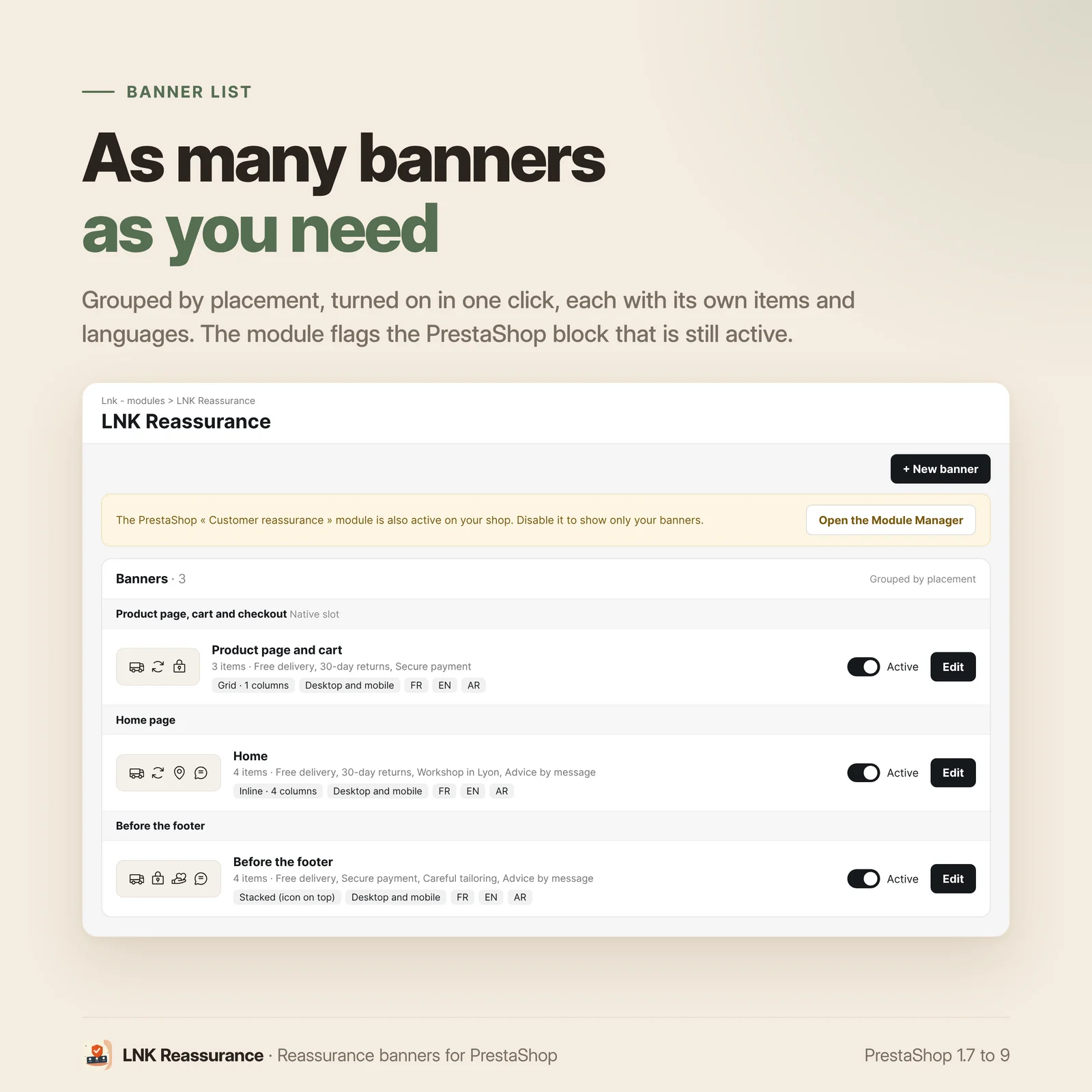
- Unlimited banners, each with its own content, position and look; several banners can follow
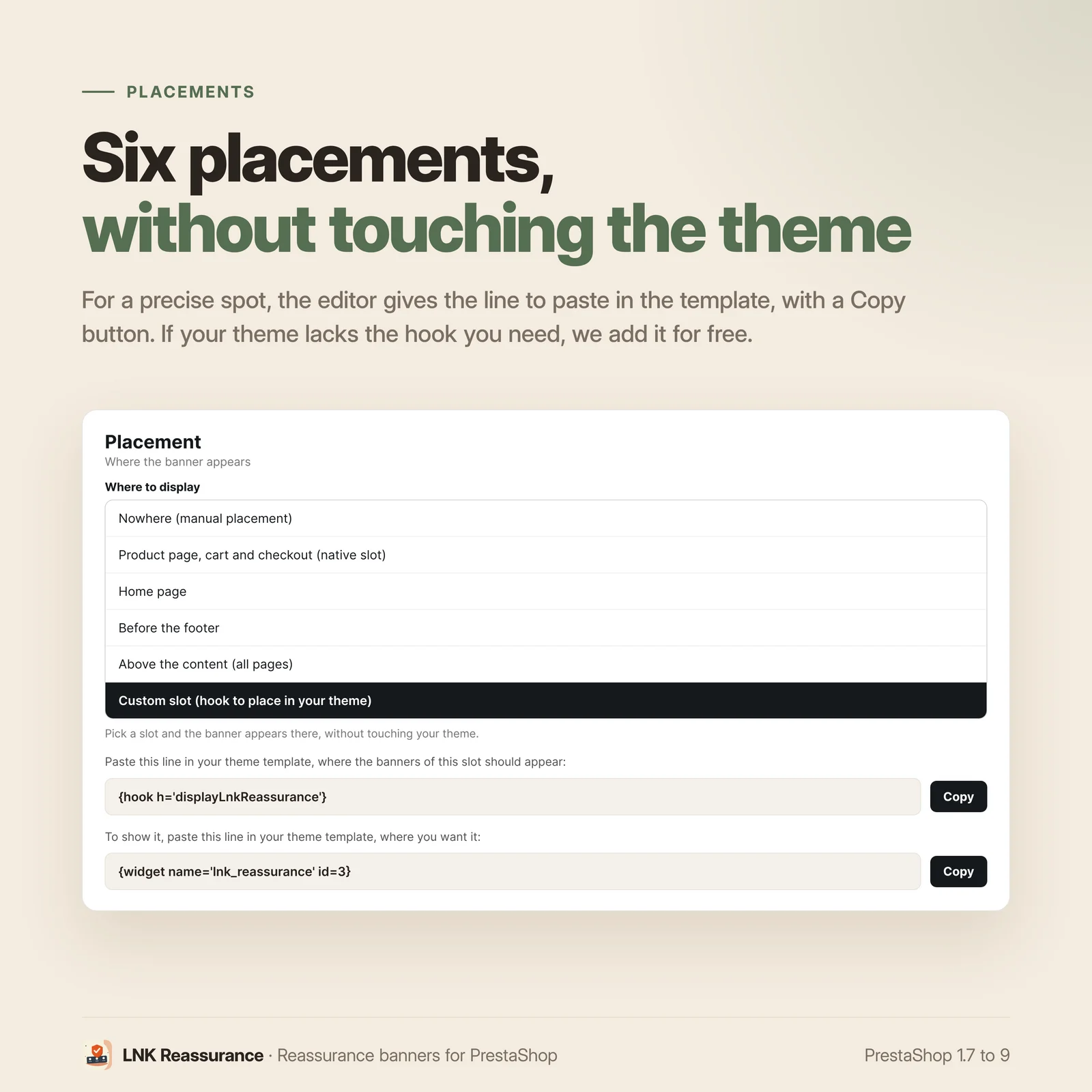
- Placement without touching the theme: six positions to choose from.
- About thirty style settings, no CSS to write.
- Preview with the real rendering, updated as you type.
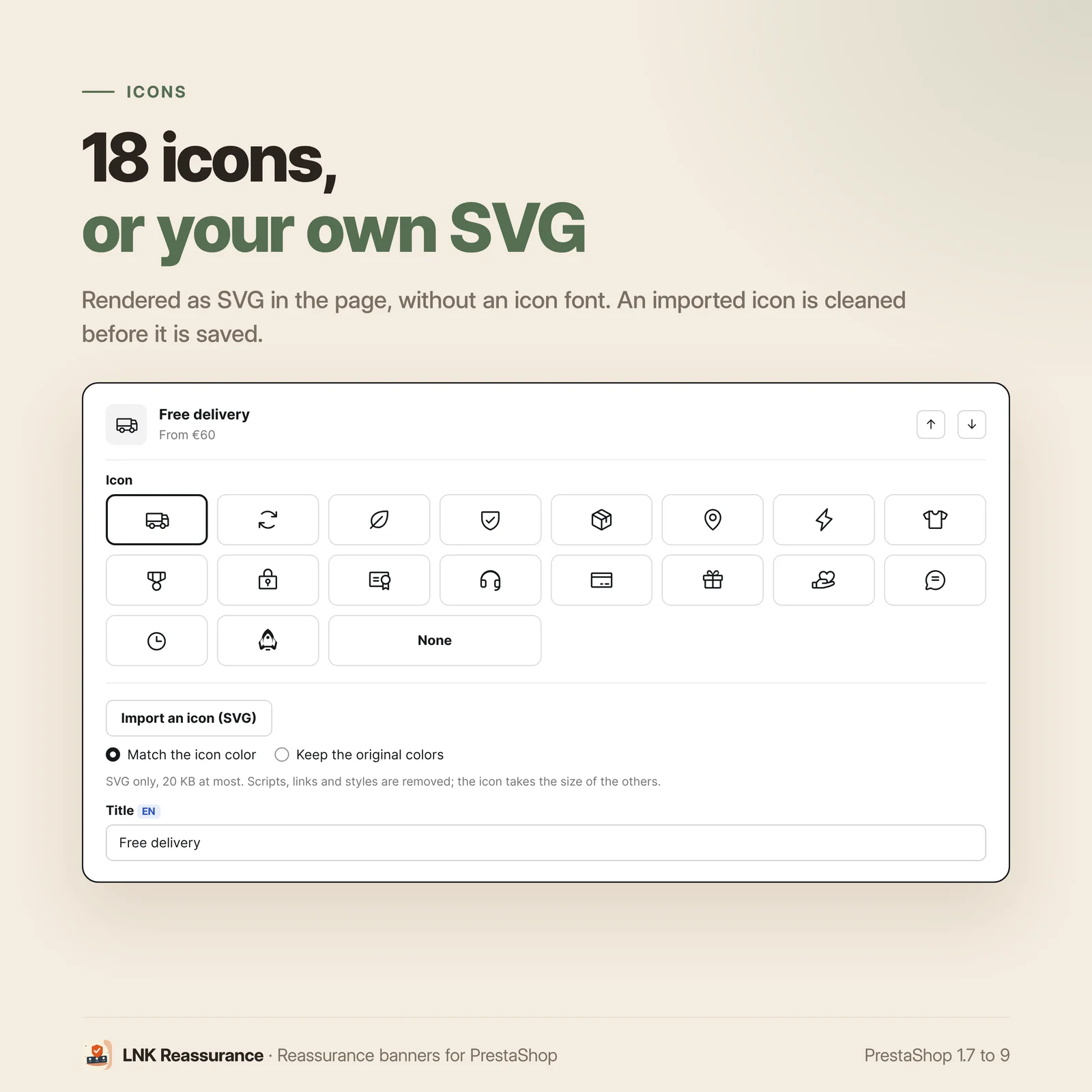
- 18 vector icons, rendered as SVG in the page.
- Import of your own SVG icon, cleaned before saving.
- Multilingual content, up to 6 items per banner.
- Hidden on mobile, per banner.
- Compatible with page builders (Creative Elements and similar).
- No core override, no call to an external service, no cookie.
- PrestaShop 1.7, 8 and 9, native Symfony back office on 9.
Several reassurance banners per shop
The reassurance block shipped with PrestaShop is a single one: one banner, one position. A shop often needs different messages depending on the page, for example:
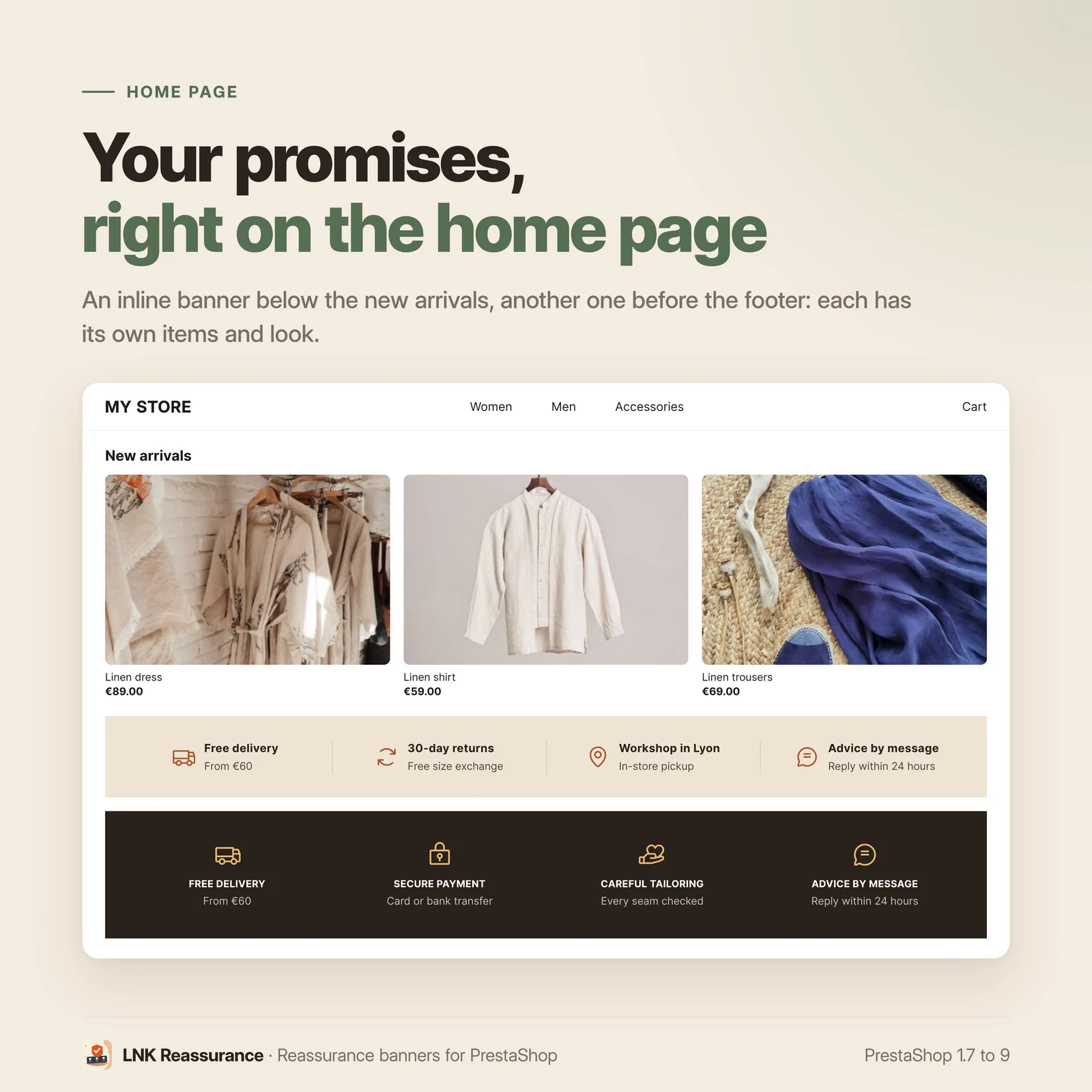
- a short banner at the top of the home page, with four promises;
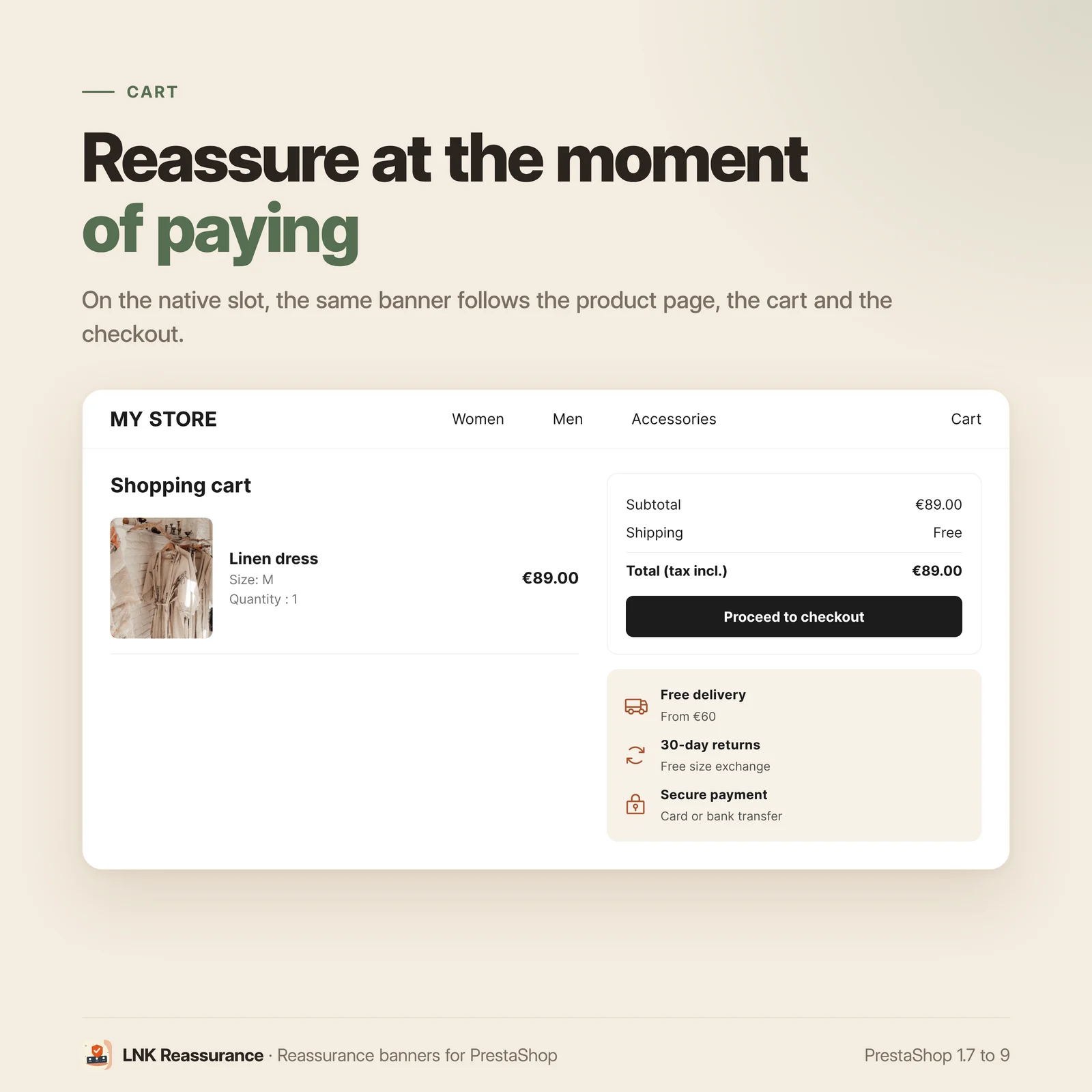
- a banner for the cart, focused on payment and returns;
- a third one below the product page, about delivery times.
LNK Reassurance lets you create as many banners as you need. Each one has its own content, position and look.
Positions to choose from, without editing the theme
Each banner has its position, chosen from a list:
| Position | Result |
|---|---|
| Product page, cart and checkout | the native position of the official themes |
| Home page | in the body of the page |
| Before the footer | just above it |
| Above the content | on every page |
| Custom | wherever you add one line |
| Nowhere | kept for manual placement |
You choose the position and save. The banner shows up without opening a single file.
For a very precise spot, one line in your template is enough:
{widget name='lnk_reassurance' id=1}. If your theme has no hook point where you want
it, we add it for you free of charge. The editor shows the line to paste for the chosen
position, with a Copy button.
Reassurance block customizable from the back office
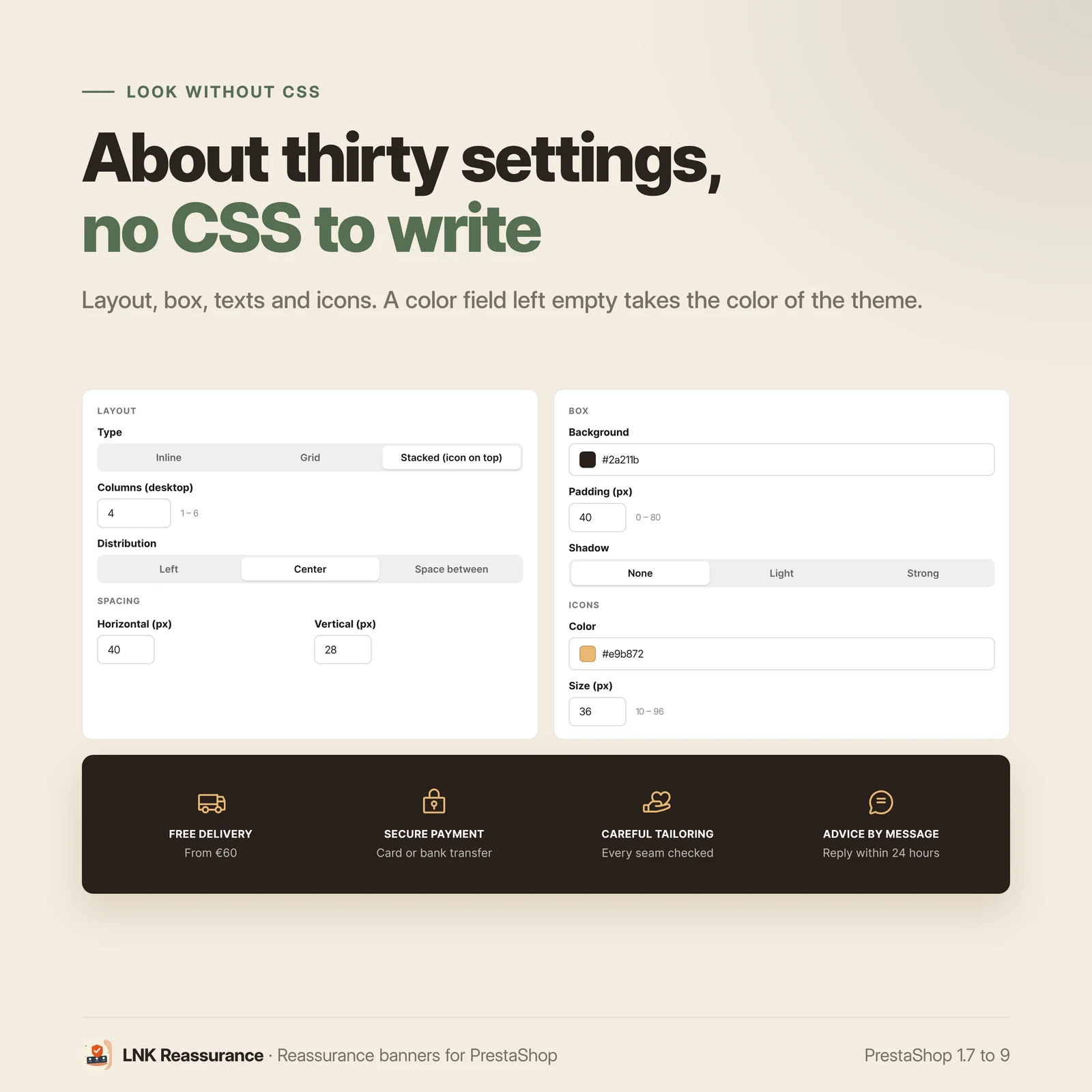
The look is set without CSS, with about thirty settings grouped by topic:
- Layout: inline, grid, or icon stacked above the text; number of columns on desktop (1 to 6) and on mobile; distribution and alignment.
- Styling: background, text color, padding, border radius, border, shadow.
- Spacing: horizontal, vertical, mobile-specific, gap between icon and text.
- Icons: color, size.
- Titles and subtitles: color, size, weight, uppercase, opacity, subtitle hidden on mobile.
- Separators: display, color, height.
A color field left empty takes the theme's color, so the banner blends in with the rest of the shop.
No file is written to disk. Settings are applied as CSS variables set on the block itself. A CDN therefore cannot serve the old styling after a change. Multistore: each banner is linked to the chosen shops, enabled and ordered shop by shop.
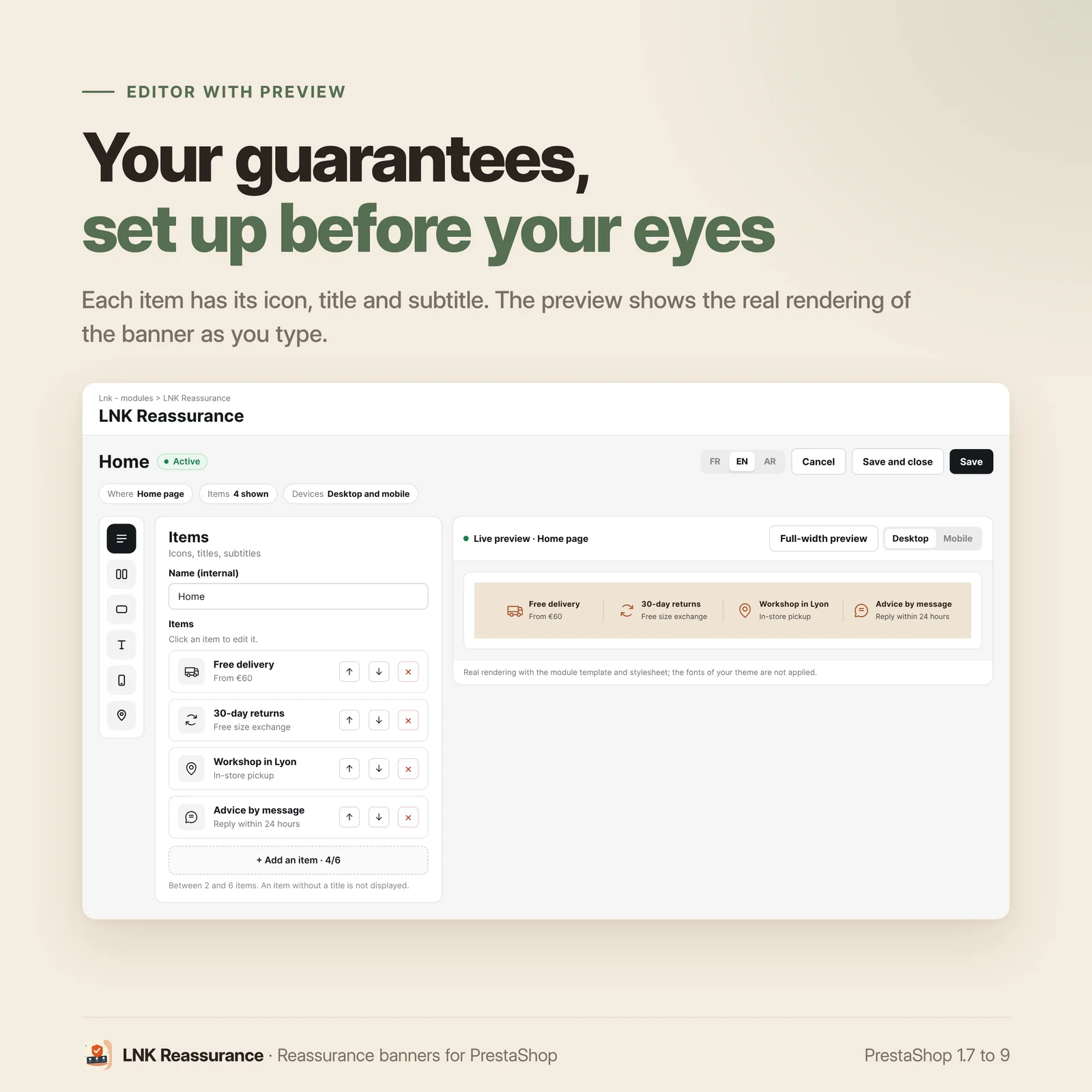
Live preview in the editor
The editor preview loads the module's real stylesheet, in an isolated frame. It reproduces how your shop renders and updates as you type.
Reassurance icons and their texts
Truck, padlock, shield, leaf, medal, headset, clock, rocket: the module offers eighteen vector icons, chosen to cover a shop's usual promises. They are rendered as SVG directly in the page, with no icon font and no third-party server. So there is nothing to download and no flicker on load.
Need an icon that is not in the list? Import your own as SVG, 20 KB at most. The module cleans it before saving it: scripts, styles, links and external addresses are removed, only the drawing remains. The icon takes the size of the others and, as you choose, their color or its original colors. An imported icon is removed from the library with its × button, unless a banner uses it.
Each item has a title and a subtitle, translatable into every language of the shop.
Compatible with PrestaShop 1.7, 8 and 9
One module and one license cover all three branches.
| Branch | PHP | Back office |
|---|---|---|
| 1.7.6 → 1.7.8 | 7.2 → 7.4 | classic controller |
| 8.0 → 8.2 | 7.4 → 8.1 | classic controller |
| 9.0 → 9.x | 8.1 → 8.4 | native Symfony controller |
| Feature | |
|---|---|
| Multiple banners | Unlimited, 2 to 6 items each; several on one position show one after the other, in the order set with the Move up and Move down buttons |
| Positions | Product page, cart and checkout, home page, before the footer, above the content, custom position, or nowhere (manual placement) |
| Multistore | Yes: each banner is linked to the chosen shops, with its activation and order set shop by shop |
On PrestaShop 9, the list and the form are Symfony controllers, with Twig templates and the layout of the new back office.
Before each publication, every listed version is installed, configured, displayed and then uninstalled in our integration matrix.
Reassurance module without override
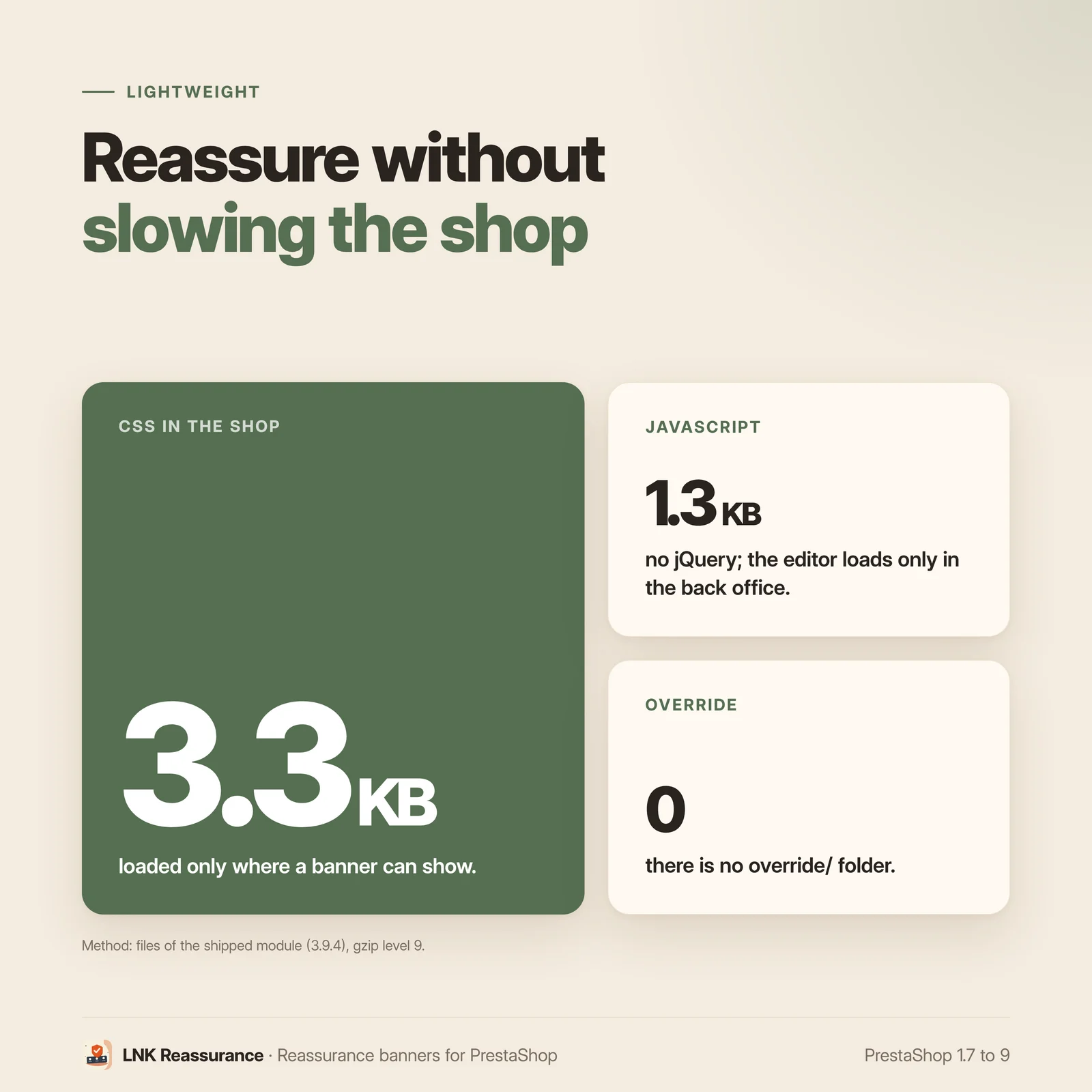
This module installs no override. The override/ folder does not exist.
For an agency, this means no conflict with another module overriding the same class, no orphan file after a PrestaShop update and nothing to clean up before a migration.
Light and fast
Figures measured on the shipped module, gzip-compressed (level 9), 1 KB being 1,000 bytes. In the shop: a stylesheet of 3.5 KB compressed (gzip) and a script of 1.3 KB compressed (gzip), no jQuery, loaded only where a banner can show, or on every page if you place a banner yourself in the theme (widget or custom slot); elsewhere the shop loads nothing from the module. The banner is rendered server-side, its appearance settings travel as CSS variables in the HTML: no generated file, no external call. The editor script, 9.6 KB, only loads in the back office.
Frequently asked questions
What does this module add compared with the reassurance block shipped with PrestaShop?
The native block is a single one, in a single position, and offers few settings: beyond a few options, you have to write CSS in the theme. This module lets you create as many banners as you need, each with its own position, content and look. The look is set from the back office, without CSS.
Can I keep the native block at the same time?
Better to disable it: two reassurance blocks on the same page repeat the same promises. This module installs no override and touches no setting of the native block. While PrestaShop's “Customer reassurance” module is active, the banner list flags it at the top, with a link to the module manager.
Is this module compatible with my PrestaShop version?
Yes, from PrestaShop 1.7.6 to PrestaShop 9, with a single license. On PrestaShop 9, the banner list and form are native Symfony controllers, with the layout of the new back office. Before each publication, every version is installed, configured and uninstalled in our integration matrix.
Does the module contain a core override?
No, the module contains no override and the override/ folder does not exist. It therefore
cannot conflict with any other module on that point, and a PrestaShop update leaves no
orphan file.
Do I need to edit my theme?
In the standard case, no: each banner has its position, chosen from a list of six options. If you want the banner in a place your theme does not expose, write to us: we add the hook point for you free of charge, in about fifteen minutes. For a custom slot or manual placement, the editor shows the line to paste into the theme, with a Copy button. To place a banner yourself, set it to "Nowhere": its stylesheet and script then load on every page.
Does this module slow down my shop?
No. Rendering is done by the server and the icons are SVG written directly into the page, with no icon font to download and no call to a third-party server. No CSS file is generated. In the shop, the module's stylesheet, 3.5 KB compressed (gzip), and its script, 1.3 KB compressed (gzip), only load where a banner can show, or on every page if you place a banner yourself in the theme (widget or custom slot).
How many banners can I create, and what happens if I have many?
As many as you want: the module sets no limit, and each banner has 2 to 6 items. Several active banners on the same position show one after the other, in the order set with the Move up and Move down buttons of the list. Each position loads only the banners assigned to it. If the same hook point is called several times on a page, the banner is rendered only once and the customer never sees it twice.
Is the content multilingual?
Yes. Each title and each subtitle is entered in every language of the shop, with PrestaShop's usual language selector. The module ships in French, English and Arabic: its back office and the texts of the starter banner.
Does it work in multistore?
Yes. Each banner is linked to the shops ticked in its editor; it can be active in one shop and inactive in another, with its own order in each. In the "All shops" context, the list shows the banners of every shop, with their names.
What is left if I uninstall the module?
Nothing. Uninstalling drops the module's four tables (banners, shop links, items, item
texts), its menu entry and its LNK_REASSURANCE_DESIGN configuration key. It also deletes all
the icons you imported, stored in img/lnk_reassurance/icons/. No file remains in the theme or
in override/, since the module never wrote anything there.
Does the module set cookies?
No. The module sets no cookie or tracker and sends no data to a third party. There is nothing to declare in your consent banner.
I am coming from version 2 of the module.
Your banners, their items and their style settings are kept. The update changes the database
schema: the upgrade-3.9.0.php script (PrestaShop 9) or upgrade-3.1.0.php (PrestaShop 1.7.6
to 8) moves the items into two new tables, one row per language, then drops the old column.
Nothing changes in the display. On PrestaShop 9, the menu entry moves to the new Symfony back
office.
Can I use my own icon?
Yes, as SVG, 20 KB at most: “Import an icon (SVG)” under the icon grid. An SVG can contain
code; the module keeps only the drawing (paths, shapes, colors) and removes everything else,
including scripts, styles, links and external addresses. The cleaned file is stored in
img/lnk_reassurance/icons/, outside the module folder: an update does not erase it. The icon
takes the size of the others and, as you choose, their color or its original colors. An imported icon is removed from the library with its ×
button, unless a banner uses it.
Release history
-
Version 3.9.7 PrestaShop 9
New
- Overall look of the banners: a shop setting,
LNK_REASSURANCE_DESIGN, dresses every banner in a named look, on top of its own settings and without modifying it: "Theme style", "Thin line", "Grid" or "Editorial" (thin rules, small uppercase titles), or a full design in JSON. None adds a background or a frame: the color stays the theme's. It serves demos and themes; empty, nothing changes. The editor shows which overall look is active; its preview shows the banner without it.
Fixes
- Documentation (installation, FAQ, product page) aligned with the module: starter banner (order tracking, secure payment, right of withdrawal, customer support); four tables and ten hooks created on install; "LNK Reassurance" menu in the "Lnk - modules" section; placement labels and the six sections of the editor; update from 2.x (items moved into two new tables, data kept); PrestaShop 1.7.6 minimum; module also shipped in Arabic; uninstall (four tables,
LNK_REASSURANCE_DESIGNkey, all imported icons); shop weights compressed (gzip): 3.5 KB of CSS and 1.3 KB of JavaScript.
- Overall look of the banners: a shop setting,
-
Version 3.9.6 PrestaShop 9
Changes
- Starter banner created at installation: its examples no longer promise a delivery time or anything free. They present order tracking, secure payment, the right of withdrawal (as set out in the terms of sale of the shop) and customer support, in French, English and Arabic. Banners already in place do not change.
Fixes
- Language added to the shop: the texts of the starter banner are set in the new language, even when an older module of the same range is installed alongside. Before, they could stay a copy of the default language, with no message.
- With another LNK extension installed: importing the banners supplied by the theme and their update by the theme could fail, depending on the order in which extensions load. Each extension now uses its own version of the shared tool. On update, the theme banners are read again once, without duplicates; those changed in the shop are kept.
-
Version 3.9.5 PrestaShop 9
Changes
- Module page: alternative texts of the eight screenshots in French, English and Arabic. Sizes counted everywhere with 1 KB = 1,000 bytes: the editor script weighs 9.6 KB (9.3 came from a count in KiB).
- Back office: the switch of a banner is called "Active" everywhere ("Enabled" in the Placement panel); English quotation marks in the English texts; in Arabic, Duplicate becomes "تكرار" ("نسخ" stays Copy) and the theme is called "القالب" everywhere.
Fixes
- Updating a theme that provides banners (seed.json): a new version of the file updates the theme banners you did not change, instead of ignoring them. Each banner is tracked by its key (seed_key, otherwise its name): changed, it is kept as is; deleted, it is never created again. Never any duplicate. Banners imported before this version are picked up by their name.
- Banner created at installation: its texts are set in each language of the shop (French, English, Arabic, English for the other languages). Before, the language of the installation was copied into all of them.
- Banner list: "1 column" in the singular, and the Arabic dual for 2 columns.
- Language added after installation: the items of the starter banner get their texts in that language (French, English, Arabic) instead of the copy of the default language. Only the texts you did not change are updated.
Show the 17 previous versions
-
Version 3.9.4 PrestaShop 9
New
- Order of the banners on one placement: Move up and Move down buttons in the list, with an order of its own in each shop.
- Imported icons: a × button removes them from the library. Removal is refused while the icon is used in the open banner or in a saved banner.
- Warning at the top of the list when PrestaShop's "Customer reassurance" module (blockreassurance) is active in the shop, with a link to the module manager: two reassurance modules should not run side by side.
- Line to paste into the theme: under the placement choice, the editor shows the banner's widget or the custom hook, with a Copy button. The list shows it too for "Custom slot" and "Nowhere".
- The browser warns you when you leave the editor with unsaved changes.
Changes
- Editor rebuilt on the mock-up approved on 15/10/2026: section menu with icons and a dot on changed sections, Mobile tab in two cards (Visibility; Layout, with items per row as tiles and a spacing slider), settings with no effect hidden when the banner is hidden on mobile, mobile preview inside a phone. From 1200 px wide, the preview sits next to the form, larger and easier to read.
- Menu: the module's entry moves to the "Lnk - modules" section of the back office.
- The native placement is now called "Product page, cart and checkout": the Classic and Hummingbird themes also show it on the product page.
- New banner: placed on the home page, items centred, 32px between items, 24px between rows and 12px between icon and text.
- Desktop columns: 1 to 6, since a banner has 6 items at most. A saved value above that is brought back to 6.
- In the shop, items share the row in equal parts and line up at the top, with titles and subtitles balanced over their lines. No more empty strip when there are fewer items than columns.
- "map-pin" and "hand-heart" icons redrawn as outlines, like the others.
- The banner's stylesheet and script only load where a banner can show, or on every page if a banner is placed in the theme (widget or custom slot).
- Clearer messages: "Banner created.", "Banner duplicated.", delete confirmation in a module window, a refused save reopens on the tab with the error, icon import success or refusal shown in colour.
- PrestaShop 9: the module's own switches in the editor, "Status updated." message after a list switch, back-office header restored (title, breadcrumb, shop selector), as in 1.7 and 8.
Fixes
- Imported icons: the solid background added by some icon libraries (SVG Repo for example) is removed, it turned into a solid square in the icon colour. The file's title is no longer kept: no more English tooltip in the shop. Icons already imported are fixed on display.
- Multistore: in the "All shops" context, activation is specific to each shop (one switch per shop) and saving no longer rewrites the other shops'. Shops are listed in the same order everywhere.
- Single-language shop: item titles and the "N shown" counter are filled in again.
- Item without an icon: the icon's space is kept when the others have one, so titles stay aligned.
- "Before the footer" and full-width placements: banner centred on the theme's content width, with margins. "Above the content": 20px of space under the banner.
- Shop layout: the chosen number of columns is respected, a long title wraps inside its column, no separator stuck to the edge at the start of a row, full-width items on mobile, a boxed banner never touches its edges, a narrow banner (cart column) shows one item per row.
- Back office: number fields stay in their column, colour fields show the #rrggbb hint, list switches are aligned.
- No more warnings under PHP 8.5 or with Twig 3.15.
-
Version 3.9.3 PrestaShop 9
New
- Theme contract 1 (
docs/THEME-CONTRACT.md): a theme ships its starting banners inthemes/<theme>/modules/lnk_reassurance/seed.json(placement, appearance, 2 to 6 items with an icon, a title and a subtitle per language). They are created when the theme installs the module, instead of the starter banner, or when the theme becomes active, once per file version and per shop. They are added to the merchant's banners and never change them; a name already used in the shop is not created again. - Icon provided by the theme as an SVG file: same cleaning as an icon imported in the back office.
- "Banners provided by the theme" block in the list, with an import button and the details of each refused item.
Changes
- Simpler editor: the weight and uppercase of the titles and the opacity of the subtitles move to a folded "Advanced" block, opened automatically when one of these settings is in use. Twelve visible settings at most per screen.
- Theme contract 1 (
-
Version 3.9.2 PrestaShop 9
New
- Multistore: each banner is linked to the shops ticked in its editor. Its content is shared, its activation and its position are specific to each shop. In the "All shops" or group context, the list shows the banners of every shop of the context with their names, and enabling, duplicating or deleting applies to those shops. A new shop takes over the banners of the shop it copies its data from; a deleted shop takes its links with it.
Changes
- On update, each existing banner is linked to every active shop, with its activation and its position: nothing changes on display.
Fixes
- A banner called by
{widget name='lnk_reassurance' id=X}only shows if it is active in the current shop.
-
Version 3.9.1 PrestaShop 9
Changes
- Back office on the layout shared by the LNK modules: list of the banners, editor with sections, fields and buttons like the other LNK modules. The live preview is now rendered by the template of the shop itself, from what you type, without saving: exactly what visitors will see. Same settings, same data; the editor reopens on the language, the section and the screen you left.
Fixes
- In Arabic (and in Persian or Urdu), the item titles are no longer letter-spaced: the spacing pulled the joined letters apart.
-
Version 3.9.0 PrestaShop 9
PrestaShop 9 branch. 1.7.6 to 8.x shops now have their own package, 3.1.0, with the same features: the PrestaShop 9 package no longer ships any code of the old back office.
New
- Imported icon (SVG): in the item editor, “Import an icon (SVG)”, 20 KB at most. The file is cleaned with an allowlist (scripts, styles, links,
foreignObject,on*attributes, entities and external addresses removed), saved inimg/lnk_reassurance/icons/under a fingerprinted name, then offered in the grid like the bundled icons. Rendered inline, at the size of the other icons; either matched to the icon color or in its original colors.
Changes
- Item texts in native tables: titles and subtitles leave the JSON of the
itemscolumn forlnk_reassurance_itemandlnk_reassurance_item_lang, one row per language (ObjectModelLnkReassuranceItem). A language added to the shop gets its texts through the core mechanism. - Banner form as a native Symfony form: texts are
TranslatableTypefields, with the PrestaShop language selector; six item slots, a slot without a title is not displayed. The custom repeater and language selector are gone. - Symfony configuration shipped in place in
config/, no copy at install time. - Colours fall back on the LNK theme base roles (
--lnk-text,--lnk-muted,--lnk-accent,--lnk-border), then on the previous rendering. - Module strings translated into French, English and Arabic.
upgrade/upgrade-3.9.0.phpmoves the items of every banner in every language, then drops theitemscolumn. The display is identical before and after the upgrade.- Redesigned administration: banner list grouped by placement (icons, summary, switch, duplicate) and an editor with sections (collapsible, reorderable items, icon grid, real colour pickers with “theme colour”, live desktop / mobile preview following the language, full-width preview). Subtitles are no longer dimmed by default (contrast); existing banners keep their setting.
- Addresses of the module's CSS and JS files versioned by the fingerprint of their content: after an update, neither a CDN nor the browser serves the old version.
Fixes
- A title or subtitle containing code is refused on save.
- Imported icon (SVG): in the item editor, “Import an icon (SVG)”, 20 KB at most. The file is cleaned with an allowlist (scripts, styles, links,
-
Version 3.1.7 PrestaShop 1.7.6 to 8.x
New
- Overall look of the banners: a shop setting,
LNK_REASSURANCE_DESIGN, dresses every banner in a named look, on top of its own settings and without modifying it: "Theme style", "Thin line", "Grid" or "Editorial" (thin rules, small uppercase titles), or a full design in JSON. None adds a background or a frame: the color stays the theme's. It serves demos and themes; empty, nothing changes. The editor shows which overall look is active; its preview shows the banner without it.
Fixes
- Documentation (installation, FAQ, product page) aligned with the module: starter banner (order tracking, secure payment, right of withdrawal, customer support); four tables and ten hooks created on install; "LNK Reassurance" menu in the "Lnk - modules" section; placement labels and the six sections of the editor; update from 2.x (items moved into two new tables, data kept); PrestaShop 1.7.6 minimum; module also shipped in Arabic; uninstall (four tables,
LNK_REASSURANCE_DESIGNkey, all imported icons); shop weights compressed (gzip): 3.5 KB of CSS and 1.3 KB of JavaScript.
- Overall look of the banners: a shop setting,
-
Version 3.1.6 PrestaShop 1.7.6 to 8.x
Changes
- Starter banner created at installation: its examples no longer promise a delivery time or anything free. They present order tracking, secure payment, the right of withdrawal (as set out in the terms of sale of the shop) and customer support, in French, English and Arabic. Banners already in place do not change.
Fixes
- Language added to the shop: the texts of the starter banner are set in the new language, even when an older module of the same range is installed alongside. Before, they could stay a copy of the default language, with no message.
- With another LNK extension installed: importing the banners supplied by the theme and their update by the theme could fail, depending on the order in which extensions load. Each extension now uses its own version of the shared tool. On update, the theme banners are read again once, without duplicates; those changed in the shop are kept.
- PrestaShop 1.7.6, language added to the shop: the items of the banners had no text in the new language. They now receive the texts of the default language, then those of the starter banner in that language when it has them. A text already entered is never replaced.
-
Version 3.1.5 PrestaShop 1.7.6 to 8.x
Changes
- Module page: alternative texts of the eight screenshots in French, English and Arabic. Sizes counted everywhere with 1 KB = 1,000 bytes: the editor script weighs 9.6 KB (9.3 came from a count in KiB).
- Back office: the switch of a banner is called "Active" everywhere ("Enabled" in the Placement panel); English quotation marks in the English texts; in Arabic, Duplicate becomes "تكرار" ("نسخ" stays Copy) and the theme is called "القالب" everywhere.
Fixes
- Updating a theme that provides banners (seed.json): a new version of the file updates the theme banners you did not change, instead of ignoring them. Each banner is tracked by its key (seed_key, otherwise its name): changed, it is kept as is; deleted, it is never created again. Never any duplicate. Banners imported before this version are picked up by their name.
- Banner list: "1 column" in the singular, and the Arabic dual for 2 columns.
- Language added after installation: the items of the starter banner get their texts in that language (French, English, Arabic) instead of the copy of the default language. Only the texts you did not change are updated.
-
Version 3.1.4 PrestaShop 1.7.6 to 8.x
New
- Order of the banners on one placement: Move up and Move down buttons in the list, with an order of its own in each shop.
- Imported icons: a × button removes them from the library. Removal is refused while the icon is used in the open banner or in a saved banner.
- Warning at the top of the list when PrestaShop's "Customer reassurance" module (blockreassurance) is active in the shop, with a link to the module manager: two reassurance modules should not run side by side.
- Line to paste into the theme: under the placement choice, the editor shows the banner's widget or the custom hook, with a Copy button. The list shows it too for "Custom slot" and "Nowhere".
- The browser warns you when you leave the editor with unsaved changes.
Changes
- Editor rebuilt on the mock-up approved on 15/10/2026: section menu with icons and a dot on changed sections, Mobile tab in two cards (Visibility; Layout, with items per row as tiles and a spacing slider), settings with no effect hidden when the banner is hidden on mobile, mobile preview inside a phone. From 1200 px wide, the preview sits next to the form, larger and easier to read.
- Menu: the module's entry moves to the "Lnk - modules" section of the back office.
- The native placement is now called "Product page, cart and checkout": the Classic and Hummingbird themes also show it on the product page.
- New banner: placed on the home page, items centred, 32px between items, 24px between rows and 12px between icon and text.
- Desktop columns: 1 to 6, since a banner has 6 items at most. A saved value above that is brought back to 6.
- In the shop, items share the row in equal parts and line up at the top, with titles and subtitles balanced over their lines. No more empty strip when there are fewer items than columns.
- "map-pin" and "hand-heart" icons redrawn as outlines, like the others.
- The banner's stylesheet and script only load where a banner can show, or on every page if a banner is placed in the theme (widget or custom slot).
- Clearer messages: "Banner created.", "Banner duplicated.", delete confirmation in a module window, a refused save reopens on the tab with the error, icon import success or refusal shown in colour.
Fixes
- Imported icons: the solid background added by some icon libraries (SVG Repo for example) is removed, it turned into a solid square in the icon colour. The file's title is no longer kept: no more English tooltip in the shop. Icons already imported are fixed on display.
- Multistore: in the "All shops" context, activation is specific to each shop (one switch per shop) and saving no longer rewrites the other shops'. Shops are listed in the same order everywhere.
- Single-language shop: item titles and the "N shown" counter are filled in again.
- Item without an icon: the icon's space is kept when the others have one, so titles stay aligned.
- "Before the footer" and full-width placements: banner centred on the theme's content width, with margins. "Above the content": 20px of space under the banner.
- Shop layout: the chosen number of columns is respected, a long title wraps inside its column, no separator stuck to the edge at the start of a row, full-width items on mobile, a boxed banner never touches its edges, a narrow banner (cart column) shows one item per row.
- Back office: number fields stay in their column, colour fields show the #rrggbb hint, list switches are aligned.
- No more warnings under PHP 8.5.
-
Version 3.1.3 PrestaShop 1.7.6 to 8.x
New
- Theme contract 1 (
docs/THEME-CONTRACT.md): a theme ships its starting banners inthemes/<theme>/modules/lnk_reassurance/seed.json(placement, appearance, 2 to 6 items with an icon, a title and a subtitle per language). They are created when the theme installs the module, instead of the starter banner, or when the theme becomes active, once per file version and per shop. They are added to the merchant's banners and never change them; a name already used in the shop is not created again. - Icon provided by the theme as an SVG file: same cleaning as an icon imported in the back office.
- "Banners provided by the theme" block in the list, with an import button and the details of each refused item.
Changes
- Simpler editor: the weight and uppercase of the titles and the opacity of the subtitles move to a folded "Advanced" block, opened automatically when one of these settings is in use. Twelve visible settings at most per screen.
- Theme contract 1 (
-
Version 3.1.2 PrestaShop 1.7.6 to 8.x
New
- Multistore: each banner is linked to the shops ticked in its editor. Its content is shared, its activation and its position are specific to each shop. In the "All shops" or group context, the list shows the banners of every shop of the context with their names, and enabling, duplicating or deleting applies to those shops. A new shop takes over the banners of the shop it copies its data from; a deleted shop takes its links with it.
Changes
- On update, each existing banner is linked to every active shop, with its activation and its position: nothing changes on display.
Fixes
- A banner called by
{widget name='lnk_reassurance' id=X}only shows if it is active in the current shop.
-
Version 3.1.1 PrestaShop 1.7.6 to 8.x
Changes
- Back office on the layout shared by the LNK modules: list of the banners, editor with sections, fields and buttons like the other LNK modules. The live preview is now rendered by the template of the shop itself, from what you type, without saving: exactly what visitors will see. Same settings, same data; the editor reopens on the language, the section and the screen you left.
Fixes
- In Arabic (and in Persian or Urdu), the item titles are no longer letter-spaced: the spacing pulled the joined letters apart.
-
Version 3.1.0 PrestaShop 1.7.6 to 8.x
PrestaShop 1.7.6 to 8.x branch. PrestaShop 9 now has its own package, 3.9.0, with the same features: no Symfony file is shipped to 1.7 and 8 shops any more.
New
- Imported icon (SVG): in the item editor, “Import an icon (SVG)”, 20 KB at most. The file is cleaned with an allowlist (scripts, styles, links,
foreignObject,on*attributes, entities and external addresses removed), saved inimg/lnk_reassurance/icons/under a fingerprinted name, then offered in the grid like the bundled icons. Rendered inline, at the size of the other icons; either matched to the icon color or in its original colors.
Changes
- Item texts in native tables: titles and subtitles leave the JSON of the
itemscolumn forlnk_reassurance_itemandlnk_reassurance_item_lang, one row per language (ObjectModelLnkReassuranceItem). A language added to the shop gets its texts through the core mechanism. - Banner form as a native HelperForm, with the PrestaShop language selector: six item slots, a slot without a title is not displayed. The custom repeater and language selector are gone.
- Module strings translated into French and Arabic through the module translation system (
translations/fr.php,ar.php), the only one PrestaShop 1.7.6 and 1.7.7 load for a module; the banner seeded at install time is written in every language with its translation. upgrade/upgrade-3.1.0.phpmoves the items of every banner in every language, then drops theitemscolumn. The display is identical before and after the upgrade.- Redesigned administration: banner list grouped by placement (icons, summary, switch, duplicate) and an editor with sections (collapsible, reorderable items, icon grid, real colour pickers with “theme colour”, live desktop / mobile preview following the language, full-width preview). Subtitles are no longer dimmed by default (contrast); existing banners keep their setting.
- Addresses of the module's CSS and JS files versioned by the fingerprint of their content: after an update, neither a CDN nor the browser serves the old version.
Fixes
- A title or subtitle containing code is refused on save.
- Imported icon (SVG): in the item editor, “Import an icon (SVG)”, 20 KB at most. The file is cleaned with an allowlist (scripts, styles, links,
-
Version 3.0.0 PrestaShop 1.7.6 to 8.x
First distributable version. Earlier versions were custom development for one shop; this one is ported to the three PrestaShop branches and sold.
New
- Native Symfony back office for PrestaShop 9: list and form as
PrestaShopAdminController+ Twig controllers, deployed at installation and only if the version allows it. The same script drives the item repeater in both back offices. LnkReassuranceDesign: style normalization and rendering move out of the module to become a pure class, testable without a shop.tests/test-design.php: 42 checks on sanitization, including hostile values: a color trying to break out of its CSS declaration, an out-of-range number, a layout outside the allowlist.lnk_reassurance::saveFromRequest(): single write entry point, shared by both back offices.upgrade/upgrade-3.0.0.php: switches the menu entry to the Symfony route on branch 9, without touching the schema.- Full documentation: installation, compatibility, hooks, custom hooks, marketplace page, FAQ.
Changes
- The static style methods (
designDefaults,safeColor,sanitizeDesign,designStyle,designClasses) remain available on the module as a facade, so an overridden template can rely on them, but they delegate toLnkReassuranceDesign.
Fixes
- A customer's demo content seeded at installation (workshops, cities, delivery times specific to one shop). Replaced with a generic banner (delivery, payment, returns, customer service) placed on
displayReassurance: merchants now see something as soon as they install, and that something is relevant to them. - Back-office labels in French in the code, with the PrestaShop 1.6 translation syntax (
mod=). Everything now uses English source strings with a domain (Modules.Lnkreassurance.Admin) and a shipped French catalog. - Styles and scripts hard-coded in an admin template. They now live in
views/css/admin.cssandviews/js/admin-items.js, and the data the script needs travels indata-attributes: no variable is written into the page any more. - The delete button and the activation toggle used a link: they are now POST forms, with a token, in the Symfony back office.
- Native Symfony back office for PrestaShop 9: list and form as
-
Version 2.1.0 PrestaShop 1.7.6 to 8.x
Placement on native hooks, style settings in the back office, live preview. Not distributed.
-
Version 2.0.0 PrestaShop 1.7.6 to 8.x
Move to a dedicated table, multiple banners. Not distributed.
-
Version 1.0.0 PrestaShop 1.7.6 to 8.x
Initial version, custom development. Not distributed.